Many advertisers install Conversions API only after noticing reporting problems.
Purchase tracking starts dropping. Retargeting audiences shrink unexpectedly. Ads Manager reports fewer conversions than Shopify or the CRM. Campaigns that once scaled smoothly suddenly become unstable.
At that point, most advertisers rush into the fastest setup possible.
That often creates another problem later.
The way you implement Conversions API affects attribution quality, optimization stability, event matching, and even how well Meta’s algorithm understands your customers. Some setups work perfectly for smaller advertisers but become limiting during scaling. Others require more work upfront but provide stronger long-term control.
Choosing the right setup matters more than many businesses expect.
Why Meta Pushes Advertisers Toward Conversions API
The Meta Pixel still matters, but browser-only tracking has become less reliable over time.
Several things interrupt browser events now:
- Ad blockers stop scripts from loading.
- Browser privacy restrictions remove tracking visibility.
- iOS privacy rules reduce event attribution quality.
- Slow-loading pages interrupt conversion firing.
- Weak mobile connections cause browser events to fail.
When Meta loses conversion data, optimization quality usually declines.
You can often see the impact inside Ads Manager before realizing tracking is broken:
- CPA rises gradually without obvious creative fatigue.
- Retargeting pools shrink unexpectedly.
- Campaigns stop exiting the learning phase efficiently.
- Purchase reporting becomes inconsistent day to day.
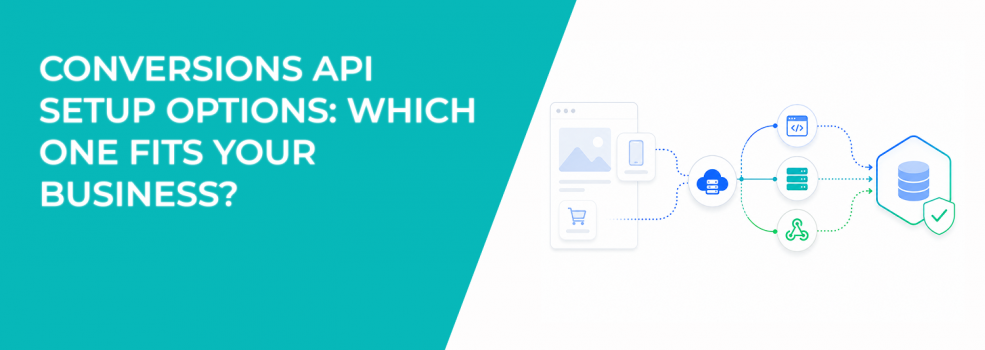
Conversions API improves reliability because data comes directly from servers, apps, CRMs, or backend systems instead of depending entirely on browsers.
The article on Pixel vs CAPI tracking differences explains why Meta now recommends running both systems together.
Meta-Enabled Conversions API: Fastest Setup, Lowest Flexibility
Meta-enabled Conversions API is the simplest setup available.
It automatically creates a server-side connection for website events alongside your Meta Pixel. Most businesses can enable it quickly without developers or custom infrastructure.
This setup works well for advertisers who:
- Need a quick improvement to event reliability.
- Run relatively simple e-commerce funnels.
- Do not need advanced event customization.
- Want minimal technical maintenance.
The biggest advantage is speed. Many advertisers can activate it in minutes.
The limitation is control.
The setup automatically shares the same events and parameters already being sent through the Pixel. That means advertisers have limited flexibility around:
- Event transformations.
- CRM integrations.
- Offline conversion structures.
- Custom parameter logic.
- Advanced filtering or routing.
For many smaller brands, that tradeoff is acceptable early on.
For larger businesses, those limitations usually become visible during scaling.
Direct Integration: Highest Control, Highest Complexity
Direct integration gives businesses full control over how data reaches Meta.
Instead of relying on prebuilt systems, developers connect internal infrastructure directly to Conversions API.
This option supports:
- Website events.
- App events.
- Offline conversions.
- CRM events.
- Messaging events.
It also allows businesses to customize exactly:
- Which events get sent.
- Which customer parameters get included.
- How event values are calculated.
- How duplicate events are handled.
- How backend systems connect together.
This becomes extremely valuable for businesses with more complicated customer journeys.
For example, a company may want to:
- Send qualified pipeline stages instead of basic leads.
- Track subscription renewals after purchase.
- Upload showroom sales from physical stores.
- Connect WhatsApp conversations to purchase attribution.
- Combine app and website behavior into one dataset.
These setups usually take longer because infrastructure and developer resources are required.
Meta estimates:
- Two to four weeks for completely new integrations.
- One to two weeks for businesses already sending website events.
The setup process is slower, but the long-term flexibility is significantly better.
The article on server-side tracking for Facebook Ads explains the technical side more simply if you are newer to server-side tracking.
Partner Integrations: The Middle Ground Most Businesses Choose
Partner integrations are currently the most common setup path for growing advertisers.
Meta works with platforms like:
- Shopify.
- WooCommerce.
- Wix.
- BigCommerce.
- Google Tag Manager.
- CRM systems.
- Messaging tools.
These integrations simplify implementation because the partner handles most of the infrastructure work.
For many businesses, this creates the best balance between setup speed and flexibility.
A Shopify brand, for example, can usually enable Conversions API with very little technical work while still improving attribution quality and event matching.
However, not all partner integrations work equally well.
Some only support basic website events. Others allow:
- Offline conversion syncing.
- CRM connections.
- Messaging events.
- Advanced parameter customization.
This is where many advertisers make mistakes. They assume every integration supports the same tracking depth.
It does not.
Before choosing a partner setup, advertisers should confirm:
- Which event types are supported.
- Whether deduplication works correctly.
- How event match quality is handled.
- Whether offline events can be included later.
- How much customization exists.
Those details become much more important once campaigns scale.
Why Offline and App Tracking Change the Decision Completely
If your business relies on offline conversions or mobile app activity, your setup options narrow quickly.
Meta currently requires direct integration for:
- Mobile app events through Conversions API.
- Offline conversion uploads through Conversions API.
This matters for businesses where purchases happen outside the website.
Examples include:
- Retail stores.
- Car dealerships.
- Healthcare businesses.
- B2B sales teams.
- Appointment-driven services.
Without offline or app signals, Meta only sees part of the customer journey. Optimization quality usually suffers over time because the algorithm lacks real business outcome data.
The Hidden Cost of Choosing the “Easy” Setup
Many advertisers choose the fastest setup possible because campaigns need to launch quickly.
That decision often works at first.
The problems usually appear later when advertisers want to:
- Improve attribution accuracy.
- Feed CRM stages into optimization.
- Track repeat purchases properly.
- Scale across multiple sales channels.
- Connect offline revenue back into Ads Manager.
At that point, businesses often rebuild their entire tracking infrastructure because the original setup cannot support advanced measurement needs.
You can usually recognize these growing pains when:
- Ads Manager numbers stop matching backend revenue.
- Attribution changes dramatically after scaling.
- High-value customers fail to improve optimization quality.
- Retargeting performance becomes inconsistent.
The article on API connection errors in Facebook Ads reporting explains how infrastructure problems quietly distort optimization and reporting.
Which Setup Usually Makes the Most Sense?
There is no universal “best” setup.
The right choice depends on how your business operates today and how complex your tracking needs may become later.
In practice:
- Smaller e-commerce brands usually do well with Meta-enabled setups or commerce platform integrations.
- Growing advertisers often benefit most from strong partner integrations.
- Larger businesses with offline sales, apps, or CRM-heavy funnels usually need direct integrations for long-term flexibility.
The important part is thinking beyond launch speed.
A setup that saves two weeks today may create major reporting limitations six months later.
Final Takeaway
Conversions API setup decisions affect much more than technical infrastructure. They directly influence attribution quality, optimization stability, audience building, and campaign scalability.
Simple setups work well for simpler businesses. More advanced businesses usually need more control over event structure and customer data flow.
The best setup is usually the one that continues supporting accurate optimization as the business grows, not just the one that launches the fastest.