Duplicate conversions don’t usually show up as a clear “tracking error.” What you see instead is a pattern that feels slightly off: Meta reports strong results, but your backend doesn’t confirm them.
At low spend, this looks like attribution noise. At scale, it becomes a structural problem.
You start increasing budget, reported CPA holds steady, but actual revenue doesn’t follow. That’s the moment duplicates stop being a reporting issue and start distorting optimization.
The Real Problem: You’re Training the Algorithm on the Wrong Signals
Meta doesn’t validate your conversions. It trusts them.
If your setup sends two Purchase events for one transaction, the system assumes both are real outcomes. That changes how it bids, which auctions it enters, and how aggressively it expands.
This is why campaigns with duplicate conversions often follow a specific trajectory:
-
Early performance looks strong.
-
Scaling feels easier than expected.
-
Then efficiency drops without a clear reason.
At that point, the system isn’t “breaking.” It’s following corrupted feedback.
This is closely related to situations described in Ad metrics that lie: when good numbers hide bad performance — the dashboard looks healthy, but decisions based on it lead in the wrong direction.
Where Duplication Actually Happens (Beyond the Obvious)
Most explanations stop at “Pixel vs CAPI mismatch.” In practice, duplication is usually more layered.
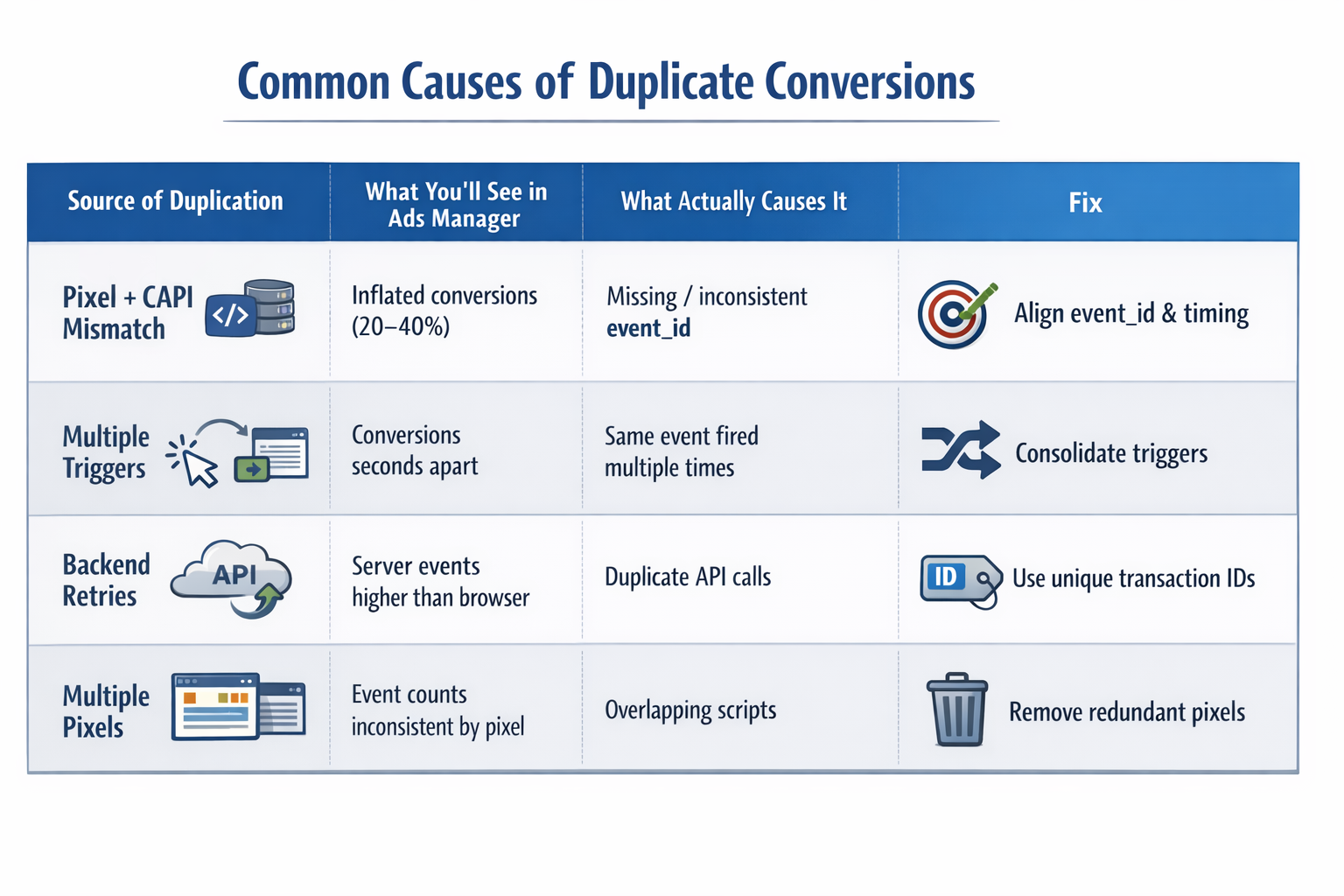
Pixel and CAPI Are Both Correct — But Still Duplicate
A technically “correct” setup can still duplicate events.
Example from a real scenario:
-
Pixel fires Purchase instantly after checkout.
-
Server sends the same Purchase event 6–8 seconds later.
-
event_id exists — but user identifiers don’t match perfectly.
Now Meta has two events that are similar, but not identical enough to merge confidently.
So it keeps both.
This is why you often see partial inflation instead of clean doubling.
If you want to understand how these layers are supposed to work together, review Pixel vs CAPI: what’s the real difference — most duplication issues start from misalignment between these two.
The Funnel Fires the Same Event From Multiple Points
This is a structural mistake, not just a technical one.
A typical broken flow:
-
Purchase fires on button click.
-
Purchase fires again on page load.
-
Backend sends confirmation event.
Each event is “valid” in isolation. But Meta doesn’t understand your funnel — it only sees signals.
If you define three moments as a conversion, Meta will count three.
This often overlaps with broader funnel issues like those explained in Why your ads get clicks but no sales: fixing the audience misalignment — because tracking errors and funnel misalignment tend to reinforce each other.
Tracking Was Added Over Time Without Rebuilding the System
Most duplication problems come from evolution, not mistakes made today.
Typical setup progression:
-
Initial Pixel installation.
-
Later → Google Tag Manager.
-
Later → Conversions API integration.
-
Later → CRM or offline events.
Each layer adds value — but without restructuring, you end up with overlapping logic.
Now you have:
-
Multiple systems capable of firing the same event.
-
No single source of truth.
-
Hard-to-trace duplication across layers.
This kind of setup is also a common root cause behind issues discussed in How agencies audit Facebook ads to uncover hidden wasted spend — because duplicated signals often hide inside otherwise “working” accounts.
Why Duplicate Conversions Break Scaling First
At low volume, duplication doesn’t hurt much.
At scale, it compounds.
Here’s what changes:
-
The algorithm overestimates performance.
-
It increases bid pressure in the wrong auctions.
-
It expands into lower-quality inventory.
You’ll notice indirect signals first:
-
CPM rises without obvious competition changes.
-
Conversion rate drops slightly, but not enough to explain CPA drift.
-
Spend distribution becomes uneven.
Most advertisers blame creatives or targeting here. But the system is reacting to inflated success signals.
A Better Way to Diagnose This
Instead of relying on reports, isolate the system.
Run a Single-Conversion Test
Use a clean environment:
-
Incognito browser.
-
No extensions.
-
Complete one real conversion.
Then check Events Manager.
If you see more than one conversion, the issue is structural — not statistical.
Use Timing to Identify the Source
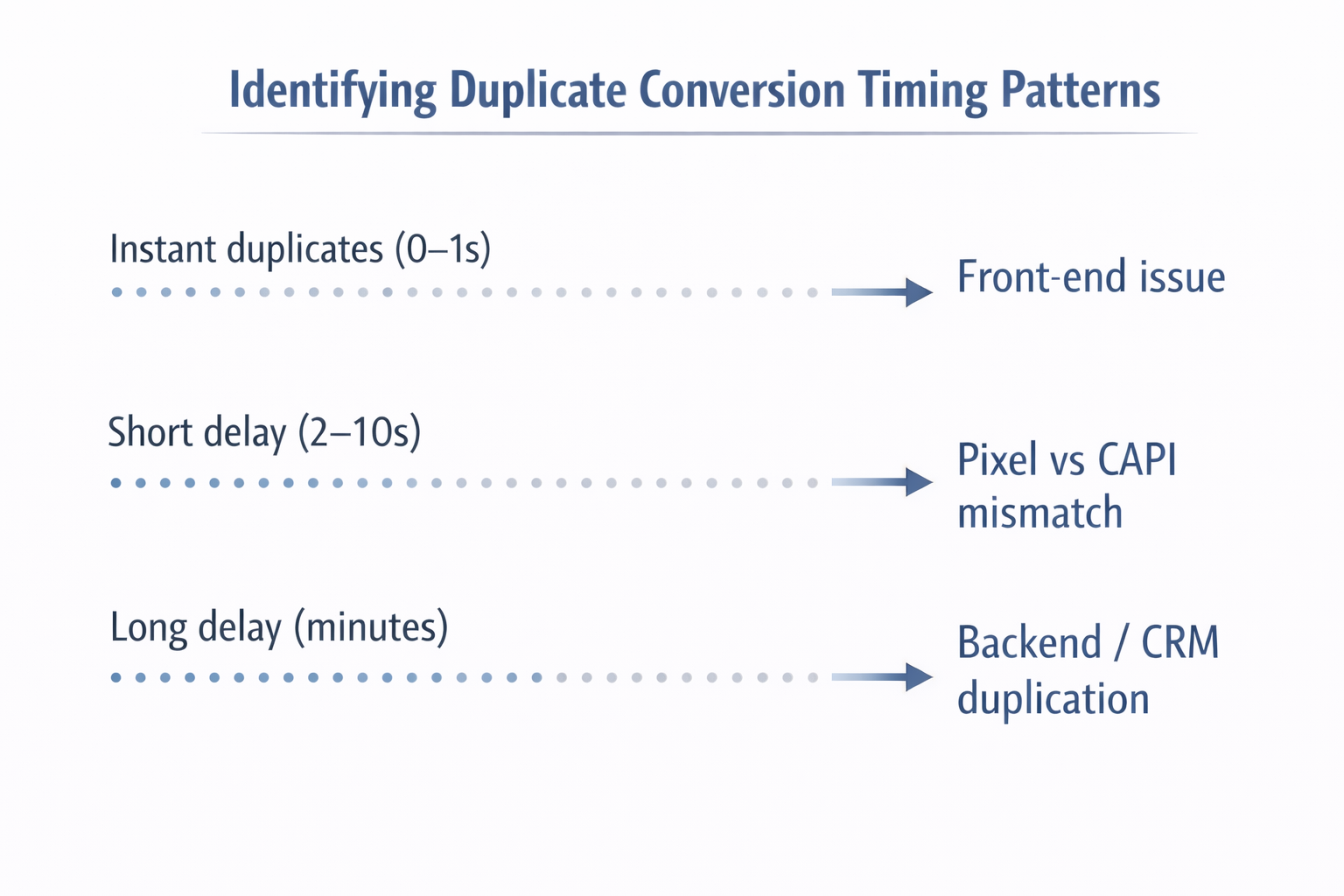
Timing reveals the origin of duplication:
-
Instant duplicates → front-end triggers.
-
Few-second delay → Pixel vs CAPI mismatch.
-
Longer delay → backend retries or CRM sync.
This is one of the fastest ways to narrow down the problem.
Compare Event Sources
Inside Events Manager:
-
Server-heavy → backend duplication.
-
Browser-heavy → front-end duplication.
-
Both high → deduplication failure.
This tells you which system is “over-speaking.”
Fixing the Issue Without Breaking Tracking
The goal is not fewer events. It’s accurate events.
Define a Single Source of Truth
Every conversion must have a clear owner:
-
Browser-first, or
-
Server-first.
Without this, duplication is inevitable.
Anchor the Event to a Real Moment
Ask:
“When does this conversion actually happen?”
For example:
-
Payment confirmation → valid.
-
Button click → not always valid.
-
Page load → depends on logic.
Once this is defined, duplication becomes much easier to eliminate.
Validate After Every Change
After fixing anything:
-
Run the single-conversion test again.
-
Check timing and deduplication.
-
Compare Ads Manager vs backend over time.
Do not rely on assumptions — verify behavior.
Practical Takeaway
Duplicate conversions happen when multiple systems try to define the same outcome independently. Until you resolve that, you’re not just misreporting results — you’re training Meta to optimize toward incorrect behavior.
And once the algorithm adapts to bad data, fixing tracking alone won’t instantly fix performance. It has to relearn.
If your campaigns scale unpredictably or results feel disconnected from reality, this is one of the first systems worth auditing.