Comments can quietly shape ad performance.
A Facebook or Instagram post may look strong in Ads Manager, but the comment section can tell a different story. Users may be asking buying questions, raising objections, complaining about pricing, challenging claims, or looking for support.
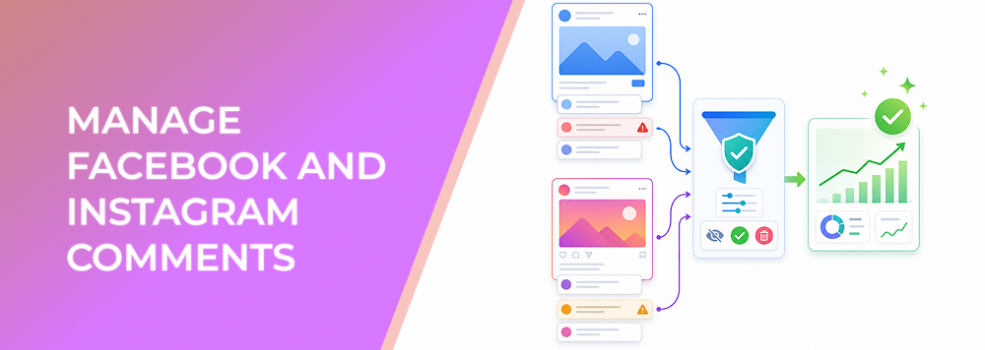
Meta Business Suite Inbox lets businesses react and reply to comments on Facebook Page and Instagram posts. For advertisers, this is not just social media management. It is conversion management.
The issue: comments influence how prospects interpret your offer
Paid social is not consumed in isolation.
When people see an ad or boosted post, they often scan comments before deciding whether to click, message, or buy. The comment section becomes a public layer of proof, objection, and brand perception.
That can help or hurt performance.
Positive comments, useful replies, and quick answers can reinforce trust. Unanswered objections, negative sentiment, spam, or confusion can weaken the offer before the user reaches your landing page or inbox.
This is why comment management matters for marketers focused on CPC, CPA, ROAS, and lead quality.
Business impact on CPC, CPA, ROAS, and lead quality
Comments affect paid performance in several ways.
If users see unanswered questions, they may hesitate to click. That can reduce CTR and raise CPC. If they click despite confusion, they may arrive with weak intent, reducing conversion rate. If negative comments dominate the discussion, even strong creative can underperform.
Good comment management can support:
- Lower wasted spend by reducing confusion before users click.
- Improved conversion rate by answering objections publicly.
- Better lead quality because prospects understand the offer more clearly.
- Stronger ROAS when social proof reinforces the buying decision.
- More useful campaign testing because comments reveal why users respond or hesitate.
A comment section can become a real-time research tool if you treat it seriously.
Typical scenarios where comment management matters
Boosted organic posts
A post that performed well organically may attract a broader audience once boosted. New comments can change how the post is perceived.
Product launches
Users often ask about features, pricing, availability, compatibility, shipping, or guarantees. Public answers can help future viewers.
Service-based offers
Comments may reveal whether prospects understand pricing, location, eligibility, or appointment availability.
B2B campaigns
Decision-makers may ask technical, budget, or fit-related questions. Public replies can demonstrate expertise.
Controversial or comparison-based ads
If your creative challenges a competitor or makes a strong claim, comments may require faster moderation and clarification.
Risks and considerations
The biggest risk is ignoring comment sentiment.
A campaign may show stable delivery while comments are damaging trust. That mismatch often appears later as poor conversion rate or low-quality leads.
Another risk is replying defensively. Public replies should be clear, calm, and useful. Arguments in comments rarely improve campaign performance.
There is also a moderation risk. Spam, irrelevant links, or misleading comments can distract prospects. At the same time, deleting or hiding comments without a clear policy can create trust issues. Teams should define moderation standards before campaign launch.
Finally, avoid treating every comment as a buying signal. Some users comment casually or critically without real purchase intent. Separate useful questions from noise.
Prerequisites and dependencies
Before managing comments at scale, make sure you have:
- Access to the relevant Facebook Page and Instagram account.
- A clear moderation policy.
- Approved response language for common questions.
- Escalation rules for complaints or sensitive issues.
- Alignment between ad claims and landing-page details.
- A process for sharing comment insights with the paid media team.
Comment management should not sit separately from campaign optimization.
How LeadEnforce helps
LeadEnforce helps advertisers improve who sees the content in the first place.
If your campaigns are shown to broad or poorly matched audiences, comment sections may fill with irrelevant reactions, confusion, or low-intent questions. LeadEnforce helps create more relevant ad audiences from Facebook groups, Instagram profiles, followers, engagers, LinkedIn professional data, and custom social-profile data.
That matters because better-fit audiences tend to produce more useful engagement. Comments become a source of insight instead of a cleanup burden.
For example, an ecommerce brand can target followers of relevant Instagram profiles. A B2B team can use professional data to reach users more likely to understand the offer. A niche advertiser can target members of communities where the problem is already familiar.
Practical recommendations
Review comments before scaling spend
Before increasing budget, check whether comments support or weaken the offer. A post with strong metrics but poor comments may not scale cleanly.
Turn common questions into creative improvements
If users repeatedly ask the same question, your ad may be missing key information. Update creative, copy, or landing-page messaging.
Respond to objections publicly when appropriate
A clear answer can help not only the person who asked, but every future viewer who has the same concern.
Separate support issues from sales questions
Support complaints should be handled carefully and routed correctly. Sales questions should be answered in a way that moves prospects forward.
Use comments to identify audience mismatch
If comments suggest users do not understand the offer, your targeting may be too broad or your creative may be attracting the wrong segment.
Final takeaway
Comments are part of the conversion environment.
They can strengthen trust, reveal objections, and help advertisers improve creative. They can also raise costs and weaken lead quality when ignored.
For performance marketers, comment management should be part of campaign optimization, especially before scaling budget.
You can build more relevant audiences that produce cleaner campaign engagement by joining the free 7-day LeadEnforce trial period.
Related LeadEnforce Articles
- How to Use the Meta Business Suite Content Tab to Improve Ad Performance — Shows how organic content signals, including comments, can inform paid campaign decisions.
- Create and Manage Stories in Meta Business Suite Without Wasting High-Intent Engagement — Relevant for managing engagement across high-intent content formats.
- How to Set Up A/B Content Tests in Meta Business Suite (Step-by-Step) — Helps teams test content before promoting it heavily.
- How to Build Effective Mid-Funnel Campaigns on Facebook — Useful for turning engagement and comments into structured mid-funnel activity.