Meta gives you dozens of CTA buttons inside Ads Manager. Most advertisers treat them as interchangeable.
They’re not.
Each campaign objective unlocks a different set of CTA options. That structure directly affects who clicks, how Meta allocates budget, and whether your campaign generates cheap traffic or real conversions.
If your CTR looks healthy but CPA keeps climbing, the CTA is often the hidden issue.
Why CTA Options Change by Campaign Objective
Meta ties CTA availability to objectives because each objective trains the delivery system differently.
An Awareness campaign can technically use “Sign Up” or “Shop Now.” But the system is still optimizing for reach, not conversion.
That mismatch shows up quickly in Ads Manager:
- High impressions and low CPM, meaning the system prioritizes cheap reach.
- Stable or above-average CTR, driven by broad curiosity.
- Low conversion rate, because users are not ready to act.
- Increasing CPA, despite decent traffic volume.
The CTA promises an action the algorithm is not optimized to deliver. That gap creates wasted spend.
Awareness Campaign CTAs: Wide Options, Weak Intent
Awareness campaigns allow one of the largest CTA sets, including:
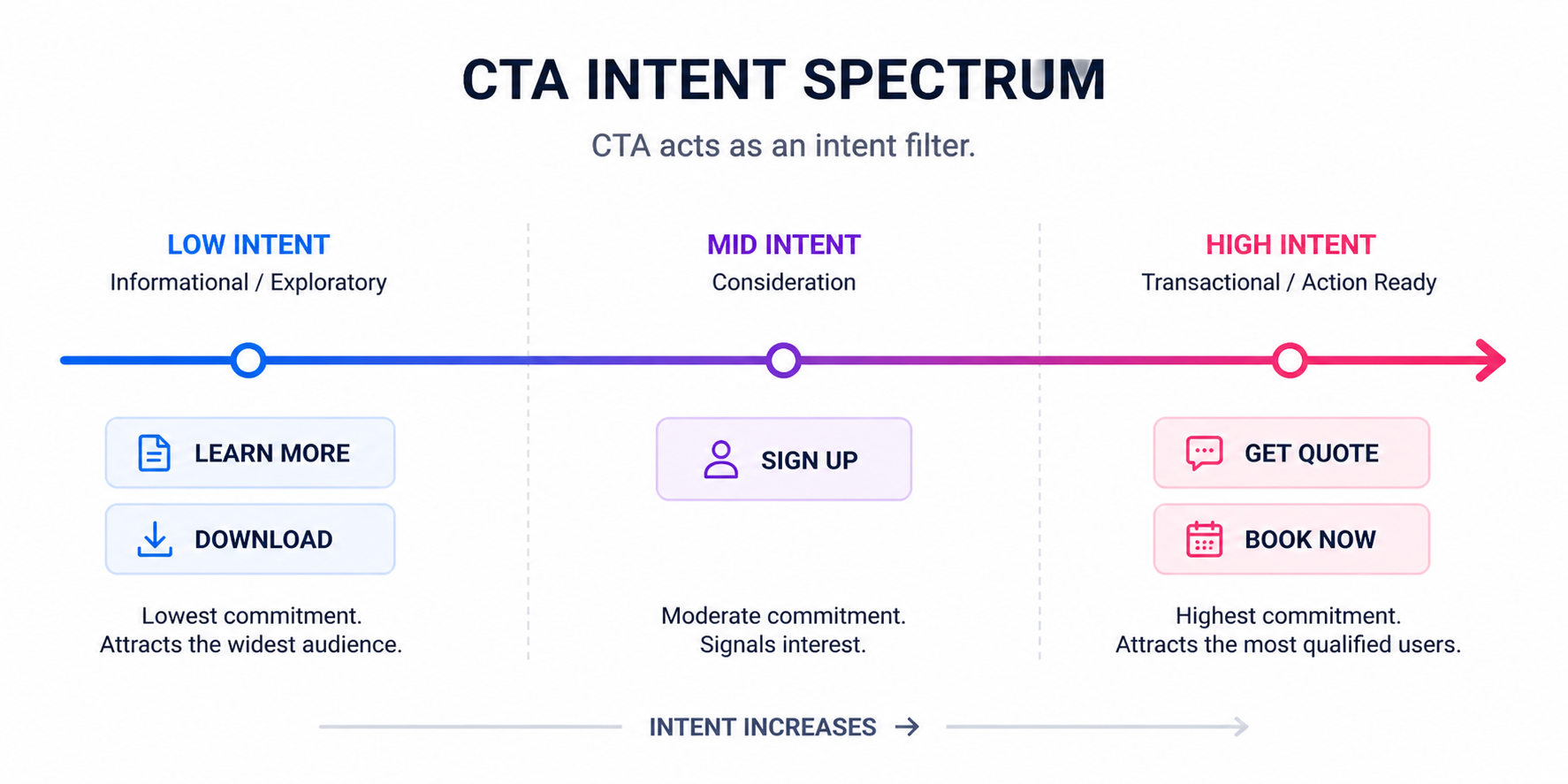
- “Learn More,” which reduces friction but attracts low-intent clicks.
- “Shop Now,” which pushes purchase behavior without qualifying users.
- “Get Quote,” which asks for commitment from cold traffic.
- “Call Now,” which assumes immediate action readiness.
This flexibility often leads to over-asking too early.
A typical scenario: advertisers run Awareness with “Book Now” or “Get Quote.” The campaign drives impressions cheaply, but conversions stay flat.
You end up buying attention, not intent.
Traffic Objective: CTA Depends on Where You Send Users
Traffic campaigns change CTA availability based on destination. That’s where performance differences start.
Your CTA options depend on whether you send users to:
- Website, where landing page speed and clarity determine results.
- App, where store experience affects install rates.
- Messenger, where response time impacts conversion.
- WhatsApp, where intent is higher but follow-up is critical.
- Calls, where availability directly affects lead capture.
Each path creates a different conversion environment.
For example, “Learn More” to a website may generate volume but weak engagement. “Send Message” to Messenger may produce fewer clicks but stronger leads.
In reporting, this looks like:
- Lower CPC for website traffic, but weaker conversion rates.
- Higher CPC for messaging campaigns, but stronger downstream quality.
The CTA defines what kind of user journey you’re buying.
Engagement Campaigns: Cheap Signals vs Real Intent
Engagement campaigns allow CTAs across multiple interaction types:
- On-ad actions, such as video views or reactions.
- Messaging apps, which move users into conversations.
- Website visits, which shift behavior off-platform.
- App interactions, which depend on install or usage flow.
- Page engagement, which builds long-term audiences.
The risk here is signal dilution.
A CTA like “Watch More” or “Like Page” can produce low-cost engagement. But those users rarely convert without additional funnel steps.
On the other hand, “Send Message” or “Get Quote” can generate stronger intent, but only if your follow-up process is fast and structured.
If engagement grows but revenue doesn’t, your CTA is likely attracting the wrong type of interaction.
Lead Campaigns: CTA Is a Qualification Filter
Lead generation campaigns give you access to high-intent CTAs like:
- “Sign Up,” which works for simple opt-ins and newsletters.
- “Get Quote,” which filters users closer to purchase.
- “Book Now,” which aligns with appointment-based funnels.
- “Download,” which fits lead magnets but lowers intent.
Most advertisers optimize for CPL first. That’s where performance breaks.
A softer CTA like “Download” or “Learn More” lowers CPL. But it often fills your funnel with users who are not ready to convert.
In Ads Manager, you’ll see:
- High form opens, driven by low friction.
- Low completion rates, due to weak intent.
- Poor lead quality, confirmed by sales feedback.
Switching to “Get Quote” or “Book Now” often raises CPL but improves close rate. That usually reduces CAC over time.
App Promotion: CTA Determines Install Quality
App campaigns are more restricted. Common CTAs include:
- “Install Now,” which targets immediate action.
- “Use App,” which works better for known brands or re-engagement.
- “Learn More,” which attracts exploratory users.
The difference shows up in install behavior.
If you see strong CTR but low install rate, your CTA is likely attracting the wrong intent.
Typical signals include:
- High click volume with weak install conversion.
- Low post-install engagement.
- Increasing cost per install over time.
The CTA should match how familiar users are with your app.
Sales Campaigns: Where CTA Precision Drives ROAS
Sales campaigns require the tightest CTA alignment. Available options include:
- “Shop Now,” which drives direct purchase intent.
- “Order Now,” suited for repeat or fast transactions.
- “Sign Up,” used for subscriptions or trials.
- “Get Quote,” for high-ticket or service offers.
This is where mistakes get expensive.
A cold audience paired with “Shop Now” usually results in:
- Higher CPC, due to lower relevance.
- Low conversion rate, due to low intent.
A warm audience paired with “Learn More” wastes momentum and delays conversion.
Sales campaigns only scale when CTA, audience, and offer match.
How CTA Choice Skews Budget Distribution
Meta prioritizes ads that generate early engagement signals. That’s where CTA choice can mislead the system.
An ad using “Learn More” often gets more clicks than one using “Get Quote.” The system interprets this as better performance and shifts budget toward it.
But if those clicks don’t convert, overall CPA rises.
You’ll notice:
- Spend concentrating on lower-intent ads.
- Conversion rate dropping at the ad set level.
- Difficulty scaling despite strong CTR.
This is why you need to test CTAs without wasting budget using controlled variables.
CTA Only Works When the Funnel Matches
Even a strong CTA fails when the post-click experience breaks the promise.
If your ad says “Get Quote,” the landing page must immediately support that action. If users have to search for the form, conversion rate drops.
This shows up as:
- Strong CTR with weak landing page engagement.
- High bounce rate.
- Drop-off before form completion or checkout.
To fix this, you need to create a seamless post-click experience.
Where Audience Quality Changes CTA Performance
CTA performance depends heavily on audience intent.
Broad targeting forces you into softer CTAs because users are not ready to convert. That lowers efficiency.
When you work with higher-intent audiences, stronger CTAs perform better.
This is where LeadEnforce fits into the strategy. By building audiences from Facebook groups, Instagram followers, and engagement data, you reduce reliance on soft CTAs and improve signal quality.
Instead of filtering intent through the CTA alone, you start with better inputs.
Final Takeaway
Meta’s CTA buttons are not cosmetic. They are intent filters tied to campaign objectives.
If your campaign is generating clicks but not results, start with the CTA.
Make sure it aligns with:
- The campaign objective.
- The user’s intent level.
- The action on the landing page.
When those match, Meta’s delivery improves. When they don’t, you pay for clicks that never convert.