Meta Ads Manager is the main tool advertisers use to create campaigns, manage ads, review performance, and make optimization decisions.
Meta describes Ads Manager as the place where you can create campaigns step by step, manage multiple ads at once, analyze results, schedule reports, and review optimization recommendations. It also includes tools for editing audiences, budgets, placements, and campaign settings across several ads at the same time.
For advertisers, this matters because almost every change inside Ads Manager affects delivery, CPA, ROAS, and lead quality.
Why campaign setup affects performance immediately
The first decisions inside Ads Manager shape how Meta spends your budget.
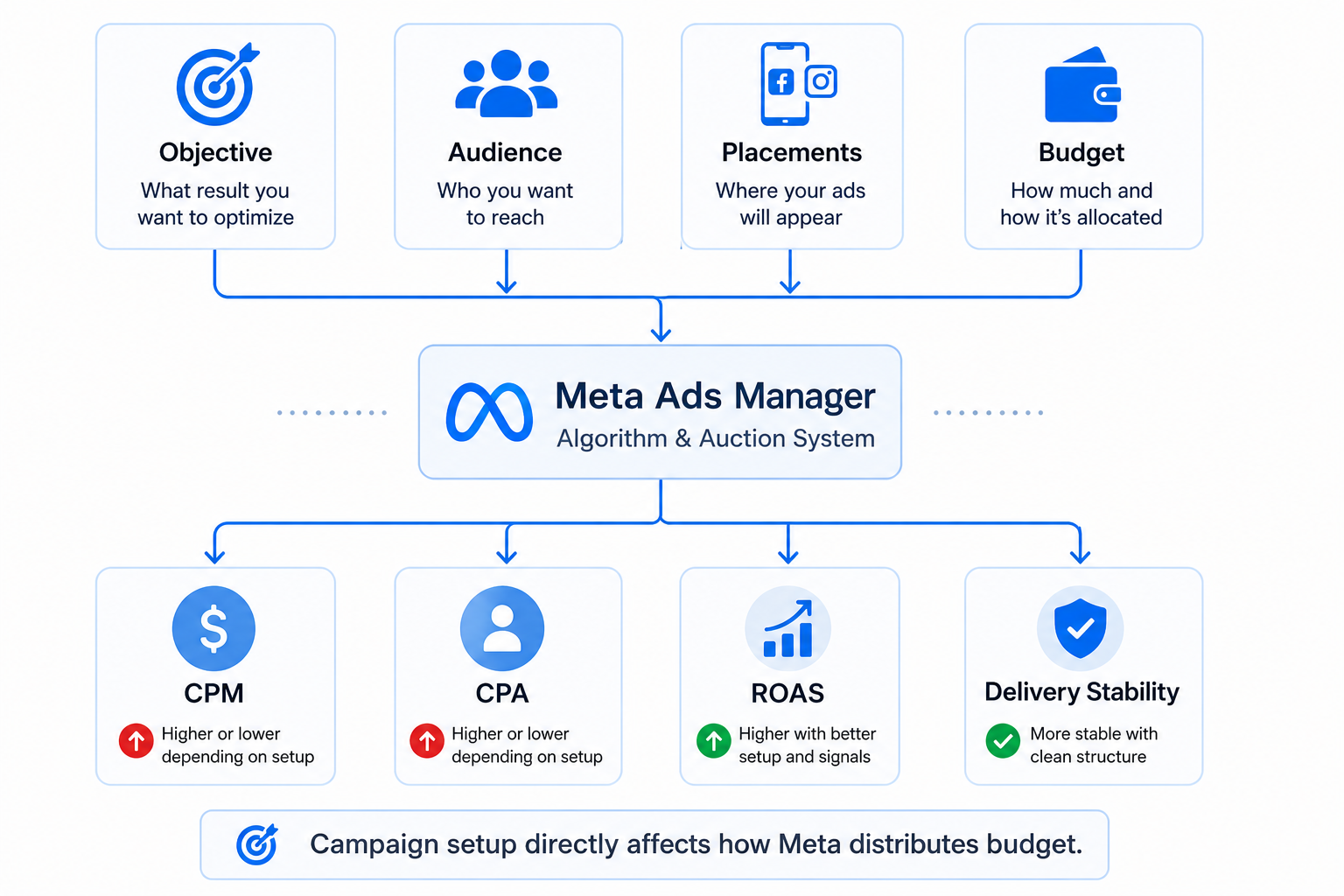
When you create a campaign, you choose:
- A campaign objective, which tells Meta whether to prioritize clicks, leads, purchases, or another result.
- An audience, which determines who enters the delivery pool.
- Placements, which control where ads appear across Facebook, Instagram, Reels, Stories, and Audience Network.
- A budget structure, which affects pacing and spend distribution.
These settings directly affect auction behavior.
For example, a traffic campaign often generates lower CPC because Meta looks for users likely to click. A sales campaign usually costs more per click because the system competes for users more likely to convert.
You can often see the difference inside Ads Manager within the first few days. CPM changes, spend shifts between ad sets, and one placement may start consuming most of the budget.
Why many ad accounts become difficult to optimize
Ads Manager makes campaign duplication very easy. That helps advertisers launch faster, but it also creates messy account structures quickly.
A common problem starts when advertisers:
- Duplicate ad sets repeatedly without changing strategy.
- Edit campaigns too often during the learning phase.
- Run overlapping audiences across multiple campaigns.
- Increase budgets every few hours based on short-term results.
At first, the account may still perform well. Then delivery becomes unstable.
Inside Ads Manager, you usually notice:
- Rising frequency.
- Uneven spend distribution.
- Higher CPA.
- Learning phase resets.
- CPM spikes during scaling.
This is where many setup mistakes that cost you money start hurting performance.
What advertisers should actually monitor in Ads Manager
Many advertisers focus only on CPC and ROAS. Those metrics matter, but they rarely explain the full problem.
The better approach is to look at how metrics move together.
For example:
- Rising CPM with stable CTR usually means auction competition increased.
- Falling CTR with stable CPM often signals creative fatigue.
- Cheap clicks with weak conversion rate usually indicate low-intent traffic.
- Strong ROAS with declining reach can point to audience saturation.
Ads Manager also lets advertisers apply breakdowns by placement, device, age, gender, or time of day.
That reporting becomes useful when performance changes suddenly.
You may discover Instagram Reels generates cheap traffic but weak lead quality. You may also find desktop users convert better even when mobile traffic is cheaper.
This is why many advertisers misunderstand platform reporting. Articles about misunderstood Ads Manager metrics usually become relevant once campaigns start scaling.
Opportunity score can help — but it should not control decisions
Ads Manager now includes an opportunity score system that rates campaign optimization from 0 to 100.
Meta also shows recommendations that may improve performance.
These suggestions can help identify issues such as:
- Missing campaign settings.
- Weak budget allocation.
- Incomplete tracking setup.
- Underused automation features.
The recommendations are useful, especially for newer advertisers. But they should not replace business judgment.
A recommendation to broaden targeting may improve delivery while reducing lead quality. A suggested budget increase may raise spend faster than revenue grows.
Meta optimizes for delivery efficiency inside the platform. Advertisers still need to evaluate profitability outside the platform.
Why reporting becomes harder during scaling
Small ad accounts are usually easy to manage. Scaling changes that quickly.
Once advertisers run multiple campaigns, reporting becomes harder to interpret. Attribution windows, placements, and overlapping audiences create conflicting signals.
One campaign may look profitable inside Ads Manager while CRM results weaken. Another may appear weak in-platform while generating strong sales calls.
This is why reporting structure matters.
Advertisers should:
- Use clear naming conventions.
- Separate prospecting and retargeting campaigns.
- Review lead quality outside Ads Manager.
- Avoid unnecessary audience overlap.
- Compare platform data with CRM or sales data regularly.
Without structure, optimization becomes reactive instead of strategic.
That is often when advertisers realize what your Ads Manager dashboard misses.
Why mobile management creates optimization mistakes
Meta also offers Ads Manager apps for iOS and Android. They are useful for checking delivery, monitoring spend, or pausing issues quickly.
The problem starts when advertisers make constant optimization decisions from mobile notifications.
Performance naturally fluctuates during the day. Early CPA spikes or temporary CTR drops do not always require action.
Frequent edits often create more instability instead.
Inside Ads Manager, this usually appears as repeated learning resets after small campaign changes.
Accounts that scale more consistently usually separate monitoring from optimization. They review campaigns daily but make major structural changes only after enough data accumulates.
Practical takeaway
Meta Ads Manager is more than a campaign dashboard. It controls how Meta distributes spend and evaluates performance.
Most campaign problems start with structure, reporting, or optimization mistakes inside the platform. Clean setup, stable testing, and disciplined reporting usually improve results faster than constant campaign edits.
Advertisers who scale successfully tend to treat Ads Manager like an operating system, not just a place to check metrics.