A Facebook Page may look like a simple brand profile, but for advertisers it is also a campaign asset.
If the Page is not connected to the right business portfolio, your team can run into access delays, fragmented signals, approval bottlenecks, and confusing campaign ownership. That matters when you are trying to launch tests quickly, control ad spend, and compare audience performance cleanly.
Adding a Page to your Meta Business Portfolio is not a performance tactic by itself. It is a foundation that helps campaign teams work from the right asset structure before they start testing audiences, creatives, offers, and budgets.
What Is Happening When You Add a Page to a Business Portfolio?
A business portfolio is the control layer where Meta business assets are organized. A Facebook Page can sit inside that structure alongside ad accounts, Instagram accounts, datasets, catalogs, pixels, domains, and other assets.
When you add a Facebook Page to the correct portfolio, you make it easier for the business to manage access, assign people, grant partner permissions, and connect the Page with the right advertising setup.
For advertisers, the key issue is ownership and control.
A Page that sits outside the business portfolio may still exist and may still publish content. But the paid media team may not be able to manage it properly, connect it to campaigns, approve partner access, or coordinate it with other assets used for optimization.
That can create confusion such as:
- Ads being launched from the wrong Page.
- Agencies waiting for access before campaigns can go live.
- Instagram accounts, catalogs, and datasets being connected to different structures.
- Internal users having ad account access but not Page access.
- Historical engagement signals being disconnected from the campaign structure.
For performance marketers, this is not just an admin cleanup task. It affects how fast and cleanly campaigns can be executed.
Why This Affects Campaign Performance
Meta campaigns rely on connected assets and consistent signals. A Facebook Page contributes to brand identity, engagement history, ad delivery context, comment management, and sometimes lead follow-up workflows.
When the Page is not connected to the right business portfolio, the campaign team may still be able to spend money, but execution becomes less reliable.
The impact often shows up in operational performance before it appears in ad metrics. Campaign launches slow down. Audience tests are delayed. Agencies need extra back-and-forth. Internal teams do not know who can approve changes. The business may duplicate Pages or ad accounts just to move forward.
That creates weaker testing conditions.
If you are comparing prospecting audiences, retargeting segments, or LeadEnforce-built custom audiences, you need a clean structure. Otherwise, performance reads become harder to trust because access problems, asset mismatches, and signal gaps interfere with the test.
Business Impact
A disconnected or poorly assigned Page can affect campaign economics in several practical ways.
First, it can delay launches. If an agency or internal media buyer cannot access the Page, the campaign may sit idle while permissions are fixed.
Second, it can waste budget. Campaigns may be launched through the wrong Page, with the wrong connected Instagram account, or without the intended audience structure. That leads to noisy results and weaker learning.
Third, it can increase CPA or CAC indirectly. The Page issue itself does not raise costs in the auction. But if campaign teams test slowly, use incomplete signals, or misread results, budget allocation becomes less efficient.
Fourth, it can reduce lead quality. If the wrong Page identity is used, prospects may see a brand experience that does not match the offer, landing page, or funnel. That weakens trust and can lower conversion intent.
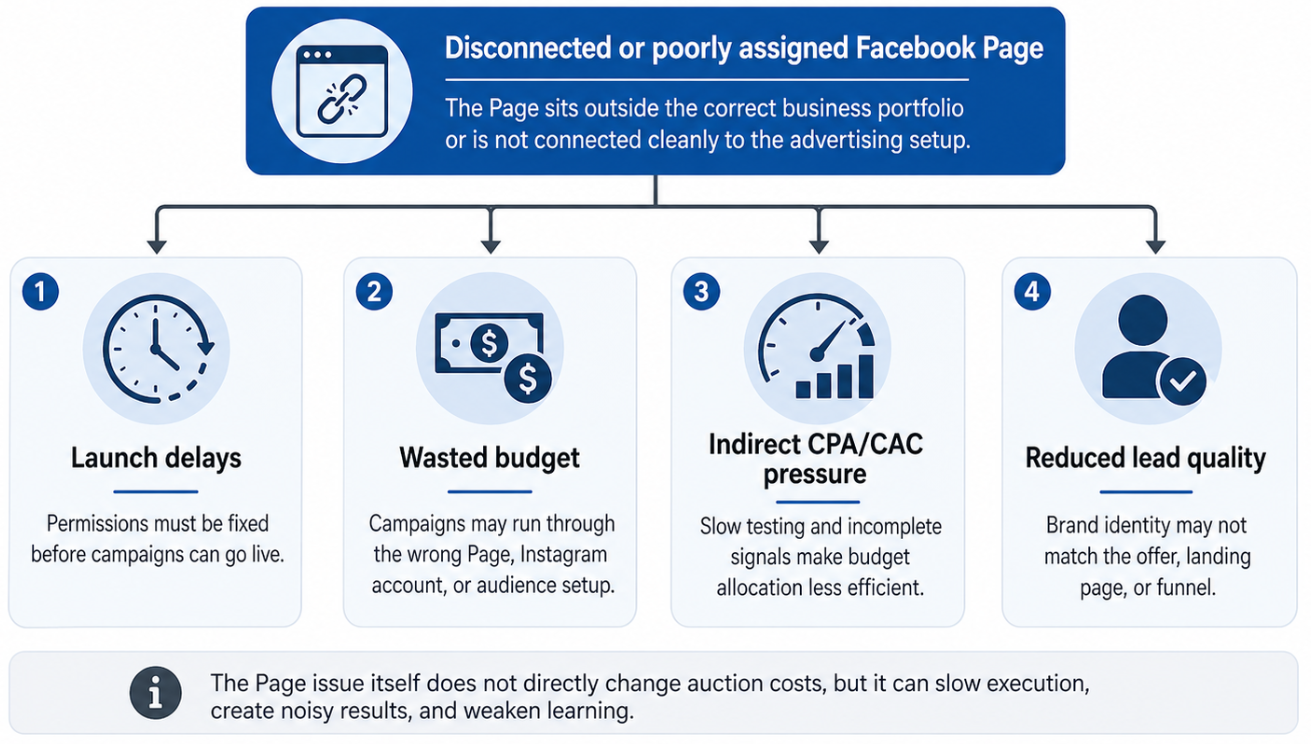
A disconnected Facebook Page does not directly change auction costs, but it can affect campaign economics through launch delays, wasted budget, less reliable testing, and weaker lead quality.
For small businesses and startups, the cost is often time. For agencies, it is onboarding friction. For B2B and ecommerce advertisers, it is slower audience testing and less reliable optimization.
Typical Scenarios Where This Applies
A small business created its Page before setting up Business Suite
This is common. The founder or owner created the Page years ago from a personal profile. Later, the business starts running serious paid campaigns and realizes the Page is not organized inside the business portfolio.
The business can publish content, but assigning agencies, connecting assets, and managing permissions becomes messy.
An agency is onboarding a new Meta Ads client
The agency needs the client’s Page connected to the right structure before it can run campaigns efficiently. If the Page is missing, the agency may not be able to launch ads, manage comments, coordinate lead forms, or use the right Page identity.
A startup wants to test multiple audiences quickly
A startup may want to test Facebook group audiences, Instagram engager audiences, LinkedIn-derived segments, and retargeting pools. If the Page and ad account are not connected cleanly, the testing process slows before the team learns anything useful.
An ecommerce brand needs Page, Instagram, catalog, and dataset alignment
Catalog ads and retargeting depend on clean asset relationships. If the Page sits in one place, the Instagram account in another, and the catalog elsewhere, campaign execution becomes fragile.
A local business manages multiple Pages
Local service businesses often have separate Pages for locations or branches. Adding the right Page to the right portfolio helps reduce confusion when campaigns are split by geography, service area, or offer.
Risks and Considerations
Before adding or organizing a Page, advertisers should check several risks.
The first risk is adding the wrong Page. Many businesses have old, duplicate, or inactive Pages. Make sure the Page has the correct brand name, URL, followers, engagement history, and relevance to the campaign.
The second risk is ownership conflict. If the Page is already controlled by another business portfolio, a former agency, or a former employee’s setup, you may need to request access rather than assume full ownership.
The third risk is over-focusing on structure. A clean Page setup does not fix weak creative, poor landing pages, low-quality conversion signals, or bad audience fit.
The fourth risk is signal fragmentation. If you create a new Page just to bypass access issues, you may lose historical engagement and brand recognition that could have supported campaign relevance.
The fifth risk is compliance. When using custom audiences, social-profile data, or external audience tools, advertisers should review platform policies and avoid treating audience creation as a shortcut around consent, privacy, or platform requirements.
Prerequisites and Dependencies
Adding a Page to the right portfolio works best when the campaign foundation is already clear.
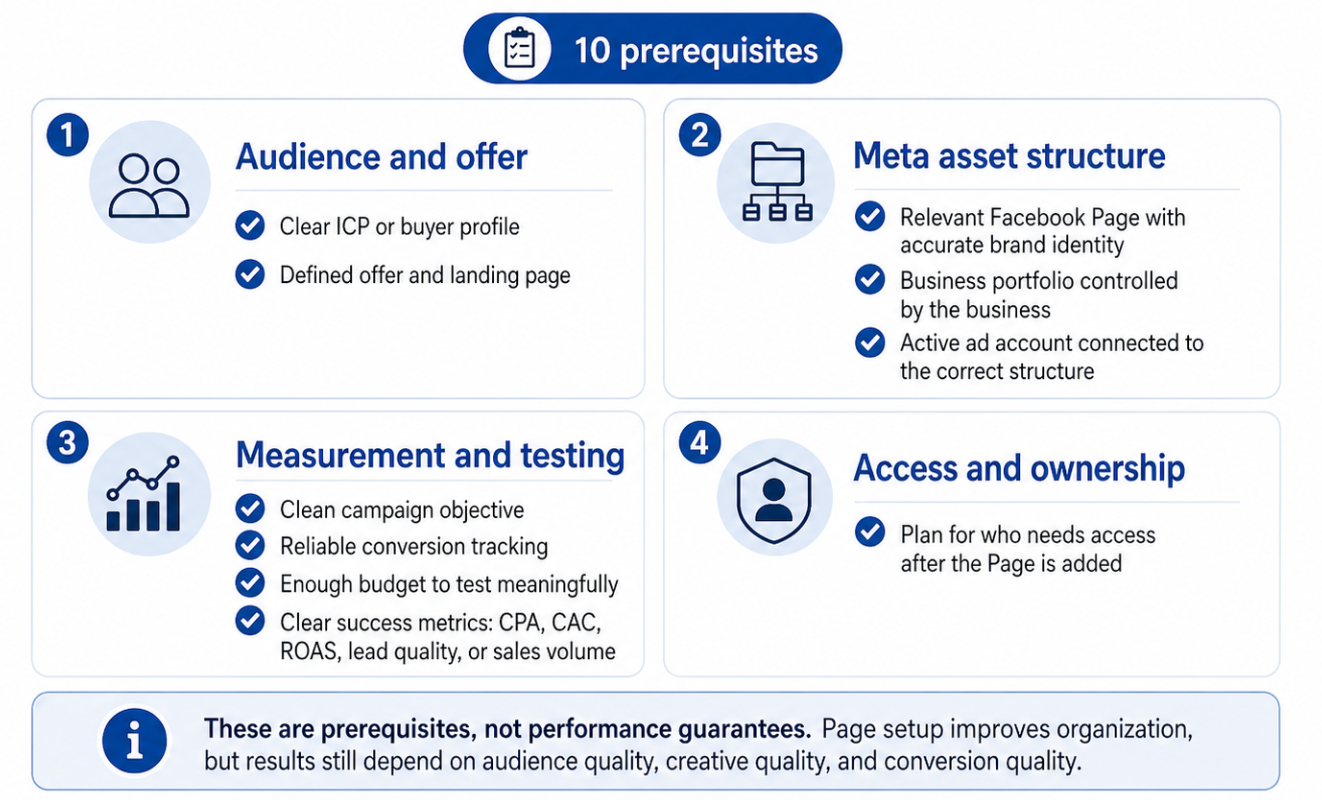
Adding a Facebook Page to the correct business portfolio works best when the surrounding campaign foundation is already clear, including ownership, tracking, budget, success metrics, and access planning
You should have:
- A clear ICP or buyer profile.
- A relevant Facebook Page with accurate brand identity.
- A business portfolio controlled by the business.
- An active ad account connected to the correct structure.
- A clean campaign objective.
- Reliable conversion tracking.
- A defined offer and landing page.
- Enough budget to test meaningfully.
- Clear success metrics such as CPA, CAC, ROAS, lead quality, or sales volume.
- A plan for who needs access after the Page is added.
Without these basics, adding the Page may improve organization, but it will not automatically improve campaign performance.
How LeadEnforce Helps
LeadEnforce helps once the account structure is ready for serious audience testing.
When the correct Page is connected to the right business portfolio, advertisers can use LeadEnforce to build more relevant custom audiences from Facebook groups, Instagram profiles, followers, engagers, LinkedIn professional data, and custom social-profile sources.
That helps replace broad targeting guesswork with more focused audience inputs.
For example, a B2B team can identify professionals and communities that match its ICP, then activate those audiences in the correct ad account. An ecommerce brand can build prospecting audiences around competitor Instagram profiles or high-intent engager pools. A local business can identify community-based audiences that are more relevant than broad location targeting alone.
LeadEnforce does not add Pages to Meta Business Portfolio, solve ownership conflicts, or configure tracking. Its value is in improving the relevance of the audiences you test once your Meta asset structure is ready.
Practical Recommendations
Start by mapping your current Meta structure. Identify which business portfolio owns the Page, which ad account is used for campaigns, which Instagram account is connected, and who has full control.
Do not duplicate Pages unless there is a strong business reason. A duplicate Page may feel like a shortcut, but it can create weaker signals, lower trust, and more reporting confusion.
Align Page structure with campaign strategy. If you run campaigns by region, product line, or brand, make sure your Page setup supports that structure rather than making it harder to analyze performance.
Confirm access before campaign planning. Agencies and freelancers should not start audience testing plans until they know which assets they can actually use.
Use Page organization as a prerequisite for testing. Once the Page is in the right portfolio, build a testing plan around audience quality, creative quality, and conversion quality.
Final Takeaway
Adding a Facebook Page to your business portfolio is not just a setup task. It is part of the operating foundation for paid social performance.
When the Page is connected to the right structure, teams can assign access faster, launch campaigns with fewer delays, reduce testing noise, and activate higher-quality audiences more confidently.
Related LeadEnforce Articles
- Why You Can’t Add or Connect Business Assets in Meta — Explains why assets may fail to connect and how that affects campaign signals and performance.
- Why Your Meta Business Portfolio Setup Affects Paid Social Performance — Shows how portfolio structure influences campaign execution, audience testing, and budget decisions.
- Set Up Your Meta Business Portfolio Before Scaling Paid Social Campaigns — A strong next read for advertisers preparing their Meta structure before scaling.
- Managing Multiple Facebook Pages & Instagram Accounts in Meta Business Suite — Relevant for teams managing multiple Pages, Instagram accounts, or regional assets.