Approving a Facebook Page access request sounds simple. Someone asks for access, you approve it, and the campaign can move forward.
In practice, this decision can affect launch speed, asset control, agency onboarding, audience testing, and campaign accountability. Approve too slowly, and campaigns stall. Approve the wrong request, and you may expose assets unnecessarily. Approve the wrong permission level, and the campaign team may still be blocked from doing its job.
For performance marketers, the goal is not just to approve access. The goal is to approve the right access for the right team so campaigns can move faster without creating avoidable risk.
What Is Happening When You Approve Page Access?
A Page access request usually means another business, agency, freelancer, or partner needs permission to work with your Facebook Page.
They may need access to:
- Run ads using the Page identity.
- Manage Page-related campaign assets.
- Review or manage comments.
- Connect the Page to other campaign assets.
- Coordinate with Instagram campaigns.
- Support lead generation, ecommerce, retargeting, or local campaigns.
Approving the request gives that party the ability to perform certain actions depending on the access level granted.
This is different from giving away ownership. A well-scoped access approval allows another party to work on the Page while the business keeps control of its core assets.
That distinction matters.
Agencies and consultants need working access. Business owners need ownership protection. The approval process is where those two requirements meet.
Why This Affects Campaign Performance
Access approvals affect campaign performance indirectly through speed, control, and signal quality.
If an agency cannot access the Page, it may not be able to launch the campaign, connect the right Page identity, coordinate with Instagram, or manage engagement from ads. That slows testing and can delay revenue.
If the agency gets too little access, it may still need the owner to approve every small action. That creates bottlenecks and slows optimization.
If the agency gets too much access, the business increases operational risk. A partner may be able to change settings, access assets outside the scope of work, or remain connected after the project ends.
The best approval decision gives the campaign team enough access to execute quickly while preserving business control.
That is especially important for performance teams testing audiences. If your agency is testing high-intent Facebook group audiences, Instagram engager audiences, LinkedIn-derived segments, or custom social-profile audiences, campaign momentum matters. Access friction can waste the first days of a test before any useful data is collected.
Business Impact
Poorly managed Page access approvals can affect several performance metrics.
Four common Page access mistakes can delay launches, waste ad spend, slow optimization, or increase asset-control risk
A delayed approval can push back campaign launch dates. For agencies, that means lost testing time. For businesses, it means slower learning and delayed revenue opportunities.
Incorrect approval can create wasted ad spend. If the partner uses the wrong Page, wrong ad account, or incomplete asset setup, campaign results may be harder to interpret.
Under-permissioning can slow optimization. If the media buyer cannot manage what they need to manage, every campaign adjustment depends on someone else.
Over-permissioning can create risk during agency transitions. If old partners retain access, the business may lose visibility into who can manage Page-related campaign assets.
The result is not always visible as one obvious metric. It shows up as slower testing, unclear ownership, duplicated work, messy reporting, and less confident budget allocation.
Typical Scenarios Where This Applies
A client hires a paid social agency
The agency requests access to the client’s Facebook Page before launching Facebook and Instagram ads. The client must approve the request, but should confirm the agency identity, permission level, and campaign scope before doing so.
A freelancer needs Page access for lead ads
A freelance media buyer may need Page access to create or manage lead generation campaigns. The business should grant enough access for campaign execution, but not automatically give full control of every asset.
An ecommerce brand works with a catalog or retargeting specialist
The specialist may need Page access alongside ad account, catalog, dataset, and Instagram access. If any asset is missing, campaign delivery and reporting can become fragmented.
A B2B demand generation team uses external audience research
A partner may build audience segments from LinkedIn-derived data, Facebook communities, or social-profile sources. The access approval should support activation in the correct ad account and Page structure.
A local business approves access for a regional campaign
A local advertiser may need an agency to run ads from the correct location Page. If the wrong Page is approved, ads may reach the right geography but show the wrong brand identity.
Risks and Considerations
Before approving a request, check who is asking.
Confirm the partner’s business name, business ID, and relationship to the campaign. Do not approve requests from unknown businesses or vague profiles.
Check the requested permission level. Partial access may be enough for campaign execution. Full control should be reserved for cases where the partner truly needs it and the business understands the risk.
Review whether the partner needs Page access only, or whether they also need ad account, Instagram account, catalog, dataset, or lead form access. Page access alone may not be enough for campaign execution.
Audit old access before approving new access. If previous agencies or former contractors still have permissions, clean up the structure before adding more people.
Do not confuse access approval with campaign readiness. A partner can have the right permissions and still run weak campaigns if the offer, audience, landing page, creative, or tracking setup is poor.
Keep compliance in mind. Custom audiences, social-profile data, and profile-derived targeting should be handled according to platform rules and internal privacy standards.
Prerequisites and Dependencies
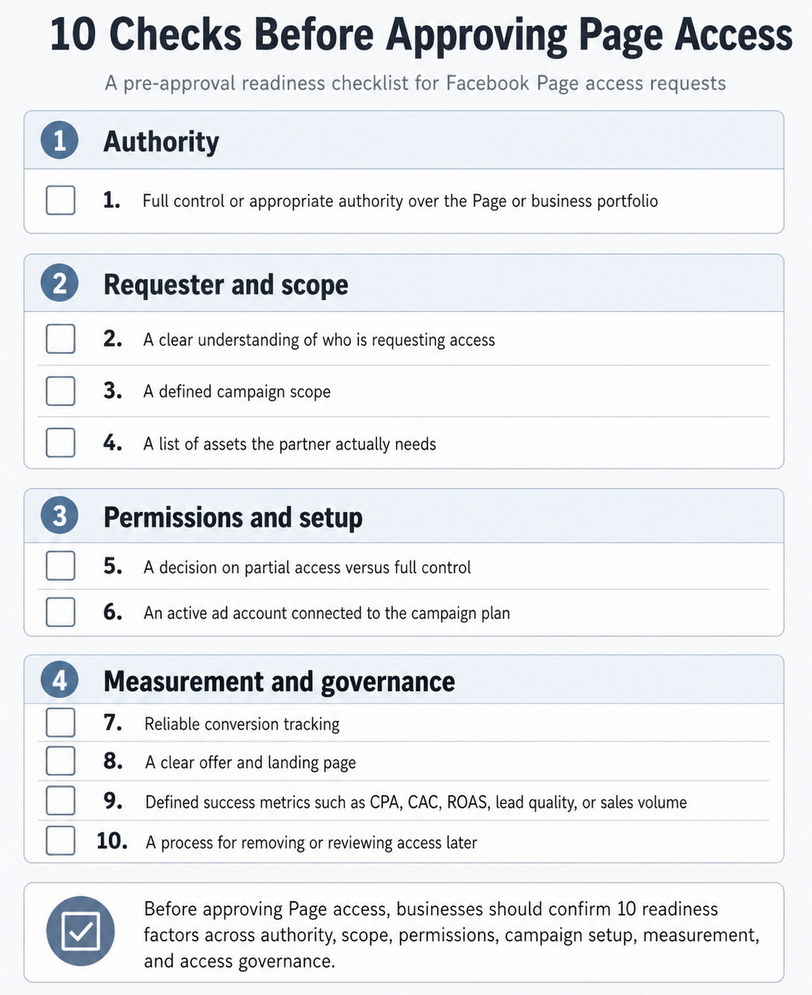
Before approving a Page access request, you should have:
- Full control or appropriate authority over the Page or business portfolio.
- A clear understanding of who is requesting access.
- A defined campaign scope.
- A list of assets the partner actually needs.
- A decision on partial access versus full control.
- An active ad account connected to the campaign plan.
- Reliable conversion tracking.
- A clear offer and landing page.
- Defined success metrics such as CPA, CAC, ROAS, lead quality, or sales volume.
- A process for removing or reviewing access later.
Approving access without these basics can make campaign execution faster but messier.
How LeadEnforce Helps
LeadEnforce does not approve Meta access requests or manage permissions. It helps make approved access more productive.
Once the agency, freelancer, or internal team has the right Page and ad account access, LeadEnforce can help them build more precise audiences for campaign testing.
Instead of relying only on broad interest targeting, advertisers can use LeadEnforce to create audiences from Facebook groups, Instagram followers and engagers, LinkedIn professional data, competitor profiles, and custom social-profile data.
This is useful after access is approved because the campaign team can immediately test more relevant audience segments.
For example, an agency approved for a B2B client’s Page can use LeadEnforce to build audiences around specific professional roles or niche communities. An ecommerce agency can build audience segments from competitor Instagram profiles and high-intent engagers. A local advertiser can use community-based audience discovery to avoid overly broad location targeting.
The access approval opens the door. LeadEnforce helps improve what the campaign team does once they can work.
Practical Recommendations
Approve access based on job function, not convenience. A reporting partner does not need the same access as a media buyer. A creative contractor does not need the same control as a senior internal marketer.
Document every approval. Record who requested access, which business they represent, which assets were shared, what level of permission was granted, and when the access should be reviewed.
Review permissions before major campaign launches. Access issues are easier to fix before a launch than during a campaign learning phase.
Keep ownership with the business. External teams should be able to execute, but the business should retain control of core assets.
Pair access approval with a testing plan. Once the partner can work, define which audiences, creatives, offers, and landing pages will be tested first.
Remove unnecessary access after the engagement ends. This protects the business and keeps future campaign decisions cleaner.
Final Takeaway
Approving a Facebook Page access request is not just an administrative step. It affects how quickly campaigns launch, how safely partners can work, and how clearly performance can be evaluated.
The right approval gives campaign teams enough access to move fast while keeping asset ownership and budget control with the business.
Related LeadEnforce Articles
- How to Give an Agency Partner Access to Meta Assets Without Losing Campaign Control — Closely related for businesses granting agencies access to Meta assets without giving up ownership.
- No Full Control of Your Meta Business Portfolio? Fix Access Before Campaigns Stall — Relevant when the person trying to approve access does not have enough control.
- Business Asset Permissions in Meta: Why Access Structure Impacts Campaign Performance — Explains why permission structure affects campaign execution and performance.
- Meta Business Portfolio Users Explained: People, Partners, and System Users — Useful for understanding the difference between internal users, partners, and system users.
- Find Your Meta Business Portfolio ID Faster When Agencies, Partners, or Tools Need Access — Helpful when agencies or partners need portfolio details to request access correctly.