A missing payment method is not a small setup issue.
It can stop a campaign before it ever reaches the auction.
Meta’s indexed help result says the payment method flow in Meta Business Suite is: go to Settings, click Billing & payments, click Payment methods, then click the Add button next to Add business payment method.
Meta also states that a payment method is needed before an ad can be published in Meta Ads Manager or Meta Business Suite.
For performance marketers, this is basic infrastructure.
Your audience strategy, creative testing plan, and conversion funnel do not matter if the ad account cannot pay for delivery.
What Adding a Payment Method Actually Solves
Adding a payment method gives the ad account a way to pay for active campaigns.
That sounds obvious, but the operational consequences are bigger than many advertisers expect.
Payment setup affects:
- Whether campaigns can launch.
- Whether campaigns continue spending after a billing event.
- Whether finance can manage ad spend cleanly.
- Whether agencies and clients know who is responsible for payment.
- Whether failed payments create delivery interruptions.
Meta’s accepted payment options include credit or debit cards, PayPal, and bank account direct debit in supported countries.
Available options can vary by country, account, and setup, so advertisers should verify what appears inside their own Business Suite.
Why Payment Setup Matters for Campaign Performance
A payment method does not improve targeting.
But payment failure can damage performance.
When delivery stops, campaigns lose momentum. Recent conversion signals weaken. Retargeting windows continue moving while ads are paused. Budget pacing becomes less predictable.
Meta’s help content on failed payments says advertisers may be able to fix an ad account disabled because of failed payments by paying the automatic billing balance.
That matters because a billing issue can look like a performance issue.
If ads stop spending, the team may assume the campaign is broken. In reality, the root cause may be payment setup, failed charge, expired card, insufficient permissions, or account restriction.
Payment setup requires 3 minimum checks: accepted method, billing name and address match, and backup payment coverage.
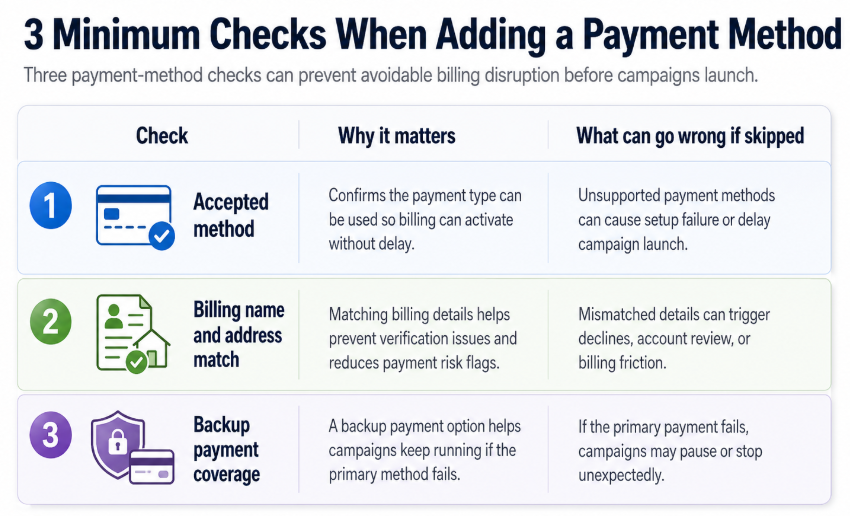
Three payment-method checks can prevent avoidable billing disruption before campaigns launch
Those checks are simple, but skipping them can create expensive disruption.
Business Impact on CPC, CPA, CAC, ROAS, and Budget Efficiency
Payment problems hurt performance through interruption.
If campaigns pause unexpectedly, the cost is not just the lost spend. It is the lost learning.
CPC can become unstable after campaigns restart.
CPA can rise when delivery has to rebuild.
CAC can increase if high-intent users age out of retargeting windows.
ROAS can fall if budget is pushed into rushed replacement campaigns.
Lead quality can drop if teams abandon prepared audience segments and switch to broader backup targeting.
Budget efficiency suffers when marketers spend time solving billing problems instead of improving campaign quality.
Typical Scenarios Where This Applies
New ad account setup
A new business cannot launch ads until the payment method is added and accepted.
Agency onboarding
The client may own the ad account, but the agency may be waiting on the client’s finance team to add or approve payment details.
Expired or replaced cards
A campaign can be healthy and still pause because the underlying card is no longer valid.
Multi-account operations
Teams managing several ad accounts need to know which payment method belongs to which business, client, or market.
Scaling periods
When spend increases, weak payment setup is more likely to surface. A payment method that worked at low spend may become a bottleneck if limits, bank checks, or account controls interfere.
International campaigns
Payment options and banking support can vary. Teams should not assume that a method available in one market will be available in another.
Risks and Considerations
Adding a payment method should not be treated casually.
Billing access is sensitive.
Advertisers should avoid sharing personal logins, using unclear payment ownership, or placing client spend on an agency payment method without written agreement.
There are also operational risks.
A single payment method can fail.
A billing address mismatch can trigger verification or bank friction.
An expired card can pause delivery.
A team member may have campaign access but not finance access.
A payment issue may be connected to a broader account restriction.
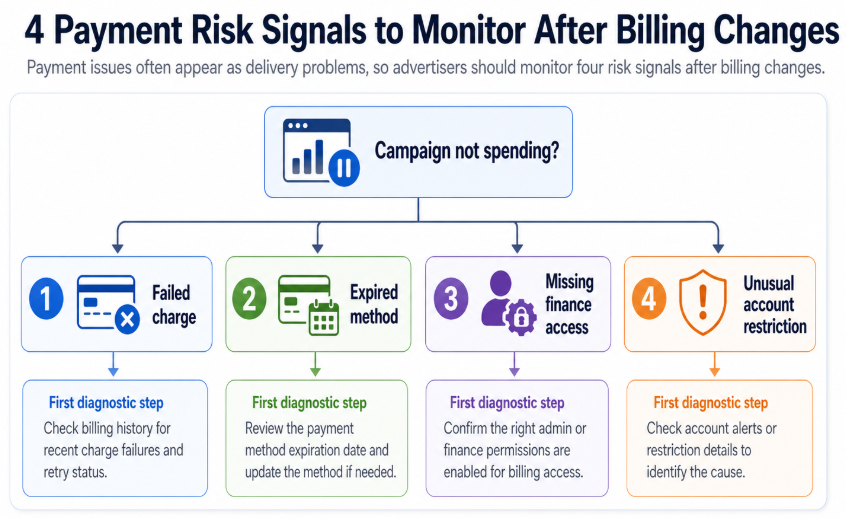
Payment issues often appear as delivery problems, so advertisers should monitor four risk signals after billing changes
After adding or changing payment information, watch 4 risk signals: failed charge, expired method, missing finance access, and unusual account restriction.
Prerequisites and Dependencies
Before adding a payment method, confirm:
- You are inside the correct Meta Business Portfolio.
- You are working on the correct ad account.
- You have the required finance or admin permissions.
- The payment method is accepted for the account and country.
- Billing name and address are accurate.
- The payment owner understands spend responsibility.
- There is a backup payment plan.
- The campaign team knows who to contact if billing fails.
For agencies, client-owned billing is often cleaner than agency-owned billing because it keeps ad spend responsibility with the business that owns the campaigns. If an agency does cover spend, terms should be documented clearly.
How LeadEnforce Helps
LeadEnforce does not add payment methods or manage Meta billing.
It helps make the campaigns funded by that payment method more targeted.
Once payment setup is ready, advertisers still need to answer the performance question: who should see the ads?
LeadEnforce helps teams build high-intent audiences from Facebook groups, Instagram profiles, Instagram followers and engagers, LinkedIn professional data, and custom social-profile data.
This matters because payment readiness can create a false sense of campaign readiness. Just because an account can spend does not mean it should spend broadly.
For SMBs, LeadEnforce can help turn niche communities into more relevant prospecting segments.
For agencies, it can help prepare client audience tests before launch.
For B2B lead-gen teams, it can help align paid social audiences with professional attributes and community behavior.
For affiliate and performance marketers, it can help reduce broad targeting waste when fast testing is required.
Payment setup keeps ads running. LeadEnforce helps improve the relevance of the audiences those ads reach.
Practical Recommendations
Add the payment method before campaign launch week.
Confirm that the payment method belongs to the correct business or client.
Add backup payment coverage where available and appropriate.
Keep finance access separate from unnecessary campaign control.
Document who owns billing responsibility.
Monitor the first billing event after adding or changing payment details.
Do not diagnose delivery problems until you have ruled out payment and account-status issues.
Use LeadEnforce to prepare stronger audience tests once the ad account is ready to spend.
Final Takeaway
Adding a payment method in Meta Business Suite is a foundational step for paid social operations.
It does not improve campaign performance on its own, but missing or failed payment setup can stop campaigns, weaken learning, and create wasted spend.
Get billing infrastructure right first.
Then focus the budget on audiences that are relevant enough to justify the spend.
Related LeadEnforce Articles
- Fix Disabled or Restricted Meta Ad Accounts Without Losing Campaign Performance — Relevant when failed payments, billing problems, or restrictions interrupt campaign delivery.
- Use Meta Security Center Before Access Problems Turn Into Wasted Ad Spend — Helps advertisers treat account security and access as campaign infrastructure.
- No Full Control of Your Meta Business Portfolio? Fix Access Before Campaigns Stall — Useful when finance access or control issues prevent payment setup.
- Why Your Meta Business Portfolio Setup Affects Paid Social Performance — Explains how business structure affects campaign execution, access, and performance operations.
- How to Improve Audience Match Quality in Meta Ads — Helps advertisers ensure the budget enabled by payment setup reaches better-matched audiences.