Ad costs going up, but conversions not following?
You’re probably spending more than you need to. And the worst part is, most budget leaks aren’t obvious. They hide in small data gaps, misaligned targeting, or slow-loading pages.
That’s where cost diagnostics come in. It’s not just about reviewing CPC or CPM. It’s about digging deeper to find the places where ad spend is being wasted.
Let’s go step-by-step and look at how to find and fix the most common leaks in your ad budget. For a broader view on pitfalls to avoid, check out Top Facebook Ad Mistakes That Drain Your Budget.
1. Check Your Tracking and Attribution First
Before optimizing anything, make sure your data is accurate. Many campaigns underperform not because the strategy is wrong, but because tracking is incomplete or inconsistent. If your analytics setup isn’t airtight, you might be making decisions based on bad information.
Start by checking the following:
-
Facebook Pixel and Google Analytics tags: Ensure they are firing correctly on every key page, including product pages, add-to-cart buttons, checkout, and confirmation pages. Missed tags mean lost data.
-
Conversion duplication or loss: Verify that conversions aren't being counted multiple times or missed altogether due to ad blockers or server-side issues.
-
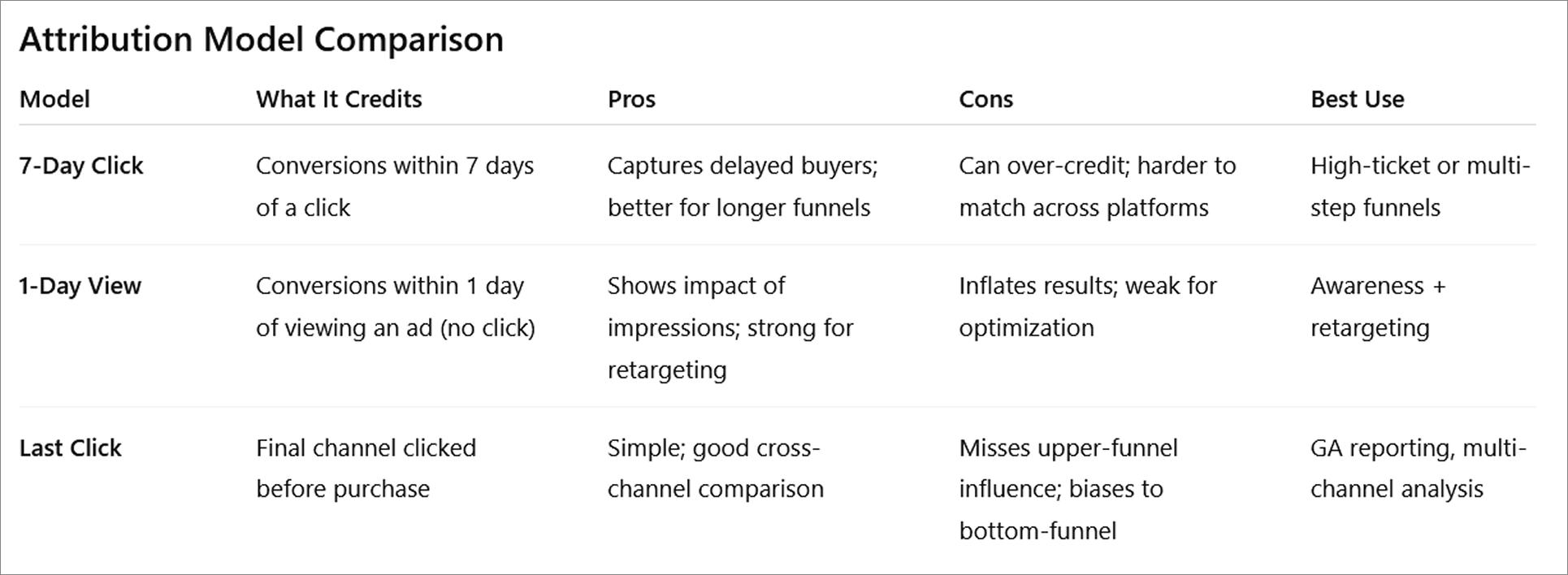
Attribution settings: Platforms use different models. Meta often defaults to 7-day click, 1-day view, while Google Ads might use last-click. Misalignment causes reporting conflicts.
-
Traffic filtering: Make sure you're excluding internal users, employees, agencies, and bots to avoid skewed cost and conversion metrics.
For a deeper look at diagnosing tracking issues and fixing learning-phase problems, check out Why You See 'Ad Set May Get Zero' on Facebook and How to Fix It.
2. Don’t Stop at CPC — Look at Action-Based Costs
Cost per click (CPC) might look low, but it doesn’t mean your traffic is converting. To understand whether your budget is being spent efficiently, you need to shift focus to cost per meaningful action.
These are better metrics to track:
-
Cost per Add to Cart: Tells you how well your product or offer resonates. If this is high, users may not see enough value or urgency on the product page.
-
Cost per Lead: Measures the effectiveness of your lead capture form. A high CPL could mean poor messaging, a long form, or lack of incentive.
-
Cost per Checkout Initiated: Shows friction points between browsing and intent to buy. If this is high, your cart experience may be clunky or mistrusted.
-
Cost per Purchase: The ultimate benchmark. High cost here signals something’s broken in the conversion process — whether that’s UX, price, product-market fit, or retargeting gaps.
3. Audit Your Targeting — Are You Reaching the Right People?
You can’t afford to spend money on the wrong audience. Poor targeting is one of the biggest causes of wasted ad spend — and it often hides behind good-looking surface metrics like CTR.
Here’s how to dig in:
-
Audience Overlap: If two or more ad sets are targeting similar audiences, they may compete in the auction, inflating costs. Use Meta’s Audience Overlap tool to identify and fix redundancies.
-
Placement Waste: Not all placements perform equally. For example, Facebook Audience Network often drives cheap clicks that don’t convert. Break down performance by placement to cut unprofitable ones.
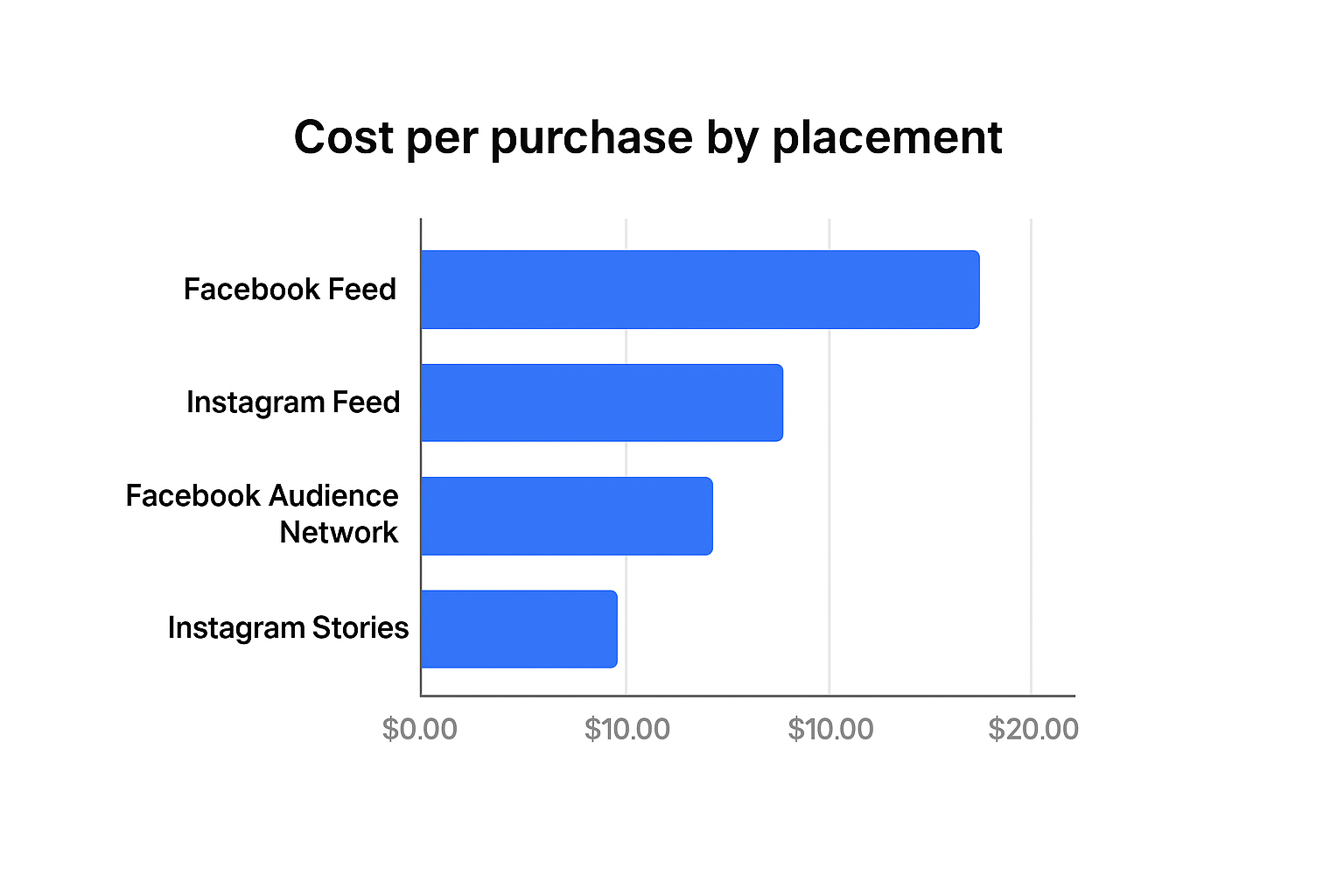 Placement costs vary by advertiser — some perform cheaply, others can be more expensive depending on audience and setup.
-
Device Behavior: Mobile users might click more but convert less, especially for high-ticket items or complex offers. Compare conversion rates by device and adjust your bidding or UX accordingly.
-
Frequency Issues: When users see your ad 5+ times and still don’t convert, costs rise and brand sentiment can drop. Cap frequency or rotate creative to keep interest high.
Not confident in your targeting setup? Review Facebook Ad Targeting 101 for practical examples and tips.
4. Rotate Creatives Before They Decay
Every ad has a lifespan. Once performance starts dropping and costs rise, you’re likely facing ad fatigue. Many advertisers don’t realize they’re losing money by holding on to creatives that once worked but no longer do.
Here’s how to spot creative fatigue:
-
CPMs go up: Meta charges more when users don’t engage. If you’re paying more for the same audience, it's a signal the ad has gone stale.
-
CTR drops: Engagement falls when your audience gets used to your ad. If CTR is down week-over-week with no other major changes, creative is likely the issue.
-
ROAS flattens or declines: Even if reach and clicks stay steady, lower revenue from the same spend often means your ad no longer inspires action.
Instead of waiting for performance to drop, plan a rotation schedule. Refresh creatives every 7–14 days when scaling. Use variations: swap images, change headlines, or test different color schemes.
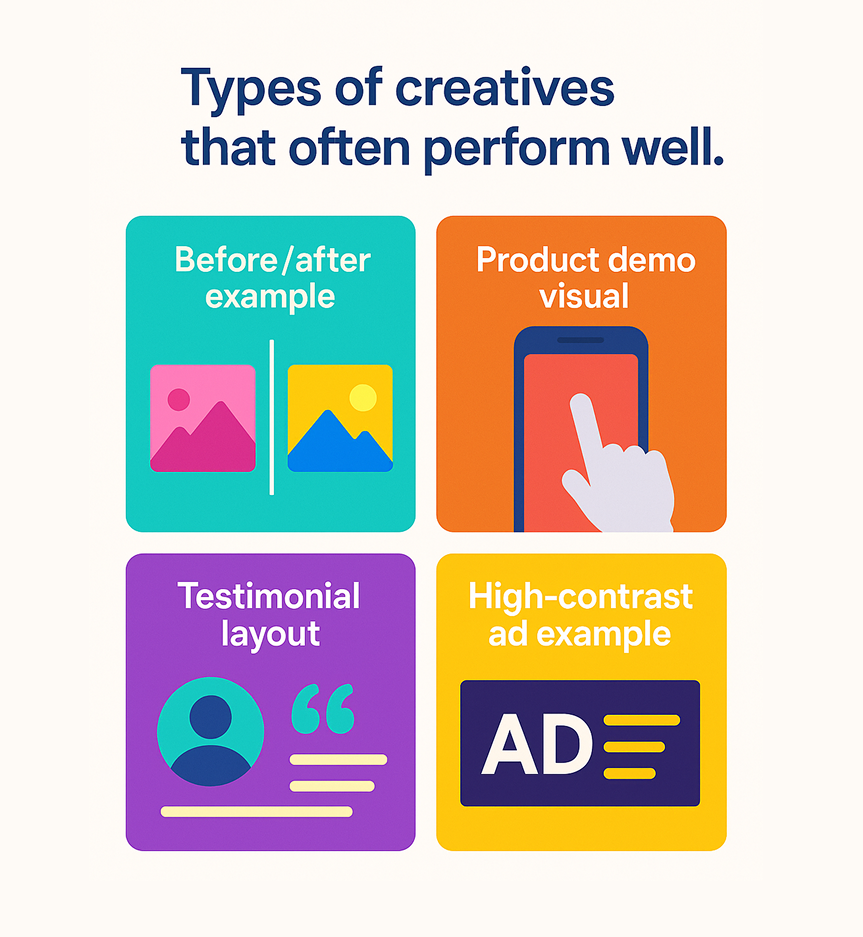
Types of creatives that often perform well:
-
Before/after visuals: These highlight transformation, which builds curiosity and trust.
-
Product-in-use demos: Showing the product in action reduces uncertainty and increases perceived value.
-
Simple testimonial quotes with faces: Social proof + human connection = faster trust.
-
Visual contrast against the feed: Use bold, high-contrast colors to interrupt the scroll pattern.
For fast ways to generate high-performing visuals, use one of these AI creative tools.
5. Diagnose Drop-Off After the Click
Getting the click is only half the battle. If people leave without taking action, your landing page may be the problem — not your ad.
Look into these areas:
-
Page Speed: A slow mobile experience (over 3 seconds to load) leads to huge bounce rates. Use Google PageSpeed Insights to spot and fix lagging assets.
-
Offer Clarity: Your headline should immediately answer: “What is this?” and “Why should I care?” Don’t make users scroll to understand.
-
Form Design: Are you asking for too much too soon? Reduce friction by removing unnecessary fields. Use multi-step forms for better engagement.
-
Distractions: Remove navigation links, external buttons, and unnecessary pop-ups that pull people away from your call-to-action.
Use heatmaps, session recordings, and funnel visualizations to find friction points. If your post-click journey is weak, no amount of ad spend will fix it.
6. Understand Conversion Delays
Not every buyer acts on impulse. Some need time. Especially in high-ticket or complex sales, the real value often happens after days — not hours.
Here are signs of delayed conversions:
-
High CTR and engagement today, but purchases happen 3–7 days later: Your offer resonates, but users may want to compare options, read reviews, or wait for payday.
-
Add to cart or lead form completed on mobile, but final action takes place on desktop: This cross-device behavior is a classic sign of considered purchases.
-
Email sign-up followed by purchase only after retargeting: Many buyers need nurturing — don’t expect one-click miracles.
To adjust:
-
Use a longer attribution window (7-day click or 1-day view in Meta): This gives delayed purchases the credit they deserve.
-
Track assisted conversions in Google Analytics: You'll spot touchpoints that helped close the sale, even if they didn’t deliver the final conversion.
-
Keep your retargeting sequences running at least 14–30 days: Don’t turn off campaigns too early just because day-one ROAS looks low.
More on adjusting your attribution model in this breakdown.
7. Don’t Scale Too Fast — Budget Leaks Multiply With Spend
Scaling is exciting, but it magnifies problems. What worked at $50/day might fall apart at $500/day if you don’t adjust structure and pacing.
Avoid these mistakes:
-
Doubling daily budgets overnight: Doing this forces the algorithm to re-learn, resets optimization, and introduces volatility.
-
No creative pipeline: As you scale, you need more creatives to avoid fatigue. Ideally, have 3–5 fresh creatives ready before every major budget jump.
-
Ignoring audience limits: Smaller custom audiences can burn out fast. If you scale into a narrow segment, expect frequency spikes and rising CPAs.
How to scale smart:
-
Use CBO (Campaign Budget Optimization) with guardrails: Let Meta allocate budget efficiently, but set minimums to avoid overspending on weak ad sets.
-
Increase budget gradually — no more than 20–30% every 48–72 hours: This helps maintain learning phase and stability.
-
Add new cold audiences as you scale: Don’t rely only on lookalikes or retargeting — introduce interest-based or broad targeting to support growth.
For a proven method, follow The Science of Scaling Facebook Ads Without Killing Performance.
Final Word: Stay Curious, Stay Profitable
Budget leaks are sneaky. They don’t always announce themselves in obvious metrics. But if you take the time to break down your costs, audience behavior, creative lifecycle, and funnel efficiency, you’ll spot them before they get expensive.
Ask regularly:
-
What changed in performance this week, and why? Look at delivery, competition, placement breakdowns, and seasonality.
-
Where am I overspending without strong returns? Dig into ad set-level metrics and eliminate low ROAS combinations.
-
Are my best audiences still converting? Watch for audience burnout or shifting intent.
Marketing isn’t set-and-forget. It’s test, analyze, adjust — over and over.