Most advertisers think permissions are just about control.
Who can edit campaigns. Who can see reports. Who can manage billing.
In practice, permissions shape how campaigns are executed — and how stable performance remains over time.
If access is misconfigured, the effects show up in Ads Manager as inconsistent delivery, unexpected edits, or campaigns that stop without explanation.
The three ad account roles — and what they actually control
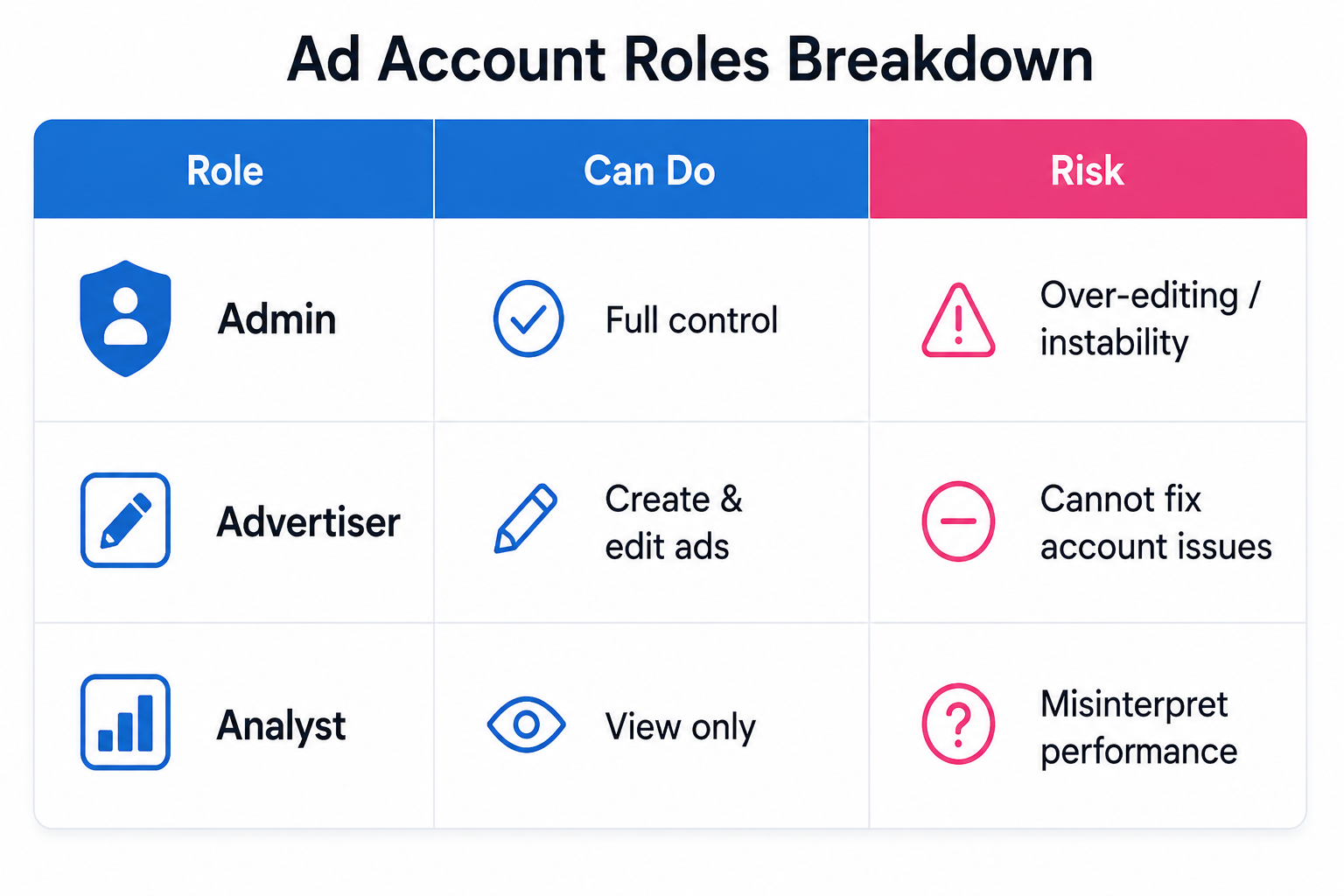
Meta keeps the structure simple: Admin, Advertiser, and Analyst.
But the real impact comes from what each role can change inside a live account.
- Admin has full control, including managing permissions, editing payment methods, and restructuring the account.
- Advertiser can create and edit ads, but cannot change billing or access settings.
- Analyst can only view performance data and reports, without making changes.
This separation is intentional. It limits risk — but only if used correctly.
Where permission mistakes start affecting performance
Permission issues rarely block access completely.
Instead, they create partial limitations that disrupt execution.
For example:
- A user launches campaigns but cannot adjust payment settings, causing delivery interruptions later.
- An advertiser duplicates campaigns but cannot fix account-level restrictions, leading to inefficient delivery.
- An analyst reviews performance without visibility into edits, creating misleading conclusions.
These situations don’t look like access issues. They look like performance problems.
The hidden link between permissions and campaign stability
Permissions directly influence how often campaigns change.
And frequent changes reset learning.
When too many users have high-level access:
- Campaign edits happen more often than necessary.
- Budget adjustments overlap across team members.
- Learning phases restart without coordination.
This leads to unstable CPA and inconsistent delivery — even if targeting stays the same.
In team environments, this becomes a structural issue. It’s especially common when trying to manage Facebook ads for multiple clients without risking account issues.
Permissions required to run ads across Facebook and Instagram
Ad account access alone isn’t enough.
Meta requires aligned permissions across all connected assets.
To run ads properly, you need:
- Access to the Facebook Page, with either full control or ads-level permissions.
- A professional Instagram account connected to that Page.
- An appropriate ad account role, typically Admin or Advertiser.
If one part is missing, the system blocks actions — even if everything else looks correct.
Error signals that point to permission problems
Permission issues often appear as platform errors.
Instead of clear warnings, you’ll see symptoms like:
- The Page doesn’t appear when creating ads.
- Ads exist but cannot be edited.
- Call-to-action buttons are locked on existing ads.
- Campaign actions fail due to restricted access.
These errors are often grouped under general system issues.
To understand them properly, you need to focus on understanding Facebook ad statuses, not just campaign setup.
Why permissions get misdiagnosed as delivery issues
When permissions block actions, delivery suffers.
But the symptoms don’t point directly to access problems.
Instead, you’ll see:
- Campaigns stuck in active status with low or zero delivery.
- Ads approved but not spending.
- Sudden drops in impressions without targeting changes.
These situations are often labeled as “algorithm issues.”
In reality, they’re execution constraints — similar to what happens when Facebook ads are not delivering.
How poor access control leads to long-term inefficiency
Permissions don’t just affect short-term delivery.
They shape how quickly your account improves over time.
If access is restricted or unclear:
- Campaign iteration slows down.
- Testing becomes inconsistent.
- Optimization decisions are delayed.
Over time, this compounds into higher CPA and lower ROAS — not because of targeting, but because execution is slower.
Best practices for managing permissions without hurting performance
Instead of giving broad access, structure roles intentionally.
A stable setup usually includes:
- One or two Admins responsible for account structure and billing.
- Advertisers handling campaign creation and optimization.
- Analysts reviewing data without modifying campaigns.
This reduces unnecessary edits and keeps learning phases stable.
It also makes performance issues easier to diagnose.
Where LeadEnforce fits into permission structure
LeadEnforce improves targeting precision, but it depends on stable execution.
If permissions are inconsistent:
- Audience targeting becomes fragmented.
- Campaign changes happen too frequently.
- Optimization signals lose reliability.
Even high-quality audiences won’t perform in a chaotic account.
Precision requires structure.
Final takeaway
Ad account permissions are not just about access — they define how campaigns are controlled, edited, and scaled.
When roles are clear, campaigns stay stable and performance improves. When permissions are messy, issues show up as inconsistent delivery, rising CPA, and confusing results.
If something feels off in your campaigns, don’t just check targeting or creatives. Check who has access — and what they’re allowed to change.