Running Facebook and Instagram ads isn’t just about good creative or choosing the right audience. If your optimization setup is off, even the best ads can fail. Worse — the system might learn the wrong things and keep sending you low-quality traffic.
In this guide, we’ll break down the sneaky mistakes that many advertisers make when optimizing Facebook campaigns — and how to fix them.
Mistake 1: Optimizing for the wrong action
Don’t tell Facebook to chase the wrong goal
The event you optimize for tells Facebook what to find more of. If you pick an event that’s too shallow or too vague, the system brings you traffic that looks good — but doesn’t actually convert.
Mistakes to avoid:
-
Optimizing for ViewContent brings you lots of visitors, but few buyers.
-
Optimizing for Leads without checking lead quality fills your funnel with junk.
-
Optimizing for Add to Cart works poorly for expensive products people need time to think about.
If your budget is low, or you don’t have many conversions yet, try:
-
Optimizing for Purchases only once you’re getting at least 50 per week.
-
Grouping all purchase types into one event.
-
Importing offline sales (from a CRM) so Facebook can learn from real results.
The better your goal matches your actual business success, the smarter Facebook’s algorithm becomes. Also see: How to align your offer with the right Facebook ad campaign objective.
Mistake 2: Splitting your budget into too many ad sets
Facebook needs enough data per ad set to learn
If you run five ad sets on a small budget, each one gets only a little money. That means they all take longer to learn — or never do.
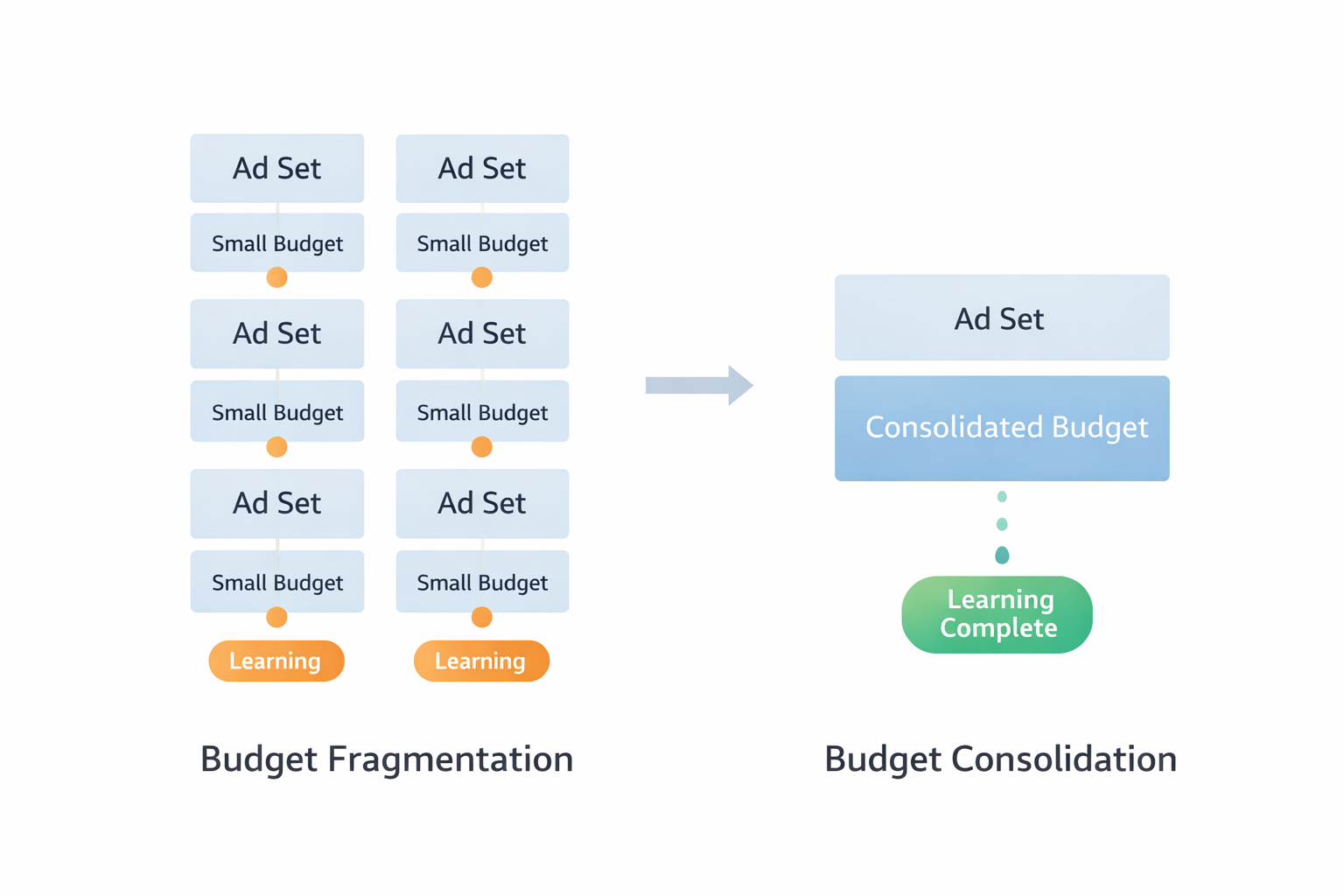
Common problems:
-
Ad sets stay stuck in the learning phase.
-
You get inconsistent results across nearly identical audiences.
-
Facebook can’t figure out where to spend your money most effectively.
Instead of splitting too early, try this:
-
Combine similar audiences into one ad set.
-
Use breakdowns (age, gender, device) to compare results after you’ve run the campaign.
-
Let Facebook’s automation do the heavy lifting — it works best with more data.
👉 One well-funded ad set often beats five underfunded ones. You might also like: When to pause or merge Facebook campaigns for better optimization.
Mistake 3: Turning ads off too soon (or waiting too long)
Don’t judge performance before the system has enough data
Early performance can be misleading. Some ads start slow but pick up. Others look good at first, then crash. It’s risky to judge too soon — or to wait forever hoping things will turn around.
What goes wrong:
-
You pause an ad after one day because the CPA is high — but it never had time to improve.
-
You leave a campaign running for weeks even though results are flat or getting worse.
Here’s a smarter approach:
-
Let each ad get at least 50 conversions before making big decisions.
-
Look at trends, not just totals — is CPA going down or up over time?
-
Use cost per extra result, not just cost per result. That tells you what you’re actually gaining.
Facebook ads need time to learn. But you need to watch how they’re learning — not just what they report. Check out: How to finish the Facebook learning phase quickly.
Mistake 4: Testing creative with no clear plan
Facebook can mix your ads — but you still need to test smart
It’s easy to upload lots of creative variations and let Facebook figure it out. But if you don’t track what each piece is doing, you won’t know why an ad worked — or how to improve it.
Here’s what can go wrong:
-
You get a top-performing ad but don’t know if it was the headline, the image, or something else.
-
You can’t repeat success because you’re guessing what worked.
-
You keep uploading more ads, but learn nothing new.
Try building modular creative:
-
Test one hook against another: “Tired of cooking?” vs. “Over 30,000 parents use this system.”
-
Try different value angles: save money, save time, social proof.
-
Change one thing at a time — and name your ads clearly so you can track what’s inside.
Don’t just test more. Test smarter — and you’ll learn faster. Learn more: Creative testing matrix for faster wins.
Mistake 5: Judging results before conversions are fully tracked
Some purchases show up days later — especially on iOS
Facebook doesn’t always report conversions right away. Many users take a day or two to buy — especially for big or complex purchases. If you check results too soon, you might pause a winning ad by mistake.
| Time after ad click | What Facebook shows | What’s really happening | Risk if you act now | What to do instead |
|---|---|---|---|---|
| Day 0–1 | Few or no conversions | User is researching or thinking | You pause too soon, thinking it failed | Wait and monitor CPA trend |
| Day 2–3 | CPA looks high, ROAS looks low | Some conversions still pending | You shift budget away from high-potential ads | Compare data across platforms (UTM, server) |
| Day 4–7 | Facebook catches up with more conversions | Conversions come in via other channels (email, direct, etc.) | You’ve already cut the ad that was working | Use longer attribution windows (7-day click) |
This causes issues like:
-
Ads look unprofitable after 2–3 days — but drive lots of sales later.
-
Retargeting gets more credit than it deserves.
-
You shift budget away from top-of-funnel ads that actually helped convert.
Here’s what to do:
-
Wait 5–7 days before fully judging performance.
-
Use other tools (like UTMs or server tracking) to cross-check.
-
Look at blended CPA across channels, not just what Facebook reports.
Some sales take time. Don’t cut off the ads that made them happen. See also: Meta ads attribution: what to know about windows, delays, and data accuracy.
Mistake 6: Retargeting too fast
Give people time to convert before chasing them
Just because someone visited your site doesn’t mean they’re ready for a retargeting ad. Hit them too soon, and you’re wasting money — or annoying users who were already planning to buy.
Retargeting mistakes:
-
Showing retargeting ads one day after a visit.
-
Repeating the same message users saw in the original ad.
-
Retargeting people who are already in your email flow.
Smarter retargeting:
-
Wait 5–7 days before showing ads to recent visitors.
-
Use exclusions so you’re not overlapping with other campaigns.
-
Show a different message — testimonials, urgency, or added value.
Retargeting should help people convert, not rush them. More tips: Retargeting strategies that double your ROAS.
Mistake 7: Trusting last-click data too much
Don’t let Google Analytics kill your best campaigns
Last-click tracking gives 100% of the credit to the final touch before a conversion. That often means retargeting or branded search gets all the credit — while prospecting ads get ignored.
What happens:
-
Prospecting campaigns look like they’re not working — so you turn them off.
-
You put too much budget into the “easy wins.”
-
Your growth stalls because you're not finding new customers.
Here’s how to fix it:
-
Use Facebook’s native reporting — it sees more of the journey.
-
Run Conversion Lift tests if you can.
-
Look at the whole funnel, not just the final step.
If you only track what closed the sale, you’ll stop funding what started it.
Final thoughts: optimization is more than just setup
Most Facebook ad problems don’t come from bad targeting or bad creative. They come from sending the system weak signals — or reading the data the wrong way.
Here’s what to remember:
-
Pick goals that match real business outcomes.
-
Give each campaign enough budget to learn.
-
Test creative parts, not just whole ads.
-
Be patient with delayed results.
-
Use attribution models that reflect the full journey.
The algorithm can do a lot — but only if you train it well.