You launch a campaign, leads start coming in, and Meta shows solid performance. When you check Google Analytics, though, the numbers are noticeably lower, and sometimes the gap is large enough to raise concerns.
At that point, it’s tempting to assume something is broken or misconfigured. In most cases, nothing is wrong. The difference comes from how each platform measures and attributes conversions.
They’re Not Measuring the Same Thing
The mismatch starts with a simple fact: Meta and Google Analytics are built to answer different questions.
Meta is designed to understand influence. It evaluates whether an ad contributed to a conversion within a defined time window.
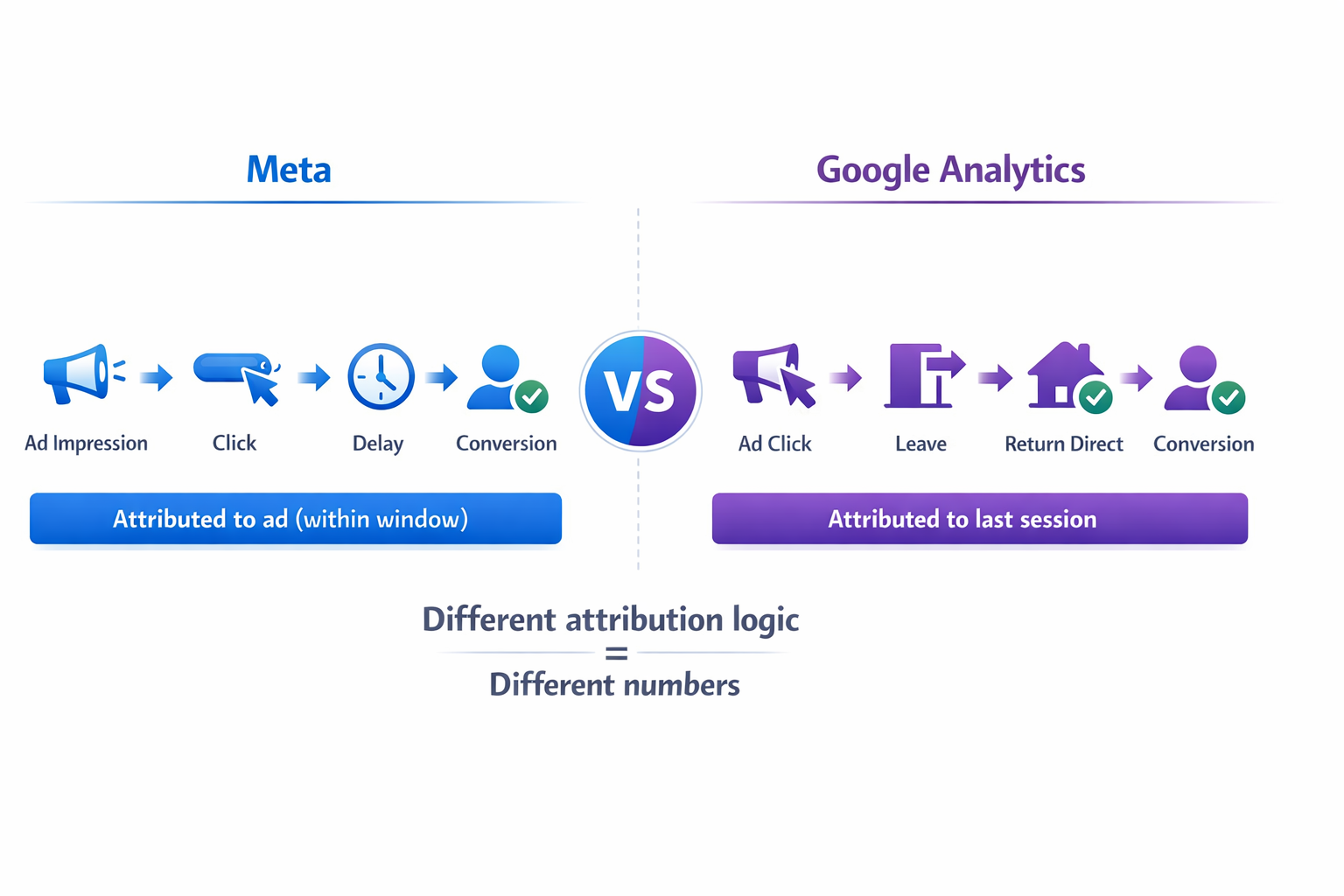
Google Analytics focuses on sessions. It tracks what happened during a visit and assigns credit to the last measurable interaction.
So even when both platforms track the same user, they may assign credit differently because they’re evaluating different parts of the journey.
If you want a deeper breakdown of how attribution works inside Meta, you can review Meta Ads attribution: windows, delays, and data accuracy.
Attribution Windows Change the Outcome
A large part of the gap comes from attribution windows.
Consider a typical scenario:
-
A user clicks your ad on Monday but doesn’t convert.
-
A few days later, they return directly and submit a form.
-
Meta counts this as a conversion because it falls within its attribution window.
-
Google Analytics attributes it to “Direct” because that was the last session.
If your buying cycle is longer than a day or two, this pattern becomes common.
This is also why last-click models often miss part of the picture, as explained in Why relying only on last-click attribution hurts ad strategy.
Meta Counts Influence That Analytics Doesn’t See
Meta includes view-through conversions by default.
This means a user can:
-
See your ad,
-
Not click,
-
Come back later through another channel,
-
And still be counted as a conversion influenced by the ad.
In campaigns with higher frequency, this becomes more visible. You’ll often see direct or branded traffic increase alongside Meta performance.
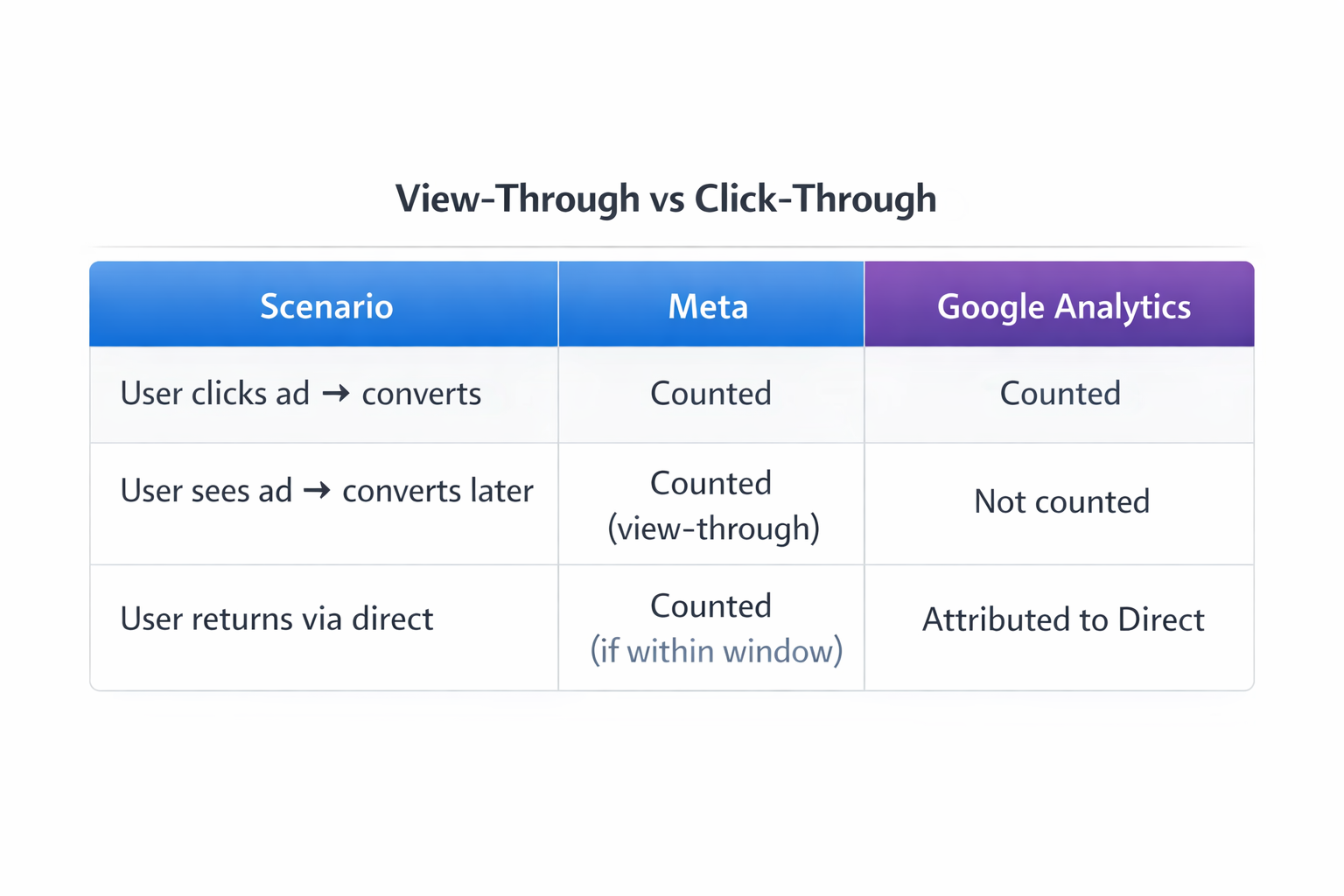
Google Analytics does not capture this type of influence in the same way.
For a clearer breakdown of this difference, see Understanding the difference between click-through and view-through conversions.
Tracking Loss Affects Analytics More
Tracking is no longer complete.
Consent banners, browser restrictions, and privacy updates reduce the amount of data platforms can collect.
Google Analytics depends heavily on:
-
Cookies,
-
Session tracking,
-
User consent.
When any of these break, data disappears.
Meta compensates using modeled data and server-side tracking, which allows it to recover part of the missing signal.
This broader shift is explained in How privacy laws are transforming social media advertising.
Cross-Device Behavior Breaks Attribution
Users rarely convert on the same device they used for the initial click.
A typical pattern looks like this:
-
Someone clicks an ad on mobile during the day.
-
Later, they return on desktop and convert.
Meta can often connect these interactions using its internal identity data.
Google Analytics usually treats them as separate users unless tracking is perfectly configured.
As a result:
-
Meta attributes the conversion to the ad,
-
Analytics may assign it elsewhere or lose it entirely.
This becomes especially noticeable in B2B campaigns or longer decision cycles.
Session Logic Creates Attribution Shifts
Google Analytics is session-based.
Every new session can change attribution.
For example:
-
A user clicks your Meta ad.
-
Leaves without converting.
-
Returns later via search.
-
Converts.
Analytics gives credit to search because it was the last session.
Meta still credits the ad interaction because it falls within its attribution window.
This is one of the main reasons paid social appears weaker in Analytics than it actually is.
Why Trying to Align the Numbers Doesn’t Work
Many teams try to fix the mismatch by adjusting settings:
-
Changing attribution models,
-
Comparing only click-based conversions,
-
Narrowing attribution windows.
These changes can reduce the gap, but they won’t remove it. The systems are fundamentally different.
Meta models behavior and captures influence. Analytics tracks observable interactions within sessions.
Because of that, exact alignment isn’t realistic.
How to Use Both Platforms Without Confusion
Instead of trying to make the numbers match, it’s more useful to assign each platform a role.
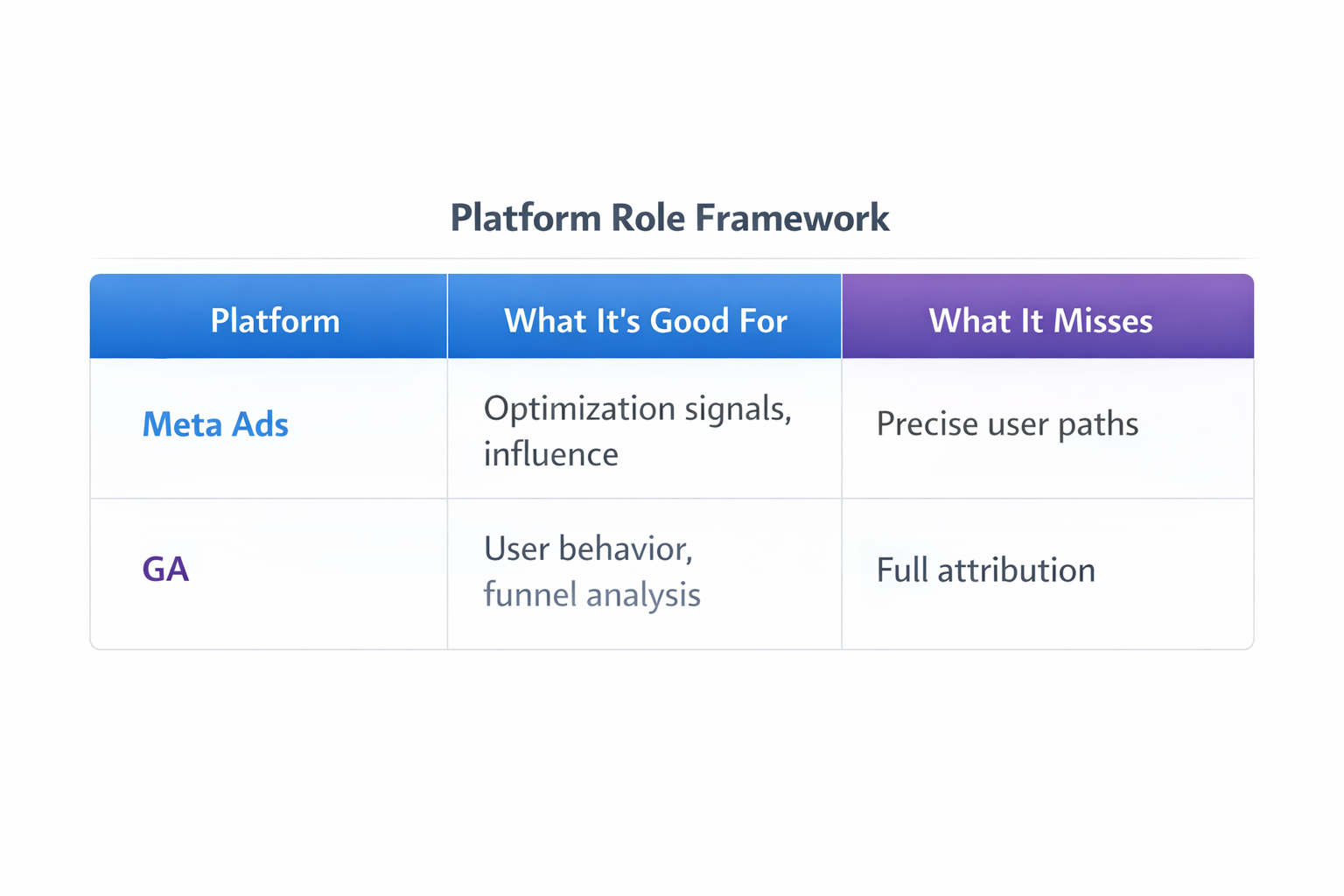
Use Meta for optimization decisions
Meta’s data reflects how its algorithm learns.
If a campaign performs well in Meta:
-
It’s finding users likely to convert,
-
It’s receiving enough signal to optimize,
-
Scaling decisions should be based on this data.
Ignoring Meta signals often leads to worse performance.
Use Google Analytics for behavioral insight
Google Analytics helps you understand what happens after the click.
Use it to evaluate:
-
Engagement quality,
-
Funnel drop-offs,
-
Differences between channels.
For example, if Meta shows strong conversions but Analytics shows very short sessions, that’s a signal worth investigating.
Focus on trends instead of exact numbers
Absolute numbers will rarely match. What matters more is direction.
If both platforms show improvement over time, even at different volumes, performance is likely moving in the right direction.
If they diverge, that’s when you need to investigate.
A Practical Way to Diagnose the Gap
If the discrepancy feels too large, break it down:
-
Check attribution window impact
Compare 7-day click vs 1-day click in Meta. A large drop means delayed conversions are driving part of the gap. -
Review view-through contribution
Temporarily remove it to understand how much it inflates results. -
Analyze device behavior
Mobile-heavy traffic with desktop conversions usually increases mismatch. -
Look at direct and branded traffic in Analytics
Growth here often signals Meta-driven influence. -
Audit tracking setup
Missing events or consent issues typically affect Analytics first.
Each of these explains part of the difference.
The Real Takeaway
The numbers don’t match because they’re not supposed to.
Meta shows how ads influence conversions over time, including modeled behavior.
Google Analytics shows how users move through sessions and where conversions are observed.
When you treat them as interchangeable, the data feels inconsistent.
When you treat them as complementary, the differences become useful.