Campaign performance often depends on how quickly your team can act. In many accounts, delays are not caused by targeting or creatives, but by access limitations inside Meta Business Portfolio.
A campaign may require a quick adjustment, but the person responsible cannot make the change. This creates a gap between identifying a problem and acting on it. Over time, these delays reduce efficiency and increase costs.
What adding people actually does inside Meta
When you add someone to a business portfolio in Meta Business Suite, you define both visibility and control. This determines how that person interacts with campaigns, data, and assets.
Each user receives a role at the portfolio level and may also be granted access to specific assets such as ad accounts, Pages, or Instagram profiles. By default, new users are given basic access, which limits their ability to make changes unless additional permissions are assigned.
One important detail is that business portfolio permissions override other access settings. If this structure is not aligned, users may technically have access but still be unable to execute campaign changes.
Why asset assignment must happen at the same time
Adding users without assigning assets is a frequent source of confusion. Access becomes operational only when both elements are configured together.
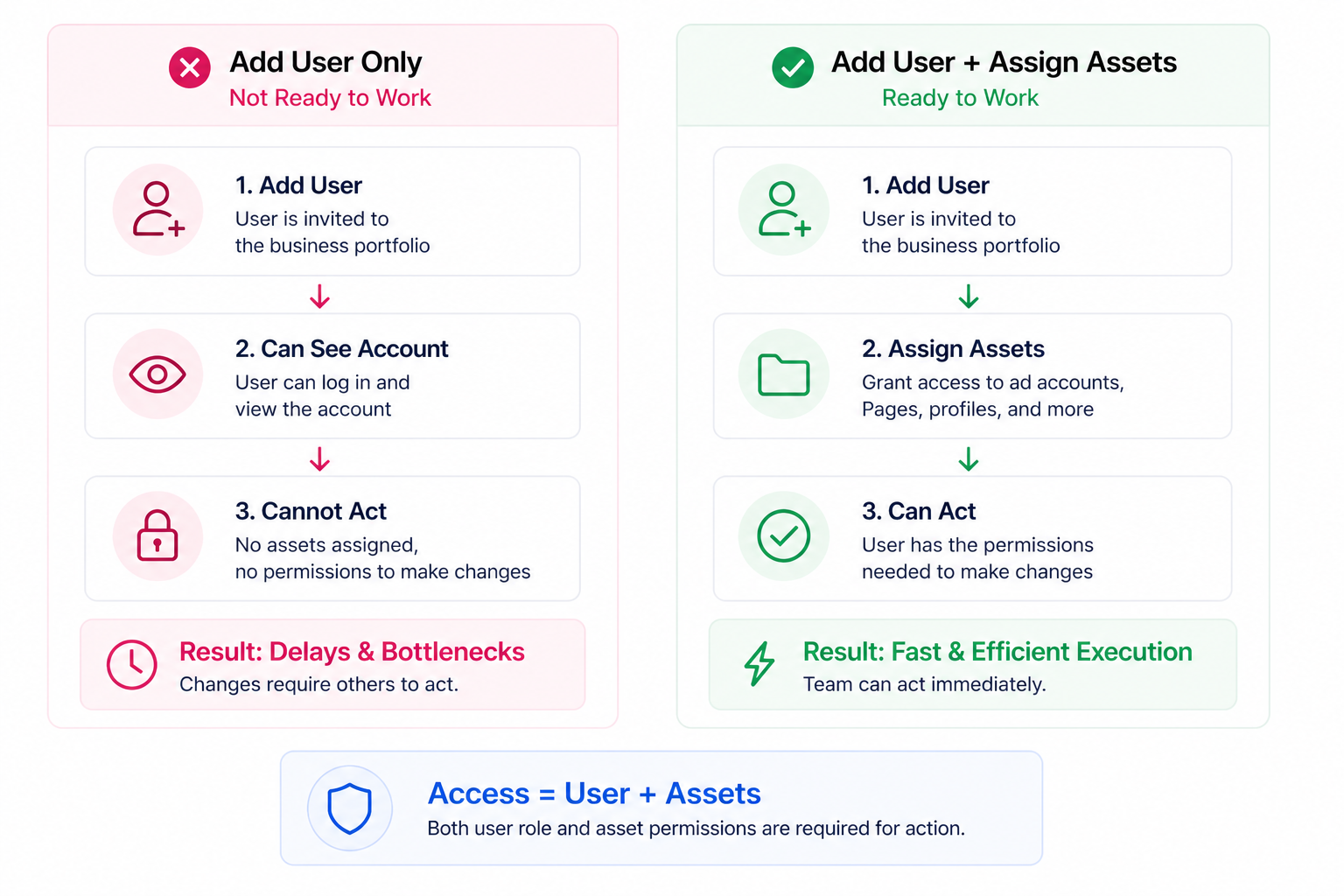
A user may be able to see the account interface but still be blocked from launching or editing campaigns. In practice, this creates unnecessary delays and repeated requests for access.
This is why user setup should always include both role assignment and asset access in the same step. Treating them separately often leads to execution gaps.
Why this affects campaign performance
Meta campaigns rely on continuous adjustments. Performance shifts quickly, and campaigns need timely updates to stay efficient.
If access is incomplete or restricted:
- Budget adjustments are delayed, even when performance declines.
- Underperforming ads continue running longer than necessary.
- Testing cycles slow down due to limited execution rights.
These issues are not always obvious at first. They often appear as inefficient spend, slow optimization cycles, or inconsistent campaign management. In some cases, teams misread the problem as a media-buying issue when the real constraint is account structure.
This is why broader setup discipline matters, especially when avoiding Facebook ad mistakes that drain budget.
Business impact
Access limitations directly affect how efficiently your budget is used. When teams cannot act quickly, campaigns become less responsive to performance signals.
This typically results in higher acquisition costs and missed scaling opportunities. Campaigns continue spending even when changes are required, and winning variations are not expanded in time.
These effects are gradual, which makes them harder to identify. They often appear as rising costs or unstable performance rather than a clear operational issue.
Requirements before adding people
Before inviting users, the structure must support proper access management. Most issues occur when one of the following conditions is not met:
- The person adding users does not have full control of the business portfolio.
- The invited user’s account is restricted or disabled.
- The email address used does not match the user’s account.
- The organisation uses managed Meta accounts, limiting invitation options.
In some cases, Meta may also require email confirmation before allowing new users to be added.
Visibility and security considerations
Access inside a business portfolio is transparent. When someone joins, their name, work email, and assigned assets become visible to users with full control.
This supports accountability but also requires careful permission management. Assigning too much access increases the risk of errors, while assigning too little creates operational friction.
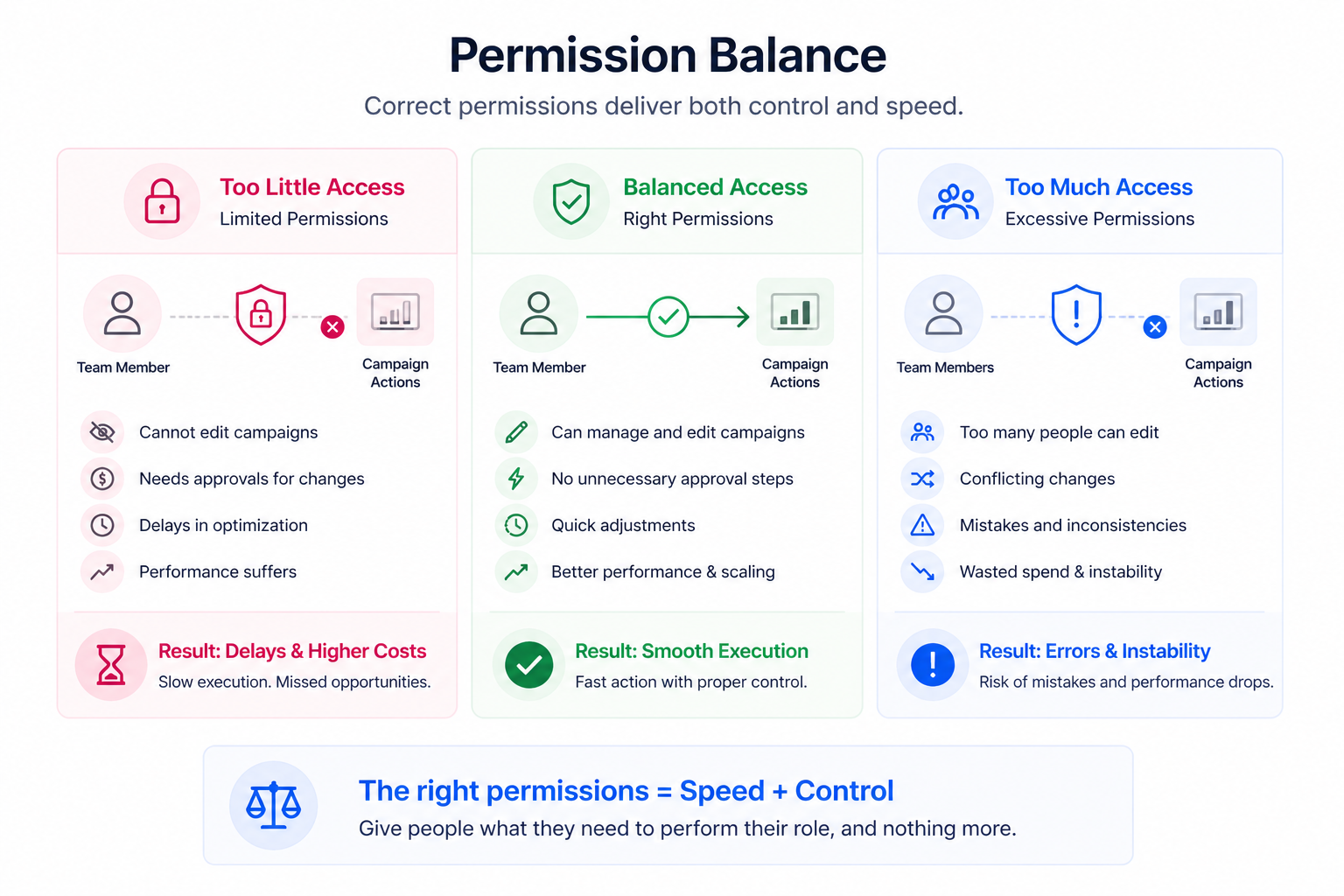
A balanced setup typically limits full control to a small number of responsible users, assigns only the permissions required for each role, and uses two-factor authentication to reduce unauthorized-access risk.
This structure becomes especially important when several people manage campaigns, budgets, creative updates, and reporting. Clear account organization helps teams avoid confusion and supports cleaner execution, similar to the principles behind staying organized when managing multiple ad accounts or brands.
Common issues when adding users
Even when the process is followed, practical issues can prevent access from working as expected.
Typical problems include:
- Missing asset assignment after adding the user.
- Approval requirements from another admin with full control.
- Partner-owned assets limiting available permissions.
Another common scenario occurs when organisations transition to managed Meta accounts. In this case, invitations may only work for specific account types, which can disrupt onboarding.
Practical recommendations
User access should reflect how your campaigns are actually managed. Treat it as part of your operational structure, not a one-time setup.
Campaign managers should have enough access to execute daily tasks without delays, while full control permissions should remain limited and intentional. Regular reviews help ensure that access stays aligned with team responsibilities.
It is also important to resolve access gaps before scaling campaigns. Scaling increases spend velocity, which amplifies any inefficiencies in execution. If your access structure is weak, higher budgets can turn small delays into larger performance losses.
This is closely related to the broader discipline of scaling ads safely without common campaign mistakes.
After users are added, confirm that each person can access the assets required for their role before campaigns depend on them. This helps prevent last-minute blockers during launches, audits, or optimization cycles.
Final takeaway
Adding people to a Meta Business Portfolio defines how your team operates inside the account.
When permissions and asset access are structured correctly, campaigns move faster and decisions are implemented without delay. When they are not, execution slows down, and performance suffers before optimization even begins.