Creating ads from your phone is convenient. It also introduces a higher risk of wasted spend if the setup is rushed.
The Meta Ads Manager app lets you launch campaigns, define audiences, and publish ads directly from mobile. The limitation is important: you cannot save drafts.
That forces faster decisions, which directly affects CPA, ROAS, and lead quality.
Why mobile ad creation often leads to inefficient spend
The biggest issue is not the tool. It’s the lack of preparation before using it.
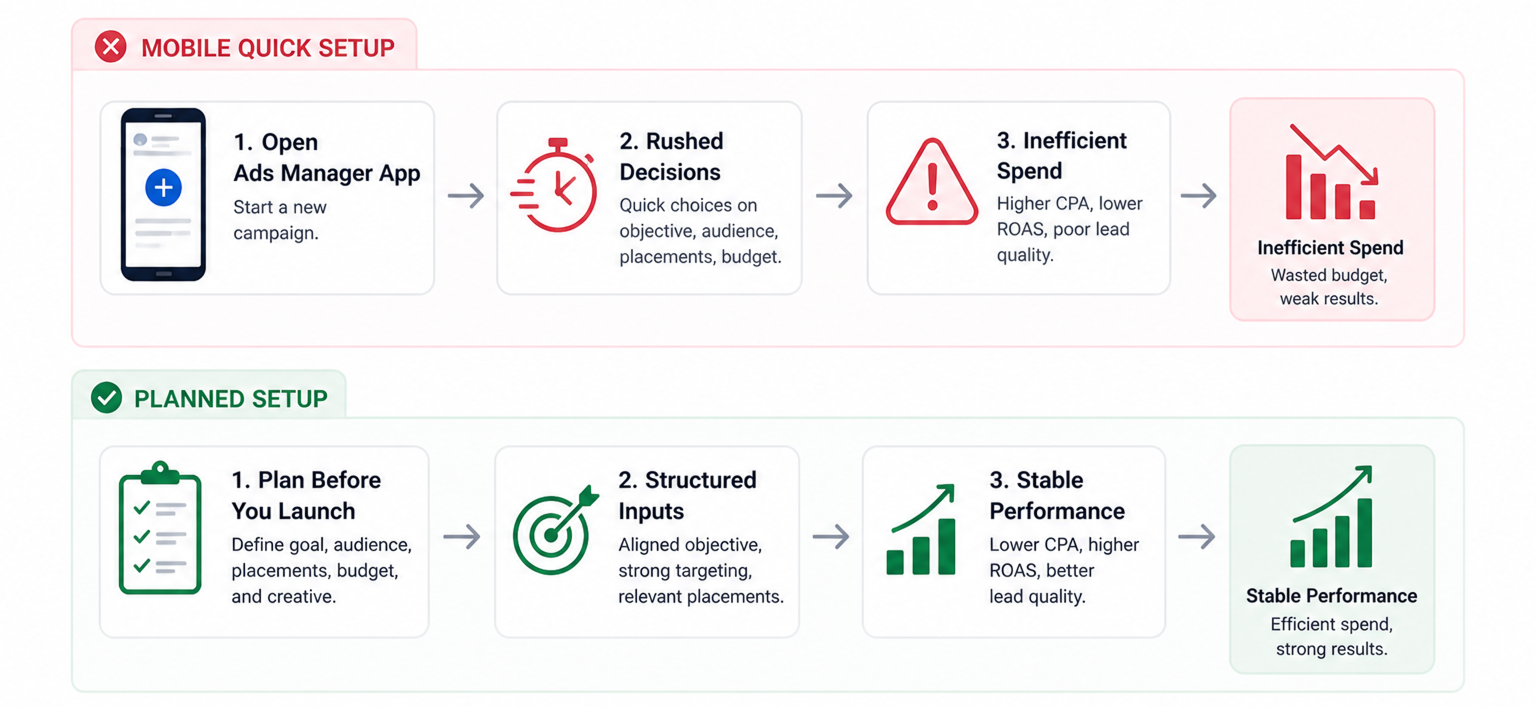
When campaigns are created quickly, several problems appear inside Ads Manager:
- CPM stays stable, but CPC rises because targeting is too broad.
- CTR looks acceptable, but conversion rate drops due to weak intent.
- Spend distributes unevenly across ad sets with no clear winner.
These signals usually indicate that audience and objective were not aligned during setup.
Campaign setup: where performance direction is decided
The campaign level defines how Meta optimizes delivery.
Inside the app, you will:
- Tap “Create campaign” or duplicate an existing campaign.
- Select a campaign objective.
- Set a name and budget.
- Assign a special ad category if required.
The objective selection drives optimization. If you choose traffic instead of conversions, Meta prioritizes clicks over outcomes.
You’ll see this quickly in reporting. High click volume appears, but CPA increases because the algorithm is not optimizing for conversion events.
If you want to avoid this mistake, it helps to structure your Facebook campaigns without wasting budget before launching anything from mobile.
Ad set setup: where targeting and delivery are shaped
Most performance outcomes are determined at the ad set level.
You configure:
- Conversion location.
- Schedule and timing.
- Audience targeting.
- Placements.
Meta enables Advantage+ audience by default. This expands targeting beyond your defined inputs.
Here’s how different setups behave in practice:
- Advantage+ with no inputs; Meta explores broadly, often lowering CPC but reducing lead intent.
- Advantage+ with suggestions; adding age, gender, or targeting signals improves direction while maintaining scale.
- Manual targeting; provides control, but can restrict delivery if too narrow.
You can switch to manual controls if needed, but this reduces algorithm flexibility. The balance between control and scale is critical.
Placement decisions and their impact on results
By default, Meta distributes ads across all placements.
This includes Feed, Stories, Reels, and Audience Network.
You’ll often observe:
- Lower CPC from external placements, but weaker conversion rates.
- Higher bounce rates from certain placements, especially off-platform traffic.
- Lead quality inconsistencies across placements.
Manual placements can improve efficiency, but removing too many options early can limit learning.
The better approach is to launch broad, then optimize after data appears.
Ad creation: where most campaigns lose efficiency
This is where many mobile-created campaigns fail.
Inside the app, you:
- Select identity (Facebook page and Instagram account).
- Choose format or existing post.
- Build creative and preview it.
- Review and publish.
Mobile workflows often skip structured testing.
Without creative variation, Meta has limited ability to optimize delivery. Over time, this leads to higher CPM and lower engagement.
The no-draft limitation and its operational impact
The Ads Manager app does not allow draft saving.
This creates a forced decision:
- Publish immediately; or
- Lose progress and rebuild later.
As a result, many campaigns are launched without full validation.
The better workflow is to prepare before opening the app:
- Define targeting strategy in advance.
- Prepare creative assets beforehand.
- Align campaign structure with funnel stage.
This reduces mistakes during live setup.
Common mobile setup mistakes that increase CPA
These patterns appear frequently in mobile-managed accounts:
- Wrong objective selection; results in traffic without conversions.
- Uncontrolled audience expansion; leads to low-intent users entering the funnel.
- Lack of creative testing; limits optimization opportunities.
- Budget too low for learning; prevents stable delivery patterns.
Each of these issues becomes visible inside Ads Manager within the first 48 hours.
Where LeadEnforce improves mobile campaign performance
Mobile setups often rely on broad or weak targeting inputs.
LeadEnforce helps solve this by allowing advertisers to build high-intent audiences based on:
- Facebook group members, which reflect shared interests and intent clusters.
- Instagram followers and engagers, which indicate active interest in similar brands or topics.
This creates a stronger starting signal for Meta’s algorithm.
When campaigns launch with better audience inputs, the system stabilizes faster. CPA becomes more predictable, and lead quality improves.
Final takeaway
The Meta Ads Manager app is a powerful execution tool. It is not a shortcut for strategy.
Most performance issues from mobile campaigns come from:
- rushed objective decisions;
- weak audience definition;
- lack of structured testing.
Plan your campaign before opening the app. Use mobile to execute, monitor, and adjust.
If performance drops after launch, reviewing what happens when you pause and restart Facebook campaigns or learning how to spot low-quality leads before they damage performance will help you fix issues without resetting everything.