A campaign can look successful inside Meta Ads Manager and still disappoint in your analytics platform, CRM, or revenue report.
That gap often comes from unclear traffic tracking. When paid social clicks are not labeled consistently, marketers struggle to answer basic performance questions:
Which campaign drove the session? Which ad created the lead? Which placement produced weak traffic? Which creative brought users who actually converted?
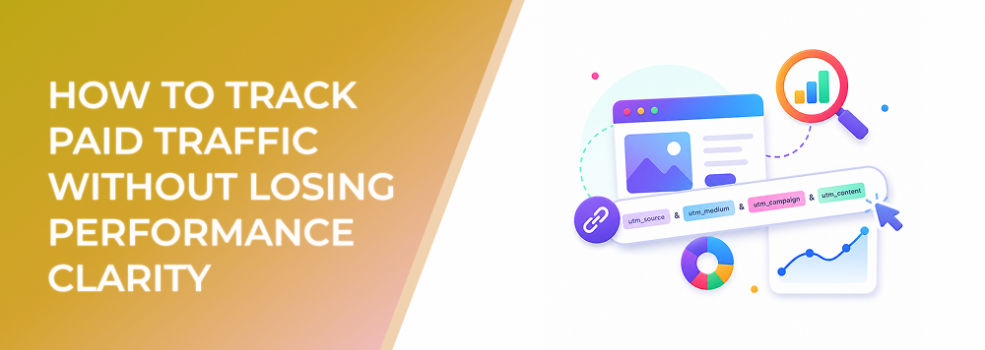
Meta’s help guidance explains that URL parameters can be added during ad creation and used on ads that link to destinations off Facebook.
For performance marketers, URL parameters are not a technical extra. They are a budget-control tool.
What URL parameters actually solve
URL parameters help identify where ad traffic comes from after the click.
They attach campaign, ad set, ad, placement, or other source details to the destination URL so analytics tools can read them. That allows marketers to compare traffic behavior outside Meta’s reporting environment.
This matters because Meta Ads Manager, website analytics, CRM tools, and sales reports often use different attribution logic. URL parameters help connect the dots.
They are especially useful when you need to evaluate:
- Landing-page conversion rates.
- Source and medium performance.
- Creative-level traffic quality.
- Placement-level behavior.
- Campaign performance inside GA4 or another analytics platform.
- Lead quality after CRM follow-up.
- ROAS outside Meta’s attribution window.
Without URL parameters, you may be optimizing from incomplete information.
Business impact on CPC, CPA, CAC, ROAS, and budget efficiency
URL parameters do not lower CPC by themselves. They improve the quality of decision-making.
That can affect performance indirectly but meaningfully.
When tracking is clean, advertisers can:
- Identify ads with cheap clicks but poor conversion rates.
- Stop spending on traffic sources that increase CPA.
- Find placements that produce better post-click behavior.
- Compare Meta campaign performance against other channels.
- Connect leads to sales outcomes.
- Improve CAC calculations.
- Allocate budget toward ads that generate revenue, not just clicks.
When tracking is messy, the opposite happens. Budget stays in campaigns that look good in-platform but underperform in the real funnel.
Typical scenarios where URL parameters apply
URL parameters are especially important when:
- Ads send users to a website or landing page.
- Multiple campaigns promote similar offers.
- Agencies report performance to clients.
- B2B teams need CRM visibility.
- Ecommerce teams compare Meta ROAS with analytics revenue.
- Affiliate marketers track traffic sources and payouts.
- Startup marketers test many landing pages quickly.
- Teams use UTMs for cross-channel reporting.
- Campaigns run across several Meta placements.
They are less relevant when the entire conversion happens inside Meta without an outbound destination, but even then, campaign naming and reporting discipline still matter.
Risks and considerations
Inconsistent naming breaks reporting
If one campaign uses “facebook,” another uses “fb,” and another uses “meta-paid,” reports become harder to trust.
URL parameters expose messy campaign structure
If campaign names are vague, duplicated, or inconsistent, dynamic parameters can pass that confusion into analytics tools.
Tracking does not replace conversion quality review
A clean UTM structure tells you where traffic came from. It does not prove that the traffic is valuable.
Too much detail can create noise
Adding too many parameters can make reports harder to use. Track what your team will actually review.
Landing pages still need to work
URL parameters identify traffic; they do not fix poor mobile experience, weak forms, unclear offers, or slow pages.
Prerequisites and dependencies
Before using URL parameters seriously, align your team on:
- Naming conventions for campaigns, ad sets, and ads.
- Source and medium values.
- Which parameters matter for reporting.
- How analytics tools will group Meta traffic.
- Whether parameters are static, dynamic, or mixed.
- How CRM or sales tools capture lead source.
- How performance will be reviewed after the click.
- Who owns reporting hygiene.
A small naming decision at launch can affect months of performance analysis.
How LeadEnforce helps
LeadEnforce helps advertisers make tracking insights more actionable by improving audience relevance before the click.
URL parameters can tell you which campaign drove a lead. But if all audience segments are broad and poorly defined, the data may not reveal much. Every segment can look noisy.
LeadEnforce helps marketers build more specific audience pools from Facebook groups, Instagram profiles, followers, engagers, LinkedIn professional data, and custom social-profile data.
That makes URL parameter reporting more useful because you can compare meaningful segments.
For example:
- A B2B team can compare traffic from LinkedIn-informed professional audiences against broader Meta targeting.
- An ecommerce brand can compare Instagram follower-based audiences by category or competitor.
- An agency can label campaigns by audience source and understand which social-profile segments produce qualified leads.
- Affiliate marketers can track which niche communities produce better downstream conversion behavior.
Better audience segmentation makes tracking data easier to interpret.
Practical recommendations
Start with a simple UTM structure
Use a structure your team will actually maintain. For many advertisers, source, medium, campaign, content, and placement are enough.
Standardize names before launch
Fix campaign, ad set, and ad naming before using dynamic parameters. Dynamic tracking only works well if the names it pulls are clean.
Track placement where useful
Placement data helps when you are testing Meta channels, creative formats, or automatic placements.
Compare Meta data with analytics data
Expect differences, but use URL parameters to understand directional behavior outside Meta.
Review lead quality by source
For lead-gen campaigns, connect URL parameters to qualified lead rate, booked calls, show-up rate, opportunities, or sales.
Do not wait until scale
Set up tracking before spend increases. Attribution confusion becomes more expensive as budgets grow.
Final takeaway
Meta URL parameters help advertisers move from surface-level ad reporting to clearer traffic and conversion analysis. They do not improve performance by themselves, but they help marketers make better budget decisions across campaigns, placements, audiences, and creatives.
To build more relevant audience segments that make your Meta tracking data easier to interpret, join the free 7-day LeadEnforce trial period.
Related LeadEnforce Articles
- Dynamic UTM Tracking: A Must-Have for Facebook Ad Attribution — Directly relevant for advertisers building cleaner attribution across Meta campaigns.
- Where Do Facebook Ads Send Users After Click? — Explains why post-click destination quality affects CPA and lead quality.
- Five Hidden Problems Inside Meta Campaigns (And How to Solve Them) — Helps diagnose deeper campaign issues that tracking can reveal.
- How Meta Business Apps Affect Ad Tracking and Campaign Performance — Useful for understanding how connected tools influence tracking and optimization signals.