A lead can submit a Meta instant form and still disappear before sales reaches them. That gap usually appears after the cleanest-looking part of the campaign.
Ads Manager may show a steady cost per lead, stable delivery, and a healthy result count. The CRM tells a different story when few leads reply, book calls, or become qualified opportunities.
That is where Meta lead nurturing matters. It lets advertisers start tailored follow-up conversations after someone submits an instant form. The follow-up can happen through Meta messaging channels, where many users already respond faster.
This feature may not be available to every advertiser yet. If the Lead nurturing section is missing, check availability before rebuilding the campaign.
What Lead Nurturing Adds After the Form Submit
Lead nurturing sits after the instant form conversion. It does not replace the audience, creative, offer, form questions, or sales process.
It gives the lead a next action while intent is still active. That action can be a Messenger chat, Instagram chat, WhatsApp message, website visit, gated file, or phone call.
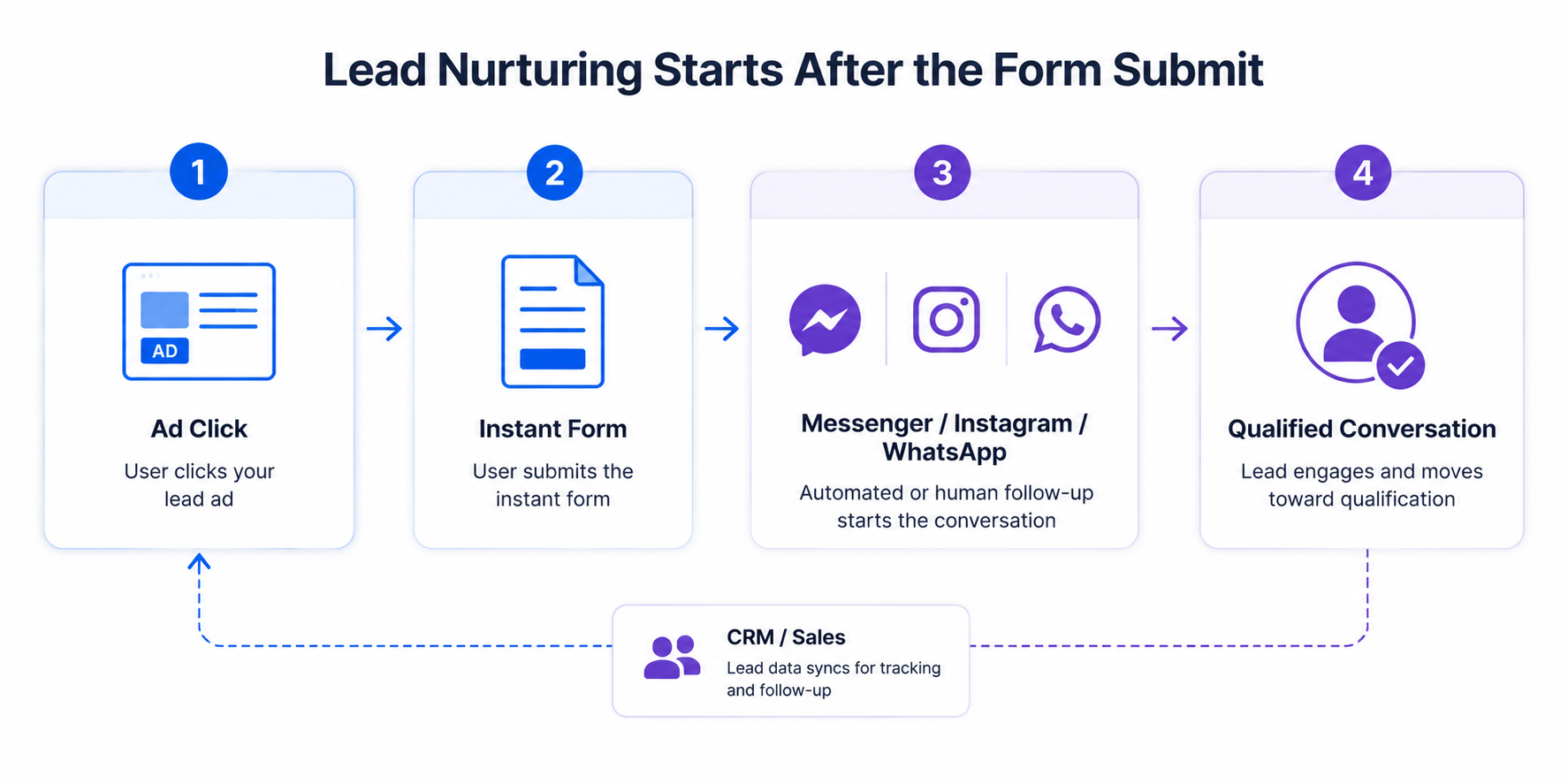
For performance marketers, the value is in the handoff. A campaign can produce a $12 CPL and still carry a poor sales-qualified CPA if follow-up is slow. If nurturing moves more leads into conversations, the reported CPL may stay flat while real CPA drops.
A B2B SaaS team might use the form to collect company size and email. The follow-up chat can then ask about timeline, role, or current tool stack. A local service business may skip long qualification and push leads into WhatsApp for scheduling.
For a broader sequence beyond the form, LeadEnforce’s guide to lead nurturing with Facebook ads fits this workflow well.
How to Enable Lead Nurturing During Ad Creation
The cleanest setup path starts inside Ads Manager while building a lead campaign. You need the Leads objective and an instant form conversion location.
Use this flow when creating the ad:
- Select Leads as the campaign objective. After clicking Continue, you may see a campaign score on the right side. Treat it as a setup signal before publishing, not proof that leads will convert.
- At the ad set level, go to the Conversion section. Choose Instant forms as the conversion location so Meta knows the lead capture happens inside the platform.
- At the ad level, reach the Destination section. Select an existing instant form or create a new one before configuring follow-up.
- In the Lead nurturing section, open Follow-up channels. Tick the channels you want to use: Messenger, Instagram, or WhatsApp.
- Finish the rest of the lead ad and publish only after previewing the form and chat experience. A broken follow-up path can waste the best leads first.
This setup is easy to miss because the nurturing controls appear after core campaign choices. If you choose the wrong conversion location, the option may not appear where you expect it.
Choosing Messenger, Instagram, or WhatsApp Follow-Up
The best follow-up channel depends on where the user is most likely to respond. Do not pick a channel only because it is available.
Messenger works well when your Page already handles service questions, quotes, demos, or appointment requests. It fits businesses with a clear qualification script and someone assigned to reply.
Instagram chat works better when the ad experience is heavily Instagram-led. If the creative runs in Stories, Reels, or Feed, the user may expect a more social and informal follow-up.
WhatsApp is usually strongest for mobile-first conversations. Local services, clinics, real estate teams, fitness businesses, and appointment-based offers often benefit from fast, short replies.
The prerequisite is strict. If your Page is not linked to a WhatsApp account, Ads Manager will ask you to connect one. If the Page uses a personal WhatsApp account, go back to the Identity section and select a Page connected to WhatsApp Business, or connect a business account to the current Page.
That detail matters in live campaigns. A media buyer can set up a strong lead ad, then lose the WhatsApp path because the client connected the wrong account type.
If WhatsApp is the primary follow-up route, compare the nurture setup against Click-to-WhatsApp ads for high-intent leads. The same response-speed logic applies, but the campaign entry point is different.
Built-In Automation and Partner Templates Are Not Interchangeable
If you select Messenger or Instagram, Ads Manager can show a Chat builder choice. This is where the follow-up experience becomes more than a generic greeting.
Built-in automation lets you edit the greeting text, call to action, link, and frequently asked questions. You can preview how the chat may appear before saving. The available fields depend on the follow-up channels you selected.
Partner templates are better when your team already uses a connected app for qualification, routing, or CRM workflows. You choose the partner app, select a template, preview the flow, and save it.
The tradeoff is control versus complexity. Built-in automation is faster and easier to audit. Partner templates can handle more advanced flows, but they add another dependency.
A common mistake is overloading the first message. If the lead just asked for pricing, do not greet them with five unrelated FAQs. Start with the next buying step.
The observable warning sign is low message engagement after strong form volume. If leads submit but do not start or continue chats, inspect the greeting, CTA, and first question before changing audiences.
Enabling Follow-Up Actions in the Instant Form Editor
Meta also lets you configure nurturing from the instant form editor. This path matters when the follow-up action belongs to the form ending screen.
After choosing the Leads objective, create or edit the instant form until you reach the Ending section. Add a headline and an optional description, then choose the additional action.
The ending screen can route leads in several ways:
- Go to website sends people to a valid website URL. This works for booking pages, pricing pages, calculators, or webinars. The URL cannot be a WhatsApp profile link.
- View file shares gated content such as a PDF, JPEG, or PNG. This fits lead magnets, brochures, menus, checklists, and buyer guides.
- Call business shows your phone number and lets people call right away. Use this only when someone can answer during campaign delivery hours.
- Chat on WhatsApp lets people message your business after submitting. If WhatsApp is already linked, this may be enabled automatically, and you can untick it if needed.
- Start a conversation on Messenger can be enabled under Connect with leads in Messenger. From there, select a partner app, choose a flow, preview it, and save.
You can also edit the default call to action. Meta allows up to 40 characters, so keep it specific. “Book a Demo” is clearer than “Learn More” when the next step is sales-owned.
This screen can change lead behavior without changing the ad creative. If post-submit clicks rise but booked calls stay flat, the ending action may be too soft for the offer.
Why Nurturing Can Lower CPA Without Changing CPL
Lead nurturing does not always reduce cost per lead inside Ads Manager. It can still improve paid social economics by increasing the percentage of leads that become qualified actions.
Assume a campaign spends $3,000 and generates 300 instant form leads. At $10 CPL, the campaign looks efficient. If only 12 leads book calls, the booked-call CPA is $250.
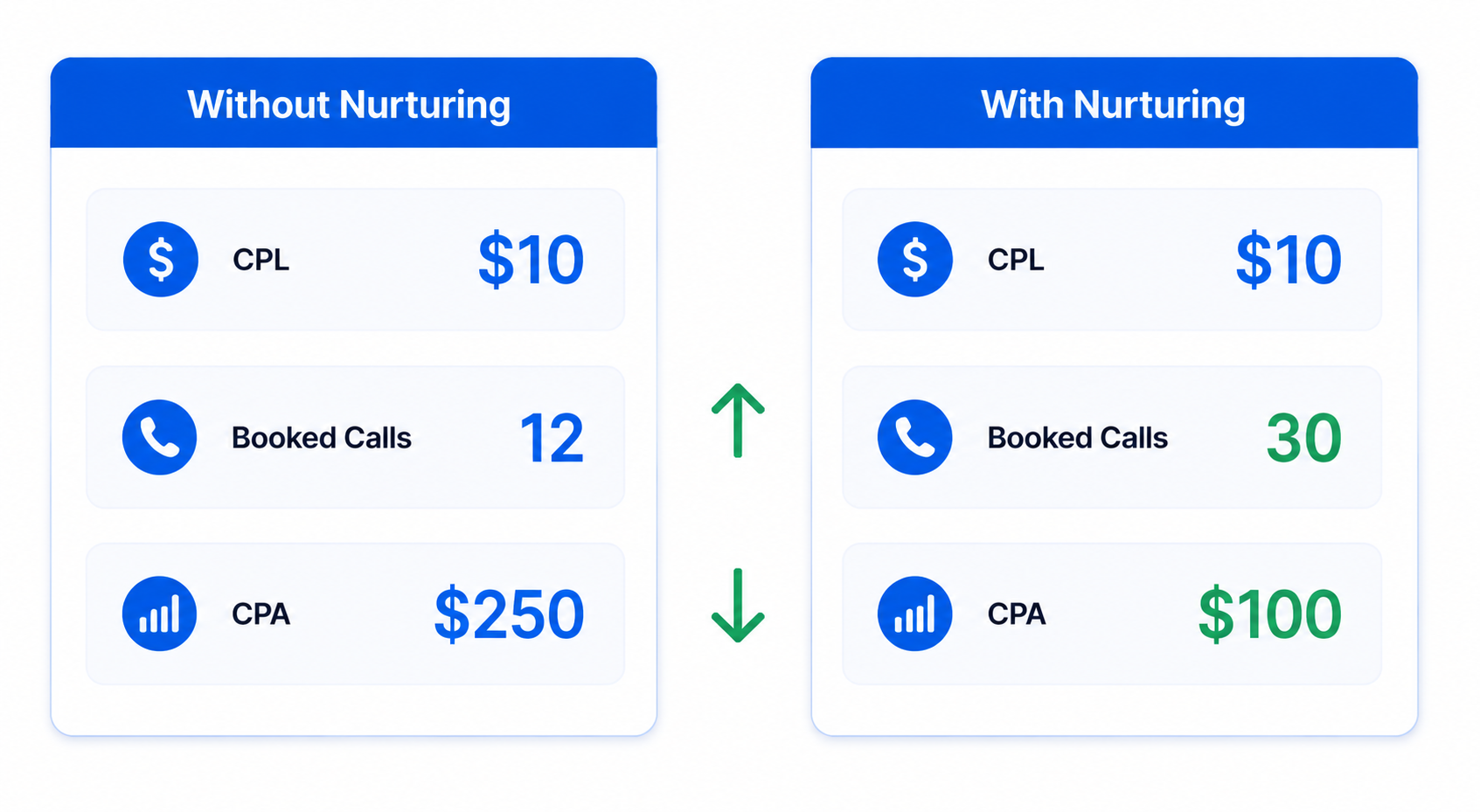
Now assume the same campaign uses a Messenger or WhatsApp follow-up and books 30 calls from the same 300 leads. CPL is still $10, but booked-call CPA falls to $100.
That is the performance impact media buyers should care about. The ad account may look unchanged while the sales funnel gets materially better.
Track reply rate, first-response time, booked-call rate, sales-qualified rate, and closed-won value. Otherwise, Ads Manager can reward the campaign for cheap form fills while the business pays for weak pipeline.
Where Lead Nurturing Can Backfire
A weak follow-up path can damage lead quality signals. It can also make a campaign look worse than it is.
If the business cannot answer Messenger, Instagram, or WhatsApp quickly, native chat becomes another dead end. A lead who receives an automated message and no human response may be harder to recover later.
Partner templates can also fail quietly when app connections or permissions change. The campaign keeps spending, the form keeps collecting leads, but the follow-up flow does not match the intended sales process.
Phone calls have their own risk. If the campaign delivers heavily outside business hours, the call action may send high-intent leads to voicemail. That can raise real CPA while Ads Manager still reports normal lead volume.
Website actions need the same scrutiny. A slow booking page, confusing pricing page, or invalid URL can turn strong form intent into post-click drop-off.
The best diagnostic is simple. Compare form submissions with follow-up starts, replies, and qualified outcomes. If lead volume is strong but every next-step metric is weak, the nurture layer needs work.
Better Follow-Up Still Needs Better Audience Signal
Lead nurturing helps interested users move faster. It does not fix a campaign that attracts the wrong people.
If your lead form pulls cheap submissions from low-intent users, Messenger or WhatsApp may only expose the quality problem faster. Sales will see vague replies, no-shows, invalid details, and people who forgot submitting.
That is where audience quality matters before nurturing. Use high-intent custom audiences for Facebook lead ads when broad targeting starts producing volume without qualified pipeline.
LeadEnforce is relevant when advertisers need a more precise signal than broad interest targeting can provide. It helps build high-intent audiences from Facebook groups, Instagram followers and engagers, and social profile data.
This gives Meta better input before the form is submitted. The nurture path then works with leads who already match the offer, category, or buying context.
You should see the difference downstream. CPL may rise slightly, but reply quality, booked-call rate, CAC, and ROAS can move in the right direction.
The Form Submit Is Only the First Conversion
Meta lead nurturing is useful because it treats the form submit as the start of the sales path. That is how lead ads should be judged.
Set up the Leads objective, choose Instant forms, select the right follow-up channels, preview the chat or ending action, and test the full path before increasing spend. Then measure what happens after the lead result appears in Ads Manager.
A strong lead campaign does not stop at cheap form fills. It creates a clean path from intent to conversation, and from conversation to revenue.