When Instagram won’t connect in Meta Business Suite, it looks like a simple login issue.
In reality, it often blocks access to core campaign functionality.
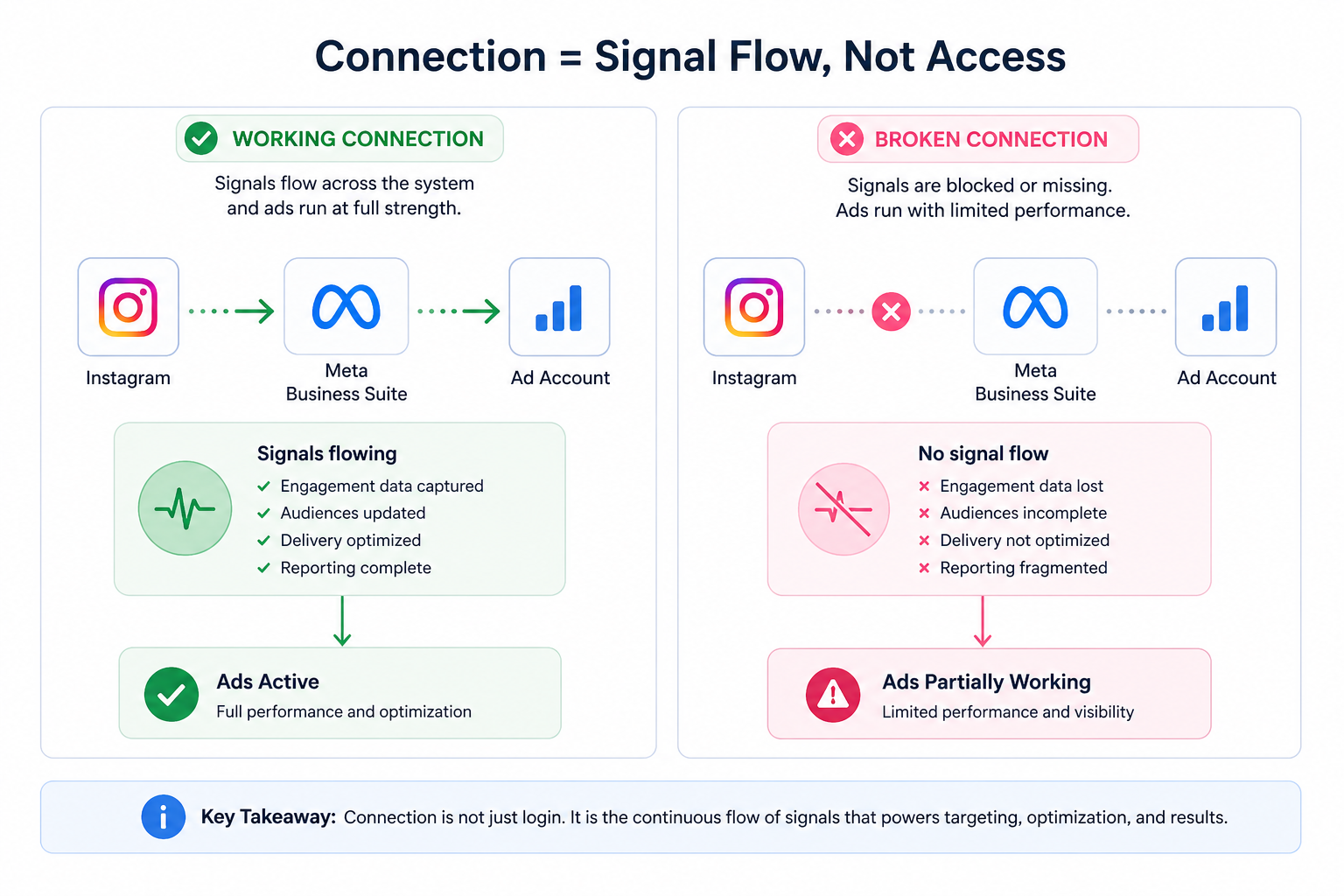
Without a working connection, Meta cannot access Instagram signals, manage assets properly, or deliver ads under the correct identity.
What “connecting Instagram” actually means
Connecting Instagram to Meta Business Suite is the foundation layer of the entire system.
This step links your Instagram login to Meta’s environment, allowing you to manage content, ads, and assets from one place.
Depending on your setup, the connection can work in different ways:
- Logging in directly with Instagram credentials allows standalone management.
- Connecting Instagram to a Facebook Page merges both into one identity.
- Connecting it only to a business portfolio keeps assets separate but manageable.
Each option affects how campaigns are structured later.
If this initial connection fails, everything downstream becomes unstable.
Why connection issues affect campaign performance
Meta relies on consistent identity mapping across platforms.
When Instagram is properly connected, the system can track how users interact with your content and use that data to optimize delivery.
When the connection breaks, that visibility disappears.
This leads to several performance gaps:
- Engagement signals from Instagram are not used in optimization.
- Retargeting audiences based on Instagram activity are incomplete.
- Ads cannot consistently use the Instagram identity.
- Reporting becomes fragmented across placements.
These gaps reduce signal quality, which directly impacts targeting accuracy.
If your campaigns bring traffic but fail to convert, the issue often looks like a funnel problem, but starts earlier. This is closely related to why your Facebook ads aren’t generating leads.
Business impact
Connection issues don’t always stop campaigns — they weaken them.
You may still see impressions and clicks, but results become less efficient.
Typical effects include:
- Lower conversion rates due to weaker audience matching.
- Reduced engagement on Instagram placements.
- Poor retargeting performance for warm audiences.
- Budget shifting toward less effective traffic sources.
Over time, this creates a misleading picture. Campaigns appear active, but underlying performance declines.
This becomes more visible when comparing placement performance. Understanding how placements behave differently is explained in Instagram ads vs Facebook ads: which is better for your business.
Common scenarios where Instagram won’t connect
Connection failures usually follow a few predictable patterns.
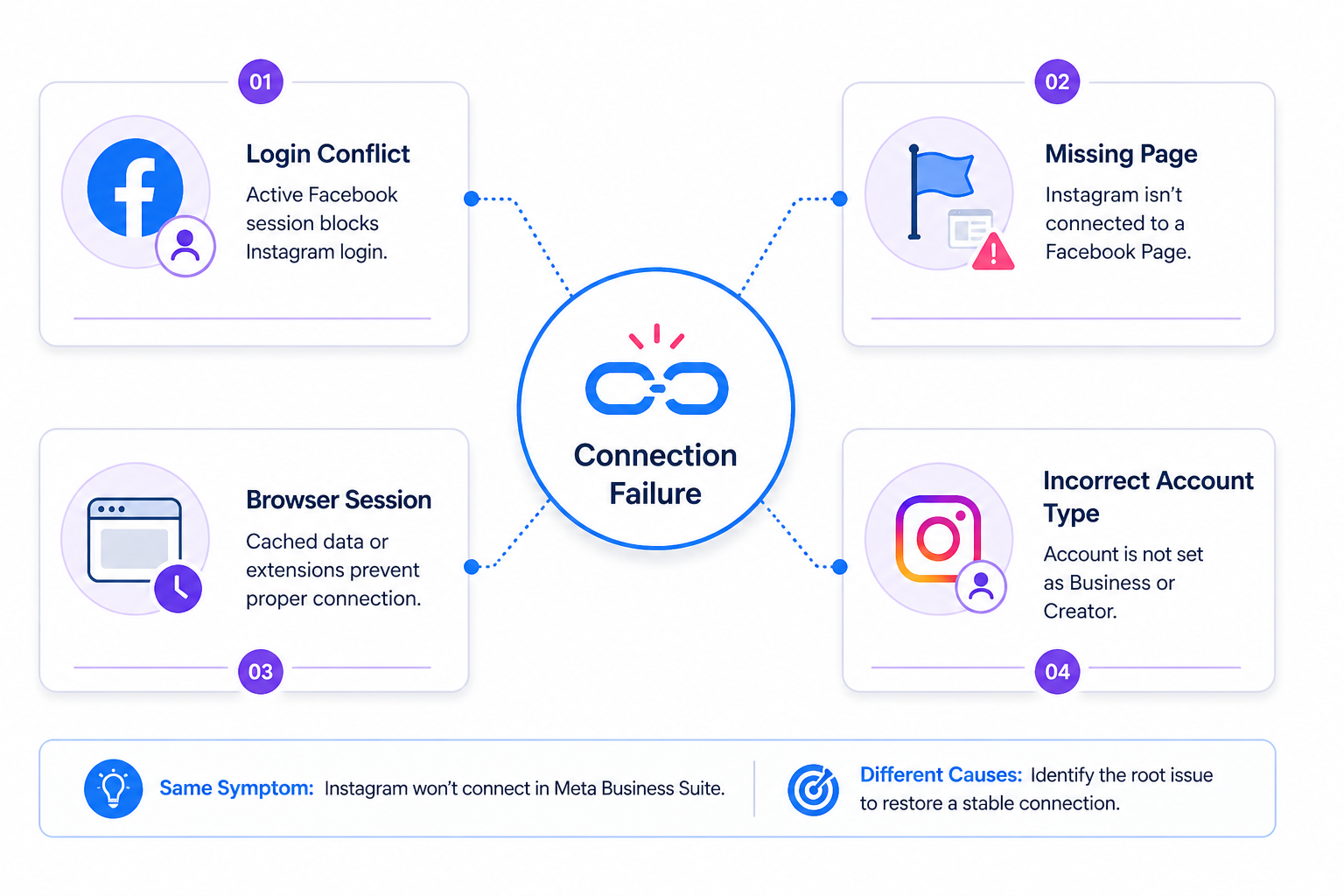
The most common ones include:
- Login conflicts, where an active Facebook session interferes with Instagram authentication.
- Missing Page connection, which triggers forced setup flows that break the process.
- Browser session issues, where cached data prevents proper login.
- Incorrect account type, when the Instagram account is not set to Business or Creator.
Each of these creates friction at the authentication level, before any campaign setup begins.
Risks and considerations
Fixing connection issues can affect how your assets are structured.
For example, connecting Instagram to a Facebook Page merges identities, which changes how ads appear and how data is grouped.
There are also operational risks:
- Connecting the wrong account can affect brand consistency.
- Reconnecting assets may disrupt campaign setups.
- Mixing personal and business accounts creates long-term management issues.
These are not technical problems — they are structural decisions that affect performance later.
Prerequisites and dependencies
Before connecting Instagram, make sure the foundation is correct.
Key requirements include:
- The account must be set as a Business or Creator account.
- You must have access to login credentials and security verification.
- The account should align with your business portfolio structure.
- Browser sessions should not conflict with existing logins.
You also need to decide how the account should be structured inside Meta. Whether it is connected to a Page or managed separately will affect how campaigns use it.
Practical recommendations
Start by isolating the problem.
If login fails, remove session conflicts first. Logging out of Facebook or using a private browser often resolves hidden issues.
Next, review your asset structure. Decide whether Instagram should be connected to a Page or managed independently within a business portfolio.
After connecting, verify how the account appears in Meta Business Suite. Check whether assets are grouped correctly and whether you can manage them without restrictions.
Once the connection is stable, move to performance validation. Look at engagement signals, placement distribution, and campaign behavior.
If Instagram is connected but performance still feels weak, the issue may be in audience structure rather than setup. This is where understanding targeting becomes critical, as explained in everything you need to know about Facebook ads audiences.
Final takeaway
If Instagram won’t connect in Meta Business Suite, the issue is not just technical.
It breaks the foundation of how Meta tracks behavior, assigns identity, and delivers ads.
Fixing the connection restores signal flow, improves targeting accuracy, and stabilizes performance.
Without it, campaigns run with blind spots — and those gaps show up directly in your results.