Most advertisers treat ad format as a creative choice.
In reality, it changes how Meta delivers your ads, where they show, and what kind of users click. That directly affects CPC, CPA, and conversion rates.
If results shift after changing format, it’s rarely random. The delivery system is reacting to the new structure.
Why format changes can break performance (even if CTR improves)
You launch a new format. CTR goes up. CPC drops. Then CPA gets worse.
This usually means the format changed where your ads are shown and who sees them.
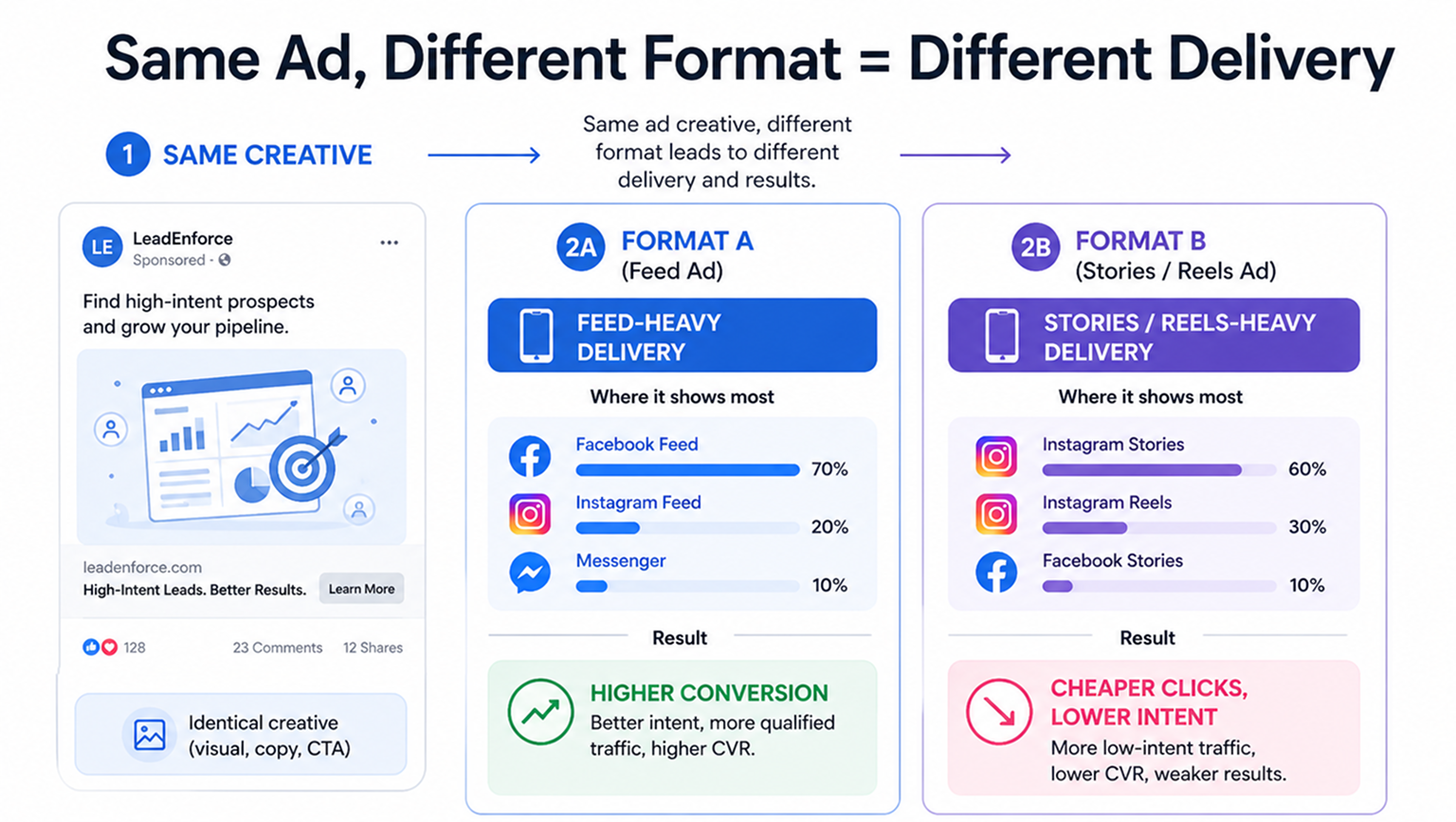
Inside Ads Manager, you’ll often notice:
- One format spends mostly in Feed, where users convert more often.
- Another shifts into Stories or Reels, where clicks are cheaper but weaker.
- A third enters cheaper auctions with lower competition.
So you’re not just testing creative.
You’re testing delivery behavior. That’s why format changes can cause:
- CPM spikes from more competitive placements.
- CPC drops from lower-quality clicks.
- Conversion rate drops after the click.
- Lead quality issues even when CPL looks good.
If you don’t check placement breakdowns, it’s easy to draw the wrong conclusion.
Why some formats don’t appear in Ads Manager
A common issue: you can’t find a format during setup. This usually comes down to how the campaign is configured.
Meta limits formats based on objective and conversion location.
Here’s what controls availability:
- Campaign objective: Traffic, engagement, and sales unlock different options because Meta optimizes for different actions.
- Conversion location: Website, app, or messaging changes how users interact.
- Placement compatibility: Some formats only work in mobile-first placements.
- Creative inputs: Missing assets can hide certain formats.
If something is missing, check the setup first before rebuilding the ad.
Flexible format: fast testing, low clarity
Flexible format lets Meta decide how to combine your images and videos. You upload multiple assets. The system chooses what to show.
This can work well early on. It helps find which visuals get attention.
You’ll often see:
- Spend quickly focusing on a few assets.
- CTR improving in the first days.
- Faster exit from the learning phase.
But it’s harder to understand what actually worked.
If CPA improves, you don’t know if it came from:
- The format.
- The asset.
- The placement.
- The system’s combinations.
That makes scaling harder.
Also important: starting March 2026, Flexible format won’t appear in Ad setup anymore. Many teams will look for it in the wrong place.
Single image or video: best for clean testing
If you want clear data, start here.
One visual. One message. One action.
This makes problems easier to diagnose.
For example:
- High CTR + low conversions → landing page issue.
- Low CTR → weak hook or creative.
- High CPC → poor audience match.
Video adds more signals like watch time and drop-off. But it can also attract passive viewers who never convert.
Use this format when the offer is simple and you want reliable data.
Carousel ads: better clicks are slower clicks
Carousel works when users need more context.
Each card adds information. That changes who clicks.
Instead of quick clicks, you get more considered ones.
In Ads Manager, this often shows up as:
- Lower CTR.
- Higher post-click conversion rate.
- Better lead quality.
Carousel works well when you need to explain something before the click. For a deeper breakdown, see choosing the right format for each funnel stage.
One thing to watch: if users don’t swipe, extra cards don’t matter. Check card-level performance.
Collection ads: strong engagement, mixed buying intent
Collection ads create a fast in-app browsing experience.
Users tap the ad and open a full-screen view.
This reduces friction, especially on mobile.
You’ll often see:
- Higher landing page view rates.
- Lower drop-off before product view.
- Strong engagement.
But engagement doesn’t always mean purchase. Collection ads can attract users who browse but don’t buy.
That shows up as:
- High interaction.
- Low purchase rate.
- Weak ROAS.
Also note: from March 2026, Collection moves out of Ad setup and into the creative section.
Why placement shifts make format tests unreliable
You compare two formats. One looks cheaper. Then performance drops after scaling.
The issue is usually placement distribution.
Check these before making decisions:
- Spend by placement: Formats may distribute budget differently.
- CPM by placement: Higher CPM can mean better inventory.
- Outbound CTR: Filters out low-quality clicks.
- Conversion rate by placement: Shows where real value comes from.
If you don’t control for placements, results can be misleading.
That’s why understanding how ad placements affect performance is critical when testing formats.
Ad format directly impacts lead quality
Cheap leads don’t always mean good leads.
Some formats make it too easy to click. That brings in low-intent users.
You’ll see this when:
- CPL looks strong.
- CRM quality drops.
- Sales teams reject leads.
This often comes from formats that don’t explain enough before the click.
Better formats usually cost more per lead, but filter users earlier.
That improves:
- Lead-to-call rate.
- Lead-to-sale rate.
- Overall CAC.
Format tests fail when the audience is weak
You can test every format and still get inconsistent results.
The problem is often the audience, not the creative.
Broad targeting lets Meta find cheap clicks, not strong buyers.
That distorts all results.
This becomes clearer when you focus on how to build high-performing custom audiences instead of relying on broad segments.
Using higher-intent audiences makes format comparisons more reliable.
This is where LeadEnforce fits in.
By building audiences from Facebook groups, Instagram engagers, and profile data, you give Meta better signals from the start. That reduces noise in testing.
Final takeaway
Ad formats are not just design choices. They control:
- Where your ads appear.
- Who interacts with them.
- How users behave before converting.
If performance changes after switching formats, look at delivery first. Start simple. Test cleanly.
Then scale only when you understand what’s driving results.