Meta campaigns sometimes spend only part of the daily or lifetime budget even when everything appears configured correctly. Ads are approved, targeting looks reasonable, and the campaign is active — yet the platform delivers only 30–60% of the planned spend.
In most cases, this behavior is not a technical error. It occurs when Meta’s delivery system cannot find enough auction opportunities that meet the campaign’s optimization, targeting, and bidding constraints.
Understanding the mechanics behind this helps diagnose the issue quickly and avoid unnecessary campaign changes.
How Meta Actually Decides Whether to Spend Your Budget
Meta does not try to spend the full campaign budget automatically. The system attempts to maximize the number of optimization events within acceptable cost ranges.
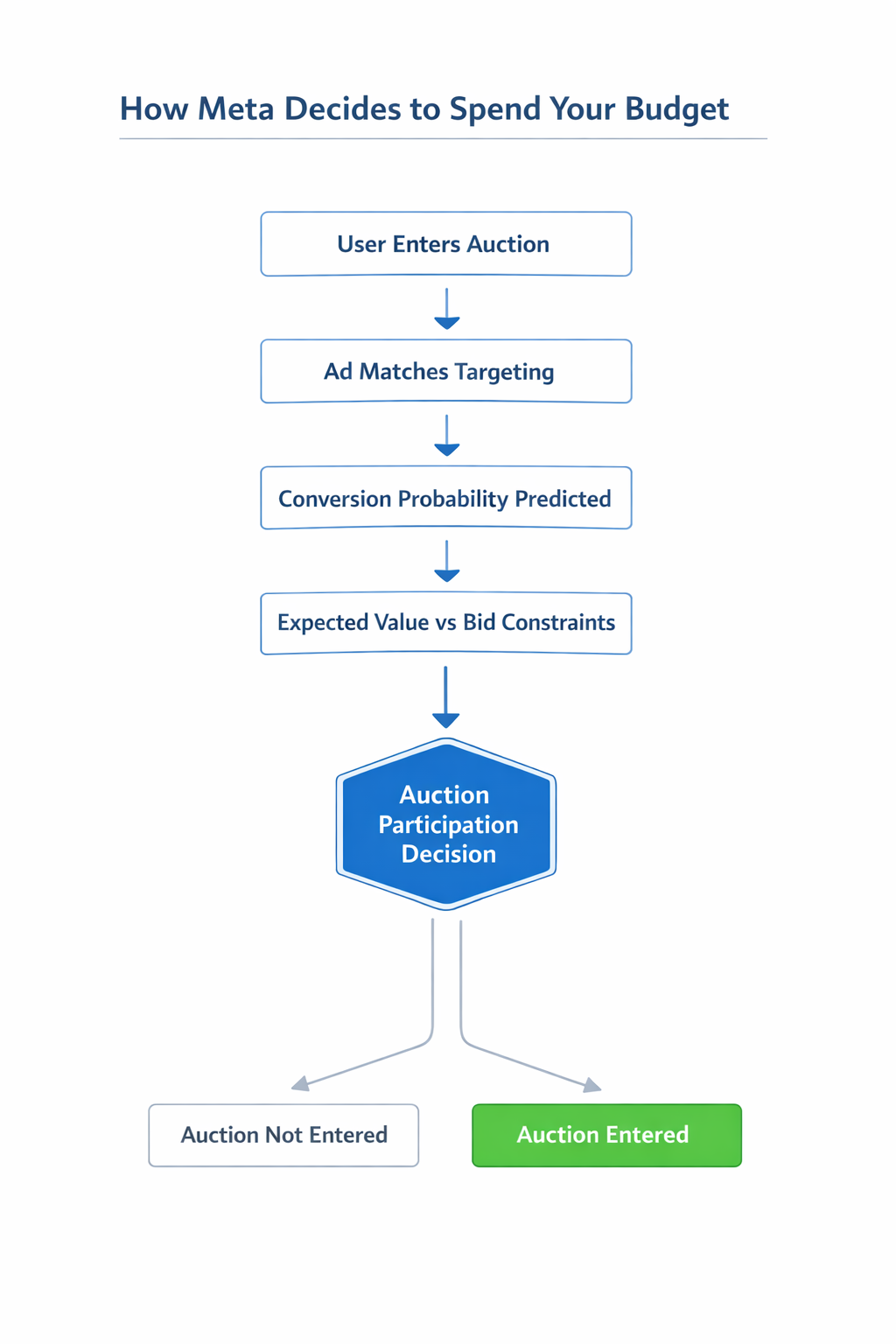
Every time a user becomes available for an ad impression, the platform evaluates the opportunity through several internal checks:
-
User enters the auction pool.
The platform identifies a user who fits the campaign’s targeting parameters. -
Conversion probability is predicted.
Meta estimates the likelihood that this user will complete the optimization event (purchase, lead, add-to-cart, etc.). -
Expected value is compared to bid constraints.
The predicted value is evaluated against the campaign’s bid strategy and cost controls. -
The system decides whether to enter the auction.
If the expected return is too low, the ad simply does not participate.
If this happens across many auctions, the campaign spends less than the available budget.
Cause 1: Bid or Cost Controls Are Too Restrictive
Aggressive cost controls are one of the most common reasons campaigns underspend.
When you set a cost cap or bid cap, you instruct Meta to participate only in auctions where conversions are expected to fall below a specific cost threshold.
If that threshold is unrealistic for the market, the system rejects most auctions.
Typical signals inside Ads Manager include:
-
Spend remains far below the daily budget, even though CPM and CTR appear normal.
-
Learning Limited status appears frequently, especially in new ad sets that have not accumulated enough conversion data.
-
Impression volume remains low, but engagement metrics such as CTR or video views look healthy.
Example scenario
An advertiser launches a purchase campaign with a $25 cost cap, but the real market CPA fluctuates between $35 and $45.
Because most auctions exceed the allowed threshold, the system declines to participate in many of them, which dramatically slows delivery.
How to fix it
Relax cost constraints so the algorithm can compete in more auctions.
Practical adjustments include:
-
Increase the cost cap to roughly 20–40% above recent CPA benchmarks so the system can test more auctions.
-
Remove bid caps temporarily during the learning phase so Meta can gather conversion data.
-
Reintroduce cost controls gradually once stable performance appears.
Restrictive bidding strategies can protect margins, but they frequently limit delivery more than advertisers expect.
Cause 2: The Audience Is Too Small for the Budget
Budget increases without expanding the reachable audience often produce partial spend.
Meta’s delivery system tries to avoid rapid saturation of the same users because excessive repetition usually reduces engagement and increases CPM.
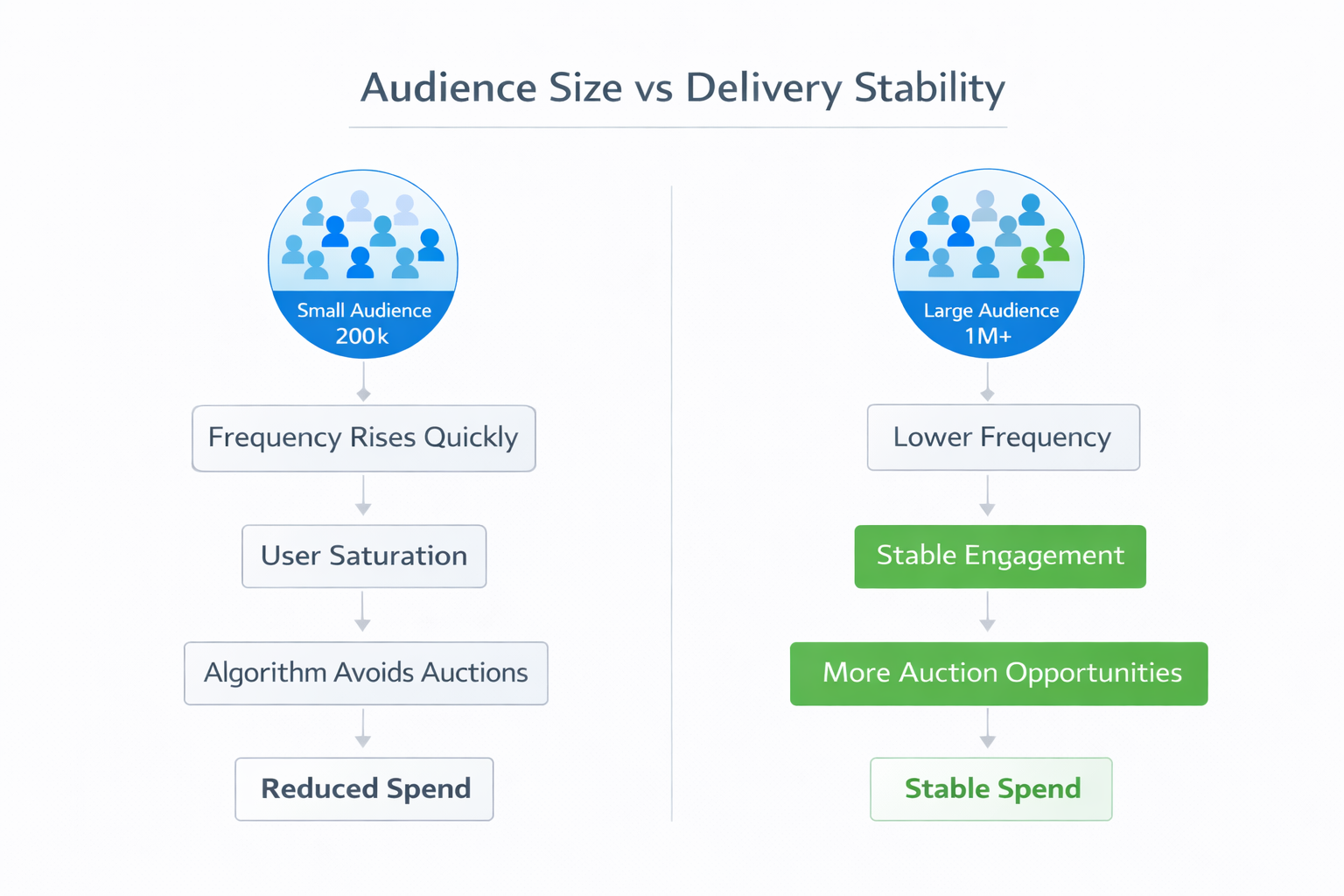
You can usually detect this pattern through these signals:
-
Audience size below roughly 200k–300k users for conversion campaigns.
-
Frequency increases quickly, even with moderate daily spend.
-
CPM rises while impression growth slows, indicating the algorithm is running out of new users.
When the system predicts that users have already seen the ads several times, it stops entering auctions for those users. Delivery slows as a result.
Advertisers frequently encounter this issue when overly precise targeting is combined with larger budgets. A deeper explanation of how targeting structure affects reach is covered in The Ultimate Guide to Facebook Audience Targeting.
How to fix it
Increase the number of users the algorithm can evaluate in auctions.
Recommended adjustments include:
-
Broaden geographic targeting or remove unnecessary demographic restrictions.
-
Replace stacked interests with broader interest clusters that still capture relevant behavior.
-
Allow automated audience expansion so Meta can test adjacent behavioral groups.
Campaign delivery often stabilizes once the reachable audience exceeds 500k–1M users.
Cause 3: The Optimization Event Generates Too Few Signals
Meta’s algorithm depends on conversion signals to predict which users are most likely to complete the optimization event.
If conversions occur too rarely, the model struggles to determine which auctions are worth entering.
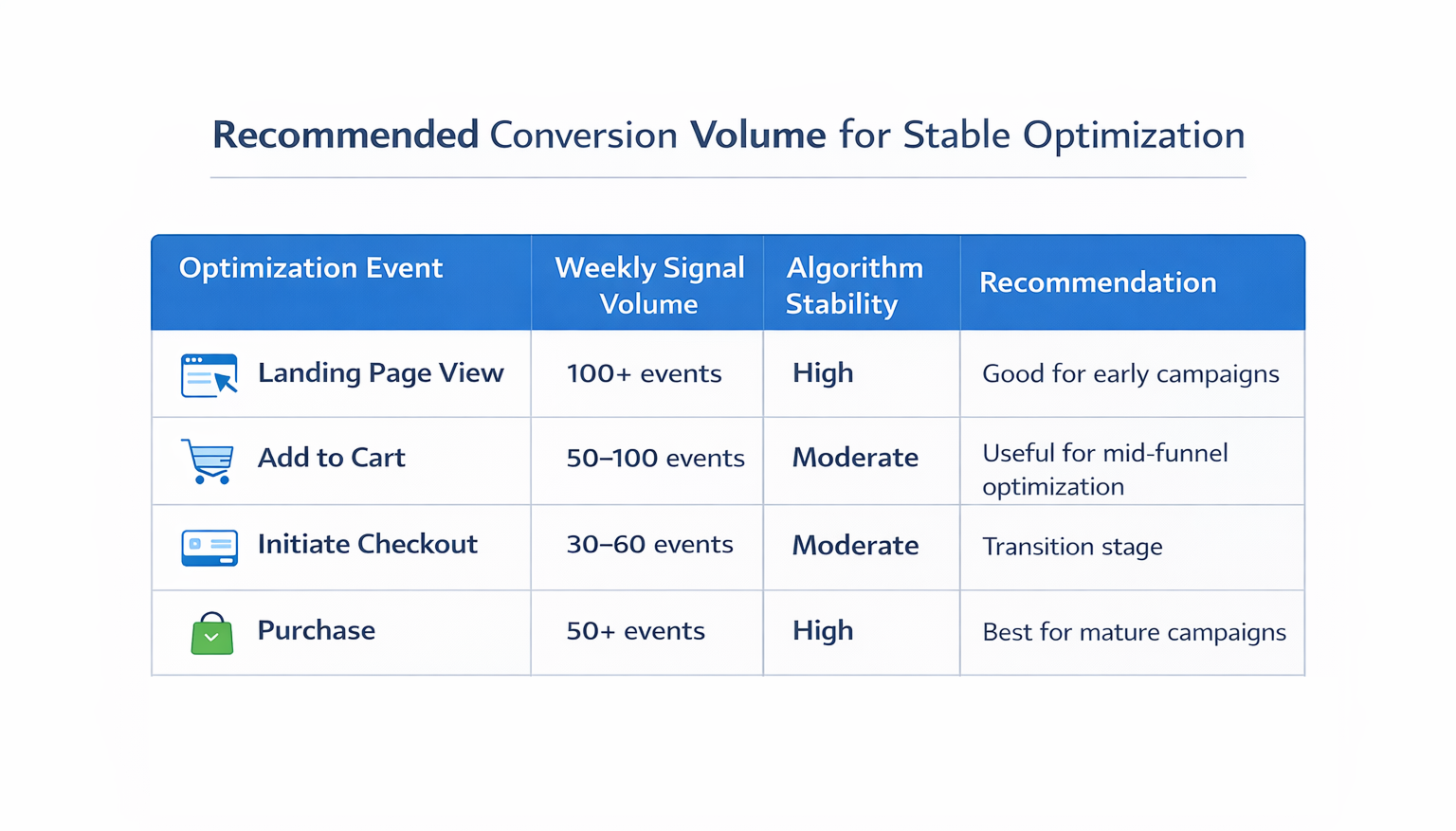
Common Ads Manager signals include:
-
Fewer than 30–50 conversions per week per ad set, which limits the algorithm’s ability to detect behavioral patterns.
-
Long learning phases, where the system continues adjusting bids and targeting.
-
Daily spend fluctuates heavily, because the algorithm cannot consistently identify profitable auctions.
Why spend drops
Without reliable conversion patterns, Meta becomes conservative in auction participation. The system reduces bidding activity because it cannot confidently estimate conversion probability.
This issue often appears in campaigns that optimize directly for purchases while generating only a few sales per week.
A broader explanation of how audience signals influence delivery can be found in Everything You Need to Know About Facebook Ads Audiences.
How to fix it
Use an optimization event that generates stronger behavioral signals.
A common progression used by performance teams looks like this:
-
Early campaigns — optimize for Landing Page Views or Add-to-Cart events to generate initial data.
-
Scaling campaigns — switch to Initiate Checkout once behavioral signals become more consistent.
-
Mature campaigns — optimize directly for Purchase after sufficient data accumulates.
Once the algorithm gathers enough behavioral signals, campaigns typically return to purchase optimization with more stable delivery.
Cause 4: Too Many Ad Sets Compete for the Same Budget
Campaign fragmentation can also slow delivery.
When multiple ad sets target similar audiences, Meta distributes budget cautiously until it identifies a clear performance leader.
This situation often appears as:
-
Six to eight ad sets launched simultaneously, each targeting slightly different interests.
-
Minimal impressions per ad set, because the system tests each one separately.
-
Total campaign spend remains below the allocated budget, even though individual ad sets appear active.
Instead of concentrating data into a single learning model, the system attempts to test multiple audiences at once.
As a result, none of the ad sets accumulate enough conversion signals quickly.
How to fix it
Simplify the campaign structure so the algorithm can gather stronger performance signals.
Operational improvements often include:
-
Consolidating overlapping audiences into broader ad sets.
-
Using Advantage Campaign Budget, which allows Meta to allocate spend dynamically across ad sets.
-
Limiting testing campaigns to two to four ad sets initially, which accelerates the learning process.
Audience segmentation can still be introduced later. Many advertisers build layered targeting structures once delivery stabilizes, as explained in How to Create High-Converting Facebook Custom Audiences.
How to Diagnose the Real Cause Quickly
When a campaign underspends, reviewing several signals inside Ads Manager usually reveals the underlying problem.
Start by checking:
-
Bid strategy — verify whether cost caps or bid caps restrict auction participation.
-
Audience size — confirm that the reachable audience is large enough for the planned budget.
-
Conversion volume — determine whether the optimization event generates sufficient weekly signals.
-
Campaign structure — look for unnecessary ad set fragmentation that spreads learning data.
-
Learning status — check whether recent edits reset the learning phase.
If several of these signals appear at the same time, the campaign likely suffers from multiple delivery constraints.
Key Takeaway
Meta campaigns rarely underspend because of technical errors. Delivery slows when the platform cannot find enough auctions that satisfy the campaign’s targeting, bidding, and optimization constraints.
When spend stalls, the solution is often removing restrictions rather than adding new optimizations. Broader audiences, realistic cost caps, and simpler campaign structures give the algorithm more auction opportunities — which naturally increases spend.