Many advertisers raise budgets too late.
They see strong ROAS, increase spend manually, then watch CPM rise within hours. Meta starts entering more expensive auctions, and CPA often gets worse before the campaign stabilizes again.
Meta budget scheduling was built to reduce that problem.
The feature lets advertisers schedule temporary budget increases during periods when demand is expected to rise. That can include weekends, product launches, holiday sales, sporting events, or recurring high-conversion hours.
Instead of reacting manually, you prepare the budget increase in advance.
What budget scheduling actually does
Budget scheduling temporarily raises your campaign or ad set budget during selected periods. The feature only works with daily budgets. Campaigns using lifetime budgets cannot use it.
This matters because budget scheduling changes how much Meta can spend during certain hours or days. It does not control when ads are allowed to run.
For example, a local restaurant may notice that delivery orders rise between 5 p.m. and 9 p.m. Instead of increasing the budget for the entire day, the advertiser schedules a temporary increase during dinner hours only.
Meta can then spend more aggressively during the busiest period without increasing the baseline budget permanently.
The limits advertisers should know first
Meta added several restrictions to prevent unstable delivery.
First, scheduled increases cannot exceed eight times the daily budget. A campaign spending $100 daily cannot go above $800 during a high-demand period.
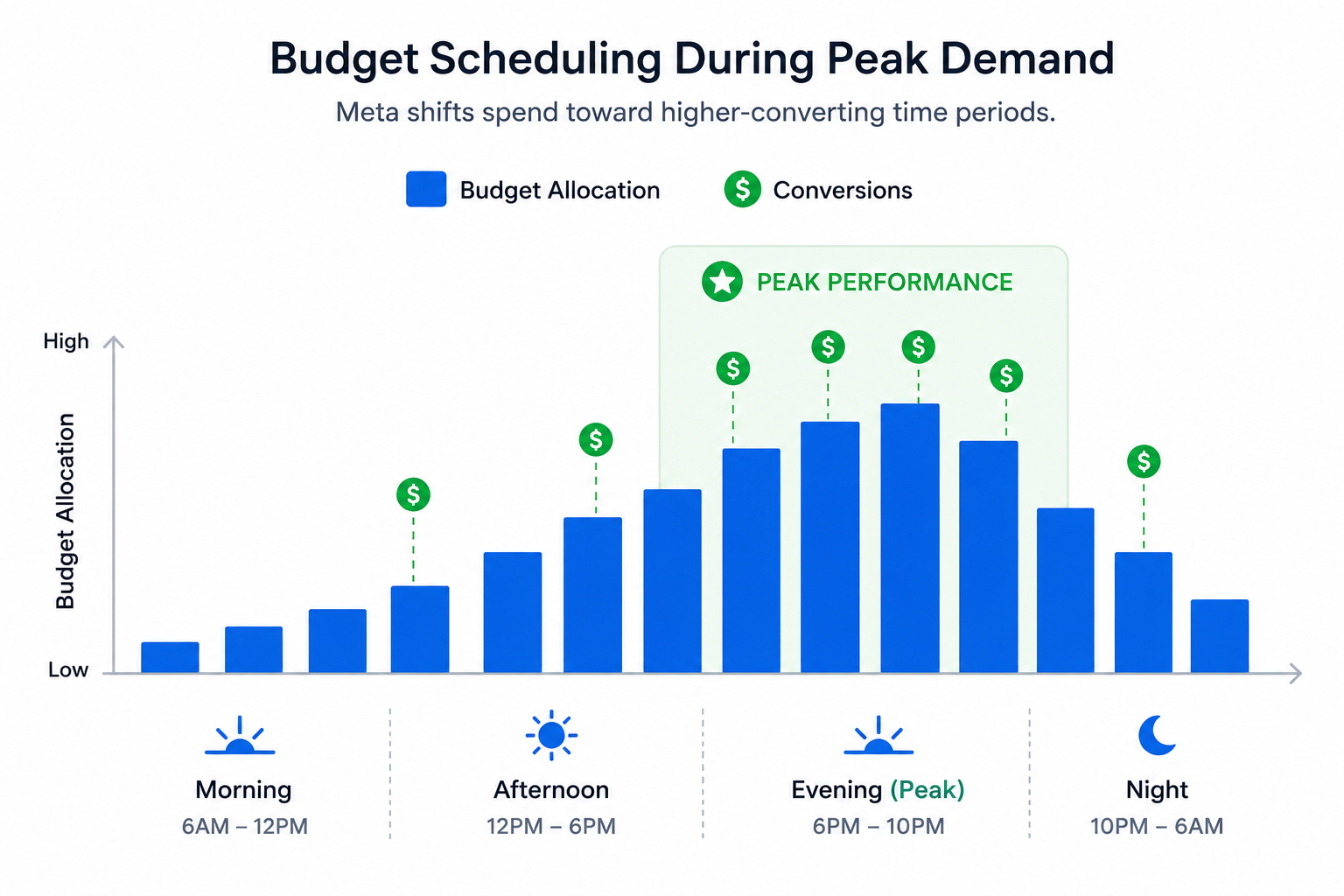
Second, high-demand periods must last at least three hours. You cannot create tiny 30-minute bursts around short traffic spikes.
Meta also limits campaigns to 50 scheduled periods per campaign or ad set. That usually matters for ecommerce advertisers running many seasonal promotions.
These limits are important because too many small schedule changes can create unstable pacing inside Ads Manager.
Why scheduled increases usually work better than manual changes
Manual budget edits often create delivery problems.
An advertiser raises spend in the middle of the day after seeing strong results. Meta suddenly has to spend more money immediately, so the system expands into more auctions very quickly.
You can usually spot the problem inside Ads Manager:
- CPM rises quickly.
- Frequency increases faster than normal.
- Spend shifts into weaker placements.
- Conversion rate drops even if CTR stays stable.
Scheduled increases are smoother because Meta already knows when the budget change will happen.
That gives the delivery system more time to adjust pacing before the traffic spike starts. It also reduces the chance of sudden spend volatility during important sales periods.
This works especially well when paired with ad scheduling and timing strategies.
When budget scheduling works best
Budget scheduling works best when buyer behavior follows a predictable pattern.
A B2B campaign may generate stronger leads during weekday mornings. An ecommerce store may see higher purchase rates on payday weekends or during flash sales.
The key factor is consistency. If the same periods keep producing better results, scheduled increases can help you capture more conversions without raising spend all week.
Strong use cases usually include:
- Product launches with fixed release dates.
- Weekend-heavy ecommerce campaigns.
- Webinar promotions near registration deadlines.
- Seasonal sales with predictable traffic spikes.
A gaming company launching a new title is a good example. Demand usually peaks during launch day and opening weekend, then drops afterward. Budget scheduling helps the advertiser spend more during the strongest demand window without permanently inflating costs.
Why budget scheduling can still hurt ROAS
The feature does not fix weak targeting.
If Meta cannot find enough qualified users during the scheduled period, the system still tries to spend the extra budget. That often pushes delivery into weaker traffic.
Several warning signs usually appear:
- CPM rises while CTR stays flat.
- Lead volume increases, but lead quality drops.
- Frequency climbs quickly in retargeting audiences.
- More spend goes toward weaker placements.
This is especially common in lead generation campaigns.
Meta can often generate more form submissions during scaling periods, but the additional leads are not always sales-qualified. The campaign looks stronger at the top of the funnel while actual revenue efficiency gets worse.
That is why budget optimization for lead generation campaigns matters before scaling aggressively.
Better audience quality makes budget scheduling safer
Audience quality matters more when spend increases quickly.
Large ecommerce brands can sometimes absorb scheduled increases with broad targeting because the audience size is massive. Smaller advertisers usually hit saturation faster.
That is where LeadEnforce becomes useful. Advertisers can build more precise audiences using Facebook groups, Instagram engagers, and social profile data instead of relying only on broad targeting.
This gives Meta stronger behavioral signals before the scaling period begins. In many cases, that helps maintain lead quality during temporary budget increases.
How to test budget scheduling properly
Many advertisers change too many things during scheduling tests.
They increase budgets, launch new creatives, expand audiences, and adjust placements at the same time. When performance changes, they cannot tell which edit caused the result.
A better approach is simpler.
Test one recurring high-demand period first. Keep the audience, creatives, and placements stable while the scheduled increase runs.
Watch these metrics closely:
- Hourly CPA trends.
- CPM movement during the scheduled period.
- Frequency growth in retargeting pools.
- Lead quality after CRM review.
This is where many advertisers make bad decisions. Early results often look strong because Meta spends aggressively and generates more conversions quickly. Several days later, sales teams notice weaker close rates and lower-quality leads.
That is one reason daily budget increases can hurt performance even when front-end metrics look healthy.
Budget scheduling vs ad scheduling
These two features sound similar, but they solve different problems.
Ad scheduling controls when ads can run. Budget scheduling controls when Meta can spend more money.
A restaurant campaign shows the difference clearly. Ad scheduling may stop delivery overnight when the business is closed. Budget scheduling may keep ads active all day while increasing spend during dinner hours.
One controls visibility. The other controls spend intensity.
Final takeaway
Meta budget scheduling works best when demand patterns are already clear inside your campaign data.
It helps advertisers spend more during strong conversion periods without permanently increasing budgets. But if the audience is weak or saturated, the extra spend usually leads to higher CPMs, weaker leads, and unstable performance.
Before using budget scheduling, make sure the campaign already has stable conversion data, reliable tracking, and enough audience depth to support scaling.