The Planner in Meta Business Suite looks like a simple scheduling tool. For many teams, it becomes exactly that — a place to line up posts and keep the content calendar organized.
But the way you schedule content has a direct impact on how your campaigns perform. Not because the Planner controls ads, but because it shapes the engagement signals your ads depend on.
If those signals are inconsistent, everything downstream becomes harder to optimize.
What the Planner Actually Controls
The Planner helps you organize and publish content across Facebook and Instagram from one place. You can schedule posts, stories, reels, and even plan campaigns around key dates or events.
In practice, most teams use it to:
-
map out weekly or monthly content calendars,
-
schedule posts ahead of time,
-
coordinate publishing across platforms,
-
manage drafts, edits, and revisions.
That sounds operational — but the timing and structure of this content determine how users interact with your brand.
Those interactions matter more than they seem.
Why Scheduling Has a Performance Impact
Every piece of content generates signals: views, clicks, reactions, comments. What matters is not just the volume of those signals, but how consistently they occur.
When content is well-timed and spaced properly, engagement builds naturally. More people interact, and those interactions form the basis of your warm audiences.
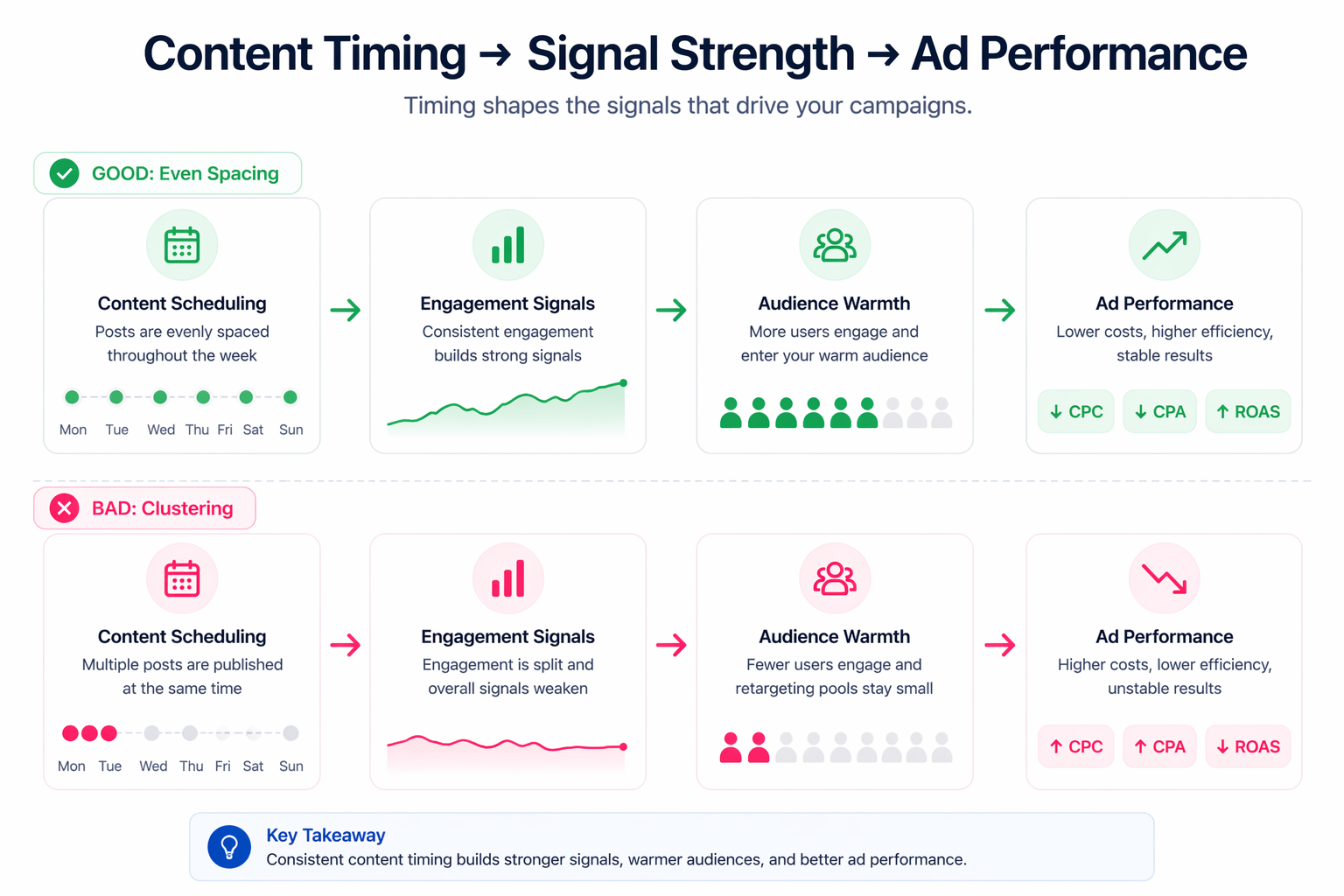
When scheduling is off, the opposite happens:
-
posts get minimal early engagement,
-
fewer users enter retargeting pools,
-
ads rely more heavily on cold traffic.
That shift affects both cost and efficiency.
A useful way to think about it is that organic activity helps build audiences before you pay for traffic — something explored in more detail in how to build ‘no-CPC’ warm audiences through organic Facebook activity.
Where Scheduling Starts to Break Down
Most issues come from how content is planned, not from the tool itself.
A few patterns show up repeatedly:
-
posting multiple pieces of content within a short time window, which splits engagement,
-
scheduling based on internal convenience rather than audience behavior,
-
treating content as a checklist instead of part of the performance system.
None of these look like critical mistakes on their own. But together, they weaken the signals feeding into your campaigns.
The problem is that this doesn’t immediately show up as a content issue. It often appears as rising CPC or declining conversion rates, which leads advertisers to adjust campaigns instead of fixing the source.
How This Affects CPC, CPA, and Campaign Stability
When engagement signals weaken, your campaigns lose efficiency in subtle ways.
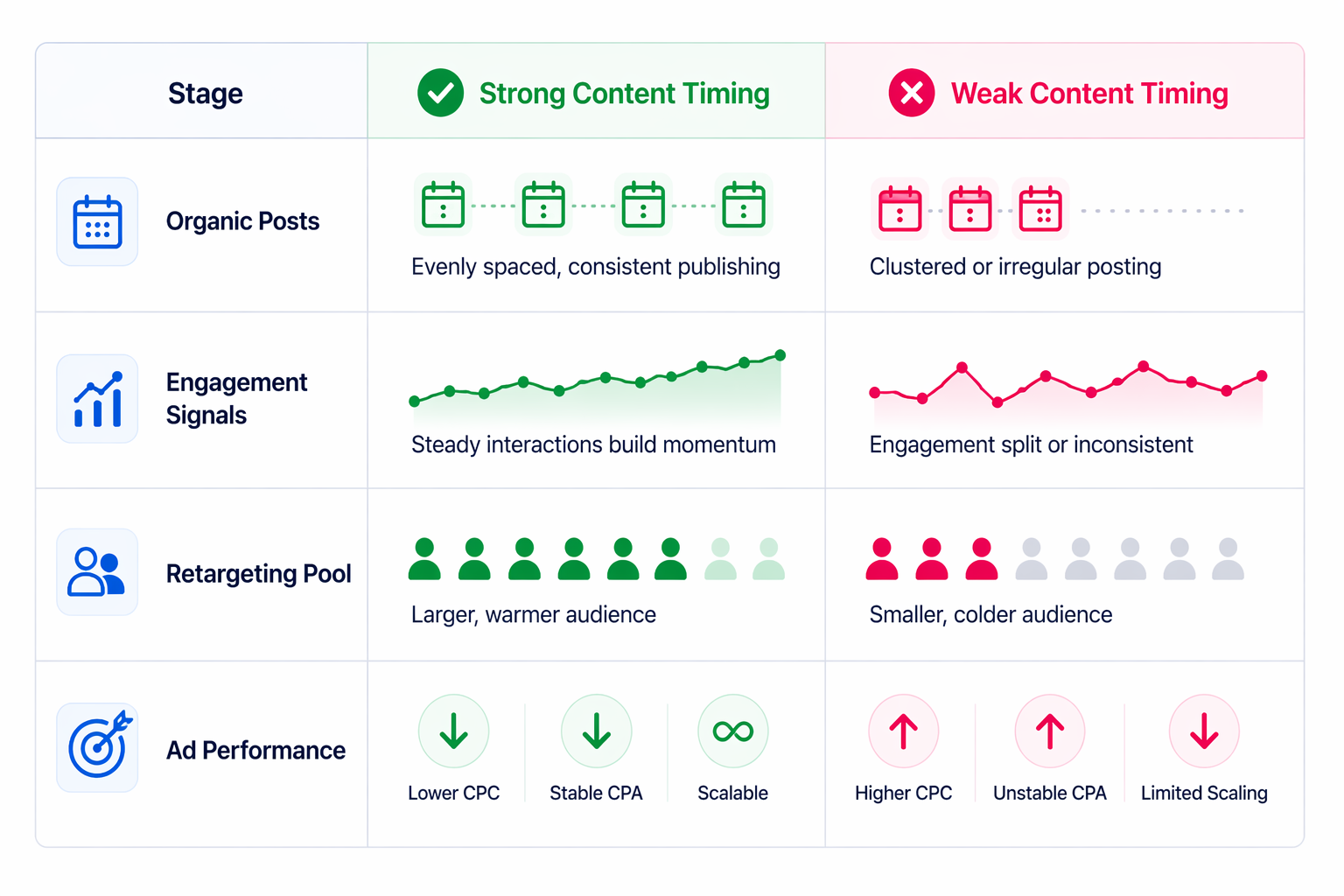
Over time, you’ll typically see:
-
CPC increase, because fewer users are already familiar with your brand,
-
CPA rise, as conversion rates drop on colder traffic,
-
slower learning, due to inconsistent audience signals,
-
reduced scalability, because performance becomes harder to predict.
Even strong creatives struggle when they’re shown to audiences with little prior engagement.
Typical Scenarios Where This Happens
In B2B campaigns, timing is critical because engagement volume is already limited. Posting outside active hours can significantly reduce the number of users entering your funnel.
In ecommerce, content often clusters around promotions. Multiple posts go live at once, which reduces engagement per post and weakens retargeting pools.
Agencies face a different version of the same problem. Content is scheduled in batches across multiple clients, but audience behavior differs for each one. Without adjusting timing, performance becomes inconsistent.
Local businesses tend to post whenever they have time, which often means low-activity periods. Engagement stays low, and boosted posts fail to convert effectively.
Using Planner Data to Improve Ad Performance
The Planner is not just for scheduling — it’s also a source of insight.
When you review how posts perform over time, you can start identifying patterns:
-
which days generate stronger engagement,
-
which formats drive interaction,
-
how timing affects reach and response.
Those insights should feed directly into your ad strategy.
For example, content that consistently drives engagement often translates into stronger ad creatives. This connection is explored in how to use learnings from organic posts to guide ad creative.
Ignoring this feedback loop is one of the reasons campaigns underperform despite strong creative ideas.
Building a More Reliable Content System
Improving performance through the Planner doesn’t require more content. It requires better structure.
A more effective approach looks like this:
-
space out posts to avoid competing for attention,
-
align publishing times with audience activity,
-
use content to warm up audiences before launching campaigns,
-
review engagement trends before making ad decisions.
Even small adjustments here can improve signal consistency significantly.
If you’re unsure what kind of content drives engagement in the first place, it helps to revisit the best organic Facebook post ideas to drive engagement.
Final Takeaway
The Planner controls when your content enters the system, and timing shapes how that content performs.
If scheduling is inconsistent, the signals feeding your campaigns weaken. That leads to higher costs, lower efficiency, and less predictable results.
When you treat content planning as part of your performance strategy — not just a publishing task — your campaigns become easier to optimize and much more stable over time.