Campaigns often perform well at low budgets, then stall when you try to scale.
When that happens, the issue is not always targeting or creatives. In many cases, it comes from how Meta evaluates your business behind the scenes.
Meta business verification is one of the signals that determines whether your account is treated as reliable or risky.
What Meta business verification actually does
Meta business verification confirms that your business portfolio belongs to a real, legitimate organization.
Your portfolio includes core assets such as Pages, ad accounts, domains, and catalogs. Verification connects all of them to a validated business identity.
To approve verification, Meta checks several things:
- your business is legally registered and consistent across documents;
- your contact details (email, phone, or address) are valid and accessible;
- you are authorized to represent the business;
- your domain is owned or controlled by your business.
This process does not give you a visible badge. Instead, it strengthens internal trust signals that affect how your campaigns are handled.
When verification becomes required
Verification is not always mandatory at the beginning. However, it becomes necessary as soon as you start expanding your activity.
At that stage, Meta may require verification to unlock or scale certain capabilities.
This typically includes:
- increasing your daily ad spend faster;
- accessing specific billing or payment features;
- using advanced integrations or developer permissions;
- running ads in regulated or sensitive categories;
- enabling features tied to messaging or commerce.
In practice, this means growth is often tied to verification status, even if campaigns are already running.
Why this affects campaign performance
The impact of verification is not always obvious. You won’t see a clear error message saying “verification required.”
Instead, performance starts to behave differently.
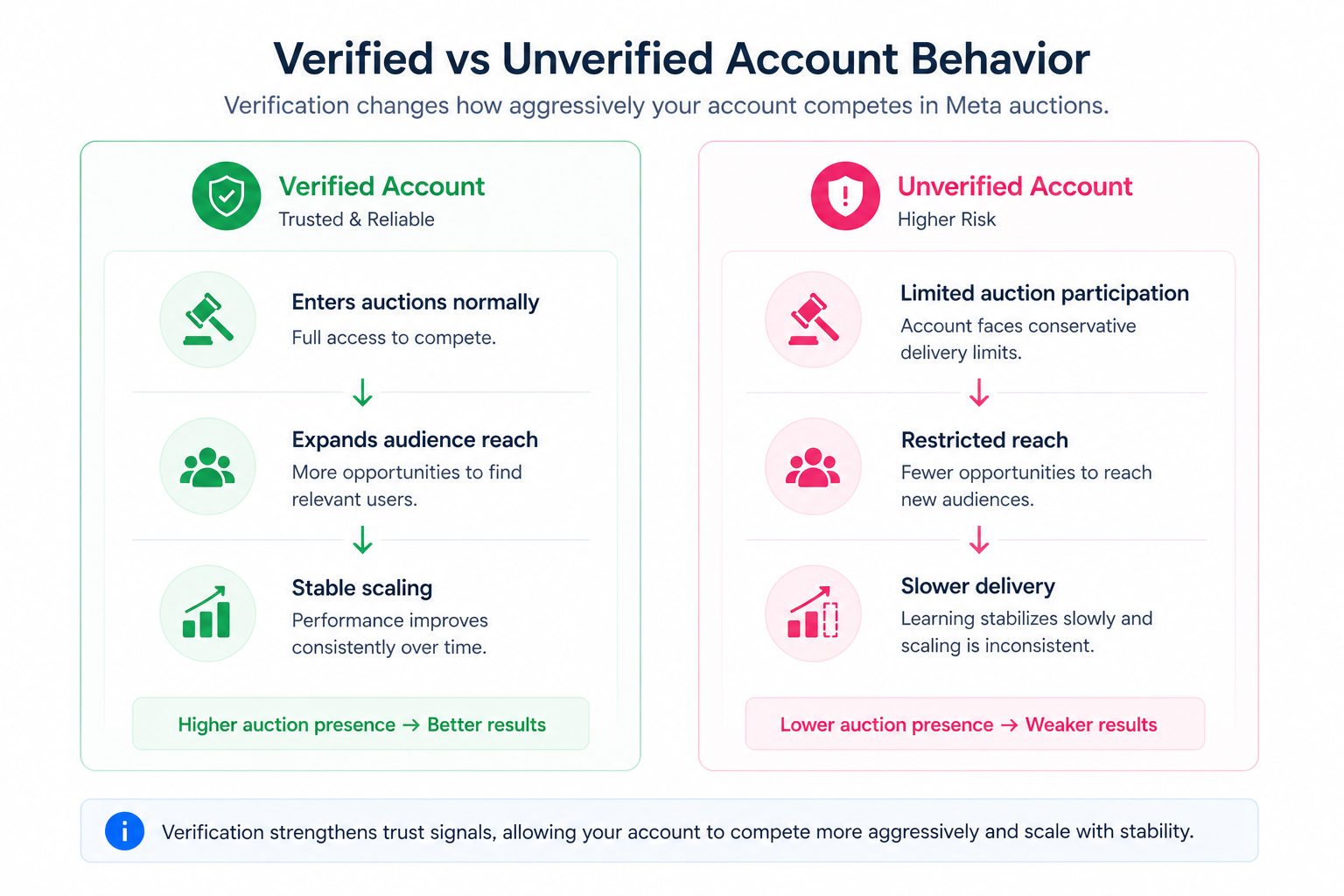
You might increase your budget and see little change in delivery. Or campaigns may take longer to stabilize after launch. In some cases, ads go through repeated reviews, which slows down execution.
This happens because Meta limits how aggressively unverified accounts compete in auctions. The system reduces risk by applying more conservative delivery logic.
Over time, this creates friction:
- slower learning phase stabilization;
- limited expansion into new audiences;
- inconsistent delivery during scaling.
If you’ve seen campaigns struggle without a clear reason, this can be one of the hidden causes. In similar situations, advertisers often assume the issue is targeting or funnel setup. For example, this breakdown of Why Your Facebook Ads Aren’t Generating Leads and How to Fix It shows how performance issues are often misdiagnosed.
Typical scenarios where this applies
Verification problems usually appear when campaigns become more complex.
A few common situations:
- An ecommerce brand increases budget during a promotion, but delivery doesn’t scale.
- An agency launches campaigns for a new client without verifying their business.
- A startup tries to unlock messaging or commerce features and gets restricted.
There is also a structural case that shows up often. Businesses managing multiple assets without a clear setup create inconsistent signals. That inconsistency affects how Meta evaluates the account.
In all of these scenarios, campaigns remain active, but performance becomes harder to predict.
Risks and considerations
Verification is straightforward in theory, but small inconsistencies can delay or block approval.
Most issues come from mismatched information. For example, your website might show a different business name than your official documents. Or your domain might not clearly represent your brand.
Timing also matters. Starting verification while actively scaling campaigns can introduce unnecessary instability.
If verification fails or gets delayed, it’s better to review the root cause first instead of resubmitting immediately. You can check common verification issues and fixes before trying again.
Practical recommendations
Treat verification as part of your campaign infrastructure, not a separate task.
Start by aligning your business details across all assets. Your website, Meta account, and official documents should match exactly. Even small inconsistencies can slow down approval.
Complete verification before scaling budgets or launching major campaigns. This reduces the risk of delivery limitations during critical periods.
It’s also important to look at verification as part of a larger system. Campaign performance depends not only on targeting, but also on how stable and trustworthy your account appears.
If you’re planning to scale, it helps to understand how campaigns behave at higher spend levels. This is explained in detail here:
The Science of Scaling Facebook Ads Without Killing Performance.
Final takeaway
Meta business verification is not just a setup step. It shapes how your campaigns scale, how stable they are, and which features you can use.
Without it, performance may look fine at first, but break under pressure. With it, you remove hidden constraints and create a more predictable foundation for growth.