You increase your budget expecting scale, but delivery barely moves.
CPM rises, reach stagnates, and conversion campaigns take longer to stabilize. These are not always creative or targeting problems.
In many cases, they trace back to business verification.
Meta uses verification as a trust layer. If your business is not fully verified, the system applies stricter delivery thresholds. That means fewer auction entries, higher costs, and slower optimization.
Where to check Meta business verification status in Security Centre
Before adjusting anything inside Ads Manager, check your status in Meta Business Suite’s Security Centre.
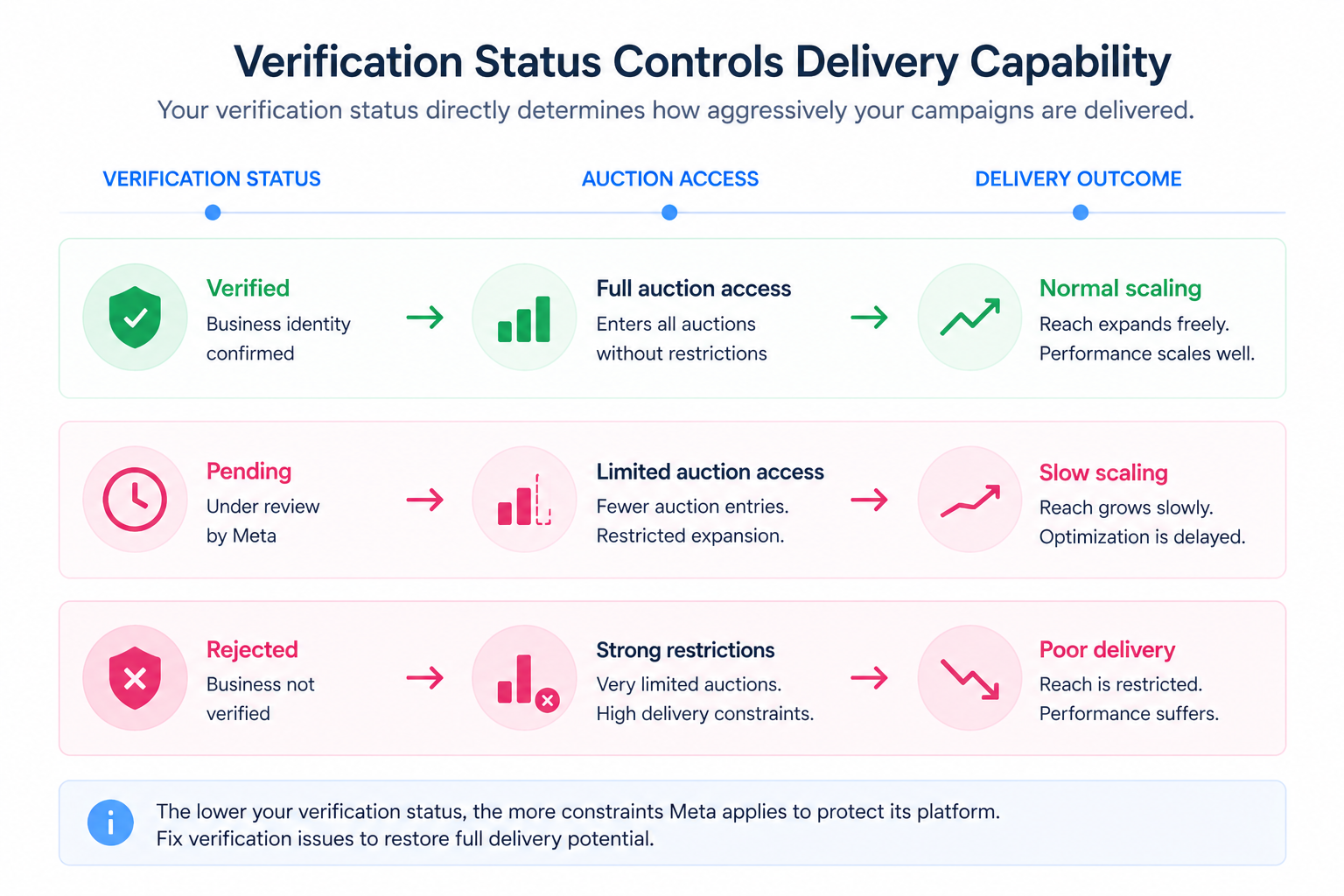
If your verification is:
- rejected,
- pending,
- or requires additional information,
your campaigns are already operating under constraints.
Many advertisers skip this step and try to fix delivery issues blindly. As a result, they end up applying tactics meant for problems like fix low reach on Facebook ads when the real issue sits at the account level.
Common reasons Meta business verification gets rejected
Verification failures usually come from inconsistencies across your business signals.
Meta evaluates whether your legal identity, website, and account behavior align.
The most frequent rejection causes include:
- Submitting inaccurate or misleading business information.
If your legal name, documents, or domain don’t match exactly, Meta cannot confirm ownership. - Attempting to verify a business you don’t own or control.
This is common in agency setups where access exists, but ownership is unclear. - Trying to bypass Meta’s verification system.
Multiple inconsistent submissions can trigger automated risk flags. - Using a website that fails validation checks.
A non-loading page, missing HTTPS, or broken links prevent Meta from verifying your business presence.
These issues don’t just block verification. They reduce account trust, which directly affects campaign delivery.
Why Meta asks for more information during verification
The “we need more information” status signals incomplete alignment between your documents and business data.
Meta cannot confidently connect your submission to a real, verified entity.
Typical issues include:
- Unsupported document types.
Only official documents that confirm your legal business identity are accepted. - Self-filed documents without official validation.
Documents must include a signature, seal, or government approval. - Language mismatch.
Unsupported languages require certified translations with official stamps. - Low-quality or unreadable files.
Blurry or corrupted documents fail both automated and manual checks. - Expired documentation.
Meta verifies validity dates and rejects outdated files automatically. - Mismatched business details.
Your business name, address, and phone number must match exactly across all assets. - Missing required identifiers.
For example, a bill without a business name cannot confirm ownership.
Repeated submissions without fixing these issues often lead to delays and further restrictions.
How verification problems affect Facebook ad delivery and scaling
When verification is incomplete, Meta reduces how aggressively your campaigns compete in auctions.
You’ll typically observe:
- restricted audience expansion when increasing budgets,
- rising CPM despite no targeting changes,
- uneven spend distribution across ad sets,
- slower optimization for conversion campaigns.
Inside Ads Manager, this often looks like performance inconsistency rather than a clear error.
In many cases, advertisers misinterpret this as poor optimization or creative fatigue. They apply fixes that would normally work for issues like why Facebook ads performance declines over time, but see no improvement.
What happens when Meta business verification is pending
Verification reviews can take up to 14 working days.
During this time, campaigns may appear stable at low spend but break during scaling.
A common pattern:
- Budget increases by 20–30%.
- Spend increases only slightly.
- Frequency rises instead of reach expanding.
This indicates limited auction access. The system is holding back delivery because account trust is not fully established.
Why you can’t start Meta business verification in Security Centre
Some advertisers don’t see the verification option at all.
This usually happens when:
- your business is not eligible yet.
New or inactive accounts may not meet verification thresholds. - required assets are missing.
For example, app developers must connect an app before verification becomes available. - verification was started on another platform.
In this case, the status won’t appear in Security Centre and must be checked elsewhere.
This often overlaps with broader account setup issues, which can later lead to restrictions if not resolved early. In those cases, it’s critical to avoid getting your Facebook ad account disabled by maintaining clean account structure and ownership clarity.
How to fix Meta business verification issues step by step
Resolving verification issues requires aligning all business signals, not just correcting forms.
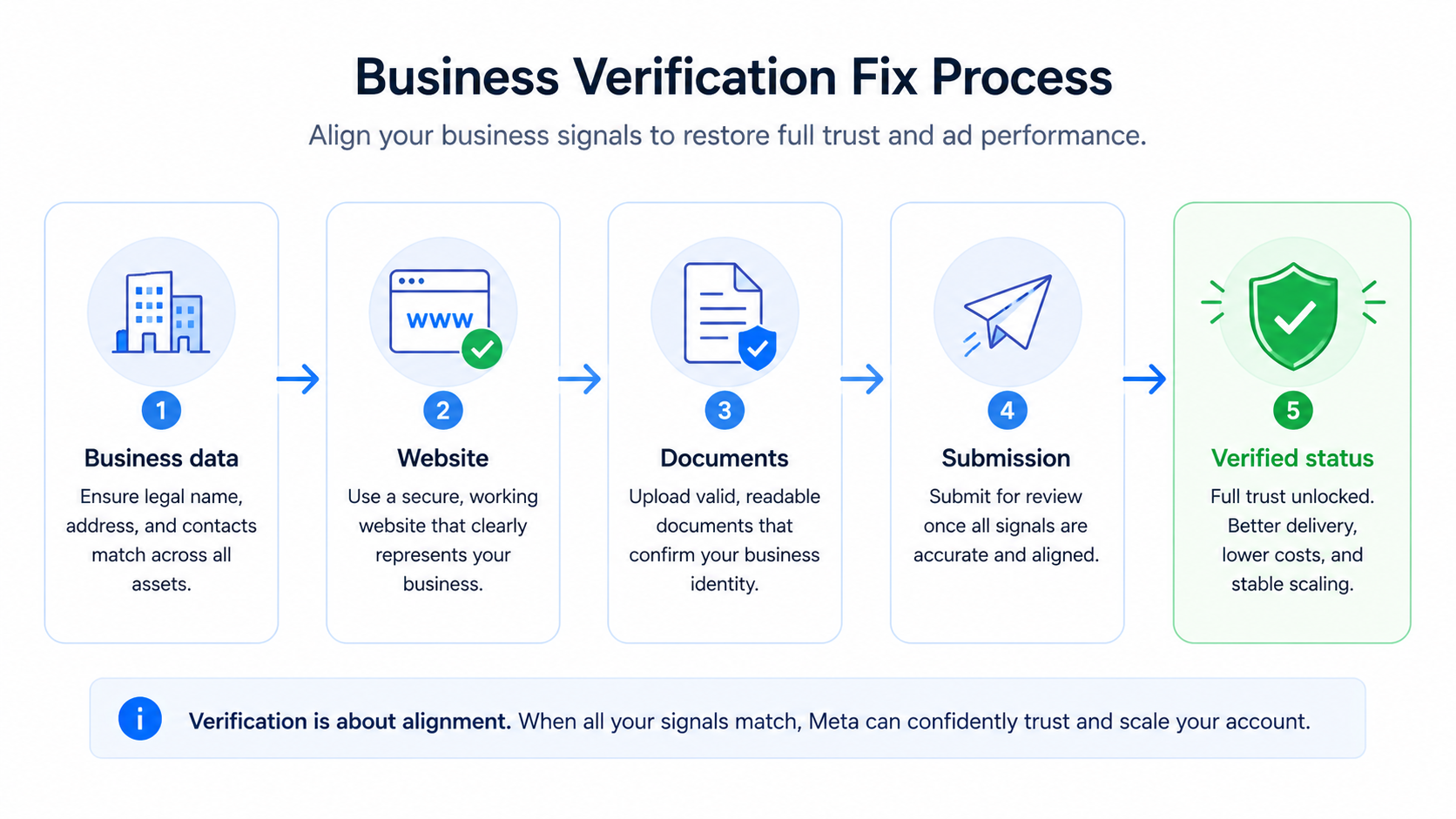
Focus on the following:
- Align your legal business information across all assets.
Your Business Manager details must match your official documents exactly. - Ensure your website is functional and secure.
Use HTTPS, fix broken pages, and clearly present your business identity. - Upload high-quality, valid documentation.
Documents must be readable, current, and include official validation marks. - Avoid repeated submissions without fixing inconsistencies.
Each failed attempt can reduce trust and slow down approval.
This is not a quick fix. It’s a structural correction of how your business appears inside Meta’s system.
How to maintain ad performance while fixing verification issues
While verification is unresolved, your account operates with reduced trust.
Broad targeting becomes less effective because Meta restricts expansion.
In this situation, focusing on higher-intent audiences helps stabilize performance. These audiences rely less on algorithmic expansion and more on existing behavioral signals.
Final takeaway: fix verification before optimizing campaigns
Verification issues don’t stop campaigns immediately. They limit them.
You’ll see slower scaling, higher costs, and unstable delivery before anything fully breaks. If performance drops without a clear cause, check verification first.
Restoring account trust often has a stronger impact than any campaign-level optimization.