A campaign can spend consistently, generate clicks, and still struggle to convert at a sustainable cost. When this happens in product-based campaigns, the issue often sits deeper than creatives or targeting. In many cases, the real bottleneck is catalog permissions, which quietly limit how product data flows into Meta’s delivery system.
Meta rarely flags permission problems as explicit errors, which makes them difficult to diagnose. Instead, the impact shows up indirectly through inefficient delivery, unstable results, and limited scaling.
What Meta catalog permissions actually control
Catalog permissions determine which ad accounts, users, and systems can access and use your product data inside Meta. This directly affects how campaigns interact with your catalog during delivery.
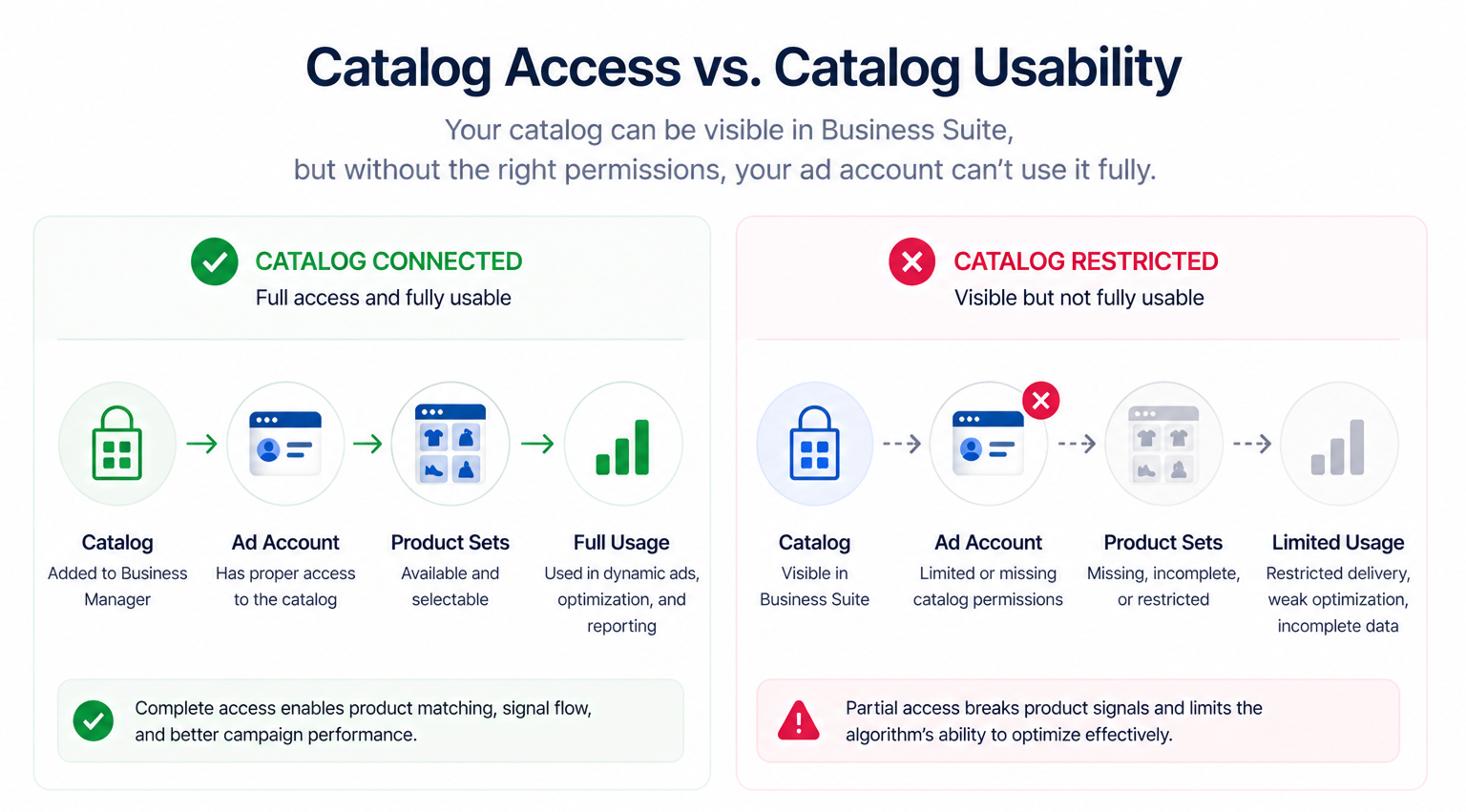
When permissions are configured correctly, the system can fully connect product data with user behavior. When they are not, the catalog may still appear connected in Business Suite, but the ad account operates with restricted access.
This usually affects three core areas:
-
Ad account usage. The ad account must have proper access to use the catalog in dynamic campaigns. Without it, product sets may not load or may be incomplete.
-
Product set availability. Campaigns rely on product sets for targeting and optimization. Limited access restricts what the algorithm can actually use.
-
Signal flow. Product interactions such as views and purchases need to feed back into the system. Permissions can interrupt that loop.
A common situation is when the catalog is visible inside the business portfolio, but the ad account cannot fully use it. Campaigns run, but product-level optimization never really kicks in.
Why permission gaps create delivery problems
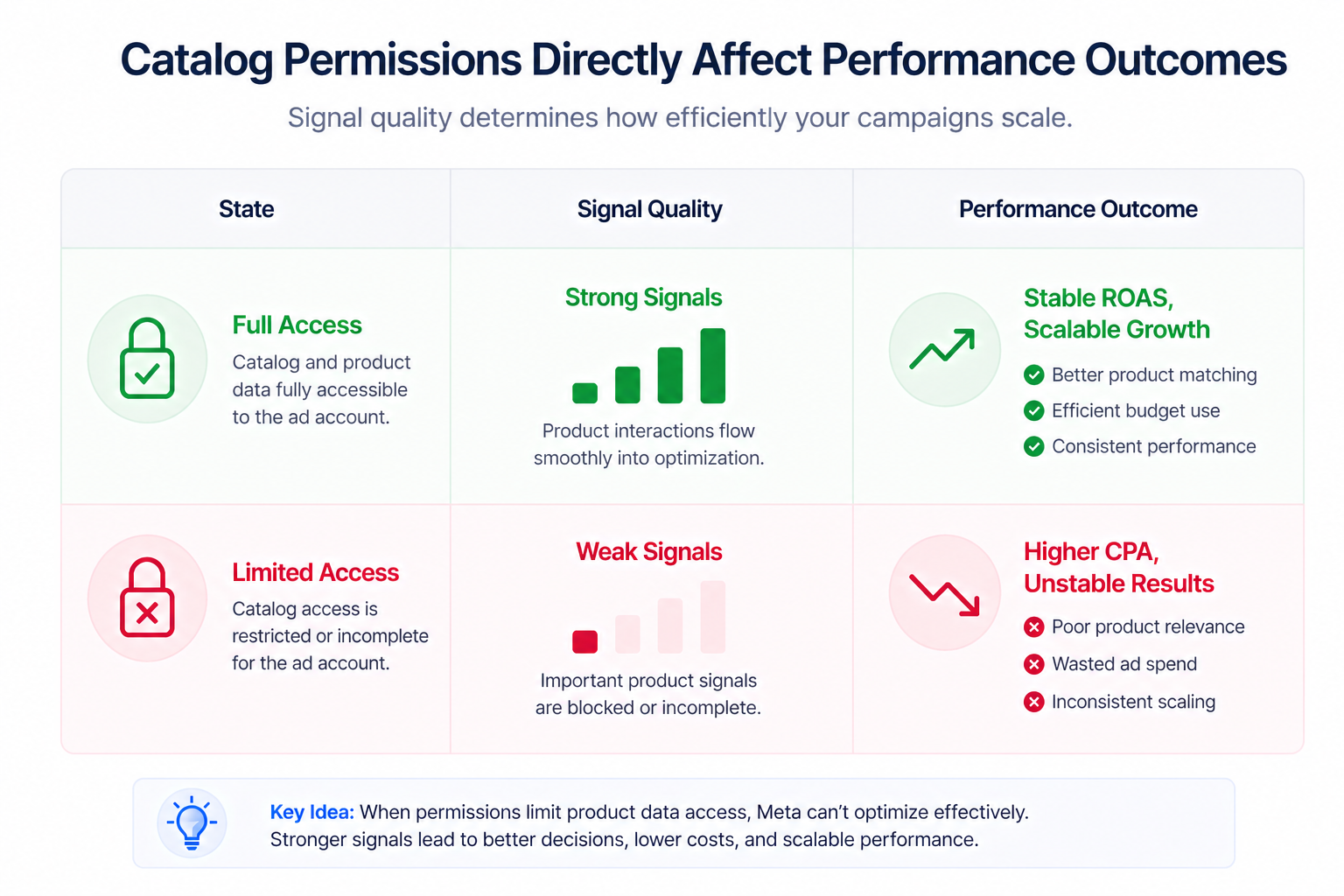
Meta’s delivery system depends on product-level signals to decide which ads to show and which products to prioritize. When permissions limit access to that data, the system starts making weaker decisions.
This typically creates three types of breakdowns:
-
Product matching weakens. The system cannot reliably connect users with the most relevant products, which reduces conversion probability.
-
Optimization signals degrade. Events like product views and purchases do not feed cleanly into the algorithm, so delivery becomes less precise.
-
Dynamic behavior is reduced. Ads stop adapting properly and begin to behave more like static campaigns.
Inside Ads Manager, this often looks like normal delivery with acceptable click-through rates, but declining conversion rates and rising CPA. If this pattern feels familiar, it mirrors situations described in Facebook Ads Not Converting: How To Fix It
Typical scenarios where this applies
Catalog permission problems usually appear in operational environments where multiple assets or teams are involved, and they rarely show up as clear setup errors.
Some of the most common scenarios include:
-
Agency onboarding.
An agency gets access to the ad account but not full catalog permissions, which results in campaigns that launch correctly but underperform due to limited product visibility. -
Multi-catalog ecommerce setups.
Businesses managing multiple catalogs across regions or product lines often assign permissions unevenly, which leads to inconsistent results across campaigns. -
Scaling with new ad accounts.
When new ad accounts are added, catalog access is not always replicated correctly, which creates performance gaps between otherwise identical campaigns. -
Business Manager migrations.
Catalogs that are moved or shared between portfolios often lose or reset permissions, which disrupts active campaigns without obvious warnings.
In each case, the issue presents as performance instability rather than a visible technical problem.
Risks and considerations
Fixing permissions requires precision, because incorrect changes can create new issues.
Key things to watch:
-
Over-permissioning.
Giving too many users full control increases the risk of accidental feed edits or product set changes. -
Wrong catalog assignment.
Connecting the wrong catalog to an ad account can fragment performance data and distort reporting. -
Partial access setups.
View-only permissions can create visibility without usability, which slows down troubleshooting. -
Ignoring feed quality.
Permissions do not compensate for weak product data, so poor titles, images, or categorization will still limit performance.
Prerequisites and dependencies
Catalog permissions only drive performance when the rest of the system is properly configured.
Before expecting results, make sure you have:
-
A clean and regularly updated product feed.
-
Clear product structure and consistent categorization.
-
Active ad accounts running conversion-focused campaigns.
-
Reliable event tracking across the funnel.
-
Enough product volume for the algorithm to optimize effectively.
If these elements are missing, improving permissions will not fully resolve delivery issues.
Practical recommendations
The most reliable way to evaluate catalog permissions is to look at campaign behavior instead of relying on settings alone.
Start by validating usability inside Ads Manager:
-
Can you select the correct product sets during campaign setup?
-
Do dynamic ads populate with expected products?
-
Is product-level reporting consistent and complete?
If any of these checks fail, permissions are likely incomplete.
Next, align catalog access with campaign structure. Each ad account should be connected to the catalog it is expected to scale with, without unnecessary fragmentation.
It is also important to separate responsibilities. Feed management should remain restricted to specific roles, while media buyers should have enough access to build and optimize campaigns without modifying the catalog.
Finally, connect catalog permissions with audience quality. If you are using high-intent audiences, especially enriched segments built from behavioral or social data, product matching becomes more critical.
Stronger audiences increase the pressure on delivery precision. When that precision is missing, performance drops — even if targeting is correct. This pattern is part of broader campaign inefficiencies discussed in Why Your Facebook Ads Strategy Isn’t Working (And How to Fix It)
Final takeaway
Meta catalog permissions directly influence how product data feeds into ad delivery, and when access is incomplete, the algorithm operates with limited visibility.
That limitation leads to inefficient spend, weaker optimization, and inconsistent scaling.
Fixing permissions does not create performance on its own, but without it, performance cannot scale.