A campaign reports 4.5 ROAS in Ads Manager. You scale the budget expecting revenue to climb. Instead, sales stay almost unchanged.
Nothing appears broken inside the account. CPM is stable. Conversion rate looks normal. Facebook keeps reporting purchases.
Situations like this happen because Ads Manager does not measure business impact. It measures which ad interaction happened before a conversion event.
That distinction is small in wording but huge in practice. Most reporting discrepancies come from how attribution assigns credit inside the system. Understanding how attribution works is essential if you want to interpret campaign performance correctly.
Facebook Assigns Conversion Credit Based on Interaction Timing
Open the breakdown of a purchase event in Ads Manager and you will see it tied to a campaign, ad set, and specific ad.
This connection is created by the attribution system.
When a user interacts with an ad and later triggers a purchase event on the site, Meta links the two events if they fall inside the attribution window.
A simple example illustrates how this works:
-
A user searches your product on Google.
-
They visit the site and compare several options.
-
Later they see a retargeting ad in Instagram.
-
They click the ad and buy.
Ads Manager attributes the purchase to the Instagram ad.
From the system’s perspective, this is correct. The ad interaction happened before the purchase event, which satisfies the attribution rule.
What the platform cannot determine is whether the purchase would have happened anyway.
Attribution Windows Capture Conversions That Were Already in Motion
Look at the attribution setting in most ad accounts and you will see 7-day click / 1-day view.
That window creates a large measurement zone where ads can receive credit.
Imagine a customer who already intends to buy. They might:
-
research the product in the morning;
-
return in the evening to purchase;
-
encounter a retargeting ad during the day.
Because the purchase falls inside the attribution window, the conversion is assigned to the ad.
In accounts with strong organic demand, this situation occurs frequently. The platform ends up recording conversions that were already progressing toward completion.
This is why scaling retargeting campaigns sometimes increases reported ROAS without producing the same change in total revenue.
Retargeting Audiences Contain Users Who Were Already Close to Purchasing
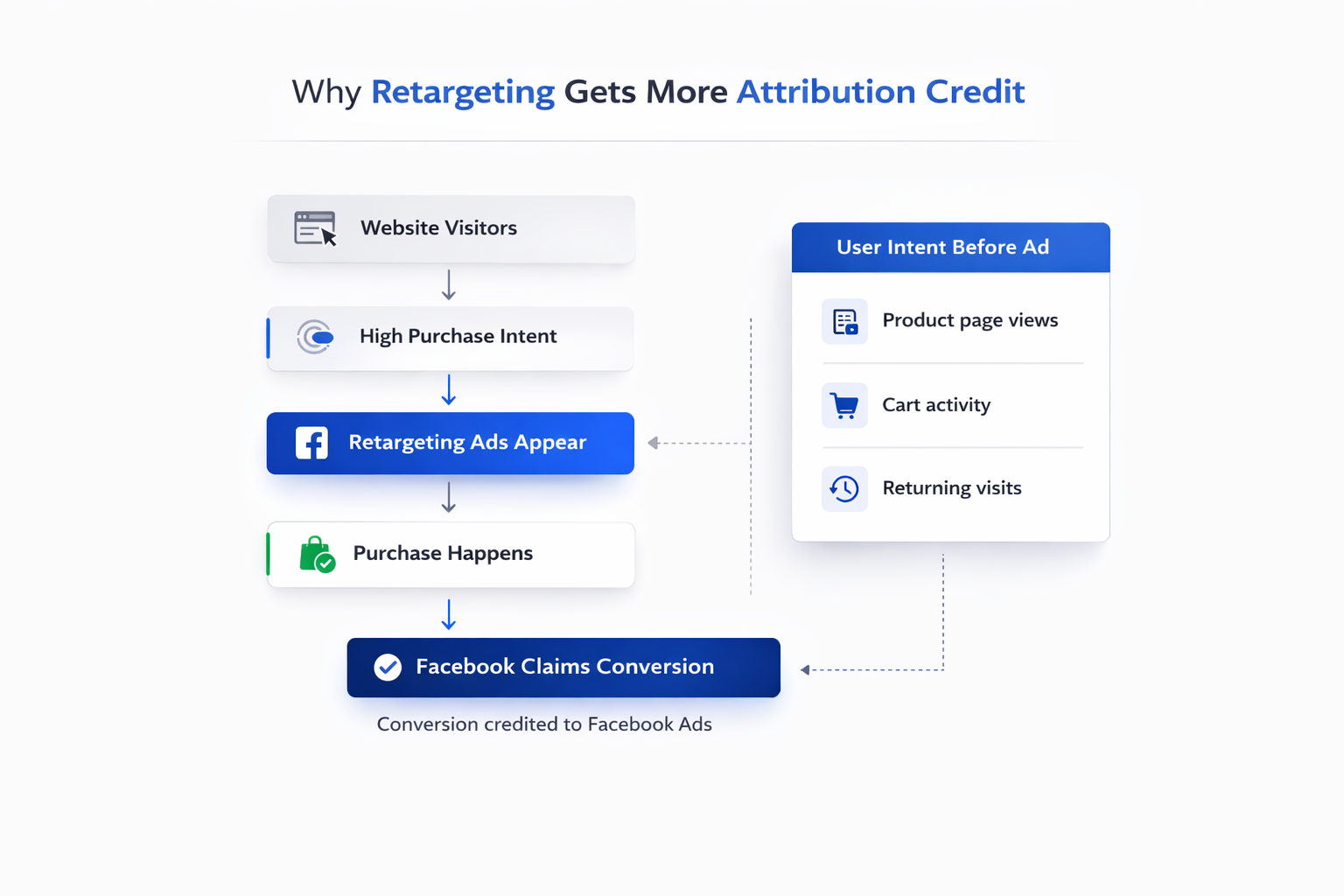
If you inspect a typical retargeting audience in Meta, it usually contains users who:
-
viewed product pages;
-
visited pricing sections;
-
added items to cart.
These signals already indicate high purchase intent.
When ads are delivered to this group, the attribution system often captures conversions that were about to happen regardless of the ad.
Media buyers often notice this pattern when retargeting performance looks dramatically stronger than prospecting.
For example:
- Prospecting campaign: ROAS — 1.8
- Retargeting campaign: ROAS — 8.5
The difference does not necessarily mean retargeting created four times more value. It often means the retargeting campaign intercepts users who were already moving toward checkout.
Attribution rules then assign those purchases to the ads.
A big factor here is how audiences are structured. Advertisers who carefully segment traffic often see clearer performance differences between prospecting and retargeting. Techniques like behavioral segmentation and lifecycle grouping can reduce attribution noise. This is explained in more detail in Maximizing ROI through Facebook Audience Segmentation.
View-Through Conversions Can Inflate Results
A surprising number of conversions inside Ads Manager come from impressions rather than clicks.
These are view-through conversions.
A user might scroll past an ad without interacting. If they later purchase within the view attribution window, the conversion may still be recorded.
In practice this happens in situations like:
-
the user receives a promotional email;
-
they open the site from the email;
-
they previously saw a Facebook ad earlier in the day.
The purchase falls inside the one-day view window, so the ad receives credit.
When campaigns generate millions of impressions, even a small percentage of these cases can produce a significant number of attributed conversions.
Cross-Channel Journeys Create Duplicate Reporting
Look at a typical ecommerce purchase journey and you will rarely see only one channel.
Users move between:
-
search ads;
-
social ads;
-
email campaigns;
-
direct visits;
-
organic content.
Each advertising platform runs its own attribution system. None of them share attribution logic with each other.
A single purchase might therefore appear in multiple reports.
For instance:
-
Google Ads records the conversion because a search ad was clicked;
-
Facebook records the same purchase because a retargeting ad was clicked before checkout.
Both systems claim credit using their own rules.
When advertisers compare platform reports with backend sales data, the total number of attributed conversions often exceeds the number of actual orders.
This overlap becomes even more visible when campaigns combine multiple audience strategies such as custom audiences and lookalikes. If you want to understand how those systems interact in delivery and attribution, Custom vs Lookalike Audiences: What Works Best for Facebook Campaigns? breaks down the operational differences between the two.
Ads Manager Records Pixel Events, Not Verified Orders
Another important detail is the way Facebook measures conversions.
Ads Manager does not see the transaction itself. It receives a purchase event triggered by the pixel or Conversions API.
Several technical factors can influence how these events appear in reporting:
-
duplicate pixel triggers caused by page reloads;
-
incorrect purchase values sent by the tracking script;
-
delayed server-side events;
-
modeled conversions introduced after privacy restrictions.
The optimization algorithm still uses these signals effectively, but they are not identical to the confirmed transactions in your store database.
As privacy restrictions continue to affect tracking accuracy, many advertisers are expanding beyond Meta’s built-in targeting and measurement tools. A broader overview of alternative data approaches can be found in Smarter Audience Building: Beyond Meta’s Built-In Targeting Tools.
Signals That Facebook Reporting May Be Over-Attributing
Certain patterns inside an ad account often suggest that attribution credit is inflating campaign performance.
Media buyers commonly notice signals like these.
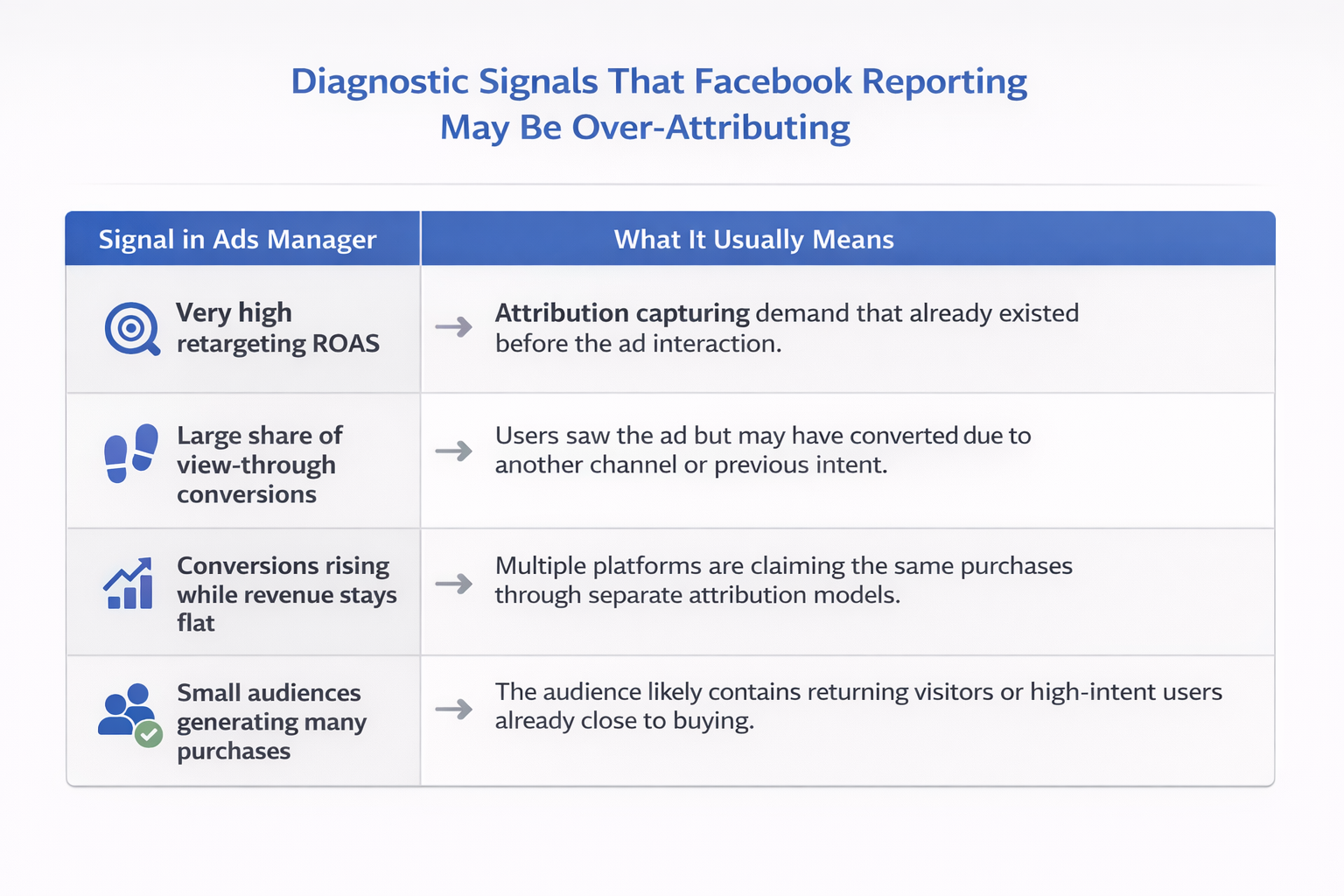
Retargeting performance looks unrealistic.
When retargeting campaigns show ROAS above 10 while prospecting struggles to break even, attribution credit is often capturing conversions from returning visitors.
Revenue does not move with reported conversions.
If Ads Manager reports increasing purchases but store revenue remains stable, multiple channels may be claiming the same conversions.
View-through conversions dominate results.
Large volumes of view-through purchases indicate the system is assigning credit based on impressions rather than active engagement.
Small audiences produce large conversion counts.
Highly restricted audiences often contain users who already planned to purchase.
None of these signals prove the ads are ineffective. They simply suggest the platform is capturing conversions that were already likely.
How Experienced Advertisers Check Real Impact
Advertisers who run large budgets rarely rely on a single attribution report.
They compare several measurement perspectives.
Compare Ads Manager data with backend revenue
Your ecommerce platform records the actual number of orders and revenue. When Ads Manager reports significantly more conversions than your store records, attribution overlap is likely occurring.
Track blended efficiency metrics
Many teams monitor metrics such as:
-
marketing efficiency ratio (MER);
-
blended cost per acquisition (CPA);
-
total revenue relative to total ad spend.
These indicators reveal whether advertising is driving overall business growth.
Run incrementality tests
A simple way to test attribution impact is to pause or isolate certain campaigns.
Examples include:
-
temporarily disabling retargeting;
-
excluding a geographic region from ads;
-
running audience holdout experiments.
If sales remain stable during these tests, some previously attributed conversions were probably not incremental.
The Key Perspective Shift
Ads Manager reporting is extremely valuable for understanding how the delivery system behaves.
It shows:
-
which audiences respond;
-
which creatives trigger conversions;
-
how campaigns scale.
But the reporting system answers a very specific question: Which ad interaction happened before the purchase event?
It does not answer the more important business question: Would the customer have purchased without the ad?
Once advertisers separate those two ideas, Facebook reporting becomes much easier to interpret.
Instead of treating attributed conversions as pure revenue generation, they become signals about where the platform is capturing demand inside the customer journey.