When teams switch from website conversions to Facebook lead forms, the first visible result is usually a drop in CPL and a noticeable increase in lead volume. On the surface, this looks like immediate improvement, and in Ads Manager the campaign often stabilizes quickly.
The problem tends to appear later — once those leads reach sales. Response rates decline, qualification becomes inconsistent, and pipeline growth no longer matches the increase in lead volume. At that point, it’s common to question targeting or creatives.
In most cases, neither is the root cause. The drop in quality comes from how lead forms change user behavior before the algorithm even starts optimizing.
Users Submit Before They Form Intent
With lead forms, most of the friction that normally slows a user down disappears. The form opens instantly inside the app, key fields are already filled in, and submission takes only a few taps.
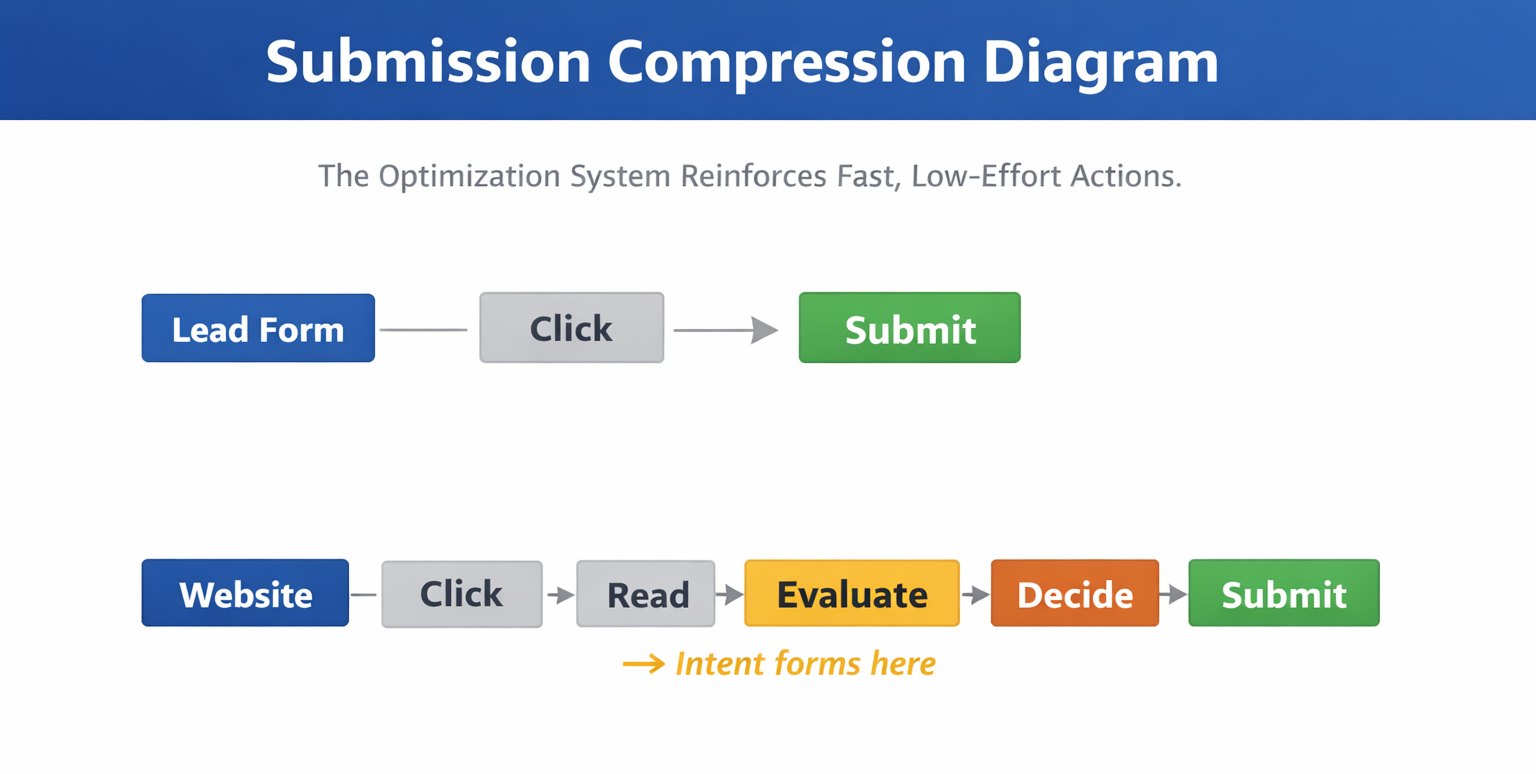
In practical terms, this compresses the time between click and conversion to just a few seconds. That window is too short for a user to properly understand the offer or decide whether it’s relevant.
You can usually confirm this through downstream behavior. Sales teams often report that leads:
-
don’t remember submitting,
-
have only partial context,
-
ask basic qualifying questions during follow-up.
This connects closely to how intent and attention diverge, explained in The Attention-Recall Gap: Why Clicks Don’t Equal Conversions.
The Optimization System Reinforces Fast, Low-Effort Actions
Once quick submissions start accumulating, Meta’s delivery system adapts.
From the platform’s perspective, performance improves. Conversion rates increase, costs drop, and the system gets a clear signal to scale. It responds by prioritizing users who behave similarly — people who complete actions quickly and with minimal resistance.
Over time, delivery shifts toward that segment.
You’ll often notice:
-
stable or declining CPL,
-
consistent lead volume throughout the day,
-
fewer fluctuations in delivery.
But outside Ads Manager, a different pattern appears. Sales acceptance rates decline, and fewer leads translate into real opportunities.
This is the same disconnect described in Ad Metrics That Lie: When Good Numbers Hide Bad Performance.
The Role of Friction in Filtering Leads
A landing page does more than present information — it acts as a filter.
Users read, scroll, hesitate, and often drop off when the offer doesn’t match their expectations. That friction removes low-intent users before they convert.
Lead forms eliminate that entire layer.
Instead of filtering before submission, you shift that responsibility to sales.
In practice, this changes where drop-off happens:
-
With landing pages → drop-off happens before the lead is created.
-
With lead forms → drop-off happens after the lead enters your pipeline.
That shift is why pipelines built on lead forms often show a sharp drop between lead and qualified stages.
Why Campaign Metrics Become Misleading
Because lead forms increase conversion rates, they almost always improve CPL. That makes campaigns look more efficient, especially in early reporting.
However, once you connect campaign data with sales outcomes, the pattern changes.
Lead volume increases, but qualified leads and opportunities do not scale at the same rate. CPL improves while actual business outcomes stay flat.
You typically see something like this:
-
More leads generated week over week.
-
Similar number of qualified leads.
-
Little to no growth in opportunities or revenue.
A more accurate way to evaluate performance is explained in How to Analyze Facebook Ad Performance Beyond CTR and CPC.
When Lead Forms Work More Reliably
Lead forms tend to perform better when the user already has context before interacting with the ad.
This usually happens in cases like:
-
retargeting users who visited product or pricing pages,
-
campaigns built around strong brand recognition,
-
narrow B2B audiences with clear intent signals.
In these situations, the form captures existing demand instead of creating it.
Improving Lead Quality Without Removing Lead Forms
If lead forms are part of your acquisition system, the goal is not to remove them but to reshape the signal they produce.
There are three practical levers you can use.
First, introduce friction inside the form. Asking users for specific details — such as budget, timeline, or company size — slows down submission and filters out low-intent users.
Second, control what happens after submission. Not every lead should go directly to sales. Filtering or scoring leads before handoff reduces wasted effort and improves visibility into quality.
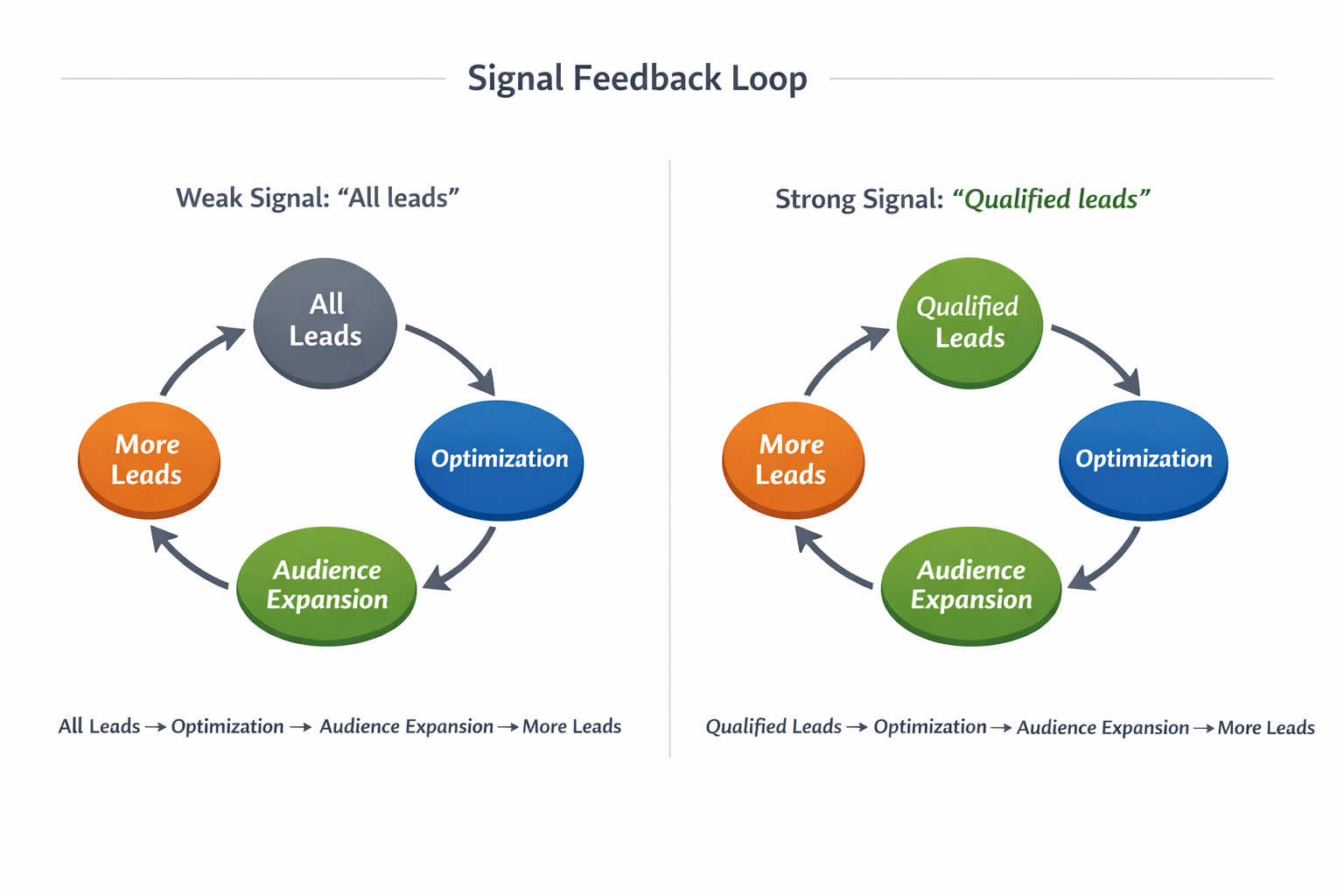
Third, change the optimization signal. When Meta receives only “lead” events, it finds the cheapest conversions. When you send back qualified leads or pipeline events, delivery gradually shifts toward higher-intent users.
The Tradeoff Behind the Format
Lead forms are designed for speed and scale. They reduce effort, increase conversion rates, and generate large volumes of leads quickly.
They weaken the connection between conversion and intent.
If you measure only CPL, lead forms will almost always look better. If you measure what happens after the lead, the answer often changes.
Final Takeaway
Facebook lead forms generate low-quality leads for a structural reason — they remove the moment where intent is formed.
Once that step disappears, the algorithm learns from low-effort actions and optimizes around them.
Improving results is not about tweaking targeting or creatives. It’s about restoring meaningful signals — either by adding friction or by optimizing for outcomes that reflect real intent.