Facebook Page ad setup looks easy because Meta removes most of the technical language from the launch flow.
You go to your Page, click Promote, choose an ad type or goal, add creative, define an audience, set a budget, and publish. Meta describes this as the basic flow for creating ads from a Facebook Page.
That simplicity helps small businesses launch faster. It also creates a real problem for advertisers who care about cost per lead, conversion rate, CAC, and ROAS.
The Page flow can make a campaign feel “set up” before the advertiser has made the decisions that actually control performance.
Problem: Facebook Page ads look like quick promotions, not real campaigns
The biggest confusion comes from the way the Page interface frames the decision.
Instead of asking you to build a campaign from the objective down, it usually starts with a visible Page action. You may see options to boost a post, promote the Page, get more messages, or drive people to a website.
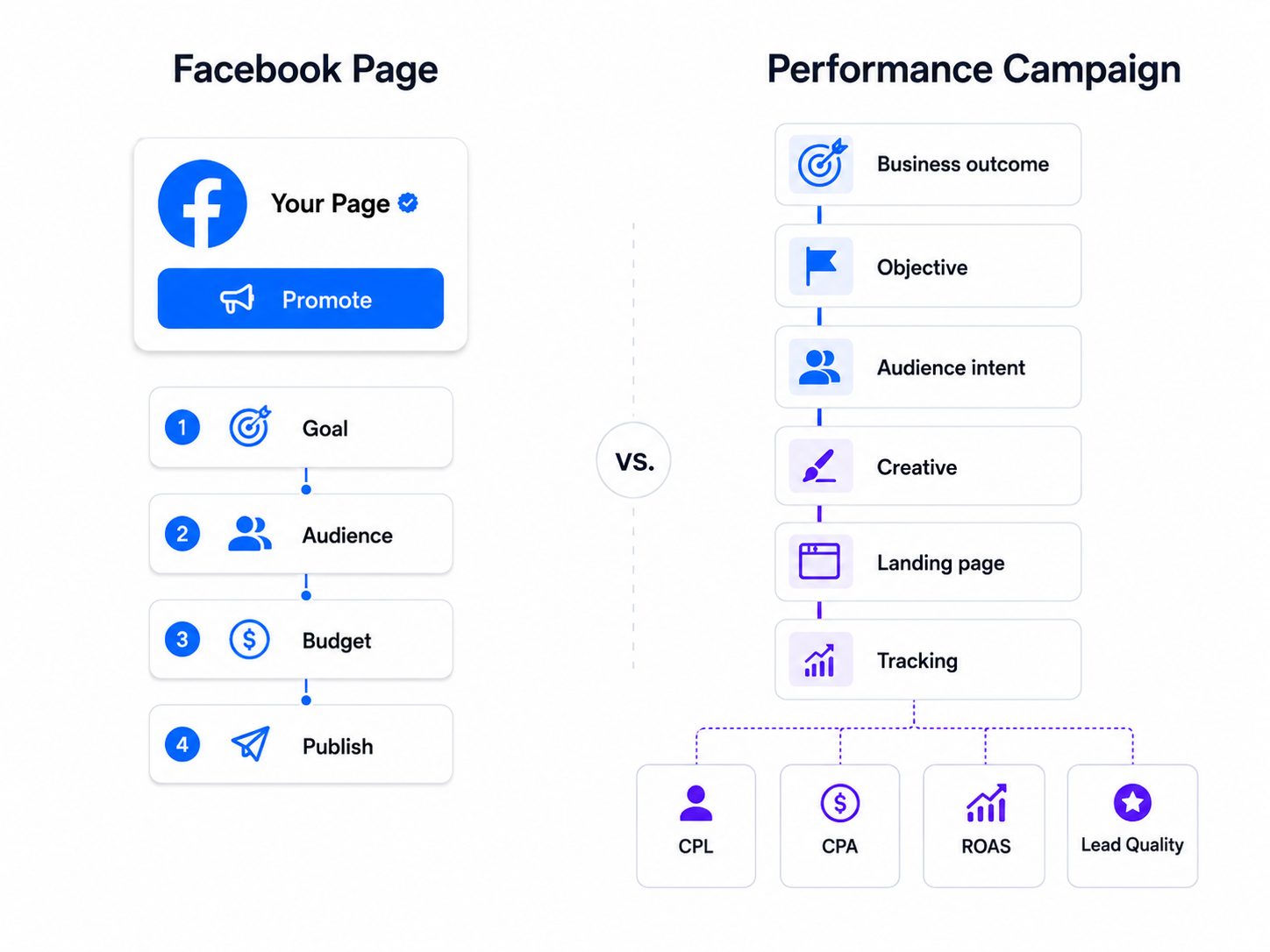
Those options sound simple. But each one tells Meta what type of user behavior to prioritize.
That is where many advertisers lose control.
A business owner may choose “get more engagement” because the post already performed well organically. A media buyer would ask a different question: are those engagement signals connected to buyers, leads, bookings, or revenue?
If the answer is unclear, the campaign may optimize for low-value actions.
Solution: choose the business outcome before clicking Promote
Do not start with the Page button. Start with the result you need.
If you need sales calls, the campaign should support booked calls. If you need qualified leads, the setup should support lead quality, not just form volume. If you need purchases, the ad should send users into a conversion path that Meta can measure.
Before using the Page flow, write one clear launch sentence: “This ad should generate [specific action] from [specific audience] using [specific offer].”
That sentence keeps the setup from drifting into cheap engagement. It also helps you decide whether the Page flow is enough, or whether Ads Manager is the better place to build the campaign.
For a related setup issue, read why boosted posts often limit campaign control.
Problem: Page-based setup hides the difference between ad goals and business goals
A Facebook Page ad goal is not always the same as a business goal.
“Get more website visitors” can sound useful, but Meta may optimize toward users who click often. That does not mean they are likely to request a demo, buy a product, or become a qualified lead.
The same issue appears with engagement campaigns. A post can collect reactions, comments, and profile visits while doing little for pipeline.
This is common in B2B and high-ticket service campaigns. The Page ad gets activity, but sales feedback is weak. The advertiser sees movement in Ads Manager, while the CRM shows poor lead-to-opportunity conversion.
The campaign did what it was told to do. It just was not told to find the right outcome.
Solution: match the setup goal to the next measurable step
A proper Page ad launch needs a direct line between the ad goal and the next measurable action.
If you are promoting a lead magnet, the next measurable step may be a form submission. If you are promoting a consultation, the next step may be a booked appointment or completed inquiry. If you are promoting an ecommerce product, the next step may be add-to-cart or purchase, depending on account volume.
The key is to avoid soft goals when the business needs hard outcomes.
Here is a simple way to check the match:
-
If the goal is awareness, judge reach, frequency, video views, and downstream retargeting pool quality.
-
If the goal is traffic, judge landing page views, bounce behavior, and post-click actions.
-
If the goal is lead generation, judge lead quality, sales acceptance rate, and cost per qualified lead.
-
If the goal is revenue, judge purchases, CPA, ROAS, and average order value.
A Page ad can still be useful. But the goal must reflect the campaign’s real job.
Problem: advertisers promote existing posts that were not built to convert
Page setup often starts with a post that already exists.
That can be convenient. It can also be a bad signal.
Organic posts are usually written to inform, update, entertain, or build trust. Paid ads need a tighter job. They need to stop the scroll, create relevance fast, make the offer clear, and move the right user to the next action.
A post that worked organically may fail as paid creative because the context changes. Organic followers already know the brand. Cold users in paid delivery may not.
This is why a Page post with likes and comments can still produce weak paid results. The engagement history looks promising, but the ad does not explain enough to convert new users.
Solution: edit the ad version for paid intent
Before turning a Page post into an ad, check whether it works for someone seeing the brand for the first time.
The user should understand three things quickly:
-
What the offer is.
-
Who it is for.
-
What action to take next.
If any part is unclear, adjust the ad version before launch.
For example, a SaaS company should not promote a vague product update to cold traffic. It should connect the update to a specific pain point, such as reducing manual prospecting or improving lead quality.
A local service business should avoid promoting a generic “we are open” post unless the goal is basic awareness. If the goal is bookings, the ad needs a clear service, location, proof point, and booking path.
Paid traffic needs sharper context than organic reach.
Problem: Page ad audiences are often chosen too quickly
The Page flow makes audience selection feel like a small step.
For simple local promotions, that may be fine. A café promoting a weekend offer can use a tight local radius and still get relevant reach.
For lead generation, niche services, B2B, and higher-ticket offers, audience quality matters more. A broad audience can generate cheap clicks from people who have no buying intent.
That hurts performance in two ways.
First, budget gets spent on users who were never likely to convert. Second, Meta receives weak early signals. If the first wave of clicks or leads comes from poor-fit users, delivery can keep moving in the wrong direction.
This is how campaigns end up with decent CPC and bad CPA.
Solution: build audience logic around intent, not convenience
Audience setup should answer a practical question: who has a real reason to care about this offer now?
For some advertisers, Meta’s native targeting may be enough. For others, especially B2B teams, agencies, and niche advertisers, the native options can be too broad.
This is where LeadEnforce can be relevant. Advertisers can build high-intent audiences from Facebook groups, Instagram followers, Instagram engagers, and social profile data. That gives campaigns a stronger starting point than broad interests alone.
The goal is not to make every audience tiny. The goal is to reduce obvious waste before Meta starts spending.
If your current campaigns attract the wrong users, this guide on how to structure a Facebook Ads campaign without wasting budget is a useful next read.
Problem: Page ads can launch before tracking and post-click flow are ready
Many Page ad mistakes happen after the click.
The ad may be fine. The audience may even be reasonable. But the landing page, form, Messenger flow, or booking path does not support the promise made in the ad.
This creates a false performance read.
The advertiser may blame targeting because conversions are low. In reality, the user clicked with intent and then hit friction. The page loaded slowly, the offer changed, the form asked too much, or the CTA did not match the ad.
Page setup makes this easier to miss because the launch flow focuses on getting the ad live.
Solution: inspect the full path before publishing
Before launching, follow the user path yourself.
Click from the ad preview to the destination. Check the headline, CTA, form length, mobile layout, page speed, and tracking parameters. Make sure the landing page repeats the same offer and audience promise from the ad.
For lead campaigns, check what happens after submission. A cheap lead is not useful if it enters the CRM without source data, offer context, or follow-up routing.
This is especially important for agencies and B2B teams. A campaign can look acceptable in Meta while sales sees missing fields, duplicate leads, or poor qualification.
Page ads should never launch in isolation. They should launch into a working conversion system.
Problem: Page setup makes budget decisions feel separate from campaign structure
A Page ad usually asks for budget near the end of the setup.
That makes budget feel like a simple spend amount. But budget interacts with audience size, objective, conversion volume, and learning stability.
A small budget spread across a broad, low-intent audience may never generate enough meaningful data. A larger budget behind a weak goal can simply waste money faster.
This is why Page ads often create misleading tests. The advertiser spends a small amount, gets mixed signals, then cannot tell whether the idea failed or the setup was too weak.
Solution: use Page ads for controlled tests, not unclear experiments
A Page ad should have a limited testing purpose.
You can use it to test whether a specific offer gets clicks from a local audience. You can use it to promote a strong organic post to warm users. You can use it to drive traffic to a simple lead magnet.
Do not use it to test everything at once.
If the audience, creative, offer, placement, and destination are all uncertain, the result will not teach you much. You will only know that one messy setup produced one messy outcome.
A cleaner test isolates the main question.
For example, if you want to know whether a new consultation offer works, keep the audience narrow and the destination stable. If you want to test audience quality, keep the creative and offer consistent.
That is how Page ads can produce useful signals instead of noise.
How to launch a Facebook Page ad properly
A proper Page ad launch is not complicated. It just needs a stronger pre-launch routine.
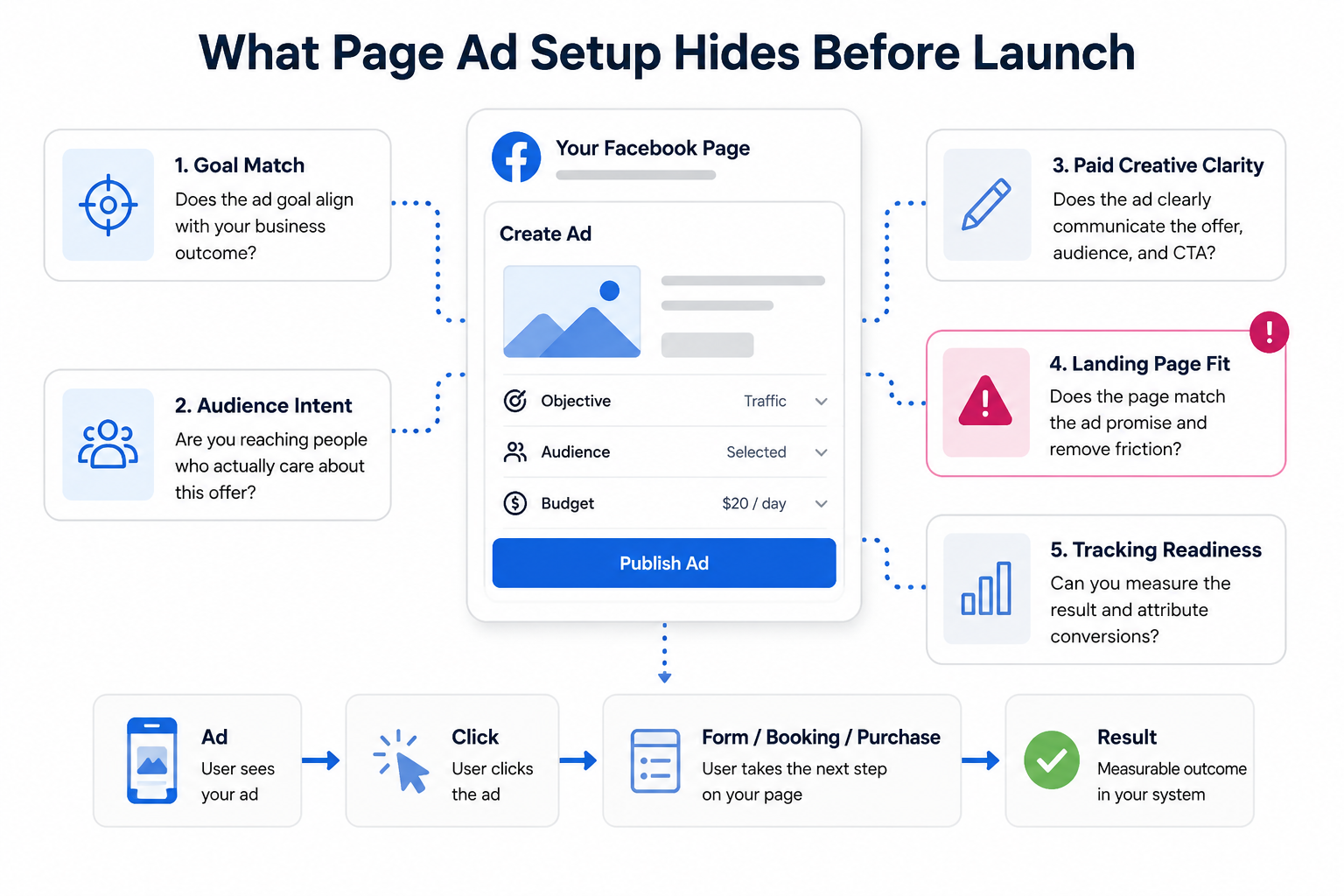
Use this sequence before publishing:
-
Define the outcome. Choose the real business action first, such as booked calls, completed forms, purchases, or qualified traffic.
-
Choose the right setup path. Use the Page flow for simple promotions. Use Ads Manager when you need campaign structure, conversion events, exclusions, or controlled testing.
-
Rewrite the post for paid traffic. Make the hook, audience, offer, and CTA clear enough for cold users.
-
Check audience intent. Avoid broad convenience targeting when the offer needs a specific buyer profile.
-
Test the destination. Confirm that the landing page, form, or message flow matches the ad and can track results.
This process adds a few minutes before launch. It can save days of unclear performance data.
If you want to avoid setup mistakes beyond the Page workflow, read Meta Ads setup mistakes that cost you money.
When to use Ads Manager instead of creating an ad from your Page
Use Ads Manager when campaign control matters more than launch speed.
That includes campaigns where you need to separate prospecting from retargeting, test multiple creatives, use custom audiences, control placements, optimize for specific conversion events, or evaluate CPA and ROAS with cleaner data.
The Page flow is best for simple promotions. Ads Manager is better for performance systems.
A small business promoting a seasonal offer may be fine starting from the Page. A B2B advertiser trying to reduce CPL without hurting lead quality should usually build in Ads Manager.
The difference is not experience level. It is campaign complexity.
Final takeaway
Facebook Page ad setup gets confusing because it looks like a simple promotion tool, but it still affects campaign delivery, audience quality, and optimization signals.
The proper launch process starts before you click Promote.
Decide the business outcome first. Match the goal to that outcome. Make the post work as paid creative. Choose an audience based on intent. Check the destination before spend begins.
Page ads can be useful when the job is simple. For campaigns tied to CPA, CAC, ROAS, or lead quality, treat the Page flow as an entry point, not the full strategy.