Most performance drops in Facebook ads are not caused by targeting, bidding, or creative fatigue. They happen after the click.
You can have stable CPM, strong CTR, and still see declining results. The issue sits in the transition between ad and landing experience, where small UX breakdowns quietly distort the signals the algorithm relies on.
This is where campaigns lose efficiency without obvious warning.
The Hidden Dependency: Ad Performance Is Post-Click Dependent
Meta does not optimize for clicks. It optimizes for outcomes based on post-click behavior.
If users land on your page and hesitate, drop off, or fail to complete the intended action, the algorithm interprets that as poor match quality. Over time, this shifts delivery toward cheaper but lower-intent users.
This is closely related to Optimizing for Post-Click Experience: What Happens After, which makes the same core point from a broader post-click perspective.
You’ll typically see this pattern inside Ads Manager:
-
Stable or improving CTR.
-
Rising CPC despite similar audience size.
-
Declining conversion rate.
-
Increasing CPA with no clear creative issue.
Nothing “breaks” in the campaign settings. The signal simply degrades.
Where Small UX Issues Start Causing Damage
These are not major design flaws. They are subtle friction points that compound at scale.
Load Delay Mismatch
A 1–2 second delay between click and content visibility is enough to distort user intent.
On mobile, users expect immediate continuity from ad to page. If the page stalls, even briefly, a portion of users bounce before interacting. That behavior feeds back into Meta’s optimization loop.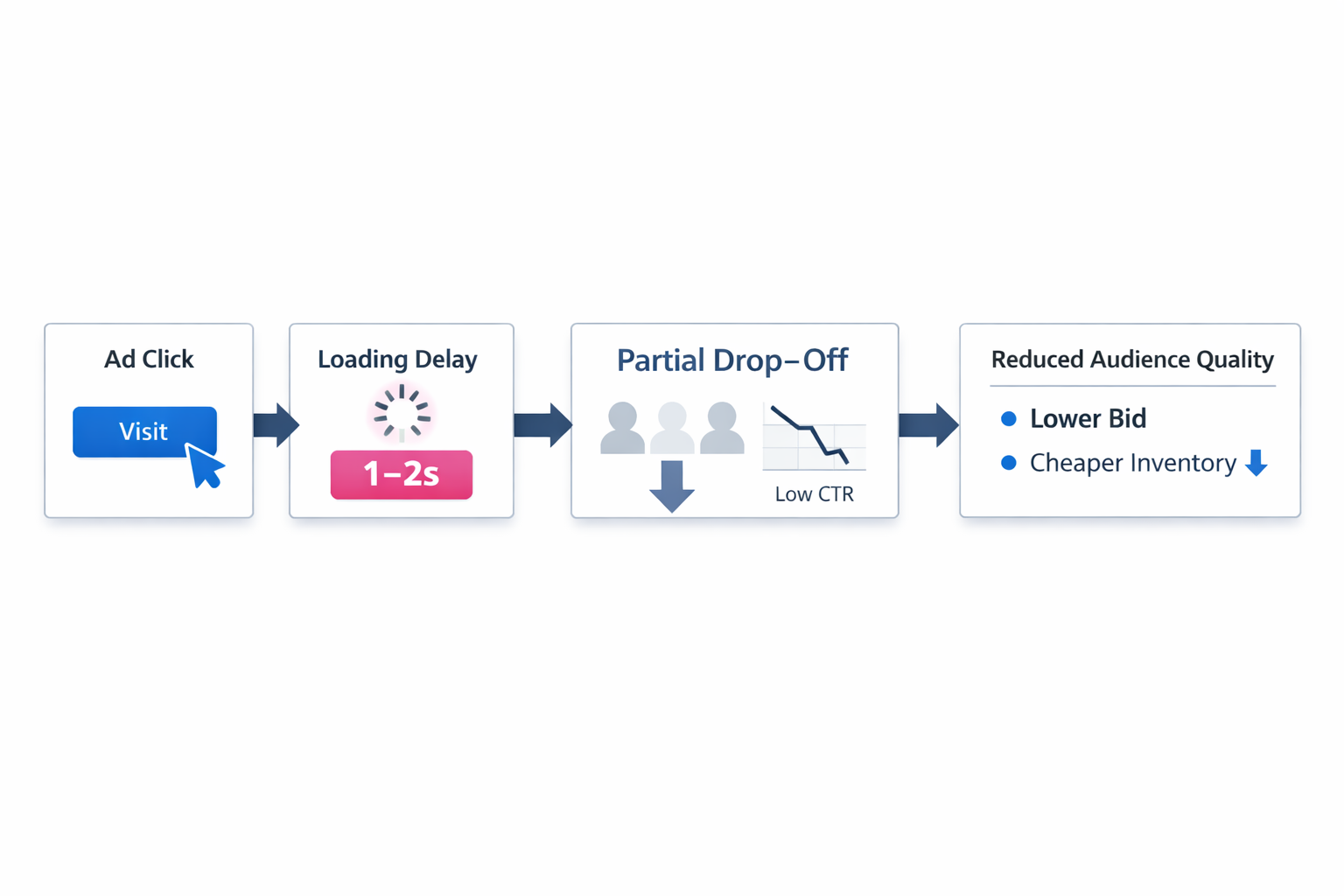
That is why landing speed should be treated as a performance variable, not a technical detail. The same idea is covered in Landing Page Speed: Cut Load, Boost CR.
What happens next is mechanical:
-
Early sessions show weak engagement signals.
-
The algorithm reduces bids for similar users.
-
Delivery shifts toward cheaper inventory.
-
Lead quality drops even if volume remains stable.
Message Discontinuity Between Ad and Page
When the landing page does not match the ad’s promise precisely, users pause.
That pause matters.
For example, if the ad promotes a specific outcome but the page opens with a generic SaaS pitch, users need to re-interpret the offer. Many won’t. A click only creates intent potential. The page still has to cash it in.
This pattern often sits underneath the problem described in Why Your Facebook Ads Aren’t Generating Leads and How to Fix It.
It creates a measurable pattern:
-
Scroll depth drops.
-
Time-to-first-interaction increases.
-
Form starts decline even with consistent traffic.
Meta interprets this as weak relevance, even though the issue is purely UX alignment.
Form Friction That Interrupts Momentum
Long forms do not always hurt performance. Poorly structured forms do.
The difference comes down to cognitive load at the moment of intent. A user who just clicked an ad is still in motion. Every unclear field, unnecessary dropdown, or awkward step increases the chance that momentum disappears.
Common friction points include:
-
Unclear field purpose.
Users hesitate when they do not understand why certain information is required, especially in B2B contexts where forms often ask for work email, company size, or job title. -
Sequential dependency.
Fields that only reveal after previous inputs create unnecessary pauses and break flow, particularly on mobile. -
Premature qualification pressure.
Asking for detailed company data too early can push users out before intent is fully expressed.
This is highly relevant to What Makes a Facebook Lead Form Convert? 5 Key Optimization Tips, especially when the issue is not traffic quality but the mechanics of completion.
In Ads Manager, this often appears as stable landing page views but declining conversion rate. The traffic is arriving, but the flow breaks before completion.
Visual Hierarchy That Competes With the CTA
If multiple elements compete for attention, users do not know where to act.
This is common in SaaS pages that try to communicate too much at once: product features, testimonials, integrations, proof points, and pricing cues all placed above the fold. Nothing is technically wrong, but the page asks the visitor to process too much before taking the next step.
The result is hesitation.
That hesitation shows up as delayed clicks on the main CTA, increased scrolling without interaction, and lower form start rates despite decent engagement.
Mobile-Specific Breakdowns
Many campaigns are evaluated on desktop previews but fail on mobile execution.
Subtle issues include:
-
Buttons partially off-screen.
-
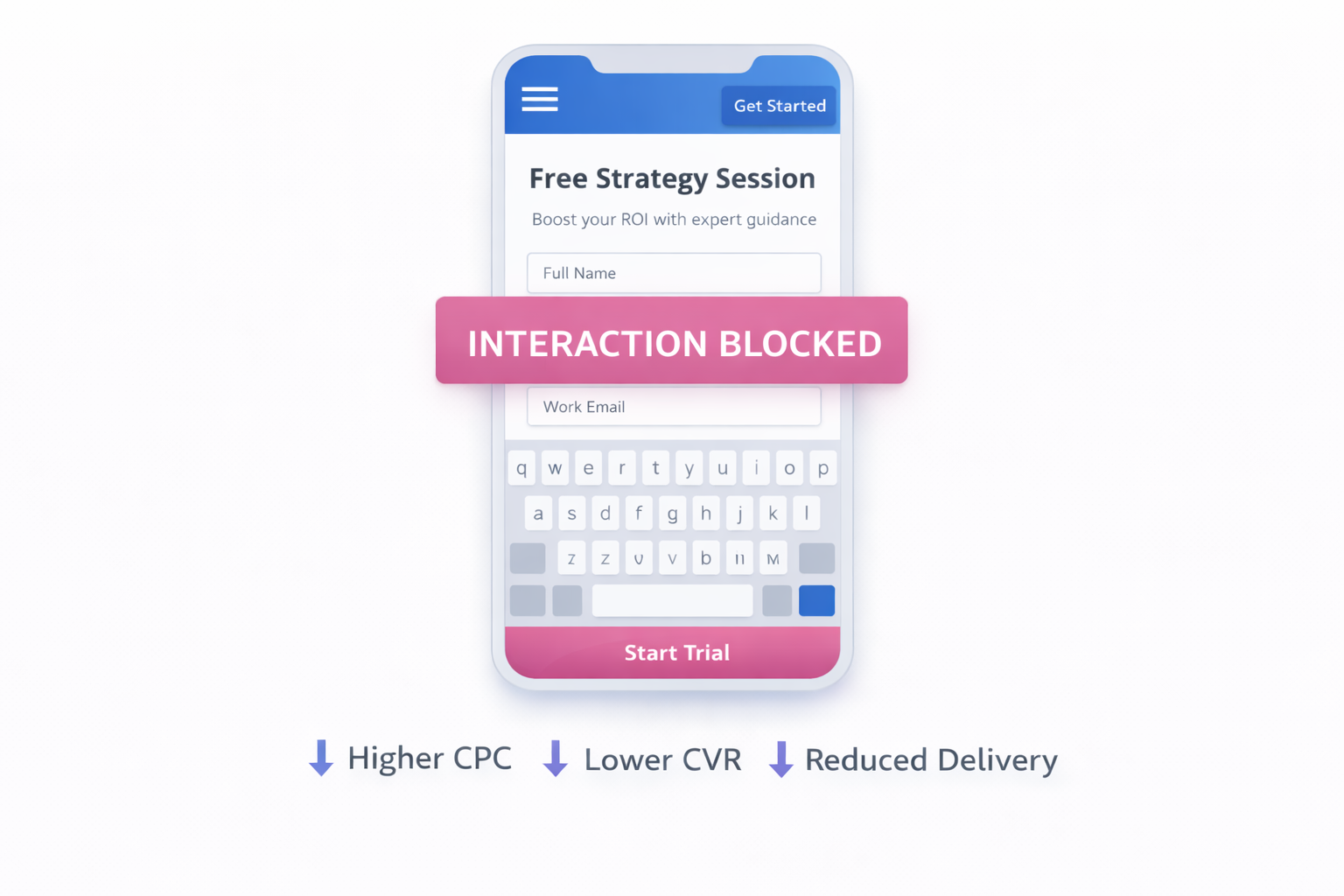
Input fields triggering awkward keyboard overlap.
-
Excessive vertical spacing that hides the CTA.
-
Sticky elements covering key actions.
These issues rarely appear in reports directly. Instead, you see indirect symptoms:
-
Higher CPC on mobile placements.
-
Lower conversion rate compared to desktop.
-
Reduced spend allocation to mobile over time.
The algorithm is reacting to degraded performance signals, not the root cause.
Why These Issues Scale Disproportionately
A small UX problem does not reduce performance in a clean, linear way. It compounds through the optimization system.
Here is the structural effect:
-
A slight drop in conversion rate weakens signal quality.
-
Weaker signals reduce auction competitiveness.
-
Lower competitiveness shifts delivery toward cheaper audiences.
-
Cheaper audiences produce even weaker signals.
This creates a feedback loop. At that point, optimizing ads alone will not recover performance because the system is already learning from flawed input.
How to Diagnose UX-Driven Performance Drops
You do not need complicated tooling to catch this. The signals are usually already visible if you compare platform metrics with on-page behavior.
Focus on inconsistencies rather than isolated numbers:
-
CTR rising while conversion rate falls.
This usually means the ad is doing its job, but the page is failing to continue the intent. -
CPC increasing without a major CPM shift.
That often signals weaker expected action rates after the click. -
Stable traffic with declining lead quality.
This can point to a page experience that filters out your better users while letting low-intent visitors pass through. -
Device-level performance gaps.
These often expose mobile UX problems much faster than aggregate reporting does.
Session recordings, click maps, and simple mobile walkthroughs usually surface the problem faster than endless ad-side tweaks.
Fixing UX Without Overhauling the Entire Page
You do not need a full redesign. Most gains come from removing friction at the moments where intent is most fragile.
Prioritize changes that affect decision speed:
-
Align the first screen with the ad promise.
Repeat the main claim, offer, or angle immediately so users feel continuity instead of uncertainty. -
Reduce initial form load.
Keep the first step light. Ask for only what is needed to continue the conversation. -
Make the primary action unmistakable.
One dominant CTA should visually win over everything else on the screen. -
Improve perceived speed.
Even before full performance optimization, faster content rendering above the fold can reduce early drop-off. -
Validate the mobile flow manually.
Click the ad yourself, on a real phone, and complete the journey without shortcuts.
The Strategic Takeaway
Most advertisers treat UX as a design layer. In practice, it is part of the optimization system.
If the post-click experience introduces friction, the algorithm learns the wrong thing. Over time, that mislearning becomes more expensive than many targeting mistakes.
Fixing UX is not about aesthetics. It is about restoring clean, reliable signals so Meta can actually scale what works.