Facebook and Instagram are still two of the best platforms for growing a Shopify store. They have huge audiences, strong targeting tools, and great options for showing off products.
But getting people to click your ad is just the first step. If your goal is more sales — not just more visitors — you need to guide users all the way from the ad to checkout.
This article shows how to run Facebook ad campaigns that turn traffic into real purchases. It covers setup, targeting, creative, and optimization — all in a clear, step-by-step way.
Step 1: Set Up Facebook Ads the Right Way
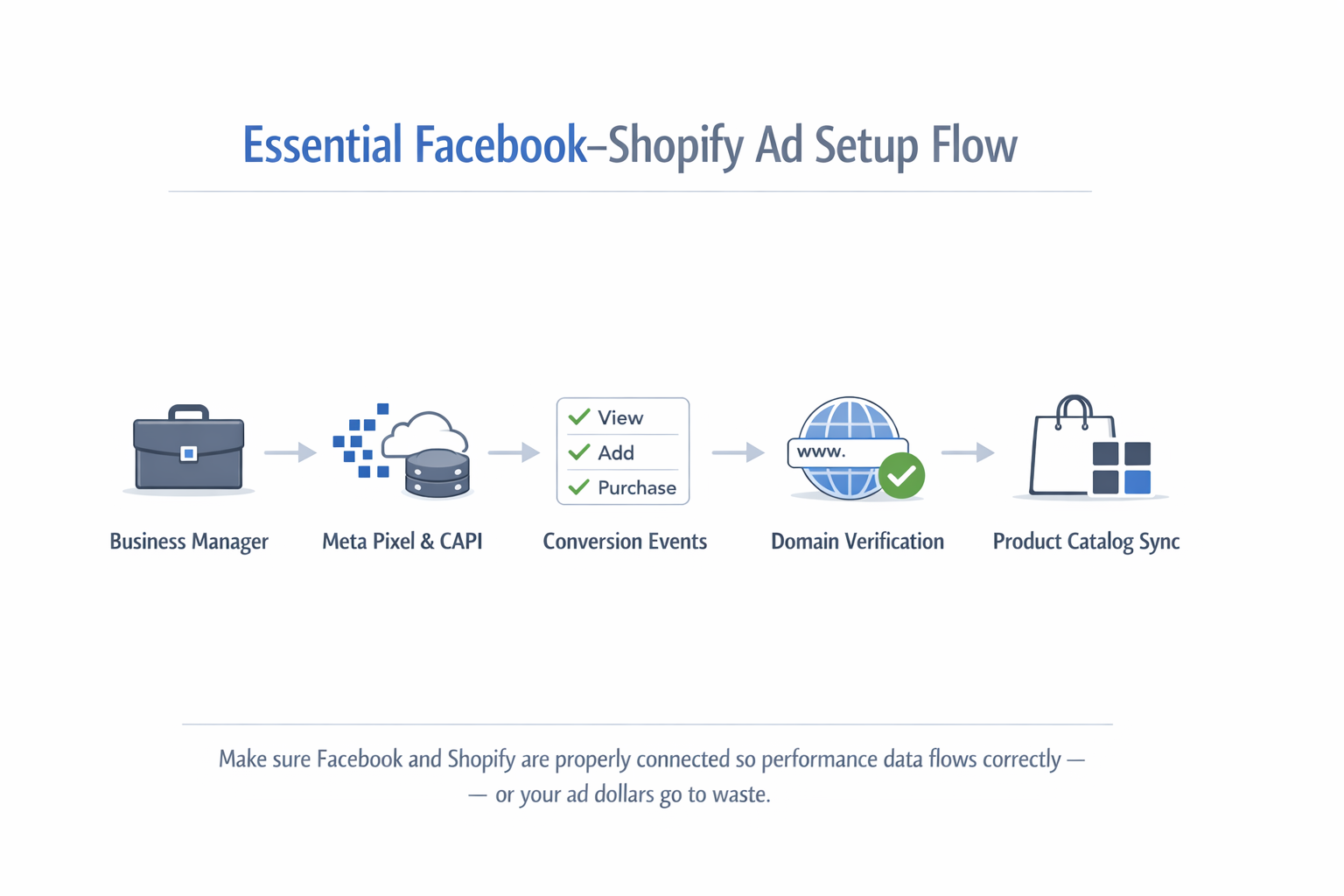
Before you start running ads, it’s important to connect your Shopify store with Facebook. If your setup is wrong, Facebook won’t know what’s working — and you’ll waste money.
What You Need to Do
-
Create a Facebook Business Manager account and set up your ad account.
-
Install the Meta Pixel and Conversions API on your Shopify store.
-
Track key actions like View Content, Add to Cart, and Purchase.
-
Verify your website domain inside Facebook Business Manager.
-
Connect your product catalog so you can run dynamic ads later.
To get everything working properly, follow a step-by-step setup guide that includes how to track conversions and feed Facebook the right performance data.
Step 2: Structure Campaigns Based on the Customer Journey
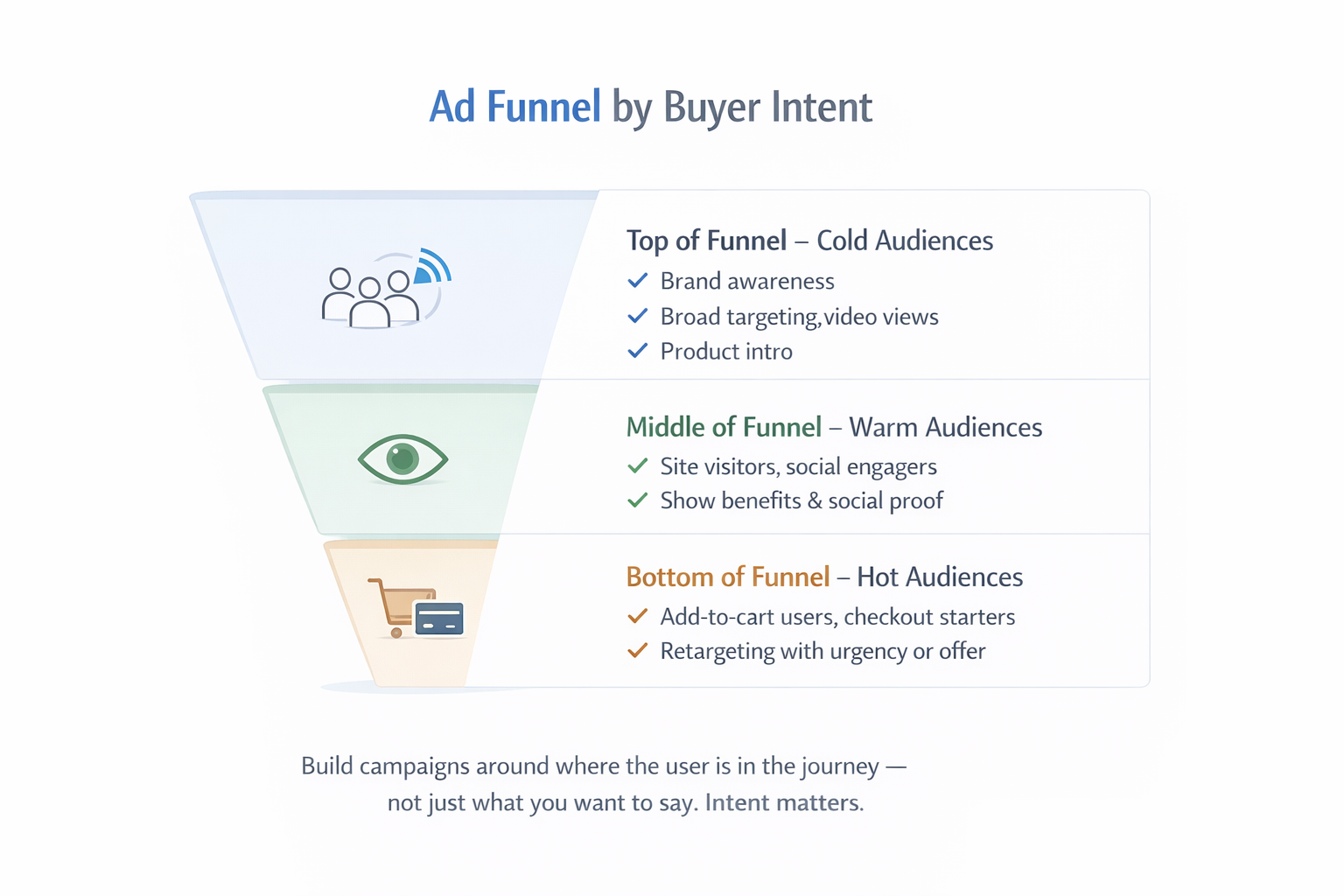
Most people don’t buy the first time they see your product. That’s why you need different campaigns for different types of users — based on where they are in the buying process.
Build a Funnel That Matches Buyer Intent
-
Top of Funnel (New Visitors): Show your brand to people who don’t know you yet. Use interest-based or broad targeting.
-
Middle of Funnel (Warm Visitors): Reach people who visited your site or watched your videos. Share benefits, reviews, and product value.
-
Bottom of Funnel (Hot Leads): Retarget users who added to cart or started checkout. Use urgency, discounts, or trust signals to close the sale.
This structure helps you send the right message to the right person — which improves results and lowers costs.
To better understand how to set this up, explore this guide on mapping the customer journey to campaign structure.
Step 3: Choose the Right Campaign Settings
Facebook gives you several campaign options. If you choose the wrong one, your ads may get clicks but no sales.
What to Select in Ads Manager
-
Use the Sales objective when you want purchases.
-
Optimize for the Purchase event, not for traffic or engagement.
-
Avoid targeting the same people in multiple ad sets. This makes your ads compete against each other.
-
Make sure your Pixel events are working properly.
When Facebook knows your real goal is purchases, it can help you reach people who are more likely to buy.
Step 4: Target the Right Audiences
Not every shopper is the same. Some are new, some are familiar, and some are ready to buy. The better you target them, the better your ads will perform.
Four Main Audience Types
-
Cold audiences: People who have never seen your brand. Try broad targeting or lookalike audiences.
-
Warm audiences: Visitors who looked at products but didn’t buy.
-
Hot audiences: Cart abandoners or people who started checkout.
-
Past customers: Buyers who might return for more products.
Match your message to each group. Cold users need education. Hot users need a reason to act now.
Step 5: Create Offers That Make People Want to Buy
A good offer does more than get clicks — it helps people say yes to buying. But many ads only focus on discounts, which often isn’t enough.
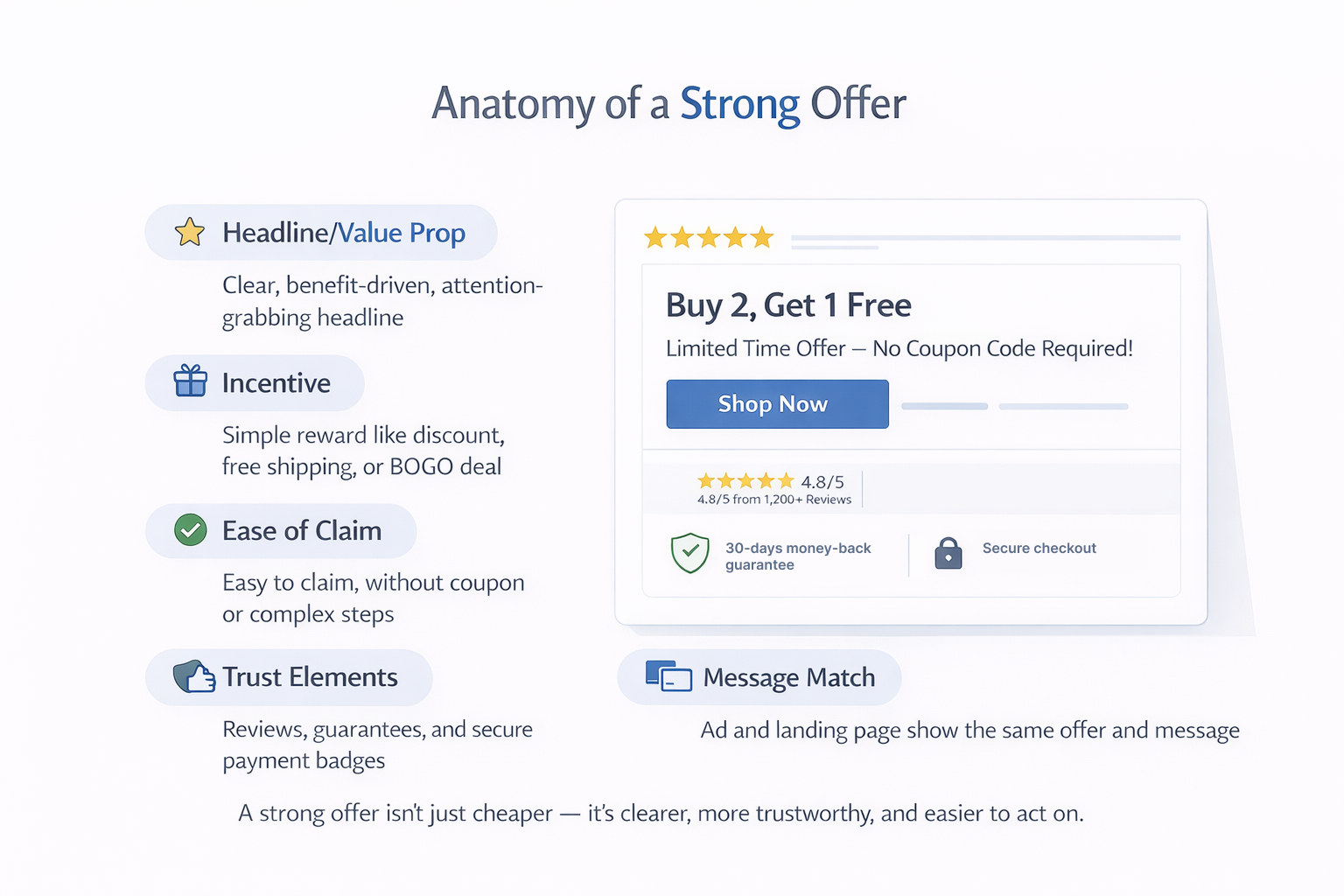
What Makes a Strong Offer
-
A clear explanation of why your product is valuable or different.
-
A simple reward, like “Buy 2, Get 1 Free” or “Free Shipping Today Only.”
-
Easy to claim — no codes or complicated steps.
-
Extra trust, like reviews, guarantees, or secure payment badges.
-
A landing page that shows the same offer and message as the ad.
If you're not sure whether your offer is strong enough, learn how to build a “must-click” hook that gets users to take action.
Step 6: Design Creative That Gets Clicks and Converts
Your ad’s creative — the images, video, and copy — is what makes people stop scrolling. It needs to look good, feel relevant, and say something clear.
Formats That Work Well for Shopify Stores
-
Video Ads: Great for telling a story or showing how your product solves a problem.
-
Carousel Ads: Useful for showing different products, features, or customer reviews.
-
Image Ads: Keep it clean and focused on one product with one strong message.
-
Collection Ads: Combine a product video with a list of items underneath — great on mobile.
No matter the format, focus on one key benefit, a strong headline, and one clear call to action.
Step 7: Make Sure the Landing Page Matches the Ad
Even if your ad gets a click, users won’t buy if the landing page doesn’t feel right. If the message changes or the offer disappears, they’ll leave fast.
A Good Landing Page Should Include
-
The same headline, visuals, and offer from the ad.
-
Simple layout with the product, benefits, and trust badges.
-
Reviews and photos from real customers.
-
Fast loading and mobile-friendly design.
-
Easy checkout — guest checkout, express pay options, and clear pricing.
Think of the landing page as part of your ad. Everything should feel consistent and easy.
Step 8: Use Retargeting to Recover Lost Sales
Most people won’t buy the first time. Retargeting lets you bring them back — with better timing and better messaging.
How to Retarget the Right Way
-
Show product reminders to people who viewed an item but didn’t add it to cart.
-
Offer a discount or urgency to people who abandoned checkout.
-
Try new creative for users who engaged with your ad but didn’t visit your site.
Need help building the right segments? This Facebook retargeting guide covers creative tips, audience rules, and frequency limits.
Step 9: Track the Metrics That Matter
To grow your results, you need to look at more than just clicks. Focus on numbers that show real business performance.
Key Metrics to Watch
-
ROAS (Return on Ad Spend): Shows how much you earn for every dollar spent.
-
Cost per Purchase: Helps track if you’re staying within your profit margin.
-
Click-Through Rate (CTR): Tells you if your ad is catching attention.
-
Conversion Rate: Shows how well your landing page turns visitors into buyers.
-
Average Order Value (AOV): Helps you decide when to bundle products or upsell.
If you're unsure where to focus, review the top 5 Facebook ad metrics for optimization and how they impact decisions.
Final Thoughts: Focus on the Whole Journey, Not Just the Click
Facebook Ads can be one of the best ways to grow your Shopify store — but only if every part of your campaign works together.
That means:
-
Setting up your Pixel and events the right way.
-
Organizing campaigns by where users are in their buying journey.
-
Creating offers that give people a reason to act.
-
Designing creative that grabs attention and builds trust.
-
Making sure the landing page finishes what the ad started.
-
Watching your numbers and improving over time.
When you focus on turning traffic into purchases — not just getting clicks — Facebook becomes a powerful and profitable channel for your brand.