Business Apps in Meta Business Suite are tools connected to your business portfolio to manage workflows, data, and external platforms.
They look like operational utilities. In reality, they sit inside the signal pipeline that feeds Meta’s optimization system.
If an app handles leads, purchases, bookings, CRM syncs, or product catalogs, it changes what Meta receives after the click. When that data weakens, campaigns continue delivering, but performance gradually declines.
Business Apps directly affect what Meta can optimize for
Most performance drops are blamed on creatives or audiences. Often, the issue starts after the click.
When a connected app sends clean conversion events, Meta can map outcomes to user behavior. That’s what stabilizes CPA and improves delivery.
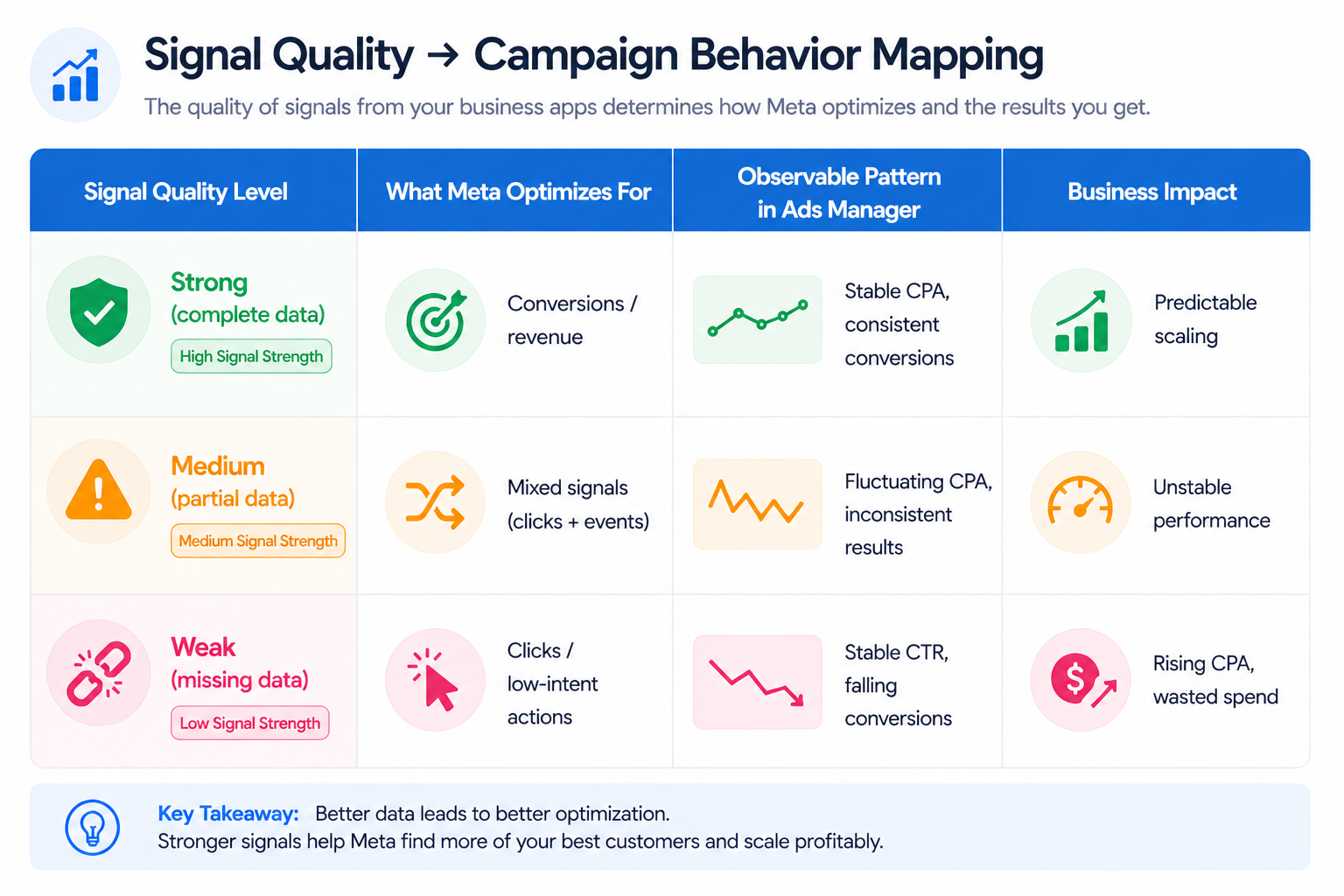
When the connection weakens, the system reacts in predictable ways:
- Shift toward low-intent users. Meta prioritizes clicks or page views instead of conversions.
- Rising CPA. Conversion optimization becomes less efficient due to missing signals.
- Learning instability. Campaigns struggle to accumulate enough meaningful events.
- Spend redistribution. Budget moves toward ad sets with incomplete but frequent signals.
These patterns are visible in Ads Manager long before someone checks the integration layer.
Where app issues show up inside Ads Manager
Meta doesn’t notify you when an integration fails. You see it through performance behavior.
Typical signals include:
- Stable traffic with declining conversions. The system still delivers, but events are not recorded properly.
- Consistent lead volume with lower sales outcomes. CRM or lead routing issues reduce downstream quality.
- Unexplained ROAS volatility. Purchase tracking or catalog sync problems distort reporting.
- Campaigns re-entering learning. Event volume drops below optimization thresholds.
These issues often mirror what’s explained in how API connection errors can skew Facebook Ads reporting, where measurement breaks while delivery continues.
Permissions determine whether integrations actually work
Connecting an app is not enough. It must have correct access to assets.
Apps may require permissions for:
- Ad accounts. Without access, campaign-level data cannot sync properly.
- Pixels. Event tracking fails if the wrong pixel is connected.
- Pages or forms. Lead data may not transfer correctly.
- Catalogs. Product-based campaigns lose accuracy.
A common scenario: leads appear in Meta, but CRM data is incomplete. Sales teams receive lower-quality inputs. CPL looks stable, but CAC increases.
Clean data matters more than more integrations
More tools do not improve performance. Cleaner data does.
When apps introduce noise, Meta optimizes toward the wrong outcomes.
Before scaling, validate:
- Event consistency. Check whether conversion events match expected volume trends.
- Data completeness. Ensure all required fields pass through to CRM or backend systems.
- Deduplication logic. Confirm that conversions are not counted multiple times.
- Correct asset mapping. Verify that integrations connect to the intended pixel and ad account.
Ignoring these checks creates inefficiencies similar to those described in the hidden costs of a messy ad account, where structural issues silently drain budget.
Why unmanaged apps create long-term performance risk
Most ad accounts accumulate integrations over time.
Unused or outdated apps create hidden dependencies. When they break, performance drops without obvious changes in Ads Manager.
This typically happens when:
- API behavior changes. Third-party tools stop syncing properly.
- Access permissions expire. Data flow becomes partial or stops.
- Old tools remain connected. Conflicting data sources distort tracking.
The effect is gradual. Campaigns don’t fail immediately. They become less efficient week by week.
How Business Apps influence targeting quality
Meta’s optimization relies heavily on behavioral signals.
When Business Apps degrade signal quality, targeting weakens:
- Lookalike audiences become less accurate.
- Retargeting pools shrink or lose relevance.
- Broad campaigns drift toward lower-intent users.
This aligns with patterns described in signal loss in digital ads, where weaker data inputs reduce algorithm precision.
For advertisers working with high-value leads or niche markets, relying only on platform signals becomes risky.
LeadEnforce addresses this by building high-intent audiences from Facebook groups, Instagram followers, and engaged users. Instead of relying entirely on post-click data, you start with stronger pre-click intent signals.
Practical takeaway
Business Apps are part of your campaign infrastructure.
When they work correctly, they improve optimization by sending high-quality signals.
When they fail, they distort performance without clear errors.
Before changing creatives, budgets, or targeting, check your integrations. If the data layer is broken, every optimization decision built on top of it becomes unreliable.