Collaborative posts in Meta Business Suite allow two Facebook Pages to publish the same post together. The content appears on both Pages, and both are listed as co-authors.
At a glance, this looks like a simple reach expansion feature. In reality, it changes how engagement builds, how signals form, and how content performs once you introduce paid spend.
You are not just increasing visibility. You are merging two audience pools into a single engagement stream, which directly affects how Meta evaluates your content.
What actually changes when a post becomes collaborative
Once a collaborator accepts the invitation, the post is distributed across both Pages. Engagement is shared, and both sides can access performance insights in Meta Business Suite.
The difference shows up early.
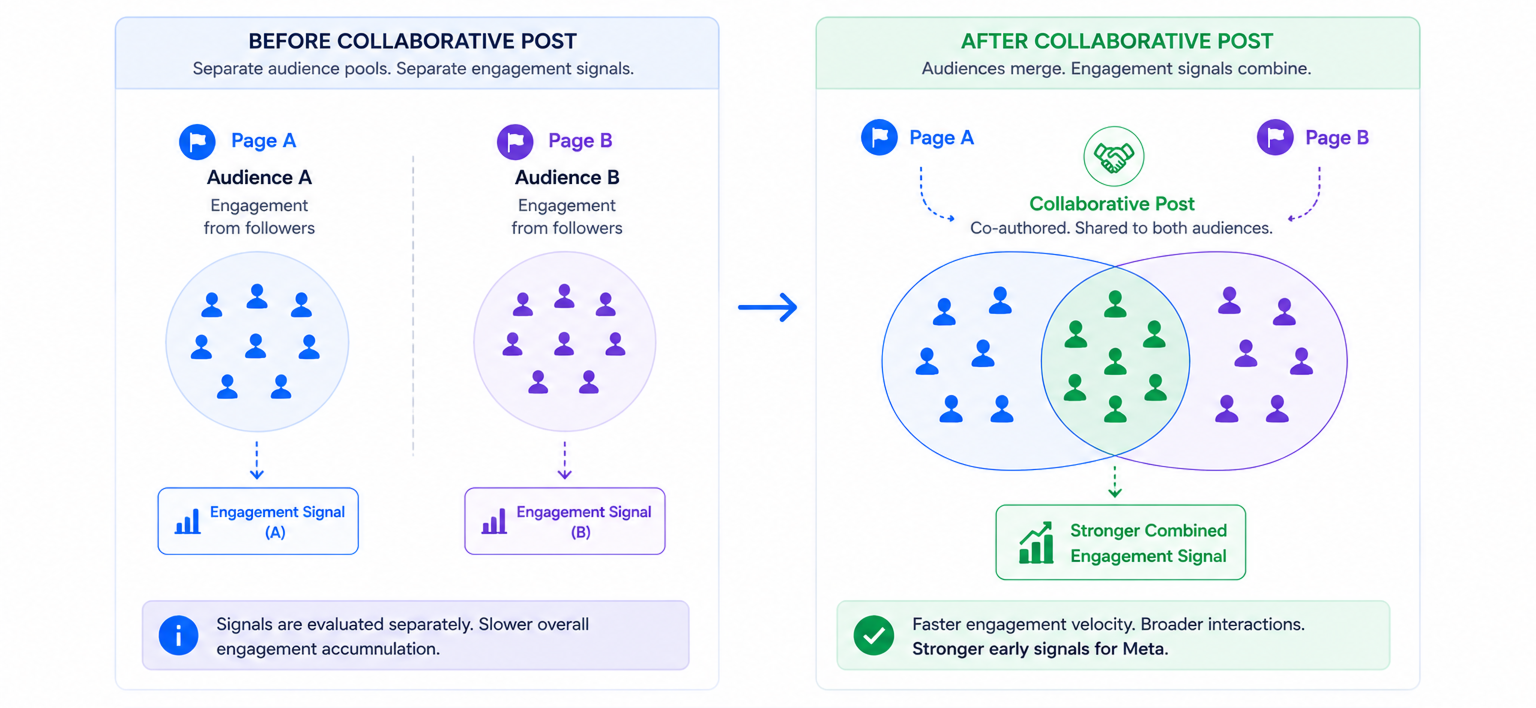
Instead of one Page generating engagement first, both audiences react at the same time. This often leads to faster accumulation of likes, comments, and shares within the first few hours.
You can usually spot this in:
- Faster engagement velocity within the first few hours.
- A higher share of interactions from non-followers.
- More diverse comments from different audience segments.
These early signals matter because Meta uses them to estimate content relevance before expanding distribution or pushing the post into paid delivery.
How to add a collaborator in Meta Business Suite
The process itself is simple, but small details can affect campaign execution.
- Create a post in Meta Business Suite and upload a photo or video.
- Add a collaborator by selecting a Page or entering its URL.
- Send the invitation and publish the post.
- Wait for the collaborator to accept before the post becomes shared.
One important limitation: photo posts cannot be scheduled when a collaborator is added, while video posts can.
If your campaign depends on timing, this can become a constraint. Many teams switch to video purely for scheduling control.
Why collaborative posts can change CPC and CPA
Meta’s delivery system reacts to engagement quality, not just volume. Collaborative posts often generate more interactions, but that does not guarantee better results.
What matters is who those interactions come from.
If the collaborator’s audience matches your target customer, the post can enter paid campaigns with stronger signals. This often leads to higher CTR and more stable CPM.
If the audience is misaligned, performance usually drops after scaling.
Inside Ads Manager, you will typically see:
- CTR increases, but conversion rate declines.
- CPM rises as Meta struggles to find responsive users.
- Traffic increases, but lead quality weakens.
Before scaling, it helps to review how to use learnings from organic posts to guide ad creative so you can separate meaningful engagement from surface-level reactions.
When collaborative posts actually improve performance
Collaborative posts work best when the second Page adds relevance, not just reach.
A smaller but highly aligned partner often outperforms a large but broad creator. This becomes clear when you track downstream metrics like cost per lead or purchase rate.
For example, a SaaS company collaborating with a niche partner often sees better lead quality than when working with a general audience influencer.
This is why relevance matters more than reach in paid social campaigns. Extra impressions do not help if the audience is not aligned with your offer.
Where advertisers make mistakes with collaborative posts
The most common mistake is treating engagement as proof of performance.
A collaborative post can generate strong reactions and still underperform once you attach a budget. This usually happens when the collaborator’s audience does not match your buyer profile.
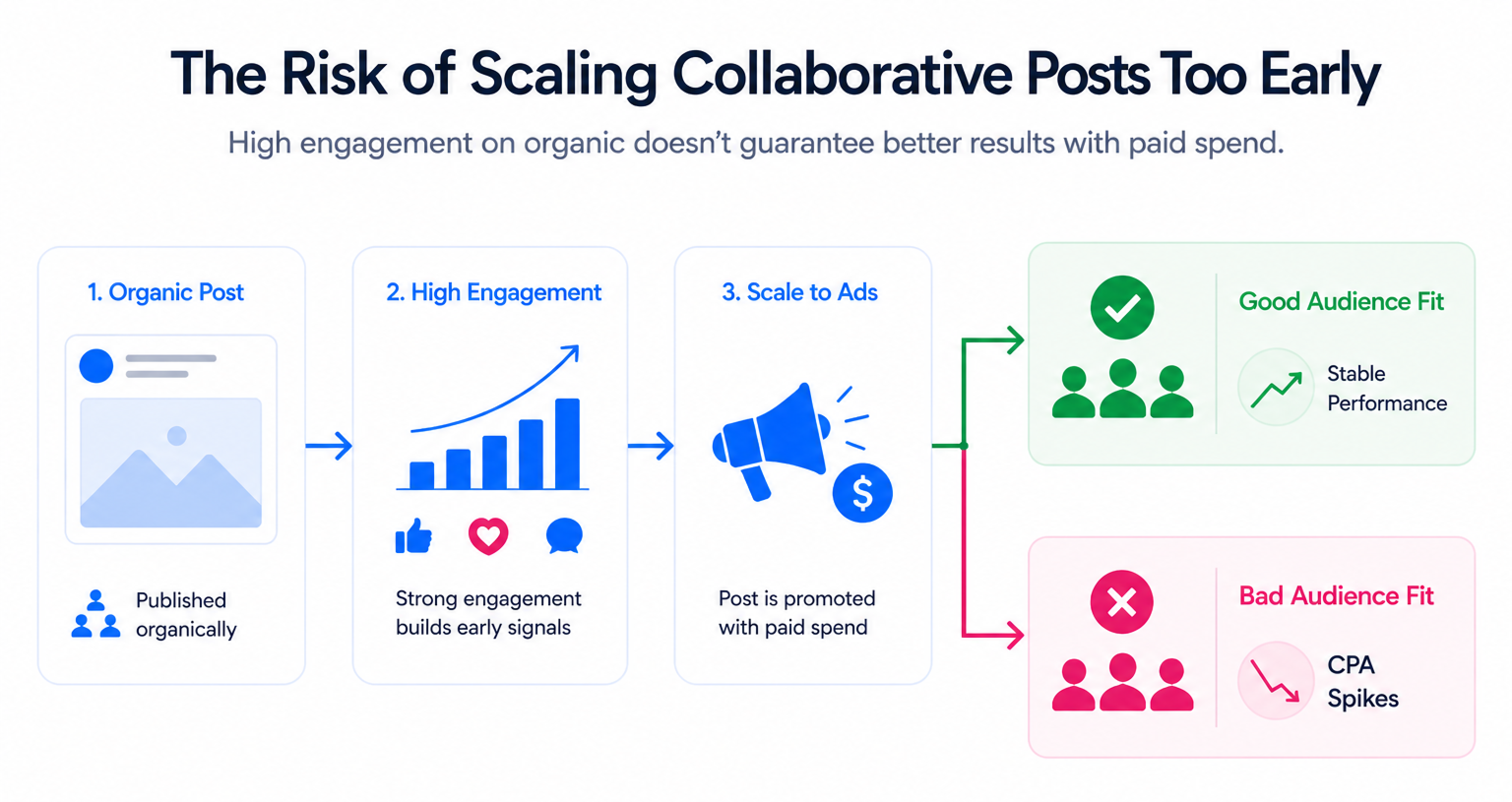
You may notice:
- High engagement with low outbound clicks.
- Strong reach but weak landing page views.
- Stable CPM but rising CPA after scaling.
Another issue is operational. Since collaborators must accept the invite, delays can affect campaign timing. If the collaboration is removed later, reporting consistency can break.
Before increasing spend, always run lead quality checks before scaling spend. This prevents you from optimizing toward engagement instead of real conversions.
Final takeaway
Collaborative posts are not a shortcut to better performance. They are a signal-building tool.
They work when the collaborator brings qualified demand. They fail when they only add volume.
Use them to test audience overlap, validate engagement quality, and observe early signals. Then scale only if CTR, conversion rate, and CPA confirm that performance is actually improving.