Two advertisers can run the same A/B content test and walk away with completely different outcomes.
One identifies a creative that scales into paid campaigns with lower CPC. The other gets a “winner” that collapses as soon as budget is added.
The difference is rarely the creative itself. It’s the setup.
Meta distributes content based on the signals it receives. If those signals are inconsistent or diluted, the platform cannot isolate what actually drives performance. In practice, this shows up as unstable reach, overlapping engagement patterns, and no clear separation between variants.
How to set up an A/B content test in Meta Business Suite
To create a test, go to Content → A/B tests in Meta Business Suite and click Create A/B test.
Version A acts as your baseline. Upload your post or reel and define all required elements such as caption, title, and thumbnail. Version B should introduce a single, deliberate change.
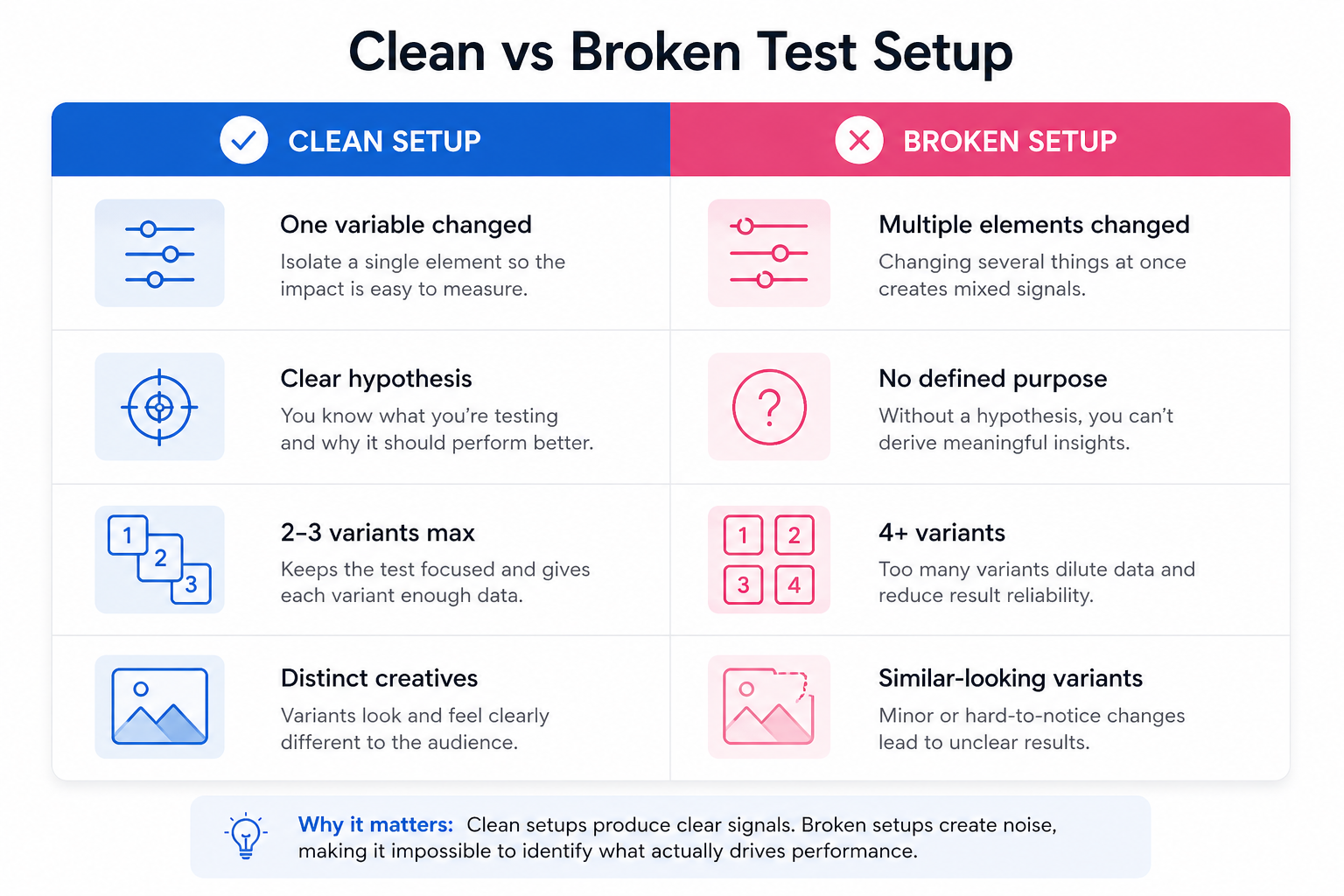
You can technically add up to four variants, but this is where many tests lose clarity. More versions require more impressions to produce reliable comparisons. If your Page audience is limited, fewer variants usually lead to better insights.
A clean setup typically looks like this:
- Version A represents your default approach.
This is the version you would have published without testing. - Version B isolates one meaningful variable.
For example, a different opening hook, thumbnail, or caption angle. - Additional versions are only added if each tests a specific hypothesis.
Adding variants without a clear purpose weakens the signal.
After building your variants, select a default version for tie scenarios, define your publishing option, and move to the key metric and duration.
What actually happens after you launch the test
Once the test starts, Meta does not publish your posts to your Page immediately. Instead, it distributes each variant to different audience segments.
This creates a controlled environment where engagement signals are comparable.
In early delivery, you’ll often notice one variant starting to pull ahead. It may receive impressions slightly faster, generate higher engagement within the first few hundred views, and begin to dominate distribution.
When the test ends, Meta publishes the winning version and pushes it to your full audience. This second phase is where performance often compounds, especially if the winning creative generated strong early signals.
Choosing the key metric without creating a false winner
The key metric determines how Meta evaluates performance and selects the winner.
This decision should match the role of the content in your funnel.
Here’s how different metrics influence outcomes:
- Engagement-based metrics favor attention.
Posts that generate reactions or comments tend to win, even if they don’t drive meaningful traffic. - View-based metrics prioritize retention.
Video variants that hold attention longer outperform shorter or faster-drop formats. - Click-based metrics reward traffic generation.
These are more aligned with landing page visits and downstream actions.
The issue is that these metrics don’t always align with business outcomes. A variant can win on engagement but produce lower-quality leads.
That’s why understanding how to test hooks without blowing your budget becomes important. It helps you distinguish between attention and intent before scaling.
A real scenario: when the wrong setup leads to the wrong conclusion
A B2B company tests two versions of a post:
- Version A focuses on the product.
- Version B focuses on the problem.
Version B wins the test due to stronger engagement. It generates more reactions and longer view time.
However, once promoted, Version A produces better leads and lower CPA.
The issue wasn’t the test itself. It was the alignment between the metric and the business goal. Engagement rewarded curiosity, but the product-focused version filtered for intent.
What to check before publishing the test
Before you click publish, it’s worth reviewing the setup from a performance perspective.
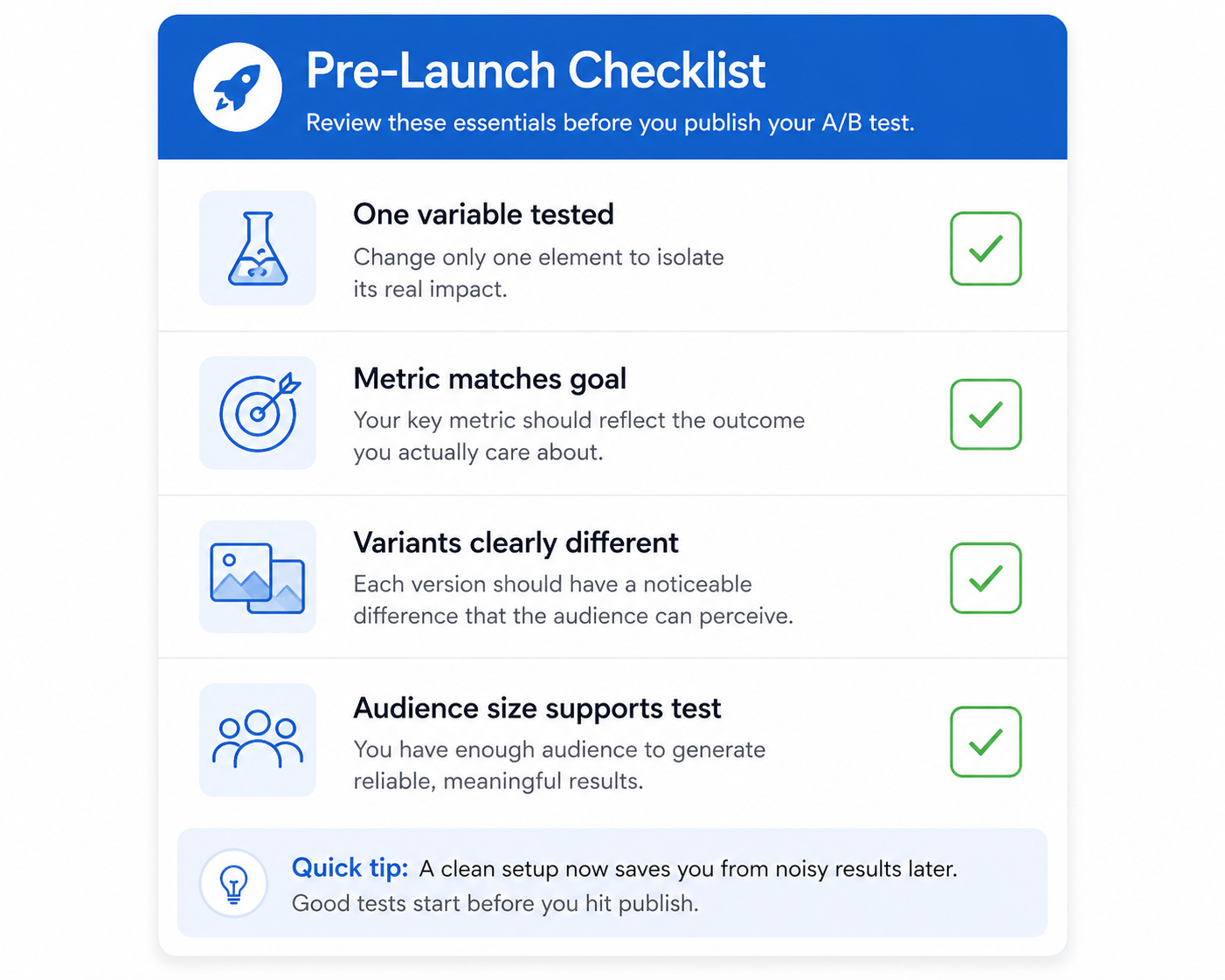
A quick pre-launch check should confirm:
- You are testing one variable, not multiple overlapping changes.
- The key metric reflects the outcome you care about, not just surface engagement.
- The number of variants matches your audience size.
- Each version is clearly distinguishable, especially for video tests.
Skipping this step is one of the fastest ways to create misleading results.
When to end a test early (and when not to)
Meta allows you to manually end a test and choose a winner before the scheduled duration ends.
This works well when one variant clearly dominates across multiple signals. For example, if it leads in reach, engagement rate, and click behavior, continuing the test may only waste impressions.
However, early performance can be misleading. Some creatives perform strongly in the first impression cluster and then decline as delivery expands.
If results are close, it’s better to let the test run its full duration.
Turning results into a repeatable testing process
The real value of A/B testing is not the single winner. It’s the pattern behind it.
If a certain hook, visual style, or message consistently wins, that becomes your new baseline. From there, you iterate again.
Teams that scale effectively don’t reinvent creatives every time. They build on previous learnings. This is how they turn insights into new creatives faster without restarting from scratch.
Why clean tests improve paid campaign performance
A well-structured test gives your paid campaigns a stronger starting point.
When a creative has already proven its ability to engage a controlled audience, it enters paid distribution with better signals. That often leads to more stable CPM, faster learning, and more predictable CPC.
If the test is noisy, Meta has to relearn performance during paid delivery. That increases cost and delays optimization.
Maintaining consistency in testing also helps reduce bias in results, especially when audience behavior varies. Approaches like creative testing without audience bias help ensure that performance differences reflect the creative, not the audience segment.
Final takeaway
Setting up an A/B content test in Meta Business Suite is simple on the surface, but the quality of your setup determines the value of the result.
Keep the variable controlled. Match the metric to the business outcome. Use only as many variants as your audience can support.
When the setup is clean, Meta identifies winners quickly and scales them efficiently. When it isn’t, the system still runs — but the result becomes noise instead of insight.