Meta Business Suite lets you reschedule posts and stories that were already planned.
The workflow is simple. You go to Content, open scheduled posts, select the post, click the three-dot menu, and choose a new time. You can also edit, duplicate, move to drafts, or delete the post before confirming.
From an operational perspective, this flexibility is useful.
From a performance perspective, it can distort how Meta evaluates your content.
What actually changes when you reschedule a post
Rescheduling does not simply move a post on a calendar. It changes how that post enters the feed.
At the moment of publishing, Meta evaluates the environment around your content. That environment directly affects how much distribution the post receives.
The key variables that shift after rescheduling include:
- Audience activity levels, because users behave differently at different hours of the day.
- Auction competition, since more advertisers compete for attention during peak time slots.
- Historical posting patterns, which Meta uses to predict expected engagement.
For example, a post originally scheduled at 7 PM may enter a high-engagement window. If you move it to 11 AM, your audience may not be active, and the post struggles to gain traction.
In Ads Manager, this often appears later as uneven CPM and unstable engagement rates between similar posts.
Why early engagement timing matters for paid campaigns
The first interactions a post receives shape how Meta treats it moving forward.
Posts that gain engagement quickly are more likely to be distributed further. Posts that start slowly often stay limited in reach.
This timing effect becomes visible when you promote content later.
You will typically see:
- Posts published at strong time slots gaining immediate interaction and building momentum.
- Rescheduled posts entering weaker windows and accumulating engagement more slowly.
- Promoted versions of those posts requiring higher bids to reach similar audiences.
This is why two identical creatives can produce very different results in campaigns.
If you’re unsure how to choose strong time windows, reviewing the best time to post on Instagram helps establish a baseline.
When rescheduling helps — and when it hurts
Rescheduling is useful when applied deliberately. It becomes a problem when used reactively.
It makes sense in controlled situations:
- When the original time would result in low visibility, such as late-night scheduling.
- When campaign timing changes and content must align with a launch or promotion.
- When the post has not yet gone live and has no engagement history.
In these cases, rescheduling improves alignment with audience behavior.
It becomes risky when used incorrectly:
- When a post already has engagement and you reset its timing, losing initial momentum.
- When you repeatedly move posts without testing consistent time slots.
- When rescheduling is used to fix weak performance instead of improving the content itself.
In those cases, performance becomes inconsistent and harder to diagnose.
The hidden issue: you lose clean data for decision-making
Frequent rescheduling introduces noise into your performance analysis. Instead of comparing content quality, you end up comparing timing conditions.
This leads to incorrect conclusions.
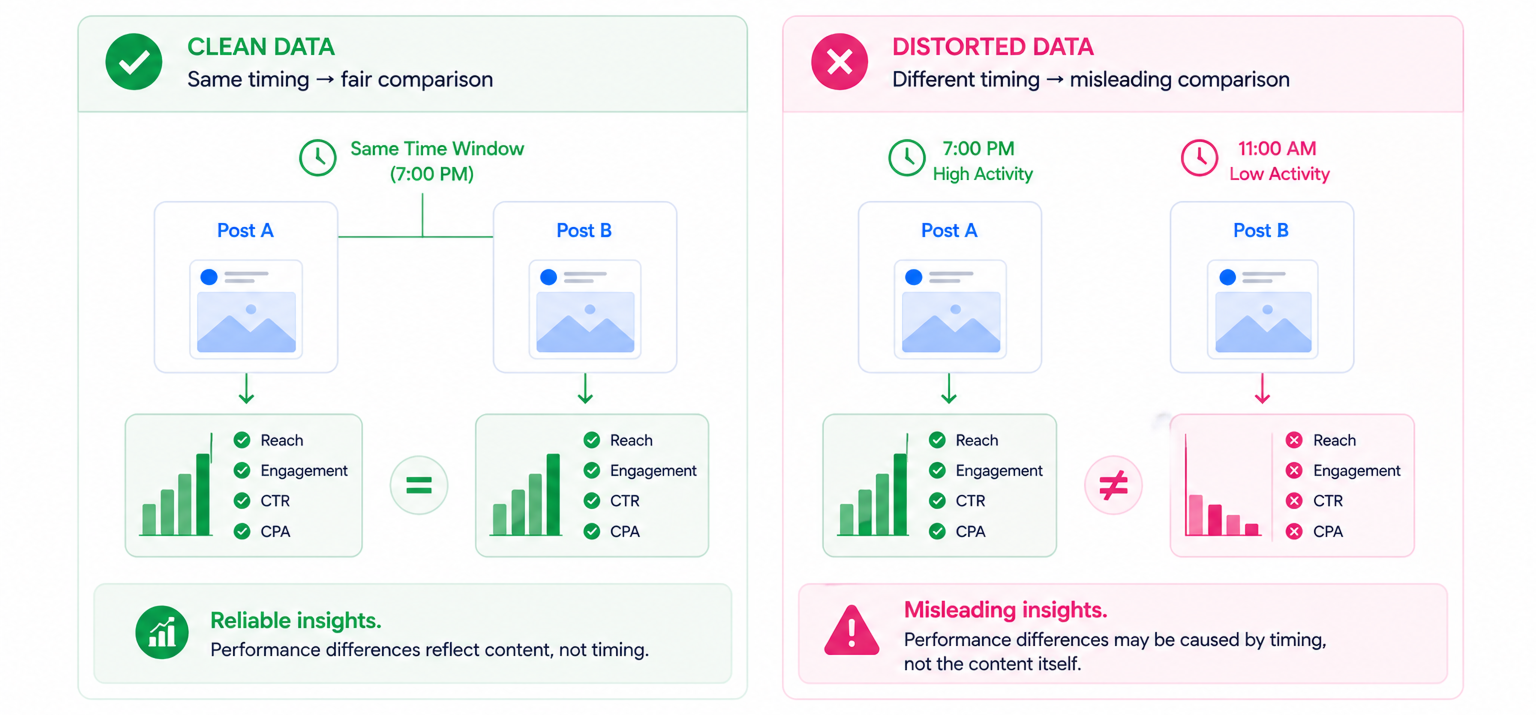
A common scenario looks like this.
A team schedules two similar posts. One is published at a high-activity time, the other is rescheduled to a lower-activity period. The first performs better, but not because of the creative. The difference comes from timing.
If the team scales that creative into ads, results often drop. In Ads Manager, this shows up as rising CPA and inconsistent conversion rates.
To avoid this, content testing requires stable conditions. If you already structure campaigns, you should also
plan a Facebook ads calendar.
A fixed schedule makes performance easier to interpret.
Why rescheduling is often used to fix the wrong problem
Most underperforming posts fail because of content issues, not timing.
Changing the schedule delays identifying the real cause.
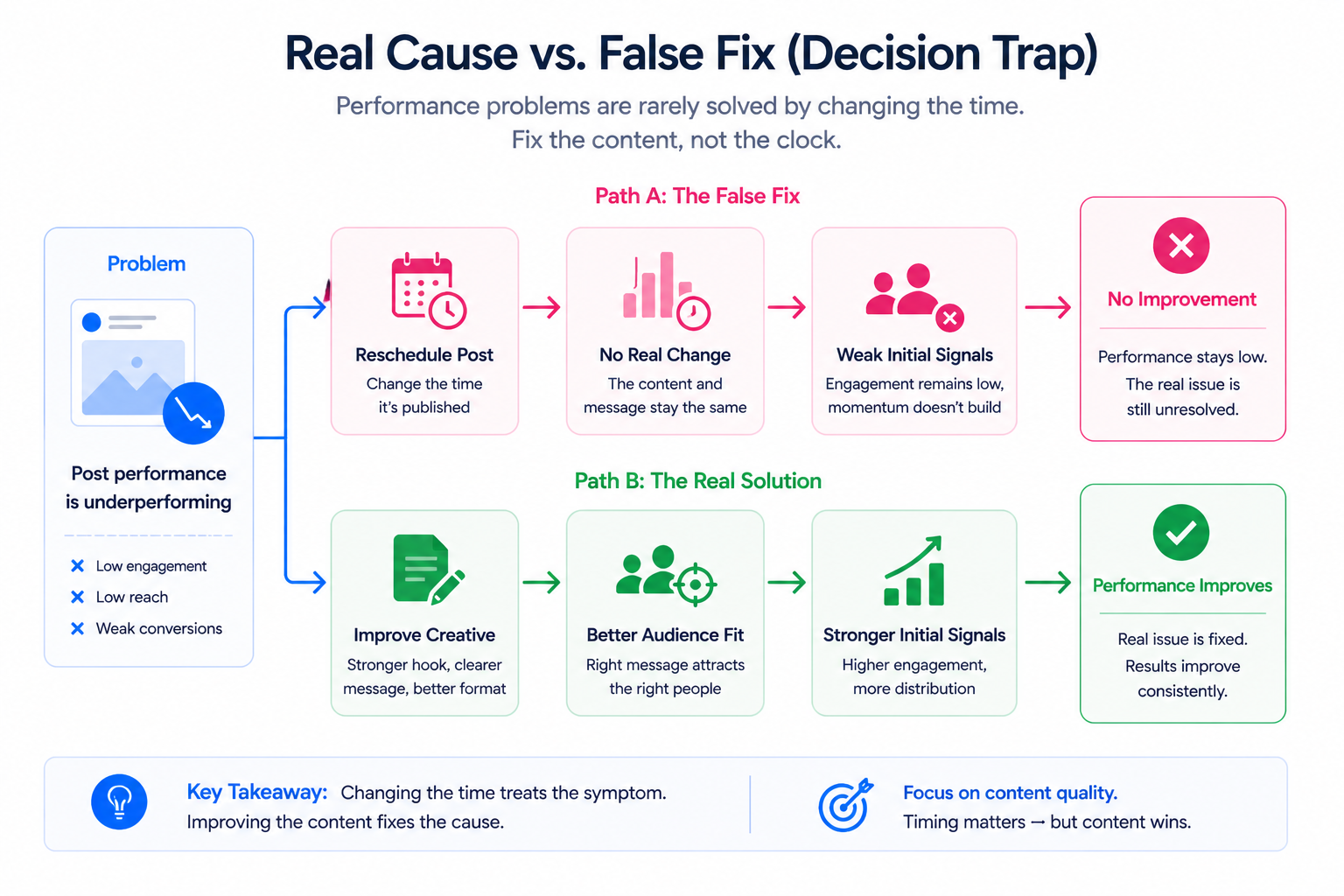
Typical content-related problems include:
- Weak hooks that fail to stop users from scrolling.
- Messaging that attracts curiosity but not intent.
- Formats that don’t match platform behavior.
Rescheduling does not address these issues.
In many cases, it is more effective to create a new version of the post with a stronger angle than to move the existing one.
When timing is not the real issue
Performance drops are often blamed on scheduling, but many cases are actually caused by creative fatigue.
You can identify this pattern when:
- Engagement declines across multiple posts regardless of timing.
- CTR drops in paid campaigns while frequency increases.
- Comments and shares decrease even when impressions remain stable.
This indicates audience saturation.
In this situation, changing the publish time does not improve results. You need new creative inputs.
For a deeper breakdown, review early signs of creative fatigue.
Practical takeaway
Rescheduling is a timing adjustment — not a performance strategy.
Use it when there is a clear reason to change timing. Avoid using it to fix weak content.
Strong performance comes from the combination of:
- Clear messaging that attracts the right audience.
- Consistent timing that builds predictable engagement.
- Reliable data that allows clean testing and scaling.
When those elements are aligned, both organic posts and paid campaigns become easier to optimize.