Permissions inside Meta Business Portfolio rarely stay static.
As teams grow, agencies rotate, or responsibilities shift, access needs to be updated. These changes may seem administrative, but they directly affect how campaigns are managed.
If permissions are changed without structure, execution slows down or becomes inconsistent.
What changing permissions actually involves
Inside Meta Business Suite, permissions can be adjusted at two levels.
The first level is the business portfolio, which defines overall control. The second level is asset access, which defines what someone can do inside specific ad accounts, Pages, or Instagram profiles.
To edit permissions, you must have full control of the business portfolio. Having full control of a single asset is not enough.
This distinction often creates confusion. Teams assume they can manage access because they control an ad account, but Meta restricts permission changes to portfolio-level authority.
How permission changes work in practice
Permissions are managed through the People section in Meta Business Suite.
When you select a user, you can:
- Update their business portfolio access.
- Modify permissions for specific assets.
- Remove them from the portfolio entirely.
- Remove access to individual assets only.
These changes apply immediately. If done without coordination, they can affect active campaigns.
Permissions can also be adjusted from the asset side through the Accounts section, which is often used when managing access at scale.
Why this affects campaign performance
Campaign execution depends on stable and continuous access.
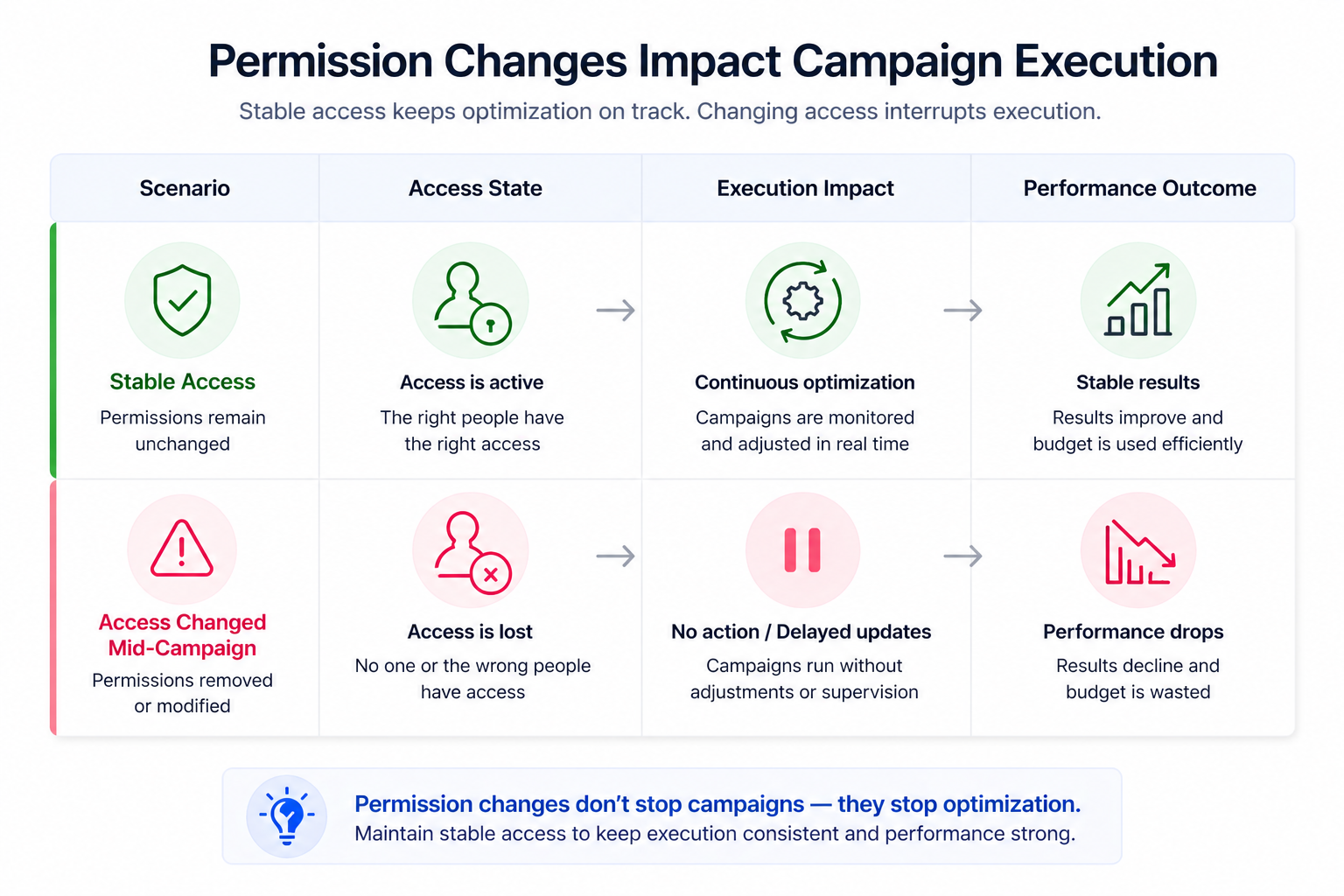
If permissions are changed at the wrong time:
- Campaign ownership becomes unclear.
- Optimization slows down or stops.
- Critical changes are delayed due to missing access.
For example, removing access from a media buyer during active optimization can leave campaigns running without supervision. The system continues spending, but without adjustments.
This creates inefficiencies that resemble typical performance issues, such as rising CPA or unstable results. In many cases, teams misinterpret these signals as strategy problems instead of access-related disruption. This is a common pattern behind performance drops described in What to Do When Your Facebook Ads Suddenly Stop Converting.
Business impact
Permission changes introduce both immediate and long-term effects.
In the short term, campaigns may lose consistency. In the long term, repeated access issues reduce the efficiency of the entire account.
This typically leads to:
- Higher acquisition costs due to slower reactions.
- Wasted budget during transition periods.
- Missed scaling opportunities.
These effects are rarely tracked directly, but they accumulate over time.
Key requirements before changing permissions
Before updating permissions, the system must allow it.
In most cases, this requires:
- Full control of the business portfolio.
- The user already being part of the portfolio.
- Access to the People section in settings.
If any of these conditions are missing, permission changes cannot be completed.
In some organisations, full control may need to be requested before changes can be made.
External constraints from partners
Permission changes are not always fully flexible.
If a partner, such as an agency, shares a business asset with your organisation, your access is limited to the permissions they assigned. This may prevent you from granting full control to your internal team.
This limitation cannot be bypassed internally. It requires coordination with the partner.
Risks and considerations
Changing permissions during active campaigns introduces risk.
Before making updates, consider the timing and impact. Removing access at the wrong moment can interrupt campaign management and delay optimization.
It is also important to avoid overlapping roles. When too many users have similar permissions, accountability becomes unclear, which slows down decision-making.
Another risk comes from frequent changes. Constant adjustments to permissions often indicate a deeper structural issue, such as unclear roles or inconsistent campaign ownership. These issues are closely related to broader account inefficiencies discussed in The Hidden Costs of a Messy Ad Account.
Practical recommendations
Permission updates should follow a structured approach.
Start by reviewing current access and aligning it with actual responsibilities. Then make targeted adjustments instead of broad changes across multiple users.
It is also important to confirm continuity. Before removing access, ensure that another team member can take over the responsibility without delay.
In many cases, fewer changes are needed when the initial setup is correct. A clear access structure reduces the need for constant adjustments and keeps campaign execution stable.
This becomes especially important in larger accounts, where multiple users manage different parts of the campaign. Without clear permission structure, coordination becomes inefficient, which can affect performance outcomes over time.
This type of structural inefficiency is also reflected in broader campaign management challenges, such as those discussed in How to Manage Facebook Ads for Multiple Clients Without Risking Account Issues.
Final takeaway
Changing permissions in Meta Business Portfolio directly affects how campaigns are executed.
Well-managed updates improve control and accountability without interrupting performance. Poorly timed or unstructured changes create delays, confusion, and wasted budget. The goal is to maintain stable access while adapting to how your team operates.