Many advertisers only look at their catalog when something goes wrong. Ads stop delivering, product recommendations feel off, or performance drops without a clear explanation.
In most cases, the issue is not the campaign setup. It is how the catalog is managed inside Meta Business Suite.
Catalog management directly influences how Meta connects user behavior with products. When this connection is weak, the algorithm cannot optimize effectively, and performance suffers across the funnel.
What catalog management actually includes
Meta separates catalog functionality across two environments: Meta Business Suite and Commerce Manager. Business Suite controls access, ownership, and connections, while Commerce Manager handles product-level operations.
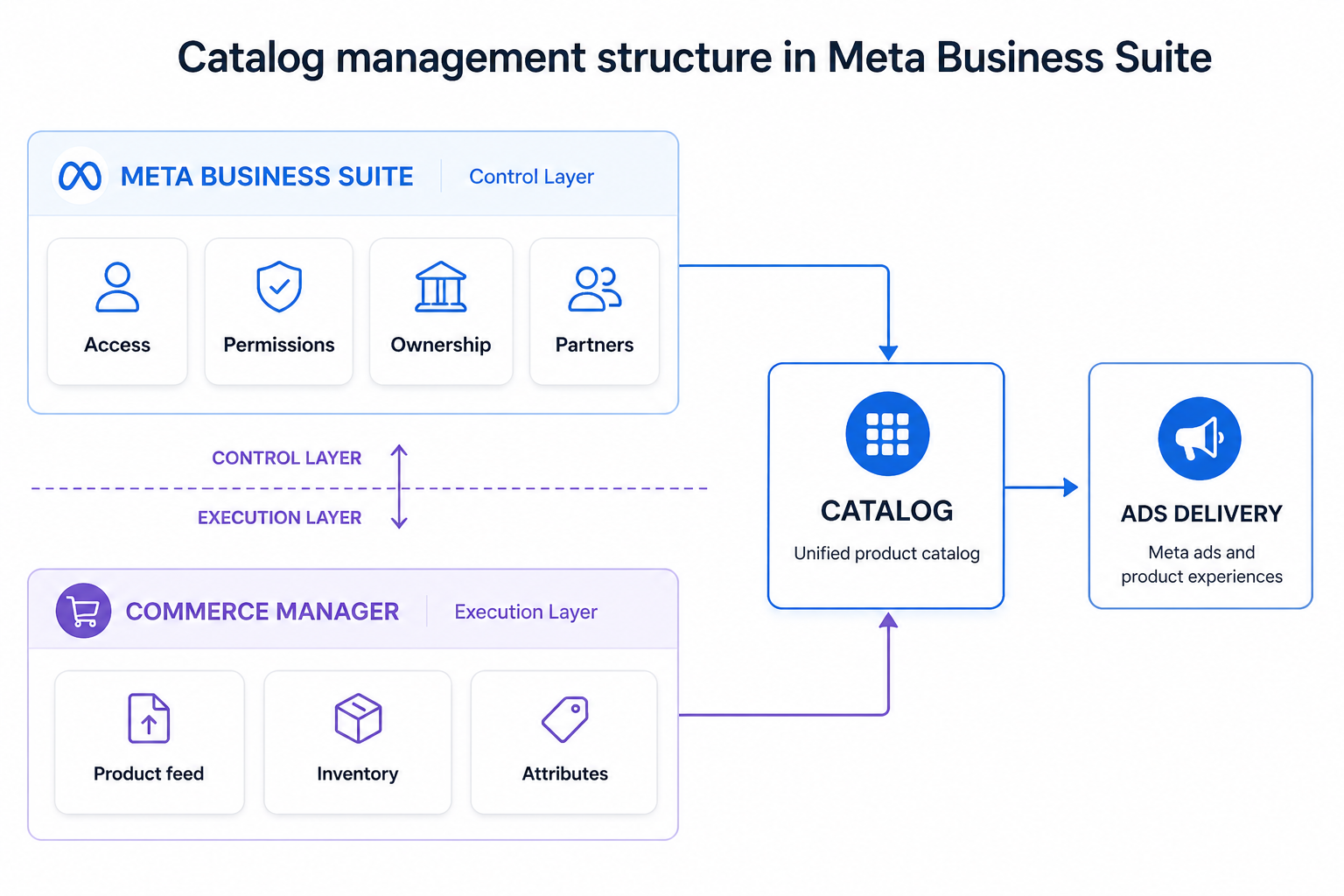
Inside Business Suite, catalog management includes:
- Creating a new catalog or requesting access to an existing one.
- Assigning people and defining permission levels.
- Granting partner access to agencies or external teams.
- Connecting data sources such as pixels or app SDKs.
- Claiming ownership if the catalog belongs to another business.
These actions define whether your catalog is properly integrated into your advertising system.
Why catalog setup directly affects performance
Meta’s algorithm relies on structured inputs. The catalog acts as the layer that links user actions to specific products.
When everything is aligned, the system can interpret behavior clearly. It knows what users viewed, considered, or ignored, and uses that data to deliver relevant products.
When the setup is incomplete, the link between behavior and products breaks down. Instead of precise matching, Meta defaults to broader delivery patterns. This reduces efficiency and weakens results.
This is a common hidden cause behind issues described in Facebook Ads Not Converting: How To Fix It.
The visible problem is performance, but the root cause is often data misalignment.
Key catalog performance factors
A few core elements determine whether your catalog supports performance or limits it.
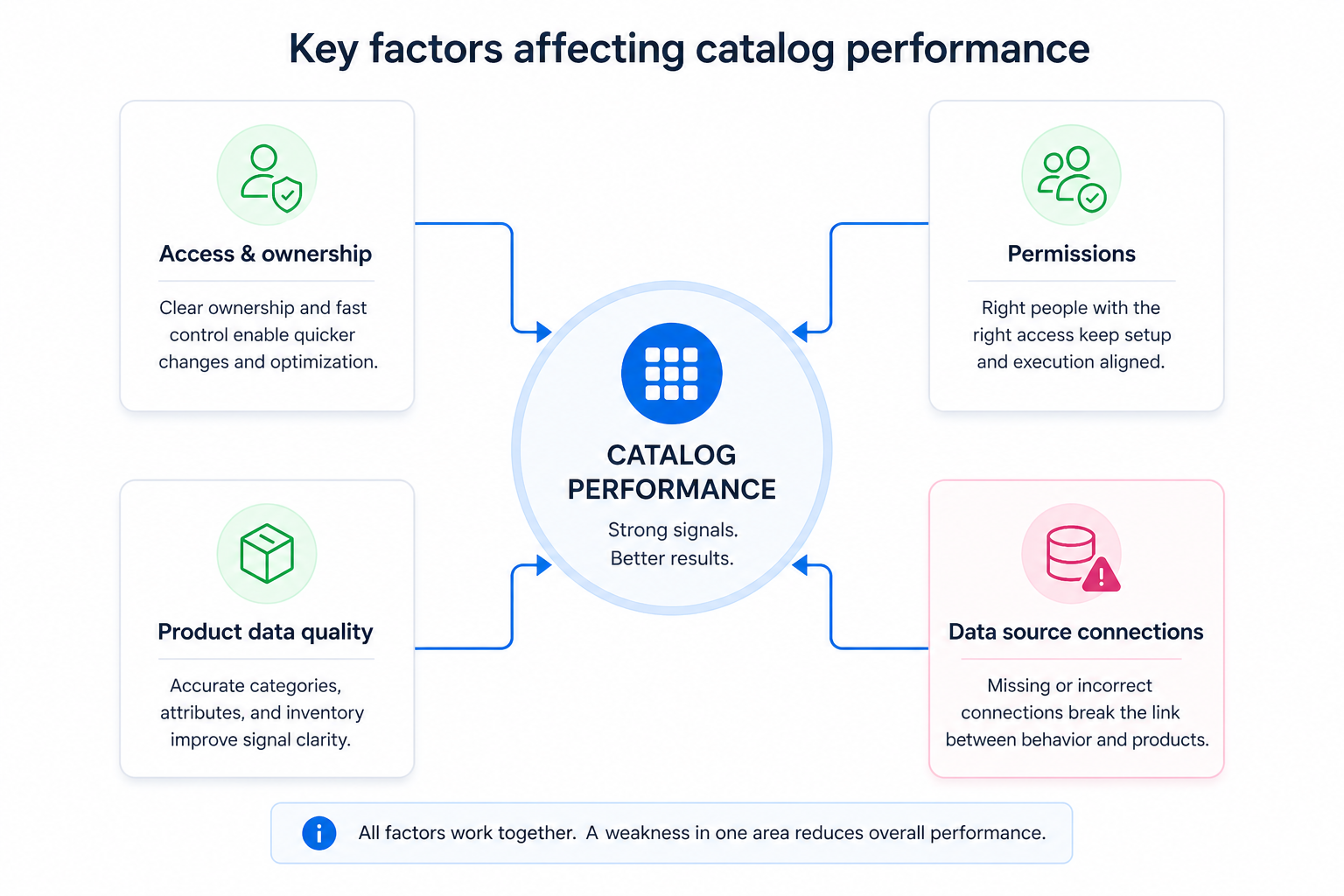
Key catalog performance factors:
- Access and ownership. Define who controls the catalog and how quickly changes can be made. Lack of ownership slows down optimization.
- Permissions. Ensure the right people can manage catalog settings. Without proper access, execution and optimization become disconnected.
- Product data quality. Maintain consistent categories, accurate attributes, and updated inventory. Poor data reduces signal clarity.
- Data source connections. Link your pixel or app data correctly. Without this, Meta cannot match user behavior to products.
These factors work together. Weakness in one area can reduce the effectiveness of the entire system.
Business impact: how problems show up
Catalog issues rarely appear as clear errors. Instead, they create gradual inefficiencies that affect campaign performance over time.
You may notice stable traffic with declining conversions. Dynamic ads may continue spending but fail to scale. Some products receive impressions while others are underutilized.
When the algorithm lacks reliable product-level signals, it cannot compete effectively in the auction. This leads to higher costs and lower returns.
Where advertisers typically run into problems
Catalog management issues tend to appear in recurring scenarios.
- Agencies managing multiple clients often deal with inconsistent access and ownership structures.
- Ecommerce brands struggle to maintain structure as product catalogs grow.
- Businesses switching partners lose control over catalog ownership and setup.
- B2B advertisers adapt catalogs without aligning them to real user behavior.
In each case, the problem is not the catalog itself, but how it is structured and connected within the system.
Risks and considerations
Before making changes, it is important to validate the fundamentals.
Before making changes, check:
- Whether your business has full ownership of the catalog.
- Whether the correct pixel or data source is connected.
- Whether product data is consistent and up to date.
- Whether access and permissions are clearly defined.
It is also important to recognize limitations. Catalog optimization cannot fix weak audience targeting, poor creatives, or low-converting landing pages.
Prerequisites for strong catalog performance
Catalog improvements only work when the surrounding system is aligned.
For catalog optimization to work, you need:
- Reliable event tracking to capture user behavior accurately.
- A clear product structure that reflects how users browse and buy.
- Sufficient interaction volume for the algorithm to learn.
- Defined campaign objectives that guide optimization.
Without these elements, improvements in catalog management will have limited impact.
Practical recommendations for marketers
Catalog management should be treated as an ongoing process rather than a one-time setup.
Start by securing ownership and defining clear access roles. This ensures your team can make changes quickly without relying on external approvals.
Keep the catalog structure simple and aligned with user behavior. Overcomplication often reduces efficiency instead of improving it.
Monitor product-level performance regularly. Campaign metrics alone do not reveal whether the catalog is working correctly.
Combine catalog optimization with stronger audience inputs. Better targeting improves how Meta interprets catalog data.
For example, improving audience quality can significantly impact results, as explained in Custom Audience – Why Should You Use It?
Final takeaway
Managing a catalog in Meta Business Suite is not about organization. It is about control and signal quality.
When ownership, permissions, and data connections are aligned, Meta can match products to user intent with precision. This leads to better conversions and more efficient spend.
When these elements are misaligned, performance declines quietly.
If your campaigns are not scaling, the issue may not be your ads. It may be how your catalog is managed.