Facebook Ads can deliver results that look good but do not help the business.
You may get clicks that do not convert.
You may get leads that sales cannot use.
You may get engagement that never turns into demand.
You may get messages from people who are not ready to buy.
This problem is common because Meta is very good at finding the behavior you ask for. If you ask for the wrong behavior, the campaign can become efficient in the wrong direction.
The goal is not to get more results. The goal is to get the right results.
The Problem
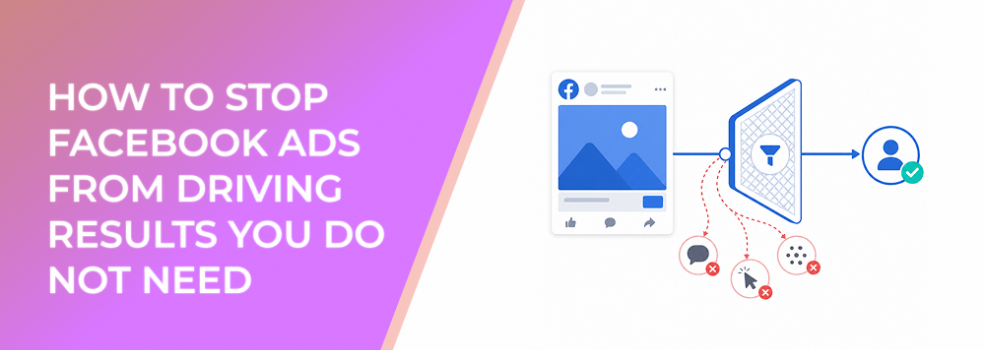
The problem is that the campaign is optimized for an action the business does not actually need.
This often happens when advertisers choose goals based on visible activity rather than business value.
A campaign optimized for clicks may drive cheap traffic, but not qualified visitors.
A campaign optimized for engagement may generate reactions, but not buyers.
A campaign optimized for low-friction leads may generate form submissions, but not sales-ready opportunities.
A campaign optimized for messages may create conversations, but not appointments, quotes, or purchases.
The campaign is not necessarily broken. It may be doing exactly what the setup instructed it to do.
The issue is that the instruction is wrong.
Why This Problem Hurts Performance
Unwanted results damage performance because they consume budget, distort learning, and create false confidence.
The budget impact is obvious. Every dollar spent on low-value behavior is a dollar not spent testing better audiences, stronger offers, or more meaningful conversion paths.
The learning impact is more serious. Early campaign data teaches Meta which users to pursue. If the campaign starts learning from people who click but do not buy, submit weak forms, or engage casually, future optimization can drift toward more of the same.
The reporting impact creates another problem. Teams may celebrate low CPC, strong CTR, high engagement, or cheap leads while CPA, CAC, ROAS, or pipeline quality gets worse.
This is how campaigns scale the wrong result.
Common Scenarios Where This Happens
An ecommerce brand gets plenty of product-page visits from a traffic campaign, but purchase volume stays weak.
A B2B company gets low-cost leads from an instant form, but most leads are students, vendors, job seekers, or companies outside the ICP.
A local service business gets many messages after boosting a post, but few users answer follow-up questions or book appointments.
An agency reports strong engagement on a client’s campaign, but the client cares about qualified consultations.
A startup gets cheap clicks to a landing page but no trial starts, no waitlist signups, and no strong validation.
An affiliate marketer drives high CTR from curiosity-based ads but downstream offer conversion is poor.
Why the Problem Happens
This problem usually happens for five reasons.
First, advertisers choose the easiest visible result. Clicks, likes, comments, and low-friction form submissions appear quickly. They create the feeling of momentum.
Second, the campaign goal is too shallow for the expected outcome. Traffic is not sales. Engagement is not pipeline. Messages are not appointments. Leads are not automatically qualified opportunities.
Third, the audience is too broad or too low intent. Even the right goal can produce weak results if the campaign reaches people who are interested in the general category but not the specific offer.
Fourth, the creative attracts the wrong behavior. A curiosity-driven hook may earn clicks from people who have no buying intent. A giveaway-style lead magnet may attract users who want free content but will never become customers.
Fifth, the KPI is incomplete. If the team only tracks CPC or CPL, it may optimize toward cheaper activity instead of valuable activity.
The Solution
The solution is to stop optimizing around surface results and rebuild the campaign around the action you actually need.
Identify the unwanted result
Start by naming the result you no longer want.
Examples:
“We are getting clicks, but not qualified visits.”
“We are getting leads, but sales rejects them.”
“We are getting messages, but not appointments.”
“We are getting engagement, but not demand.”
“We are getting purchases, but not profitable orders.”
This step matters because different unwanted results require different fixes.
Trace the unwanted result back to the setup
Look at the campaign goal, performance goal, audience, creative, offer, CTA, and destination.
If you are getting cheap clicks but no conversions, check whether the goal is traffic-focused, whether the landing page has a strong next step, and whether the audience has buying intent.
If you are getting cheap leads but poor quality, check whether the form is too easy, the offer is too broad, the audience is too general, or the campaign is judged only by CPL.
If you are getting engagement but no revenue movement, check whether the ad asks for interaction instead of action.
If you are getting messages but no bookings, check whether the message flow qualifies intent and whether the team can respond quickly.
Replace the shallow goal with a business-value goal
Do not keep optimizing for a result you do not need.
If the business needs qualified leads, the setup should support lead quality, not just lead volume.
If the business needs purchases, the setup should support purchase intent, not just product-page browsing.
If the business needs booked calls, the campaign should support a booking action, qualification path, or message process that leads to appointments.
If the business needs awareness, then awareness is valid. But measure it as awareness, not as immediate revenue.
Change the KPI before increasing budget
- Do not scale until the right metric is improving.
- Replace CPC-only evaluation with landing page conversion quality.
- Replace CPL-only evaluation with qualified lead rate.
- Replace message count with appointment rate.
- Replace purchase count with ROAS or margin-adjusted CPA.
- Replace engagement volume with downstream retargeting value or funnel movement.
The KPI should discourage the campaign from chasing results you do not need.
How LeadEnforce Helps
LeadEnforce helps when unwanted results are caused or amplified by weak audience relevance.
It allows advertisers to build audiences from Facebook groups, Instagram profiles, Instagram followers, Instagram engagers, LinkedIn professional data, and custom social-profile data.
That can help move the campaign away from generic interest assumptions and toward audiences that better reflect the desired action.
For example, a B2B advertiser trying to stop low-quality leads can build audiences around professional context instead of broad business interests.
An ecommerce advertiser trying to stop curiosity clicks can test audiences connected to niche Instagram profiles, competitor communities, or relevant product-category followers.
A local or community-driven advertiser can use Facebook group-based audience inputs to reach people closer to the service context.
LeadEnforce does not stop unwanted results by itself. The campaign goal still needs to be correct. The creative still needs to filter intent. The landing page or form still needs to qualify users.
But when the problem includes poor audience fit, LeadEnforce can support a more relevant campaign foundation.
Risks and Considerations
Do not assume that audience refinement alone will fix a wrong objective.
If you optimize for engagement, Meta will still look for engagement-prone users. If you need leads, sales, bookings, or trials, the goal must support that action.
Do not make audiences so narrow that delivery becomes unstable. A more relevant audience is useful only if it is large enough to test and learn.
Do not ignore the offer. A weak offer can attract low-intent users even when the audience is relevant.
Do not judge success only inside Ads Manager. Some unwanted results only become obvious in CRM, sales conversations, checkout behavior, or retention data.
If using LeadEnforce, make sure source communities, profiles, and data segments are genuinely related to the ICP and campaign objective.
Prerequisites and Dependencies
You need a clearly defined unwanted result, a business-value replacement metric, and a campaign structure that supports the action you actually want.
You also need reliable feedback after the ad interaction.
- For lead campaigns, that means sales acceptance, contact rate, booked-call rate, or pipeline quality.
- For sales campaigns, that means revenue, margin, CPA, ROAS, and AOV.
- For message campaigns, that means response quality, qualification rate, and appointment rate.
- For traffic campaigns, that means landing page behavior and conversion quality.
If LeadEnforce is part of the solution, you need relevant source audiences: Facebook groups, Instagram profiles, followers, engagers, LinkedIn-derived segments, or social-profile data that match the real buyer profile.
Practical Recommendations
Start by reviewing campaigns that look efficient but fail commercially.
Look for mismatches such as low CPC with low conversion rate, low CPL with poor sales feedback, high engagement with weak funnel movement, or high traffic with weak revenue.
Then decide whether the unwanted result comes from the goal, audience, creative, offer, destination, or measurement plan.
- Fix the goal first if the campaign is buying the wrong action.
- Fix the audience if the campaign is reaching people who do not match the ICP.
- Fix the creative if the ad attracts curiosity instead of intent.
- Fix the offer if users respond but do not value the next step.
- Fix the KPI if the team is optimizing for cheap activity instead of meaningful outcomes.
Only increase budget after the campaign starts producing the result the business actually needs.
Final Takeaway
Facebook Ads drive unwanted results when the setup rewards the wrong behavior.
To stop the problem, name the result you do not need, trace it back to the campaign setup, replace shallow goals with business-value goals, improve audience relevance, and measure quality after the click, form, message, or purchase.
To reduce audience guesswork before your next campaign test, join the free 7-day LeadEnforce trial period.
Related LeadEnforce Articles
- Match Facebook Boosted Posts to the Right Outcome Before You Spend — Helps advertisers avoid choosing boosted-post outcomes that do not match business value.
- Avoid Facebook Page Promotion Goals That Don’t Fit Your Campaign — Closely related to avoiding Page-promotion goals that create misleading results.
- Stop Letting the Default Facebook Boost Goal Define Your Results — Useful for replacing default goals with deliberate business-outcome decisions.
- Boosted Post or Full Ad? How to Choose Based on Campaign Goals — Helps decide whether a quick boost or full campaign is appropriate based on the result needed.