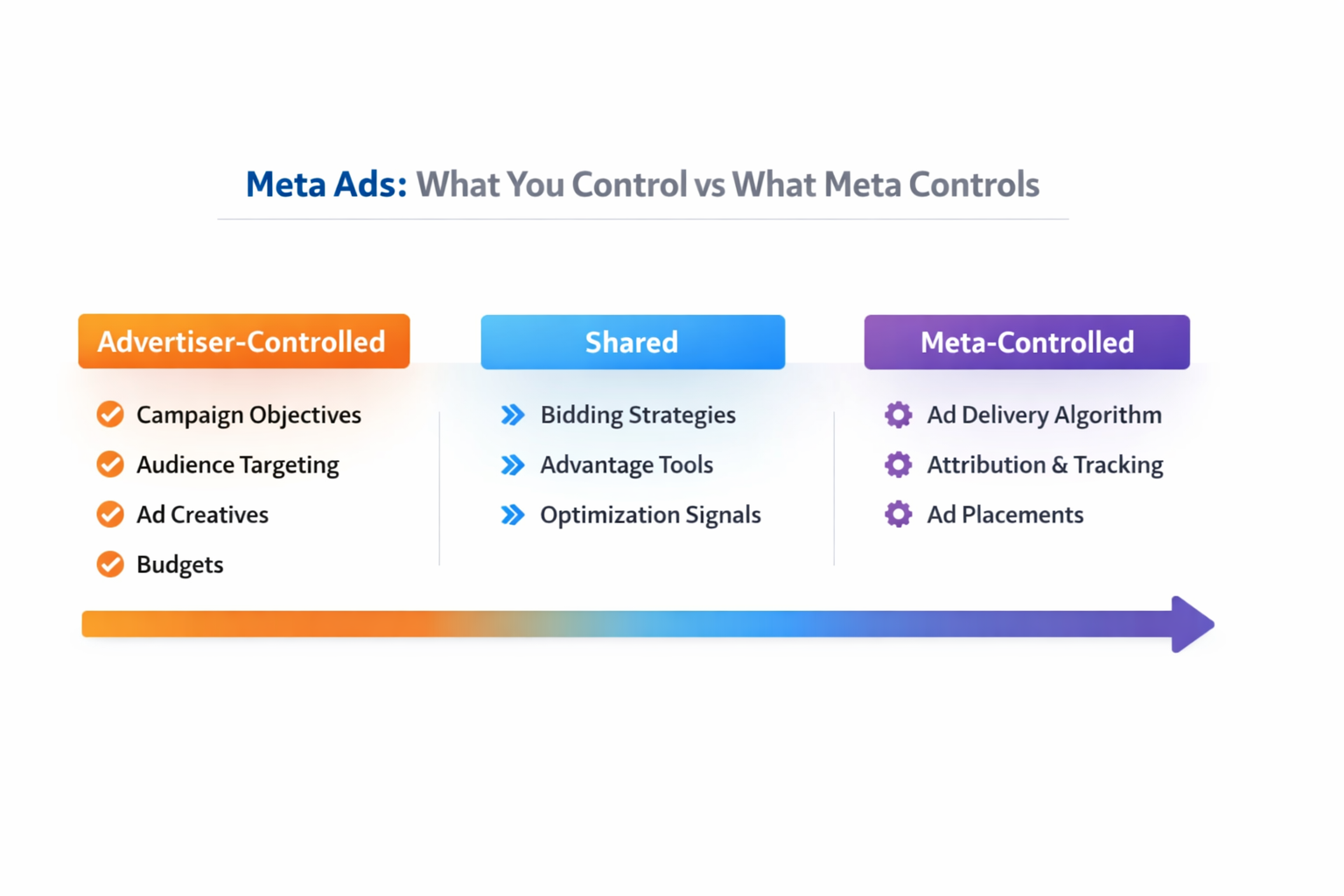
Running ads on Facebook and Instagram can be powerful — but not everything is in your hands. Meta gives you tools to set up and shape your campaigns, but once they go live, its system takes over many parts of delivery.
To build better-performing campaigns, you need to know what you can control — and what you can’t. This article breaks down both, so you can make smarter decisions and avoid wasting time or budget on things outside your influence.
What Advertisers Control
You still have control over many important parts of your Meta campaigns. These are the areas where you can make a real impact.
1. Defining Your Audience
You can choose who you intend to reach, but Meta decides who in that group actually sees your ads. Your job is to give the algorithm strong, clear signals.
There are four main audience types available on Facebook and Instagram.
Detailed Targeting
Detailed targeting includes basic audience filters such as:
-
Demographics, including age, gender, education, job role, or relationship status;
-
Interests, based on pages users follow or content they engage with;
-
Behaviors, such as device usage, purchase behavior, or travel habits;
-
Life events, like moving, getting married, or starting a new job.
This type of targeting is mostly used for top-of-funnel campaigns. However, Meta has reduced the number of available targeting options over time due to privacy changes and platform updates. As a result, detailed targeting is now broader and less precise than it used to be. Learn more about targeting options.
Custom Audiences
Custom audiences are built from people who already know your brand. You can create them using:
-
Your own data, such as customer lists, website visitors (via the Meta Pixel), app activity, or offline events;
-
Meta engagement data, including people who interacted with your ads, posts, videos, or shop.
Common use cases include:
-
Retargeting past customers with new offers;
-
Reminding website visitors about abandoned products;
-
Engaging app users based on in-app behavior;
-
Reaching followers who have interacted with your Facebook or Instagram accounts.
Because these audiences are already familiar with your business, they often convert faster and at a lower cost.
Lookalike Audiences
Lookalike audiences help you find new people who resemble your existing customers or converters.
You start with a seed audience, such as buyers, subscribers, or high-intent users. Meta then finds people with similar characteristics and behaviors.
Lookalikes are one of the most reliable ways to scale campaigns while keeping relevance, especially when built from high-quality custom audiences. Here’s when to use Custom vs Lookalike Audiences.
Advantage Audiences (AI-Based Targeting)
Meta also offers AI-driven targeting options that reduce manual setup.
These include:
-
Advantage+ Audience, where you give Meta audience suggestions and exclusions, and it expands targeting when it predicts better results;
-
Advantage Custom Audience, which allows Meta to reach people beyond your selected custom audience;
-
Advantage Lookalike and Advantage Detailed Targeting, which use your inputs as starting points rather than strict limits.
These tools often lead to broader reach and lower costs, but with less direct control over who sees your ads.
2. Setting Campaign Objectives
You tell Meta what you want from the campaign, and it optimizes delivery around that goal.
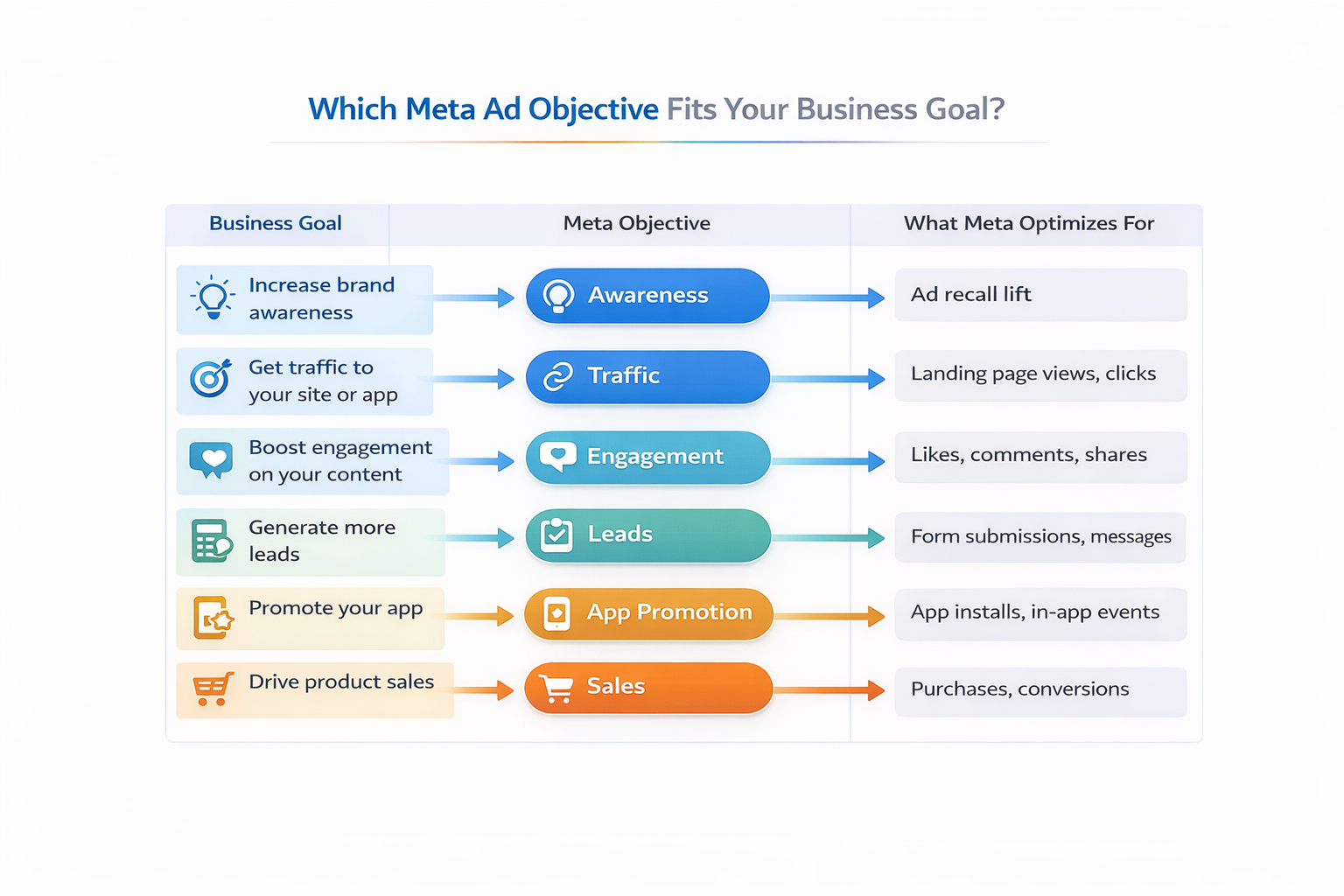
Available objectives include:
-
Awareness: show your ad to people most likely to remember it;
-
Traffic: send users to your website, app, or shop;
-
Engagement: get likes, comments, messages, or interactions;
-
Leads: collect contact information through forms, calls, or messages;
-
App promotion: drive installs or in-app actions;
-
Sales: find people most likely to purchase or convert.
Choosing the wrong objective is one of the most common reasons campaigns underperform. This article explains how campaign settings impact results.
3. Creative and Messaging
You control everything your ad says and shows.
That includes:
-
Visuals, such as images, videos, carousels, collections, or Reels;
-
Copy, including headlines, primary text, and calls to action;
-
Landing pages, where users go after clicking.
Meta does not fix weak messaging or unclear offers. If the creative doesn’t match user intent, performance will suffer regardless of targeting.
4. Budget, Bidding, and Schedule
You control how much you spend, how you bid, and when your ads run.
Your options include:
-
Daily or lifetime budgets, depending on how tightly you want to control spend;
-
Bid strategies, such as:
-
Lowest cost for maximum volume;
-
Cost cap for stable cost per result;
-
Bid cap for strict auction control;
-
-
Ad scheduling, which is useful for time-sensitive or local campaigns.
These settings influence delivery speed and scale, but they rely on strong audience and creative signals to work well.
What Advertisers Don’t Control
Even with a solid setup, Meta’s system makes many decisions automatically.
1. Who Sees Your Ad Within the Audience
Once your audience is defined, Meta decides who actually sees your ad based on:
-
Predicted likelihood of taking your chosen action;
-
Competition in the ad auction;
-
Historical performance of your ads and account.
You can’t select individual users. You influence delivery by improving signals, not by micromanaging targeting.
2. Conversion Tracking and Reporting
Meta controls how results are tracked and reported.
You cannot fully control:
-
Attribution windows (for example, 7-day click or 1-day view);
-
Reporting delays caused by modeling and privacy restrictions;
-
Differences between Meta data and your CRM or analytics tools.
This guide breaks down Meta's attribution and reporting limitations.
3. Organic Reach and Post Visibility
Boosting a post does not guarantee organic reach.
Meta’s feed algorithm decides:
-
Whether users see your content without paid promotion;
-
How often followers see your posts after engaging with ads;
-
Whether paid engagement improves future organic visibility.
Paid and organic distribution follow different systems.
4. Final Ad Placements
You can allow placements such as Feed, Stories, Reels, or Messenger, but Meta decides:
-
Where ads actually deliver;
-
How budget is split across placements;
-
Which placements scale or stop based on performance.
Even with all placements enabled, Meta will favor those that deliver results at the lowest cost.
Practical Tips to Strengthen Your Meta Ads Strategy
Once you know what’s in your control, focus on sharpening those levers.
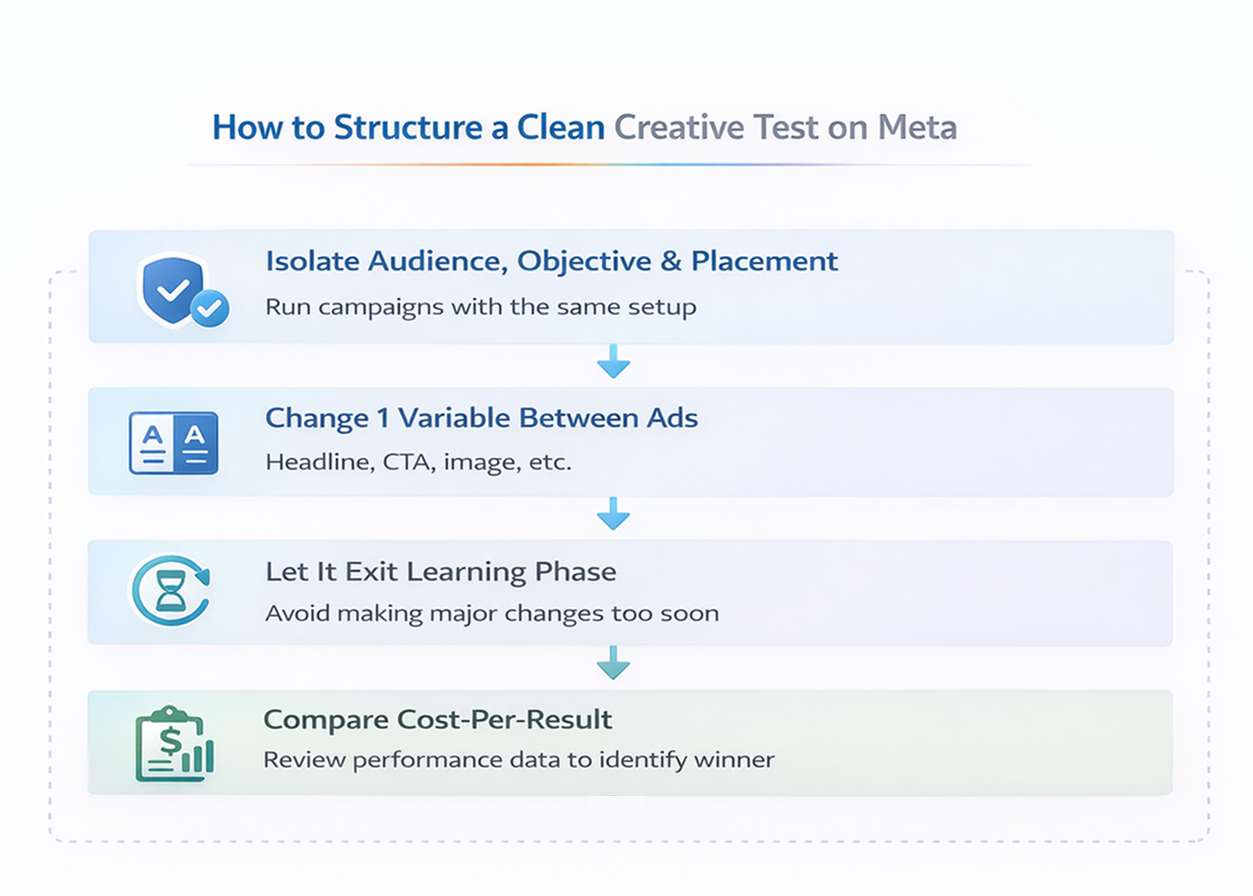
Here are a few practical ways to get better results with less guesswork:
-
Start with warm audiences. Launch new campaigns to your existing customers, email lists, or site visitors first. This improves early signal quality and helps the algorithm learn faster.
-
Keep your creative matched to your objective. If you're running a sales campaign, avoid top-of-funnel messaging. Align visuals, copy, and landing pages with the action you want users to take.
-
Use simplified ad structures. Don’t over-segment. One well-built campaign with a strong audience and creative can outperform five scattered ad sets.
-
Test one variable at a time. If you're testing creative, hold audience and objective constant. This helps you spot what’s actually driving change.
-
Let the algorithm learn. Avoid pausing campaigns too early. Let ad sets exit the learning phase before making major changes.
-
Use first-party data to fuel lookalikes. Lookalike audiences perform better when seeded from high-quality data like recent buyers or high-LTV customers.
-
Review placement breakdowns. Even if you use automatic placements, check the data. Turn off underperforming spots if they consistently drain budget.
-
Layer custom audiences with exclusions. Avoid showing ads to people who just purchased or signed up. This keeps your spend focused on the right prospects.
These tactics don’t just improve efficiency — they help Meta’s system do its job better, which means more consistent performance over time.