When you open Meta Business Suite on mobile, the Home screen looks clean and actionable. You see notifications, recent posts, ads, and a quick snapshot of performance.
It feels like everything you need is in one place.
The problem is that this view compresses multiple systems into a single layer. Without context, it becomes very easy to misread what is actually happening in your campaigns.
What the Home screen is actually showing
The Home dashboard is designed to give a high-level overview of your business portfolio and connected assets, including your Facebook Page and Instagram account.
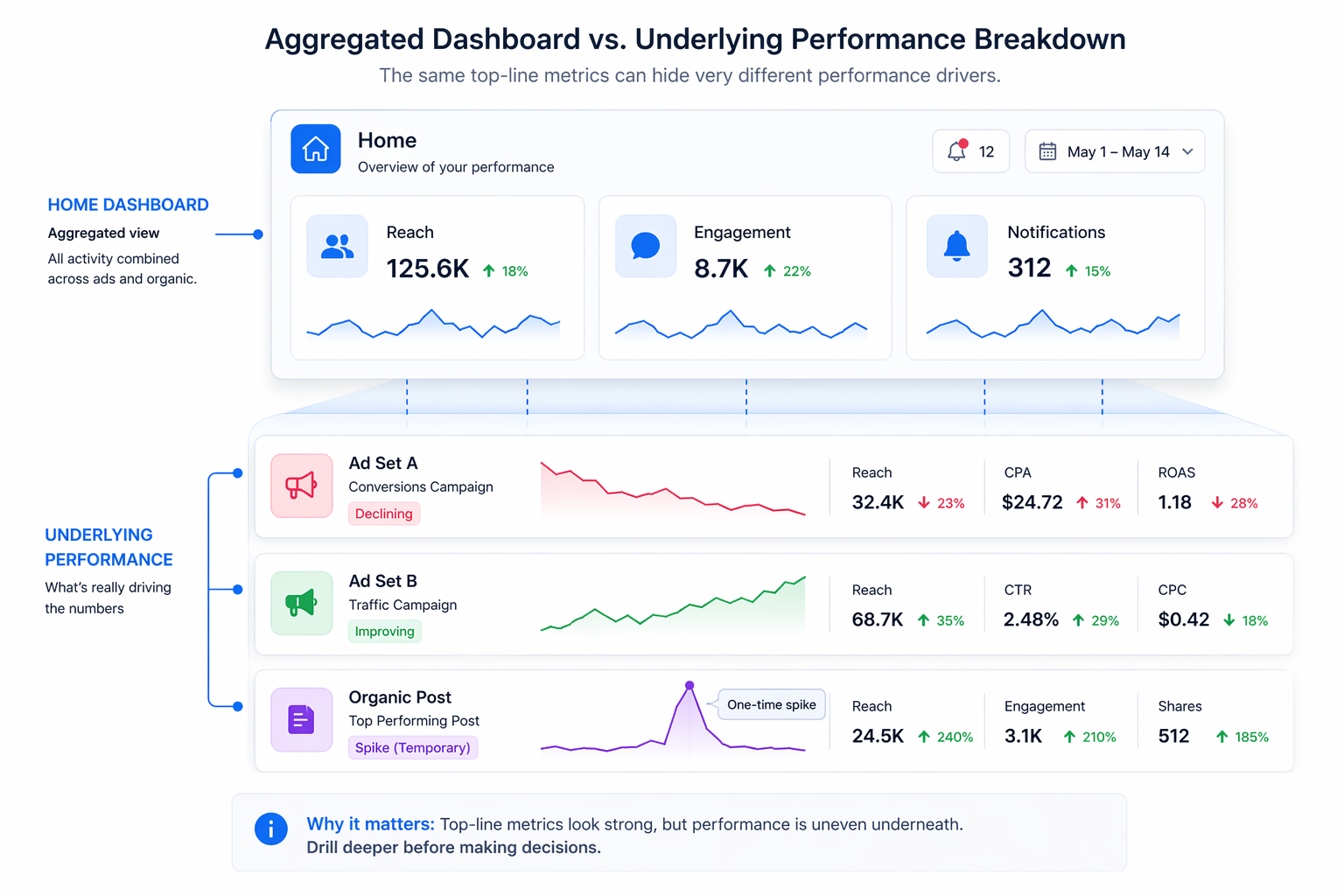
At any moment, you are looking at a combination of activity, content, and performance signals:
- Notifications. These include unread messages, comments, likes, and account-level alerts that may require attention.
- Recent content. You can quickly review and boost recently published posts, stories, and reels across Facebook and Instagram.
- Recent ads. The dashboard shows active, new, and completed ads from roughly the past 14 days, along with a shortcut to create new ones.
- Insights. You see reach, engagement, and audience growth across both paid and organic activity.
- Access to tools. You can jump into content creation, Inbox, or other parts of Meta Business Suite directly from the same screen.
None of these elements are inaccurate. The issue is that they are aggregated.
You are not seeing how performance is distributed underneath.
Why aggregated data leads to bad optimization decisions
A common mistake is reacting to what looks like a clear signal, when it is actually an average.
For example, the dashboard might show stable reach and engagement. At the same time, one ad set could be losing efficiency while another is compensating for it. That imbalance is invisible at the Home level.
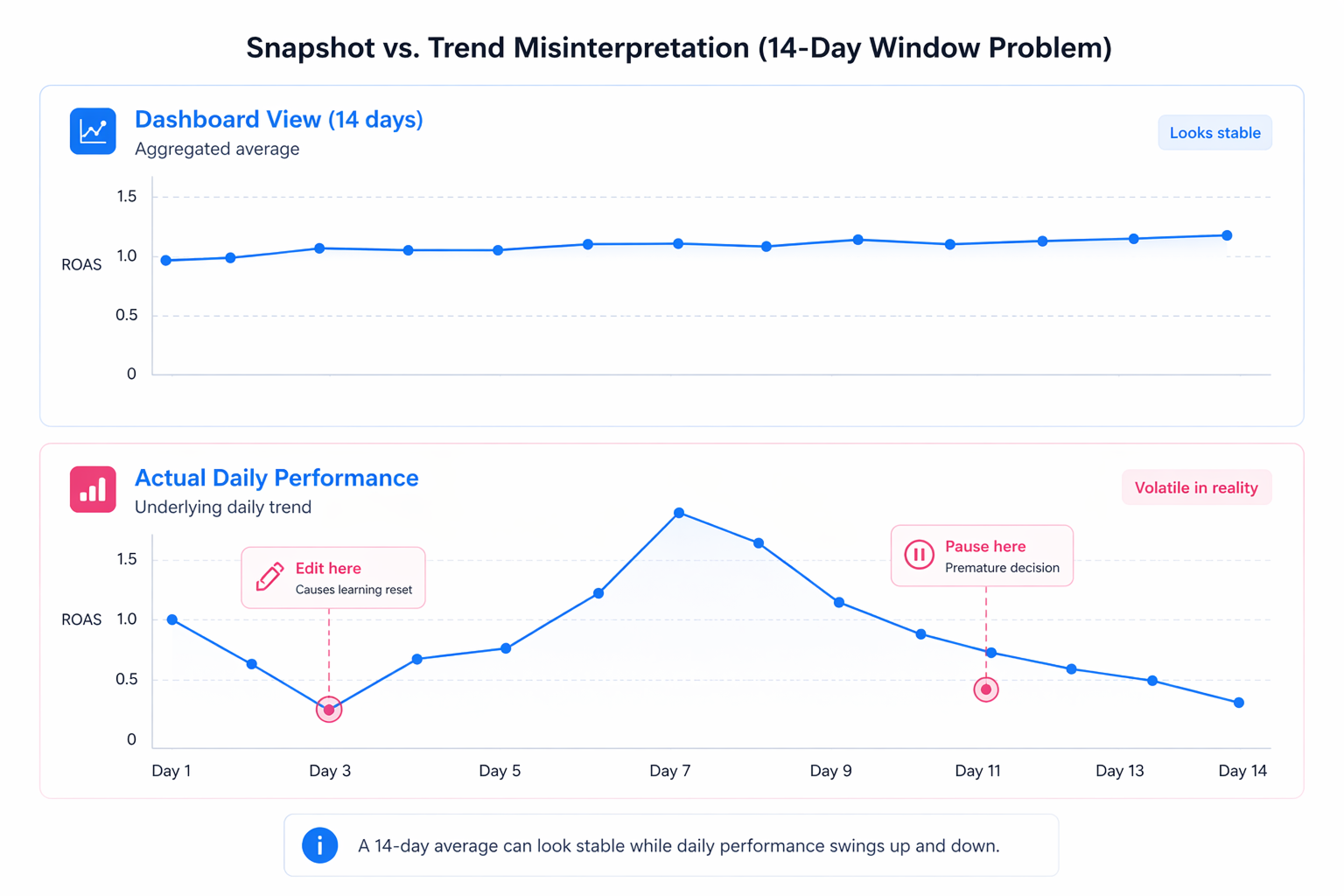
Another frequent issue appears in recent ads. Seeing performance across the last 14 days encourages short-term comparisons. Advertisers often pause or edit campaigns based on these snapshots, even though delivery naturally fluctuates during that window.
This is where performance starts to degrade.
Frequent reactions based on partial data lead to:
- unnecessary edits that reset the learning phase;
- budget shifts before performance stabilizes;
- misidentification of winning or losing creatives.
The dashboard did not cause the issue. The interpretation did.
This becomes even more dangerous when surface-level metrics look strong but hide underlying issues, which is a common pattern explored in ad metrics that lie and how good numbers can hide bad performance.
The role of Meta Business Suite in the bigger system
Meta Business Suite is built as a central management layer. It connects your assets, people, and activity across platforms like Facebook and Instagram.
The Home dashboard sits at the top of that system.
It reflects what is happening across several underlying components:
- your content pipeline, including scheduled and published posts;
- your ad activity, including boosted content and simplified campaigns;
- your audience signals, such as follower growth and engagement trends;
- your communication channels through Inbox.
Because it aggregates all of this, it is useful for orientation, but not for diagnosis.
Where advertisers usually misread the dashboard
The mistakes tend to follow predictable patterns.
One scenario is overvaluing notifications. A spike in engagement or messages can feel like a performance win, but it does not necessarily translate into conversions or revenue.
Another scenario is boosting content directly from the Home screen without validating why that content performed well organically. Engagement alone does not guarantee paid performance.
A third issue is relying on insights without separating paid and organic contributions. Growth in followers or reach might be driven by one strong post rather than consistent campaign performance.
In all of these cases, the dashboard shows a signal, but not the cause.
How to read the Home dashboard more accurately
Instead of treating the Home screen as a decision tool, treat it as a filter for attention.
When you open it, you are looking for changes that require investigation, not immediate action.
A more reliable approach looks like this:
- If notifications increase, check whether it is tied to a specific campaign, post, or audience segment.
- If recent ads show performance changes, compare them against a longer time window before acting.
- If insights show growth or decline, verify whether it is driven by paid activity, organic content, or a combination of both.
This extra step is what prevents overreaction.
In practice, this means moving beyond surface indicators like CTR or CPC and focusing on deeper patterns, as explained in how to analyze Facebook ad performance beyond CTR and CPC.
The connection between inputs and what you see
One of the biggest blind spots in the Home dashboard is that it does not show how inputs influence outputs.
Creative, audience selection, and campaign structure all shape performance, but the dashboard only shows the result.
If your creative system is inconsistent, the signals you see here will also be inconsistent. That is why understanding how creative inputs shape performance signals becomes important when interpreting dashboard data.
Without that connection, it is easy to treat symptoms instead of causes.
Why mobile usage increases the risk of misinterpretation
The Home dashboard is especially prominent in the mobile app, where space is limited and detail is reduced.
This changes behavior.
You are more likely to:
- check performance quickly and frequently;
- make decisions without reviewing deeper breakdowns;
- rely on surface-level metrics.
Over time, this creates a pattern of reactive optimization.
If you are managing campaigns from mobile, it becomes critical to avoid acting on incomplete information. This is covered in more detail in monitoring campaigns on mobile without overreacting.
What needs to be in place for the dashboard to be useful
The Home dashboard only becomes reliable when the underlying system is structured.
That includes:
- clearly separated campaigns and audiences;
- consistent creative naming and reuse;
- defined performance benchmarks;
- stable budgets and objectives.
Without these, the dashboard reflects noise rather than meaningful trends.
Final takeaway
The Meta Business Suite Home dashboard is designed for awareness, not analysis.
It tells you when something changes, but not why it changed.
The real skill is learning how to separate meaningful patterns from distractions, which is why frameworks for separating signal from noise in reports become essential as campaigns scale.
If you use the dashboard to guide attention and then validate decisions with deeper data, it becomes useful. If you treat it as a shortcut to optimization, it will lead you in the wrong direction.