The Meta Business Suite mobile app is designed for speed. You can check activity, respond to messages, review content, and launch ads without opening your laptop.
That convenience is useful, but it also changes behavior.
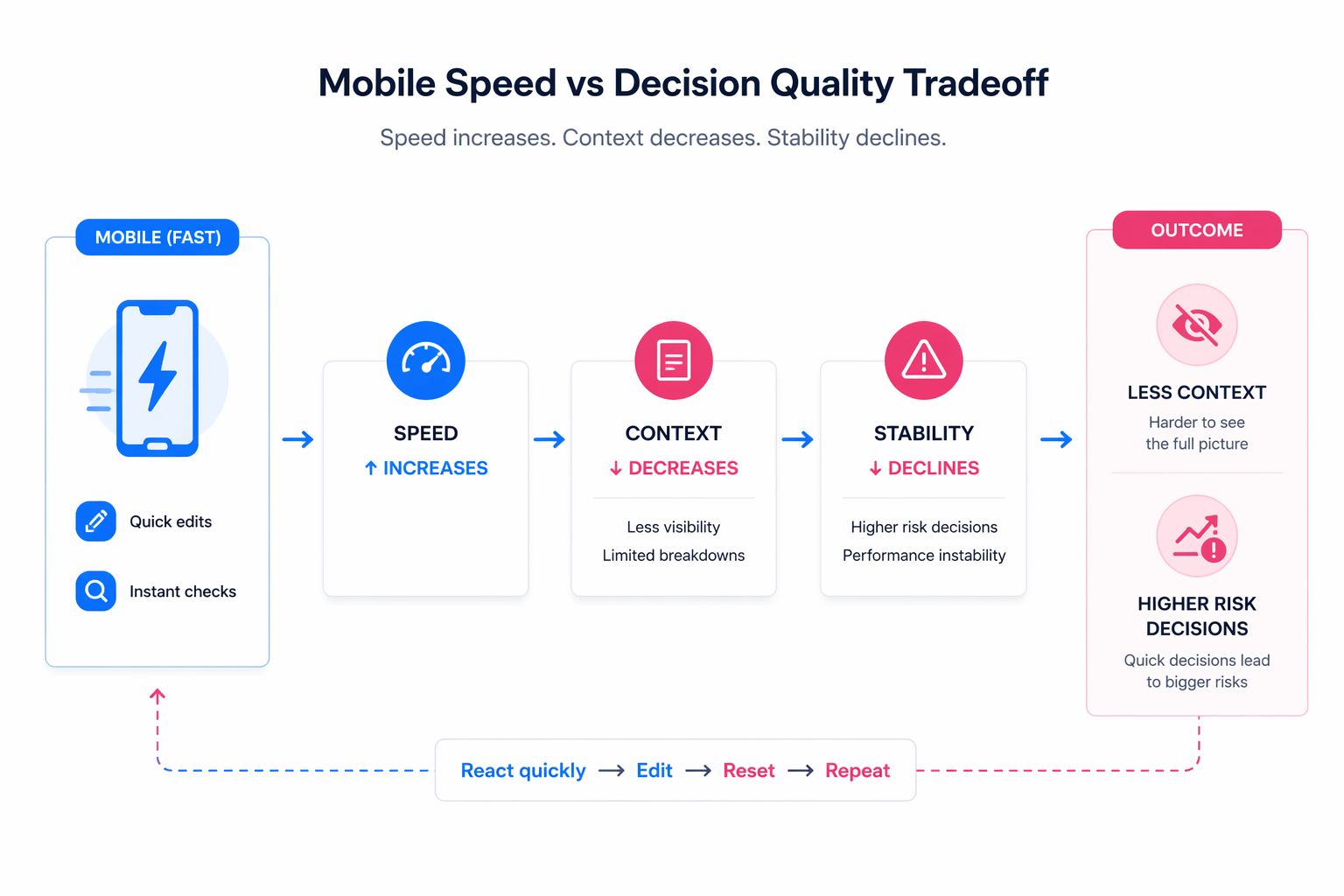
When everything is accessible in a few taps, decisions tend to happen faster and with less context. Over time, this creates a pattern where campaigns are adjusted based on partial information rather than full analysis.
The tool itself is not the problem. The way it is used often is.
What the Meta Business Suite mobile app is actually built for
The mobile app is not a simplified version of Ads Manager. It is a coordination layer for managing business activity across Facebook and Instagram.
At its core, it supports five types of actions:
- Content management. You can create, schedule, and adjust posts, stories, and reels. The planner allows you to prepare content in advance and maintain consistency.
- Communication handling. Inbox brings together messages and comments, and automations can respond instantly to common questions or first-time interactions.
- Performance monitoring. The Home screen shows recent content, ads, notifications, and high-level insights across platforms.
- Ad creation. You can launch simple campaigns, boost posts, or use automated formats to test variations quickly.
- Lead management. Leads Centre helps track and organize incoming leads from messages and ads, along with key contact details.
These features are designed for accessibility and speed, not for deep optimization.
Where performance problems start on mobile
Most issues come from trying to do too much from the app.
There are three patterns that tend to create problems.
First, campaigns are edited too frequently. A small drop in results triggers a quick change, which resets the learning phase or disrupts delivery.
Second, decisions are made based on incomplete data. The mobile interface shows summaries, not full breakdowns. That makes it easy to misinterpret short-term fluctuations.
Third, workflows become inconsistent. Assets, audiences, and campaigns are handled differently on mobile than on desktop, which leads to duplication and confusion.
These issues rarely look like mistakes in isolation. They show up over time as unstable performance and inconsistent results.
The role of planning in avoiding reactive decisions
One of the most useful features of the mobile app is the ability to plan ahead.
Scheduling content, preparing creatives, and organizing campaigns in advance reduces the need for real-time decisions. Instead of reacting to performance changes, you are working from a predefined structure.
This applies to both organic and paid activity.
When content is scheduled properly, you avoid gaps or rushed posts. When creatives are prepared in advance, you can respond to performance changes without rebuilding assets.
The same principle applies to messaging. Inbox automations ensure that responses are consistent and immediate, which improves user experience without requiring constant manual input.
Why quick actions often lead to worse results
The biggest risk with mobile usage is not making the wrong decision. It is making a decision too early.
For example, you might see a drop in results and assume performance is declining. In reality, delivery may have shifted temporarily, or the system may still be stabilizing after a change.
Reacting immediately introduces instability.
This is especially common when looking at short timeframes or aggregated metrics. Without deeper analysis, it is difficult to understand whether a change is meaningful or just noise.
This is closely related to a broader issue in campaign management: why over-optimization hurts performance , especially when decisions are made too frequently without enough data.
The connection between mobile workflows and asset consistency
Mobile usage also affects how creatives are handled.
Uploading or selecting assets from a smaller interface increases the chance of duplication or incorrect selection. Over time, this leads to multiple versions of the same creative being used across campaigns.
That fragmentation weakens performance signals and makes testing less reliable.
Maintaining a consistent asset structure becomes more difficult when actions are split between desktop and mobile. This is where keeping your creative system aligned becomes critical, especially if you want to avoid issues similar to what’s described in the hidden costs of a messy ad account.
Where advertisers typically lose control
Certain situations make mobile-related issues more likely.
In fast-moving accounts, frequent checks lead to frequent changes. Small adjustments accumulate and disrupt campaign stability.
In teams, different people using mobile access introduce inconsistency. One person follows a structured approach, while another makes quick edits without full context.
In lead generation setups, immediate responses to incoming leads are useful, but campaign changes triggered by early signals often reduce lead quality over time.
In all of these cases, the issue is not the tool. It is the lack of a clear decision framework.
What to put in place before relying on mobile
Mobile works best when it sits on top of a structured system.
At a minimum, you should have:
- clear rules for when campaigns can be edited, based on spend or time thresholds;
- a defined campaign structure, so performance can be interpreted correctly;
- consistent creative organization, to avoid duplication and confusion;
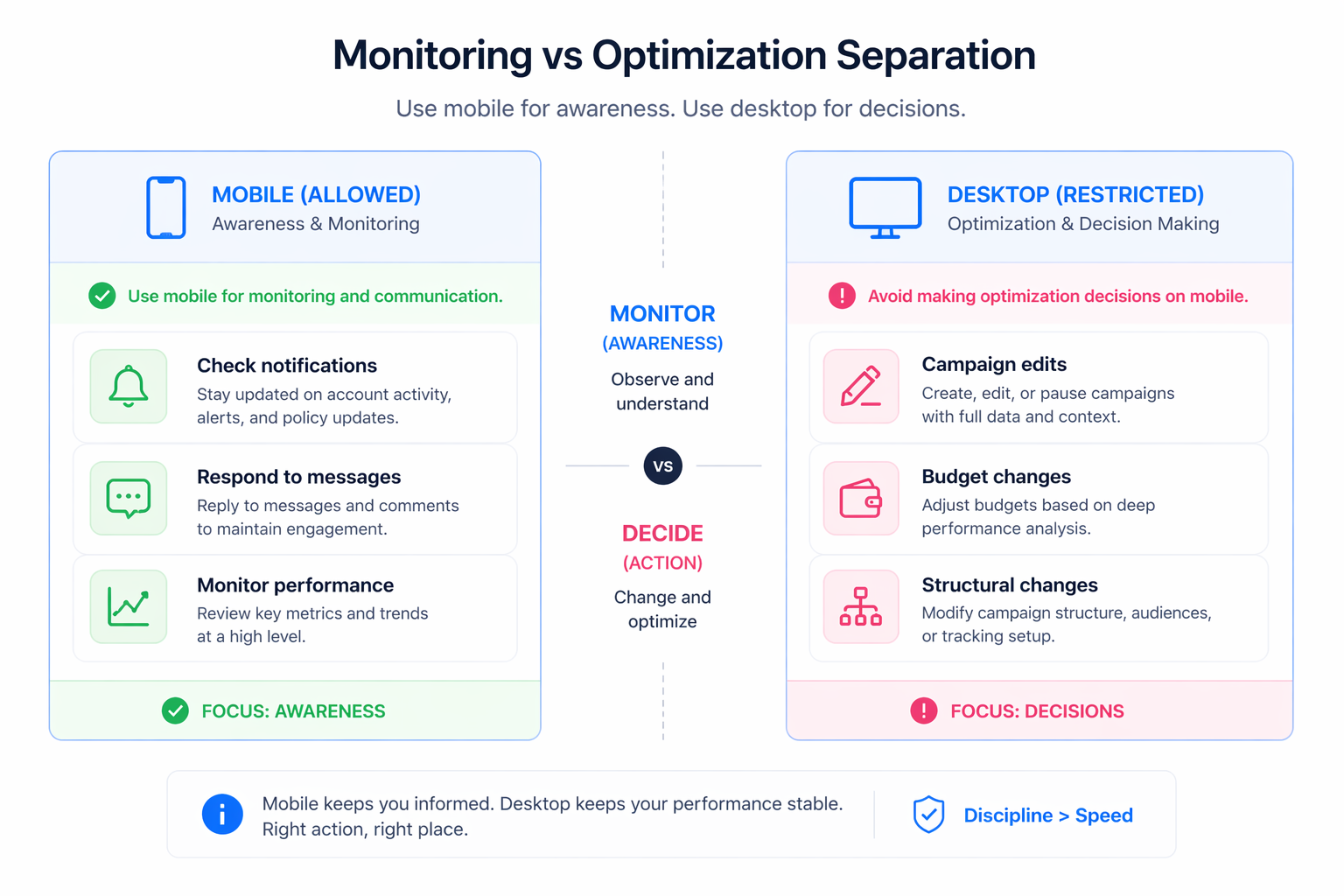
- a clear separation between monitoring and optimization tasks.
Without these, mobile access amplifies inconsistency instead of improving efficiency.
A practical way to use the mobile app without losing control
The goal is not to avoid using mobile. It is to use it for the right tasks.
A disciplined approach usually looks like this:
- Use the app to monitor activity, not to make immediate optimization decisions.
- Respond to messages and manage communication in real time, where speed actually matters.
- Prepare content and campaigns in advance, so fewer decisions are needed on the spot.
- Flag issues when you notice them, but validate them later with full data before acting.
This approach keeps the benefits of speed without introducing instability.
If you want to go further, many teams rely on structured decision frameworks similar to those described in when to pause, kill, or scale an ad set to avoid impulsive changes.
Final takeaway
The Meta Business Suite mobile app is a powerful tool for staying connected to your campaigns.
But it reduces context while increasing speed.
If you rely on it for quick decisions, performance becomes reactive and unstable. If you use it to support a structured system, it becomes a way to maintain visibility without losing control.
The difference comes down to discipline, not features.