You open Meta Business Suite, see an alert, and feel pressure to act. That’s where many campaigns start to drift off course.
The homepage is designed to surface issues quickly, but it removes most of the context behind those signals. If you treat alerts as instructions instead of prompts to investigate, you end up making changes at the wrong time.
What Those Signals Actually Represent
The homepage pulls together data from different systems — ad delivery, billing, pixel activity, asset permissions — and reduces them to short messages.
That reduction hides the underlying cause.
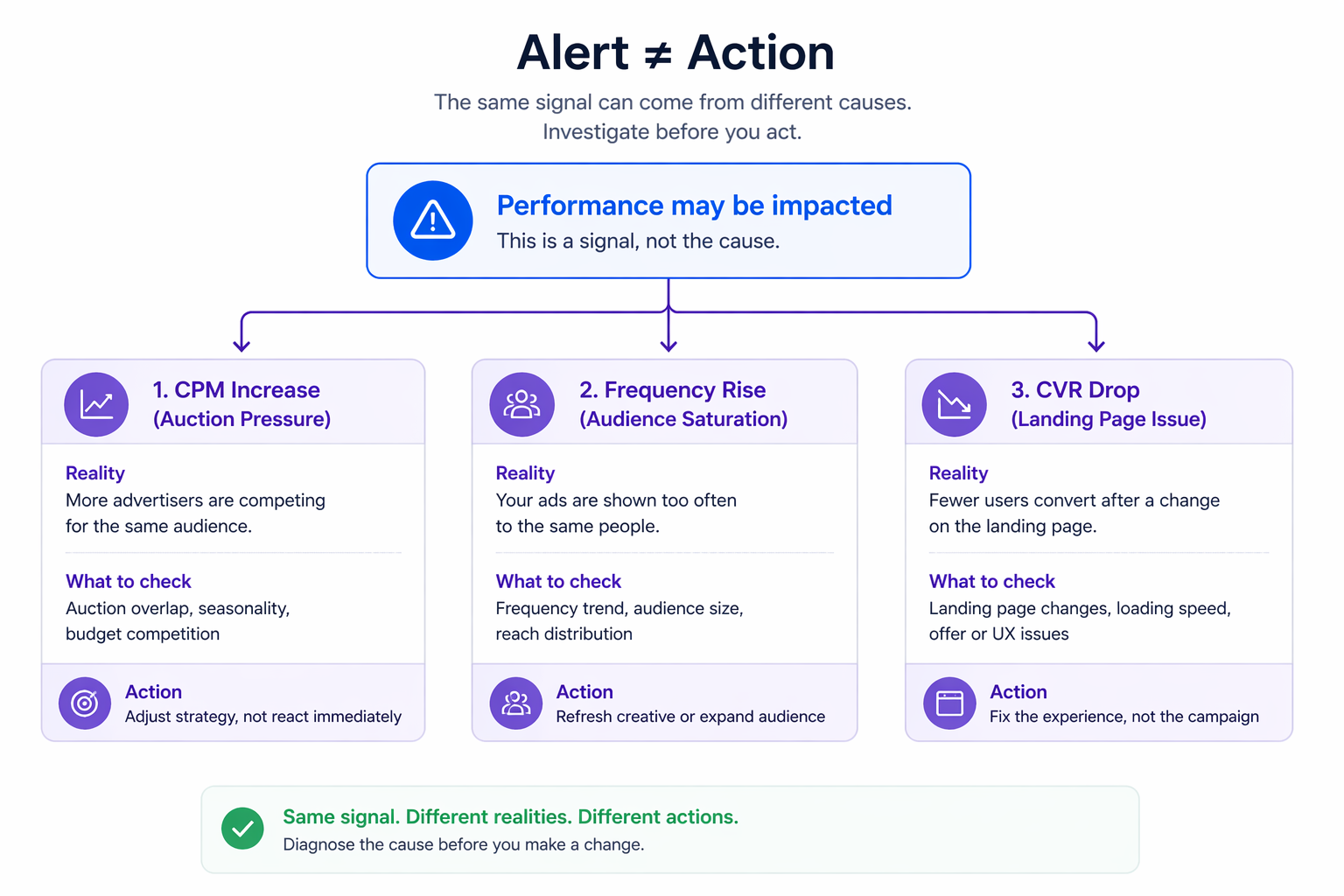
A “performance may be impacted” alert can appear in very different situations. In one account, it may follow a sudden increase in CPM after new competitors enter the auction. In another, it may be tied to rising frequency on a narrow audience. In a third case, it can come from a drop in conversion rate after a landing page change.
The wording stays the same, but the correct response is not.
This is exactly why why performance metrics need context — without context, you’re reacting to symptoms instead of diagnosing the system.
Where Advertisers Lose Control
The problem is not the alert itself. It is the reaction to it.
In unstable accounts, you can usually trace a pattern in Ads Manager:
- multiple edits within a short time frame,
- campaigns repeatedly re-entering the learning phase,
- spend shifting unevenly across ad sets.
Each change resets part of the system. Instead of stabilizing performance, the account becomes harder to read.
If you’re unsure whether a change is justified, it’s worth revisiting when you should actually edit your Facebook ads. Most performance drops don’t require immediate intervention.
Why This Impacts Cost and Scaling
Meta’s delivery system depends on continuity. When campaigns are edited too frequently, the system has to re-evaluate where to allocate budget.
That shows up in ways most advertisers recognize:
- CPA starts fluctuating without a clear direction,
- strong ad sets lose consistency,
- scaling attempts stall even when demand is present.
The issue is rarely visible in a single moment. It builds over several reactive decisions.
How This Plays Out in Real Campaigns
In B2B lead generation, the issue often comes from low conversion volume. A short-term dip can trigger concern even when performance is within a normal range for that account.
In ecommerce, it usually appears during scaling. A campaign expands into new audience segments, performance temporarily softens, and budgets get cut before the system stabilizes.
In agency environments, the effect multiplies. Multiple accounts generate alerts at once, and teams start making defensive edits instead of structured evaluations.
The difference between a real issue and a temporary fluctuation is often visible early — if you know how to spot real performance issues early.
What to Check Before Making Changes
Before acting on any homepage alert, the goal is to understand whether there is a real pattern or just short-term variation.
Inside Ads Manager, look at:
- whether the issue affects one campaign or several,
- how CPM, CTR, and frequency have moved,
- whether any recent changes could explain the shift,
- how long the pattern has been present.
If the signal is recent, it often reflects normal fluctuation rather than a structural issue.
Why System Context Matters
The homepage only makes sense when you understand where its data comes from and how different parts of Meta Business Suite operate.
Without that context, it is easy to misinterpret what you are seeing. This is especially important if you are managing both organic activity and paid campaigns in the same interface.
Content timing also plays a role. Engagement patterns from scheduled posts can influence the signals that surface here.
Practical Approach to Using the Homepage
The most effective way to use the homepage is to treat it as an early warning layer.
It tells you that something may require attention, but it does not tell you what action to take. That decision should always come after reviewing detailed data in Ads Manager.
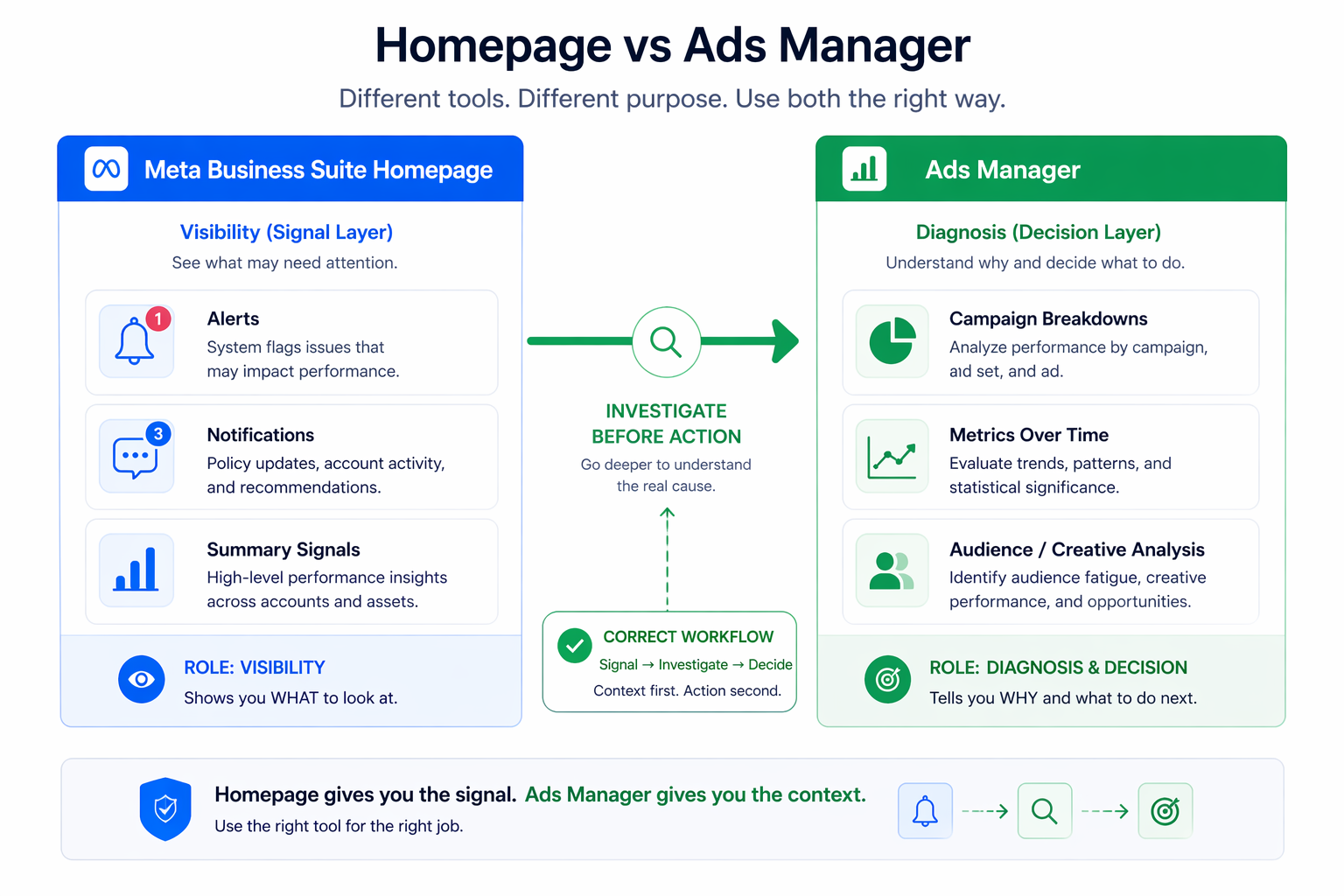
In practice, this means delaying changes until you confirm the cause. It also means accepting short-term volatility when the system is still learning.
Final Takeaway
The Meta Business Suite homepage is built for visibility, not diagnosis.
If you respond to it too quickly, you introduce instability into your campaigns. If you use it as a starting point for deeper analysis, it becomes a useful signal layer instead of a source of confusion.