Most advertisers focus on getting more leads. Fewer focus on what happens after the lead is generated.
That second part is where performance is often won or lost.
Meta Leads Centre is built to manage that stage. It helps you track, organize, and follow up with leads from different sources in one place. More importantly, it connects lead generation with actual pipeline movement.
If you ignore it, you risk optimizing for volume instead of revenue.
What Leads Centre actually collects and organizes
Leads Centre pulls together leads from multiple sources inside Meta. Instead of checking different tools, everything is centralized.
It includes leads from:
- lead ads (instant forms);
- ads that click to message;
- organic conversations through Messenger or Instagram.
This matters because leads do not behave the same across sources. Someone who fills out a form behaves differently from someone who starts a chat. Without a unified view, these differences are easy to miss.
Leads Centre removes that fragmentation and gives you one place to track all lead activity.
How Pipeline view vs Table view changes how you manage leads
Leads Centre offers two ways to visualize your data, and each serves a different purpose.
Pipeline view focuses on movement. You can drag and drop leads across stages such as Qualified or Converted. This makes it easier to understand where leads are in the funnel and where they get stuck.
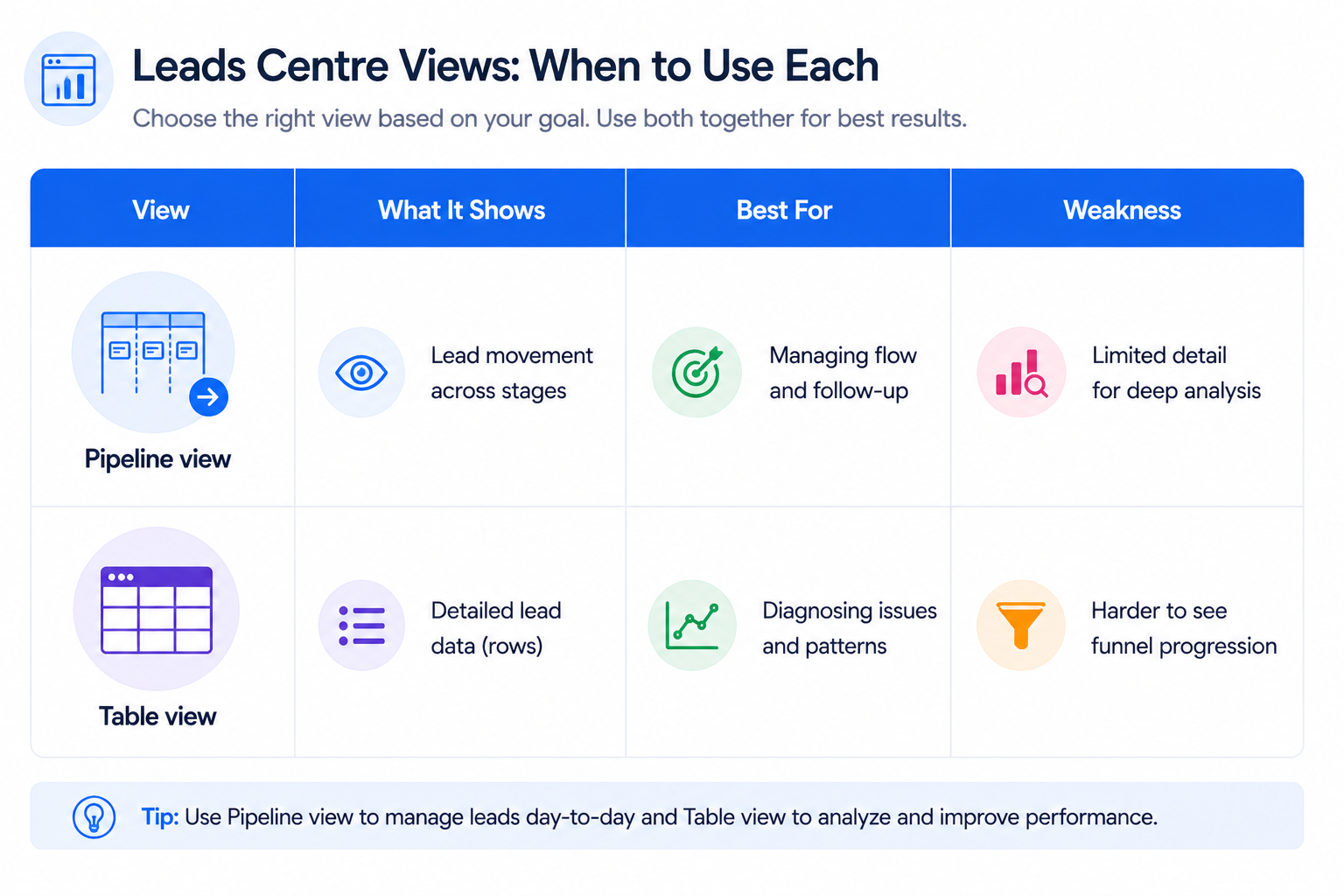
Table view focuses on detail. It organizes leads in rows and allows you to sort by fields such as date, name, source, stage, or owner. This is more useful when analyzing patterns or filtering specific segments.
The choice between the two affects how you work. Pipeline view is better for managing flow. Table view is better for diagnosing issues.
Teams that switch between both views tend to identify bottlenecks faster.
Why lead tracking inside Meta changes campaign decisions
Without structured tracking, all leads look the same in Ads Manager.
Leads Centre introduces progression tracking. Instead of seeing only lead volume, you can see how leads move through your funnel.
This gives you answers to questions like:
- how many leads are actually qualified;
- how many leads convert into customers;
- where the biggest drop-offs happen.
This is the layer that makes campaign data actionable. It connects ad performance with sales outcomes.
That’s why learning how to read Facebook ad reports like a growth marketer becomes more meaningful when paired with lead-stage tracking.
What you can actually do with each lead
Leads Centre is not just for viewing data. It allows direct action on each lead.
You can:
- edit contact details if information is incomplete or incorrect;
- message leads directly through Messenger or Instagram;
- assign a specific owner responsible for follow-up;
- add labels or notes to organize and segment leads;
- schedule reminders to ensure follow-up happens on time.
These actions create a structured follow-up system. Instead of relying on memory or scattered tools, everything is tracked in one place.
You can also upload leads from external sources, which allows you to centralize both Meta-generated and offline leads. This reduces fragmentation across systems.
Why lead stages are the backbone of performance tracking
By default, every lead starts in the Intake stage. From there, you move leads based on qualification and progress.
The standard stages include Intake, Qualified, Converted, Lost, and Not qualified. You can also customize these stages to match your sales process.
This structure matters more than it seems.
Without stages, you only measure input. With stages, you measure outcomes.
Once leads are categorized, you can identify where performance breaks. For example, a high number of Intake leads but few Qualified ones usually signals targeting issues. A high number of Qualified leads but few Converted ones often points to follow-up or offer problems.
This is exactly why lead quality checks before scaling spend should happen before increasing budget.
How filtering and sorting reveals hidden performance issues
Leads Centre allows you to filter and sort leads using multiple criteria.
You can filter by form, source, date, owner, or custom labels. You can also search using campaign ID or ad ID.
Sorting allows you to organize leads by:
- date added;
- name;
- source or channel;
- stage;
- assigned owner.
These controls make it easier to spot patterns.
For example, if leads from one campaign consistently stay in Intake, that campaign may be attracting low-intent users. If one owner has significantly lower conversion rates, the issue may be in follow-up rather than targeting.
This level of visibility helps separate campaign problems from operational ones.
How Leads Centre connects to retargeting and scaling
Leads Centre is not only a management tool. It also feeds back into your targeting strategy.
You can use collected leads to:
- create custom audiences for retargeting;
- build lookalike audiences based on high-quality leads.
This closes the loop between acquisition and optimization.
Instead of targeting broadly, you can build audiences based on real behavior and actual lead quality. This improves signal quality and helps campaigns scale more efficiently.
The difference is simple. You move from generating leads to building a pipeline that grows over time.
When exporting leads still makes sense
Leads Centre allows you to export leads as a CSV file based on your current filters.
This is useful when:
- sharing data with external teams;
- running deeper analysis outside Meta;
- transferring leads into another system.
However, exporting should not replace real-time management.
The more time passes between lead submission and follow-up, the lower the conversion rate tends to be. Leads Centre is designed to reduce that delay, not increase it.
Final takeaway
Meta Leads Centre turns lead generation into a structured process.
It centralizes leads from different sources, tracks their progress, and allows your team to act quickly. It also provides the missing link between campaign performance and actual sales results.
If you treat lead generation as a complete process at the moment of submission, performance will plateau. If you manage what happens after, results improve.
The goal is not just to collect leads, but to turn them into a predictable pipeline.