Campaign performance rarely breaks at the ad level. It usually breaks in the data layer where signals are collected and interpreted. When business apps are not connected, Meta operates with incomplete information about what users actually do after clicking.
This creates a familiar pattern in Ads Manager. CPM and CTR remain stable, but conversion volume becomes inconsistent or declines over time. Meta keeps delivering traffic, but it cannot reliably identify which users are likely to convert.
Connecting business apps aligns your ad delivery with real outcomes like purchases, leads, and product interactions. That alignment allows the algorithm to optimize toward revenue instead of clicks.
What actually happens when you connect a business app
The connection process defines how Meta builds its optimization signals. Each asset you confirm contributes to how campaigns compete in auctions and how budgets are allocated.
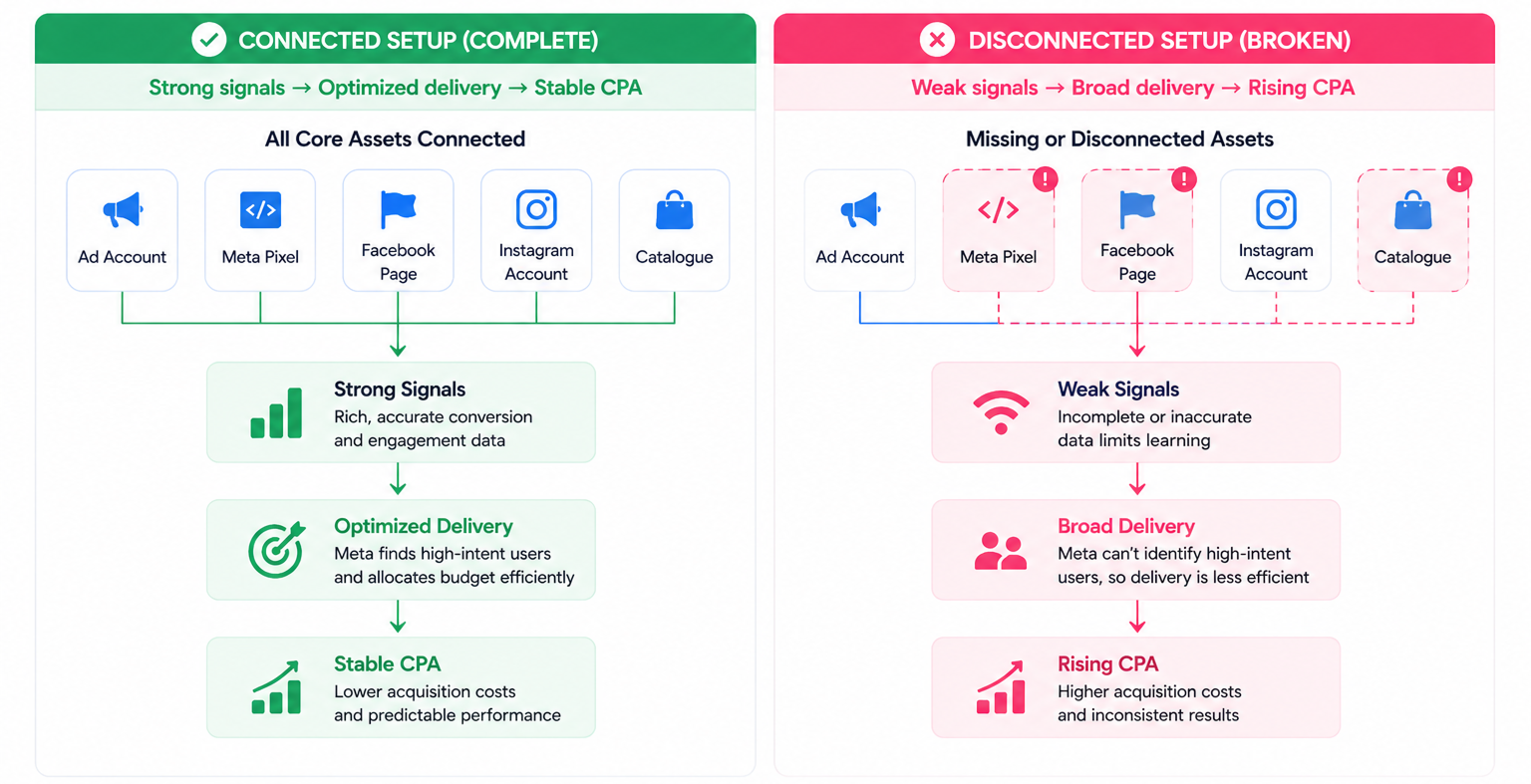
When connecting a business app, you are effectively validating several core components:
- Ad account selection.
This determines where campaign learning accumulates. Selecting the wrong account splits performance data and can reset optimization progress. - Facebook Page and Instagram account.
These assets feed engagement signals such as comments, saves, and profile visits into audience models used for retargeting. - Meta Pixel connection.
This is the core conversion signal. Without it, Meta cannot prioritize high-intent users. You need to set up accurate conversion tracking with Meta Pixel before expecting stable CPA. - Catalogue integration.
This enables dynamic ads. Without a catalogue, product-level personalization disappears, which often leads to higher acquisition costs.
Each of these inputs directly affects how Meta evaluates users in real time. Missing one weakens the system’s ability to optimize.
Where things break in real campaigns
Integration issues rarely trigger errors. Instead, they show up as subtle performance changes that are easy to misinterpret.
You can usually detect problems through these observable patterns:
- Conversion events drop while traffic volume remains stable.
This often indicates that the Pixel or app connection is no longer tracking correctly. - Campaigns remain stuck in “Learning Limited.”
This happens when Meta receives too few consistent signals to exit the learning phase. - Dynamic ads stop scaling or lose efficiency.
Catalogue sync issues prevent Meta from matching products to user intent. - Retargeting audiences shrink unexpectedly.
Data from connected apps stops feeding engagement or conversion events.
These are not creative or targeting problems. They are infrastructure issues that limit how the algorithm learns.
How to connect a business app without breaking your setup
The connection flow inside Meta Business Suite is simple, but the decisions inside it require precision. Small mistakes at this stage can affect performance for weeks.
To connect a business app correctly:
- Open Meta Business Suite and go to “All tools.”
Navigate to the Business Apps section where integrations are managed. - Select your app and click “Connect.”
Use search or categories to find the relevant integration. - Follow the setup prompts carefully.
Avoid rushing through asset selection, as this is where most errors occur. - Confirm all required assets.
Double-check your ad account, Pixel, Page, Instagram account, and catalogue. - Finish setup and verify in Connected Apps.
Ensure the app is active and syncing data correctly.
A misconfigured connection does not stop campaigns from running. It reduces performance gradually, which makes it harder to diagnose.
Why missing integrations increase CPA over time
Campaigns can perform reasonably well even with incomplete integrations, especially early on. Meta can rely on engagement signals and broader behavioral patterns to deliver results.
Over time, the system loses efficiency. You may notice lower CPC but rising CPA, along with weaker conversion rates. This happens because Meta shifts toward optimizing for cheaper actions instead of valuable ones.
Without strong conversion signals, audience quality declines. If you are trying to diagnose why your campaigns are not converting, integration gaps should be one of the first areas to check.
Dependencies most advertisers overlook
Connecting an app only works if the underlying setup is correct. Many performance issues come from missing prerequisites rather than the integration itself.
Before connecting anything, validate these elements:
- Business Manager permissions.
Incomplete access can block integrations or create partial data sync. Teams often need to properly manage permissions across your ad accounts to avoid this. - Pixel event quality.
Events must fire consistently and map correctly to conversions. Broken tracking leads to unreliable optimization. - Domain and event prioritization.
If events are not configured correctly, Meta cannot optimize effectively under privacy constraints.
These dependencies determine whether your integrations actually improve performance or just create noise.
When to audit your app connections
You do not need to check integrations daily, but certain signals indicate it is time to review them. These signals are visible directly in Ads Manager and often appear during scaling or structural changes.
Audit your app connections when you see:
- CPA increasing while CPM and CTR remain stable;
- conversion discrepancies between Meta and your CRM;
- sudden drops in retargeting audience size;
- performance changes after adding new tools or catalogues.
These situations usually indicate that data flow between your systems and Meta has been disrupted.
Final takeaway
Connecting business apps in Meta Business Suite directly affects how Meta evaluates users and allocates budget. It determines whether campaigns optimize for real outcomes or surface-level engagement.
Most performance issues that appear sudden are actually data problems. Before adjusting creatives or targeting, check your integrations and fix the signal layer first.