Leads often lose value after submission rather than during acquisition. Campaigns generate volume, CPL stays stable, and delivery looks healthy. At the same time, sales teams struggle with follow-up, and conversion rates begin to decline.
This gap usually comes from weak lead management.
Meta Leads Centre is designed to handle this part of the process. It allows you to organize, qualify, and act on leads directly inside Meta Business Suite without relying entirely on external systems.
When used properly, it improves response time and lead quality. When ignored, it creates delays that directly affect CPA and revenue.
Where Leads Centre fits in your workflow
Leads Centre sits between ad delivery and sales execution.
Ads generate the lead. Leads Centre organizes it. Sales converts it.
You can access it in Meta Business Suite through the menu or under “All tools” in the Engage audience section. From there, you can filter, sort, assign, and update leads in real time.
This becomes especially useful when you want to validate lead quality before increasing budget.
Why Ads Manager alone is not enough
Ads Manager tells you how many leads were generated. It does not show what happens after submission.
Leads Centre adds that missing layer by showing how leads move through your funnel.
Instead of only tracking volume, you can see:
- which leads are reviewed and assigned;
- which leads are qualified;
- which leads convert into actual customers.
This added visibility changes how you evaluate performance. It connects campaign metrics to real outcomes.
That’s why understanding how to read Facebook ad reports like a growth marketer matters. Lead volume alone rarely reflects true performance.
How the lead funnel inside Leads Centre works
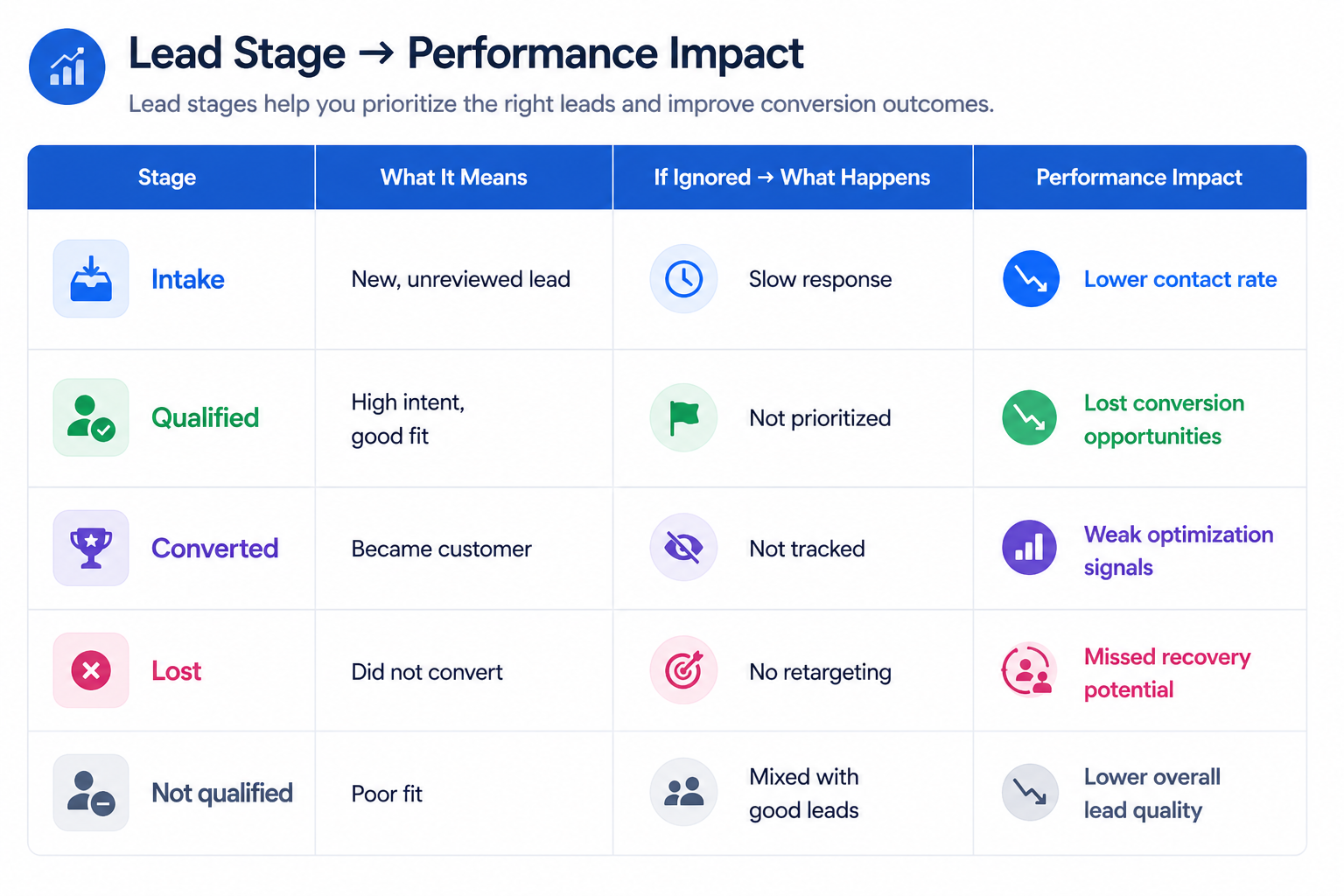
Every lead starts in the Intake stage by default. From there, it moves through the funnel based on qualification and interaction.
The standard stages include:
- Intake: new or unreviewed leads that still need evaluation;
- Qualified: leads that show strong interest and fit your offer;
- Converted: leads that completed a transaction or agreement;
- Lost: leads that did not convert but may still be useful for retargeting;
- Not qualified: leads that are not a good fit.
You can customize this funnel by creating, renaming, deleting, or rearranging stages.
This flexibility allows you to match the funnel to your sales process. Without it, all leads are treated the same, which slows down prioritization and reduces efficiency.
Why lead stages directly affect performance
When leads are not categorized, it becomes difficult to understand quality.
Meta continues optimizing for submissions, but your team cannot distinguish between high-intent and low-intent leads. Over time, this increases CPA because spend is allocated without clear feedback.
Using structured stages solves this problem.
Once you track how leads move from Intake to Qualified to Converted, you can identify where drop-offs happen and improve that part of the funnel.
This is where lead quality checks before scaling spend become essential. You move from optimizing for volume to optimizing for outcomes.
How to manage leads inside Leads Centre
Leads Centre includes built-in tools that help teams stay organized and respond faster.
You can:
- edit contact details such as email or phone number;
- message leads directly through integrated chat;
- assign an owner to each lead;
- add labels or notes for segmentation;
- move leads between funnel stages;
- schedule reminders for follow-up.
These actions create a structured workflow. Instead of reacting inconsistently, your team follows a defined process.
You can also use bulk editing to update multiple leads at once. This is especially useful when reassigning ownership or updating stages after campaign changes.
Without this structure, leads often remain unassigned or are contacted too late, which reduces conversion rates.
How Conversions API improves lead quality signals
Leads Centre can be connected to the Conversions API. This creates a direct link between your lead data and Meta’s optimization system.
Once enabled, Meta receives better feedback about what happens after a lead is generated. This improves how campaigns are optimized.
The benefits include:
- stronger alignment between lead quality and delivery;
- improved reporting accuracy;
- better optimization toward leads that actually convert.
Without this connection, Meta mainly optimizes for form submissions. With it, the platform can learn which leads progress through your funnel.
This is closely related to how API connection errors can skew Facebook Ads reporting. When data flow is incomplete, performance signals become unreliable.
When and how to download your leads
Leads Centre allows you to download lead data as a CSV file. You can do this either from Meta Business Suite or directly from your Facebook Page.
The exported data includes fields such as date, name, email, phone number, stage, source, and owner.
The file reflects your current filters, which means you can export specific segments, such as only qualified leads or leads from a specific campaign.
Downloading leads is useful when:
- you need to share data with external tools;
- you want deeper analysis outside Meta;
- your CRM integration is not fully set up.
However, relying only on downloads slows down response time. Real-time lead handling inside Leads Centre is more effective for conversion.
The hidden cost of poor lead management
When leads are not managed properly, performance issues appear later in the funnel.
Common outcomes include slower response times, missed follow-ups, and inconsistent qualification. Even with strong lead volume, fewer leads convert into customers.
Over time, this leads to lower conversion rates, higher CPA and CAC, and wasted ad spend.
Leads Centre exists to reduce this gap by connecting ad results with actual sales activity.
Final takeaway
Meta Leads Centre is part of your conversion system, not just a reporting tool.
It allows you to organize leads, track their progress, and improve follow-up speed. It also gives you clearer insight into lead quality and funnel performance.
Before scaling any lead campaign, make sure your lead management process is structured and actively used. Without that, even strong campaigns can produce weak business results.