Poor Instagram ad performance is easy to misread. A campaign can spend normally, generate clicks, and still produce weak business results. CPA stays too high, ROAS does not move, or the leads do not match the buyer profile.
Many advertisers treat this as a targeting problem right away. They replace the audience, expand interests, or move into broader targeting. That may help, but it can also hide the real issue.
Sometimes the audience is not the main constraint. The creative may attract the wrong users. The offer may ask for too much too soon. The landing page may lose people after the click.
A comparison test helps separate those problems before you rebuild the campaign.
Poor results do not always mean the audience is wrong
An Instagram audience can look bad even when it contains relevant users. The campaign may be reaching the right people, but the ad message may not match their stage of awareness.
For example, a B2B SaaS brand may target followers of niche industry accounts. That audience could be relevant. But if the ad pushes a demo request before explaining the problem clearly, many users will scroll past or click without converting.
The audience was not necessarily poor. The campaign asked for a high-commitment action before creating enough context.
This is why poor audience performance needs diagnosis, not guesswork. If you change the audience before checking the message and offer, you may remove a segment that could have worked with a better angle.
What comparison tests reveal inside Instagram campaigns
A comparison test shows whether the performance problem follows one audience or appears across several audiences. That difference matters.
If one audience performs badly while another performs well with the same ad, targeting is likely part of the issue. If every audience performs badly, the campaign may have a creative, offer, or funnel problem.
Keep the test controlled. Use the same creative, offer, landing page, objective, and conversion event. Change only the audience groups. That makes the result easier to read.
This is also why audience testing vs creative testing matters. If you change both at once, the data cannot show which variable caused the shift.
How to compare Instagram audiences without relying only on interests
A useful comparison test does not need ten ad sets. Three audience groups are usually enough to find a pattern.
You can test:
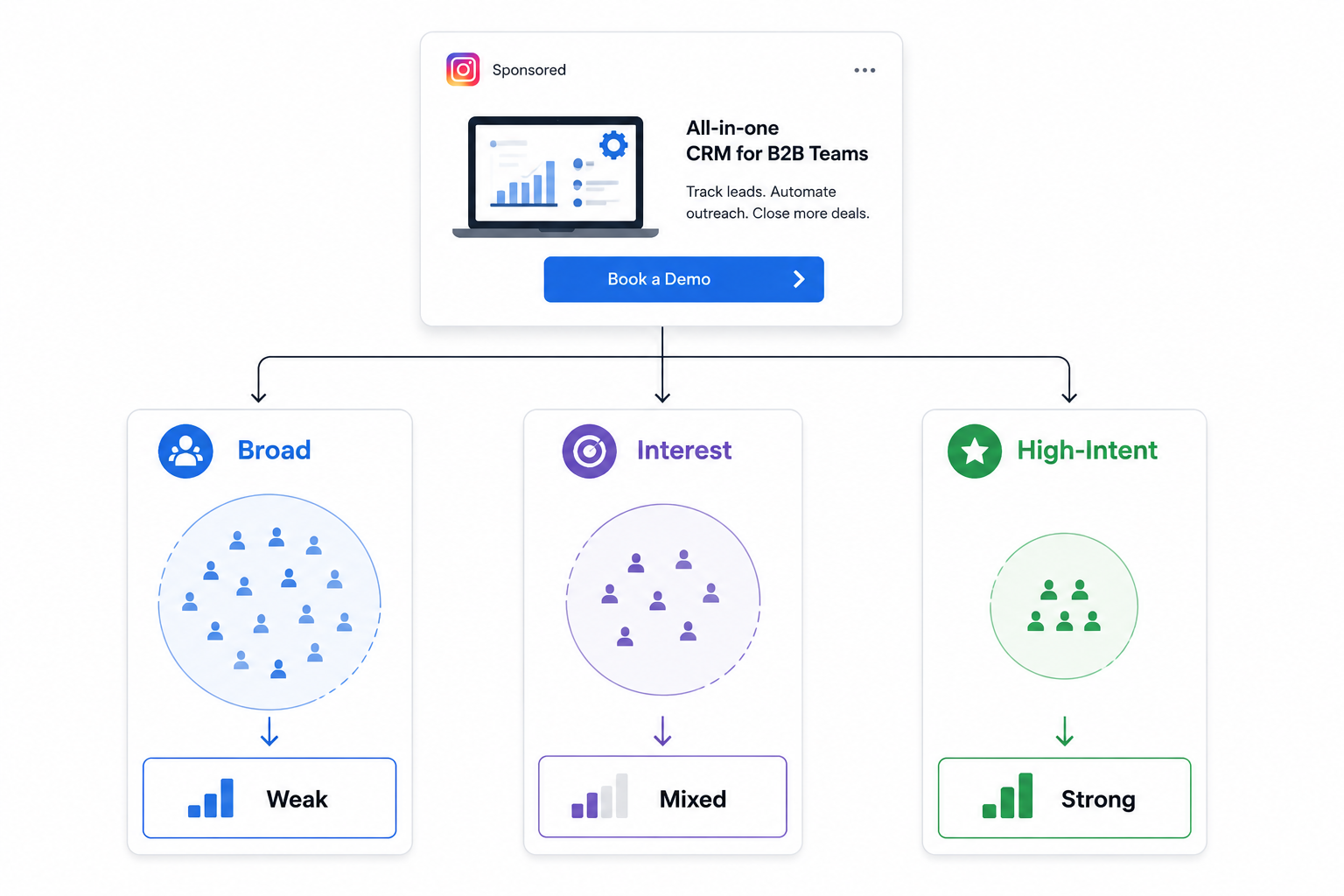
- A broad Meta audience: This gives you a baseline for cost, reach, and conversion behavior.
- An interest-based audience: This shows whether Meta’s native targeting can find relevant users from category-level signals.
- A custom high-intent audience: This tests whether stronger social behavior signals produce better CPA, ROAS, or lead quality.
LeadEnforce can help advertisers create audiences from Instagram account followers or relevant Facebook groups. That audience can then be tested against broader interests, lookalikes, or Advantage+ style audiences.
For example, a B2B SaaS company could build an audience from followers of niche industry Instagram accounts or members of active Facebook groups around the same problem. Then it can compare that audience against a standard interest-based segment.
If the LeadEnforce audience brings fewer clicks but more booked demos, the issue was not reach. It was intent quality.
How to read audience test results without chasing cheap clicks
CPC is a weak judge of Instagram audience quality. A cheap click can come from someone who likes the visual, saves the post, or taps out of curiosity. That does not mean they are ready to buy, book a call, or submit a useful lead form.
Look at the full path after the click. For e-commerce, compare add-to-cart rate, checkout starts, purchases, AOV, and ROAS. For B2B, compare form quality, booked calls, sales acceptance rate, and pipeline value.
The pattern usually tells you where the constraint sits:
- High CTR with low conversion rate: The ad may attract attention from users who do not want the offer.
- Low CTR with strong conversion rate: The audience may be relevant, but the creative is not pulling enough people in.
- Low CPL with poor sales feedback: The form is likely too easy or the offer attracts low-commitment users.
- Poor results across all audiences: The issue may sit in the offer, landing page, or conversion flow.
Use these signals to diagnose audience vs creative performance issues before making larger campaign changes.
What to change after the test
If one audience clearly wins, use that result to guide the next targeting test. Build more segments around the same behavior, community, competitor account, or problem category. Avoid jumping straight into aggressive budget increases, because that can push delivery beyond the strongest pocket of users.
If all audiences perform poorly, stop treating targeting as the only issue. Review the ad promise, the offer, the landing page, and the conversion path. The right audience still needs a clear reason to take action.
If the broad control beats your custom high-intent audience, check the source quality. The segment may be too small, too narrow, or based on accounts and groups that attract attention but not buyers. Rebuild the audience source before judging the entire targeting approach.
Final takeaway
Poor Instagram audience performance is not always an audience problem. It can be a creative problem, an offer problem, or a funnel problem that only looks like weak targeting.
Comparison tests help you see where the constraint actually sits. Test a few audience groups under the same conditions, compare the full conversion path, and use the result to decide what to fix next.