Creative often gets blamed first. Targeting usually deserves the first audit. If your results decline, review who sees the ads before rewriting copy or redesigning visuals.
This guide explains how to audit Facebook Ads targeting with a structured approach. It focuses on diagnostics, not guesswork.
Why Targeting Fails Before Creatives Do
Performance drops often start upstream. Audience quality shifts long before click metrics collapse. If you change creatives too early, you hide the real cause.
Common triggers include:
-
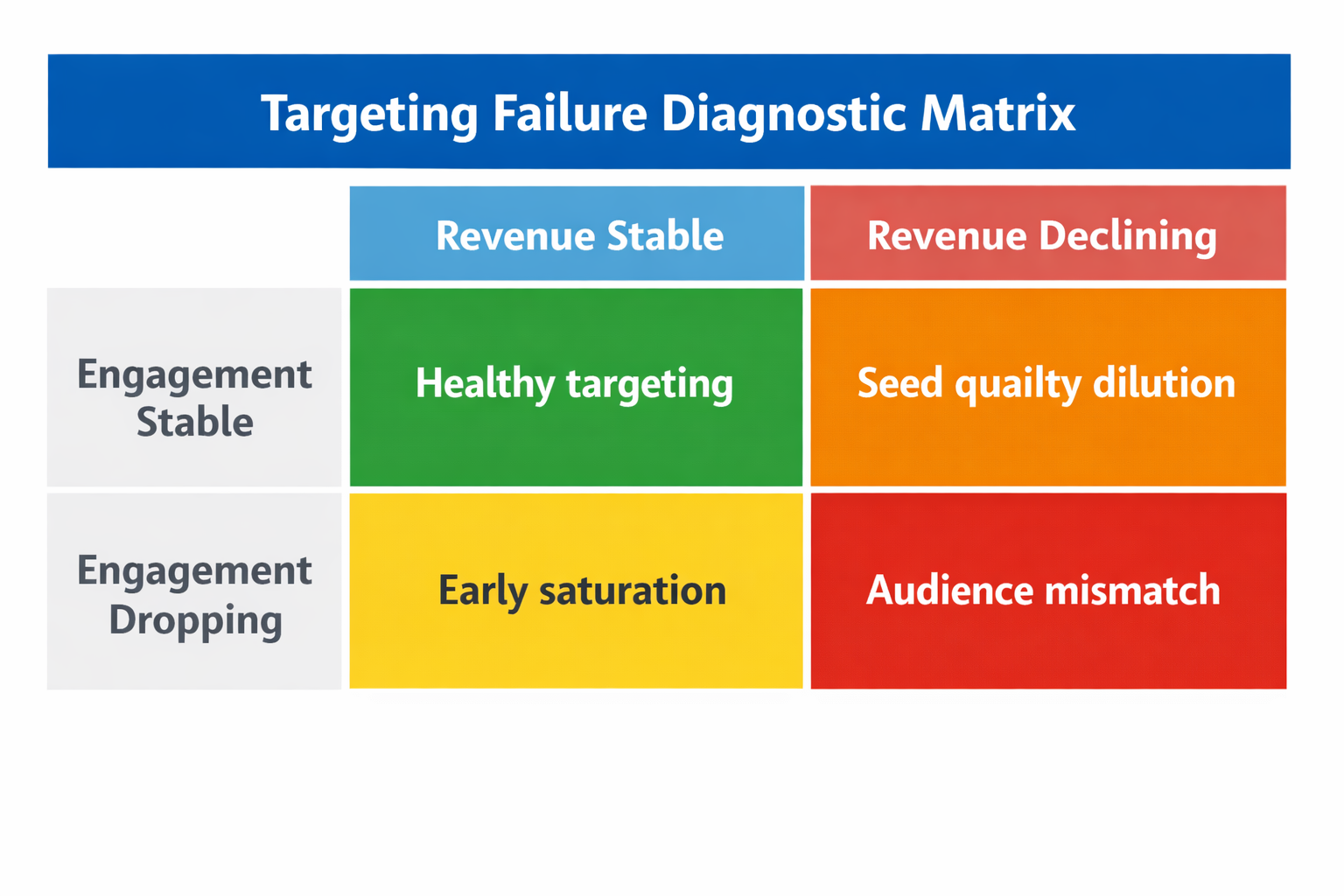
Audience saturation; frequency rises while new reach stalls. Engagement declines even when creatives remain unchanged.
-
Algorithmic drift; broad targeting expands into low-intent segments. Lead quality weakens gradually.
-
CRM mismatch; conversions increase but revenue per lead falls. The targeting attracts the wrong buyer profile.
-
Overlapping ad sets; internal competition drives CPM up. Delivery becomes unstable.
Before touching creatives, confirm whether the audience still matches your revenue goals.
Step 1: Check Audience Saturation Signals
Open Ads Manager and review delivery metrics over the last 14 to 30 days. Focus on patterns, not single-day spikes.
Look for these indicators:
-
Rising frequency above 2.5 for cold audiences; this suggests repetition fatigue.
-
Declining unique CTR; users see the ad but respond less often.
-
Stable CPM with falling conversion rate; message still reaches people but fewer act.
-
Flat reach despite budget increases; scaling no longer expands exposure.
If these signals appear together, targeting likely exhausted the reachable segment. For a deeper diagnostic process, review this guide on how to detect audience saturation in Facebook Ads.
How to Confirm Saturation
Break down results by time and placement. Compare early campaign data to recent weeks.
Check:
-
First seven days versus last seven days; engagement often drops first.
-
Feed placements versus Stories; fatigue may concentrate in one format.
-
Age brackets; narrow segments can saturate faster than broad ones.
If decline concentrates in specific segments, adjust targeting before redesigning creatives.
Step 2: Audit Audience Quality Using CRM Data
Platform metrics rarely show revenue impact. Connect ad data to downstream performance.
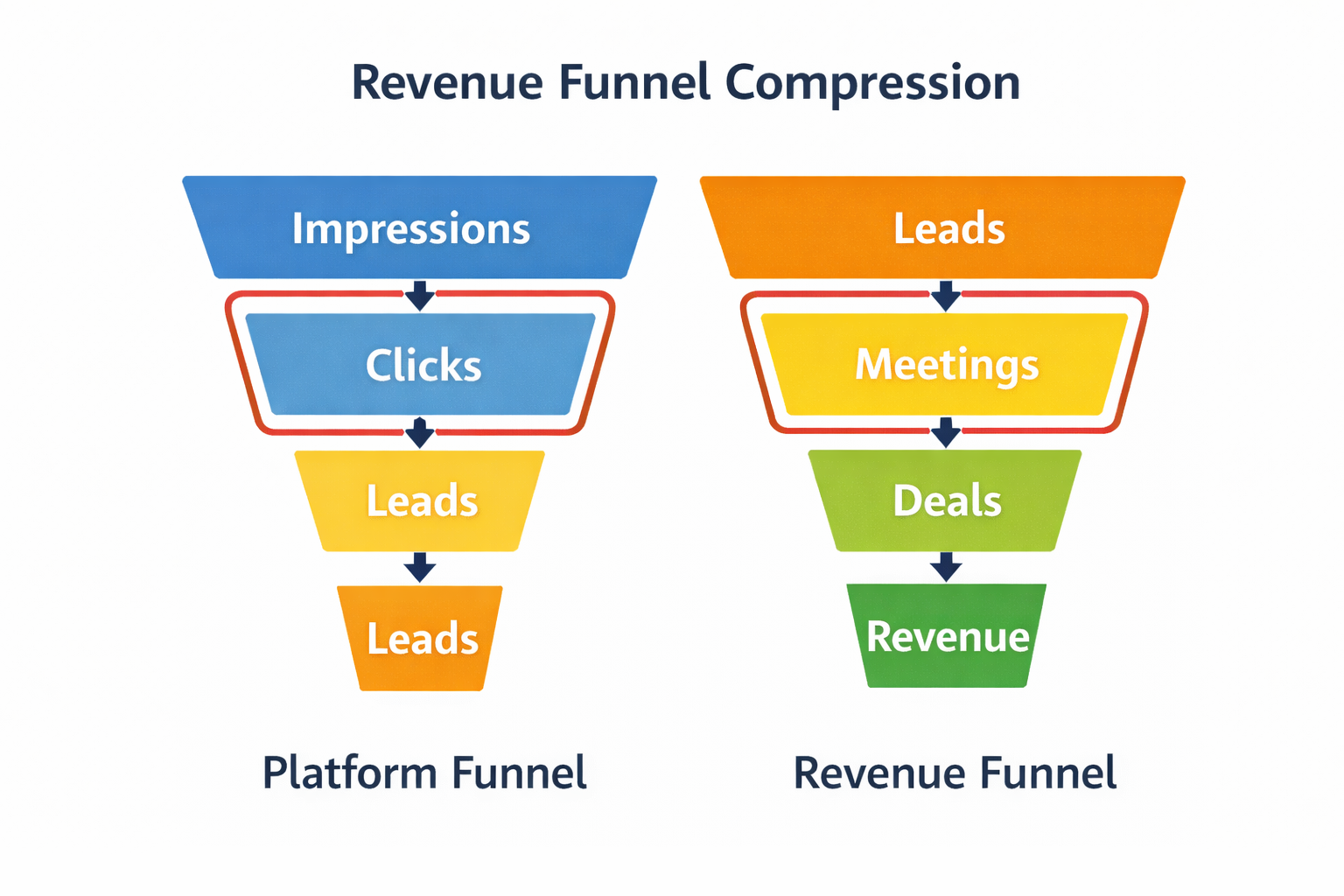
Pull these metrics from your CRM:
-
Lead-to-meeting rate; shows qualification strength early in the funnel.
-
Meeting-to-close rate; reveals alignment between targeting and offer.
-
Average deal value by audience; highlights profitability differences.
-
Sales cycle length; lower intent audiences extend time to revenue.
If volume stays stable but deal value drops, targeting attracts weaker prospects. This often aligns with the principles explained in why audience quality matters more than size for Facebook Ads.
Segment by Source and Audience Type
Group results by audience category. Compare cold, lookalike, retargeting, and broad segments.
Ask:
-
Which audience generates the highest revenue per 1,000 impressions?
-
Which one produces meetings but few closed deals?
-
Does one segment inflate cost per opportunity while keeping CPL low?
These comparisons expose hidden inefficiencies that creative changes cannot fix.
Step 3: Evaluate Lookalike Decay
Lookalike audiences degrade over time. Seed quality changes as your funnel scales.
Audit the seed source:
-
Is it based on all leads instead of closed deals?
-
Has recent volume increased while close rate declined?
-
Does the seed include low-value or unqualified records?
If seed quality weakens, the lookalike expands into marginal profiles. For a structured approach to rebuilding them, see lookalike audiences: how to seed, train, and scale.
Rebuild and Compare
Create a new lookalike from recent closed deals only. Keep the original running for comparison.
Measure:
-
Cost per opportunity; not just cost per lead.
-
Revenue per campaign; track actual contribution.
-
Lead-to-close rate; this shows true alignment.
If the rebuilt audience outperforms the original, the issue was seed dilution, not creative fatigue.
Step 4: Detect Audience Overlap
Multiple ad sets often target similar users. Overlap increases auction pressure and skews data.
Use the Audience Overlap tool inside Ads Manager. Compare custom audiences and lookalikes.
Watch for:
-
Overlap above 20 percent between cold segments.
-
Retargeting audiences intersecting with prospecting groups.
-
Broad targeting running alongside narrow interest stacks.
High overlap inflates CPM and fragments learning. For a detailed breakdown, review why audience overlap is killing your Facebook Ad performance.
Simplify Structure
Consolidate overlapping ad sets into broader groups. Allow the algorithm to optimize within a single learning phase.
When structure stabilizes, evaluate creative performance again. You need clean delivery data before redesigning assets.
Step 5: Analyze Geographic and Demographic Drift
Broad targeting expands automatically. Over time, delivery may shift toward cheaper but lower-value regions.
Break down performance by:
-
Country or region; compare revenue per lead.
-
Age and gender; identify segments with poor close rates.
-
Device type; mobile traffic may convert differently.
If lower-cost segments dominate spend without revenue impact, adjust exclusions or bid controls.
Control Expansion Without Over-Restricting
Do not over-narrow audiences immediately. Instead, exclude consistently underperforming regions or demographics.
Monitor revenue impact after each adjustment. Small exclusions often restore performance without resetting learning entirely.
Step 6: Review Budget Distribution Across Audiences
Budget allocation shapes performance more than creative rotation. High spend on weak segments distorts overall metrics.
Audit:
-
Spend share by audience type; compare to revenue share.
-
Cost per opportunity by segment; not just top-of-funnel costs.
-
Return on ad spend by campaign group.
If 60 percent of budget drives 30 percent of revenue, reallocate before redesigning ads.
Test Budget Shifts Before Creative Changes
Shift 10 to 20 percent of budget toward higher-quality audiences. Observe changes over one full conversion cycle.
If efficiency improves, the issue was allocation imbalance, not message fatigue.
When Creative Is Actually the Problem
After auditing targeting, you may confirm stable audience quality. At that point, creative testing makes sense.
Creative issues usually show:
-
High frequency with stable conversion rates; message still resonates.
-
Strong click-through but weak post-click engagement; landing mismatch.
-
Stable revenue per lead but declining CTR; attention problem.
Only address creatives after excluding targeting errors.
A Simple Targeting Audit Checklist
Before changing a single headline or image, confirm the following:
-
Frequency levels remain healthy for the audience stage.
-
CRM metrics align with historical performance.
-
Lookalike seeds reflect recent high-quality customers.
-
Audience overlap stays below critical thresholds.
-
Geographic and demographic distribution matches revenue data.
-
Budget allocation mirrors profitability, not vanity metrics.
If these checks pass, move to creative testing with confidence.
Final Thought
Creative is visible, so it receives blame first. Targeting operates quietly, shaping every result behind the scenes. Audit targeting with revenue data and structural analysis before touching design.
When targeting aligns with business outcomes, creative testing becomes precise instead of reactive.