Agencies, freelancers, and consultants often need access to client Meta assets before they can launch campaigns. But giving access the wrong way can create risk.
The common mistake is sharing personal logins, transferring ownership, or granting more permission than the partner actually needs.
Meta’s partner access workflow is designed to avoid that. The source article explains that, before sharing business assets with a partner, you need full control of the Business Portfolio, the partner needs its own Business Portfolio, and you need the partner’s business ID.
For advertisers, this is a campaign-control issue. Your agency may need access to run ads, manage creative, view results, or work with audiences. But your business should still retain ownership of its core assets.
What Is Happening When You Give Partner Access?
Partner access lets one business share selected assets with another business.
That means a client can give an agency access to specific ad accounts, Pages, Instagram accounts, datasets, catalogs, or other assets without adding every agency employee individually.
The source process involves selecting the partner, choosing which business assets to assign, and choosing the level of access for each asset. Access can be full control or partial access depending on what the partner needs to do.
- This matters because agencies usually need working access, not ownership.
- A media buyer may need to create and manage campaigns.
- A creative team may need Page or Instagram access.
- A reporting specialist may need to view performance.
- A catalog specialist may need ecommerce asset access.
- A LeadEnforce-powered audience strategist may need to coordinate audience activation inside the right ad account.
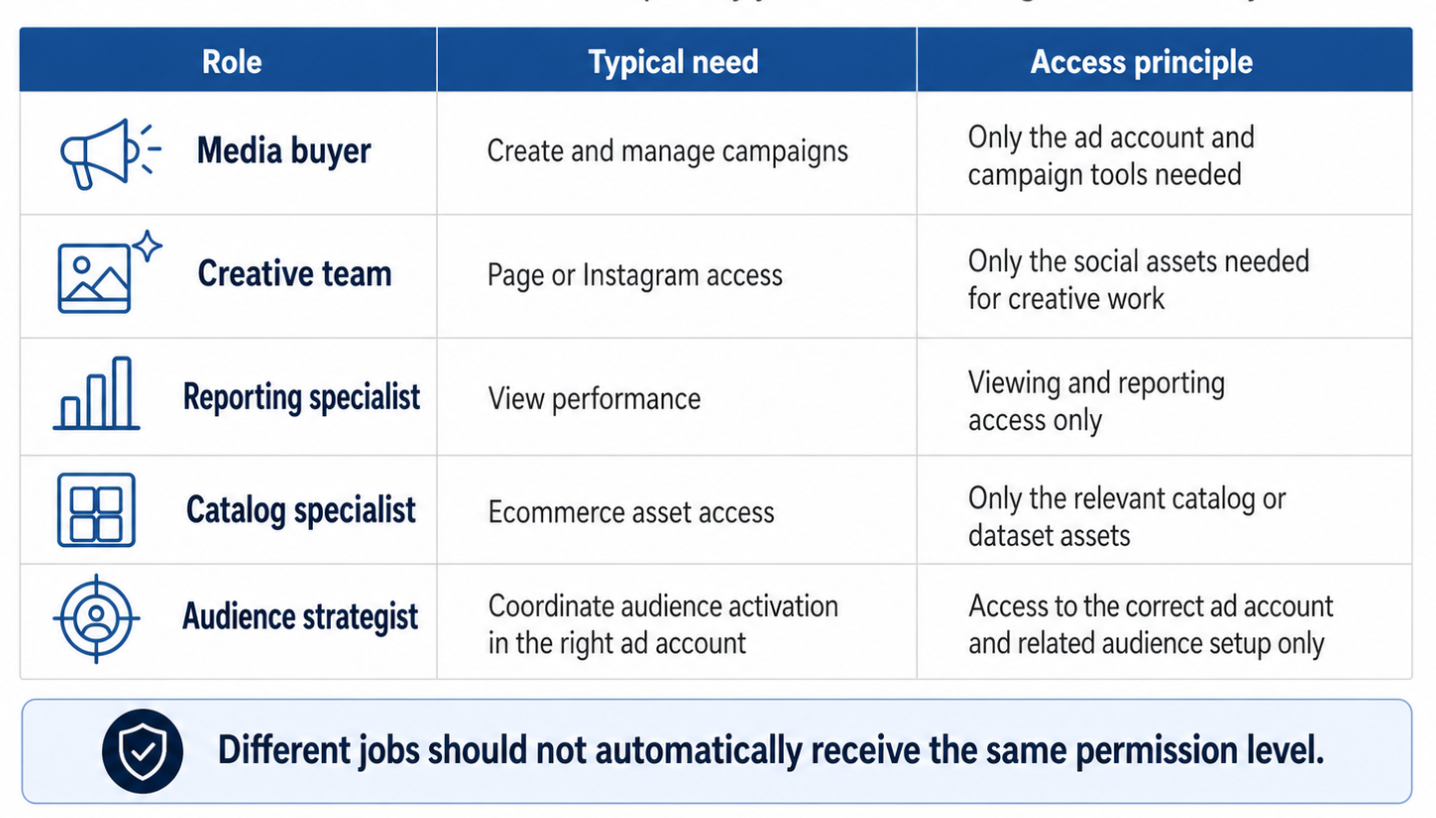
Partner access should be scoped by campaign role. The article identifies five common workstreams that may need different Meta asset permissions instead of the same broad access.
Those are different jobs. They should not automatically receive the same permission level.
Why Partner Access Affects Campaign Performance
Partner access affects performance because it determines how quickly the campaign team can act.
If the agency has too little access, campaign work slows down. They may be unable to launch ads, assign audiences, connect the right Page, review performance, or troubleshoot campaign issues.
If the agency has too much access, the business increases operational risk. A partner may be able to change settings, access assets outside the scope of work, or manage areas unrelated to the campaign.
Good partner access keeps execution fast while keeping ownership clear.
This is especially important when campaigns are built around testing. Paid social teams need to test audiences, creatives, offers, placements, and landing pages quickly. When access is unclear, the team loses momentum before the test even starts.
Business Impact for Advertisers and Agencies
Partner access can affect CPC, CPA, CAC, ROAS, and lead quality indirectly.
It does not change the auction by itself. But it changes how efficiently the team can run the campaign.
A delayed access handoff can delay campaign launches. If a new agency spends the first week chasing permissions, the business loses testing time.
Incorrect access can create wasted budget. A campaign may be launched from the wrong ad account, connected to the wrong Page, or tested without the right audience structure.
Incomplete access can weaken optimization. If the agency cannot use the correct data source, audience, catalog, or account history, the campaign may start with less useful signals.
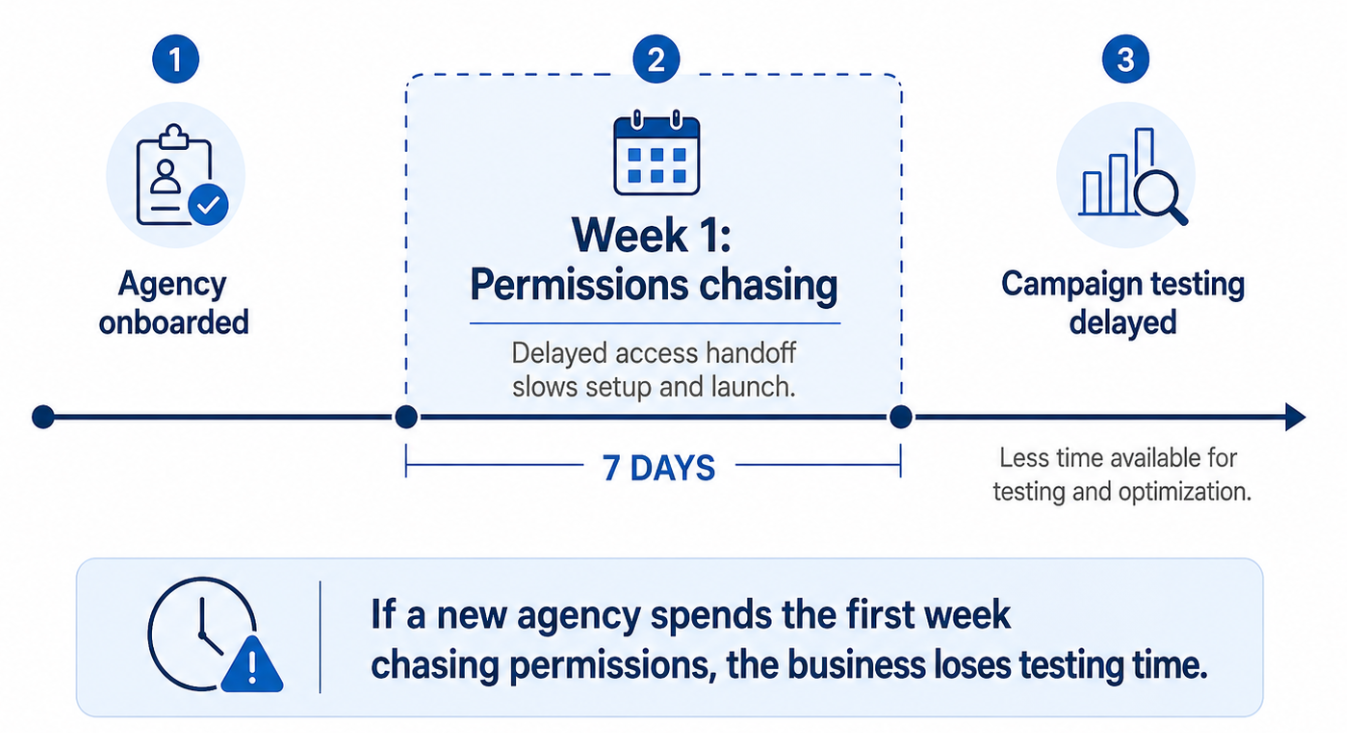
A delayed partner-access handoff can consume the first week of a new agency relationship, reducing the time available for campaign testing and optimization
Overbroad access can create risk during agency transitions. When a contract ends, the business needs to remove partner access cleanly without losing ownership or disrupting active campaigns.
The best partner access setup protects the business while allowing the campaign team to move quickly.
Typical Scenarios Where This Applies
This applies whenever an external team needs to work on Meta campaigns.
A small business hires a freelance media buyer to run Instagram and Facebook lead ads. The freelancer needs ad account access, but not ownership of the business’s entire portfolio.
An ecommerce store hires an agency to manage catalog campaigns, retargeting, and creative testing. The agency may need access to the ad account, Page, Instagram account, catalog, and dataset.
A B2B startup hires a demand generation agency to test high-intent audiences. The agency plans to use LinkedIn-derived audience research, Instagram profile segments, and community-based audience insights. They need access to activate those audiences in the correct ad account.
An affiliate marketer manages campaigns for several partners. Each business should retain control of its own assets while granting only the access needed for campaign execution.
A local services company wants to run ads across multiple locations. The agency needs campaign access, but the owner wants to avoid giving broad access to unrelated assets.
In each case, partner access helps separate ownership from execution.
For broader context, read Why Your Meta Business Portfolio Setup Affects Paid Social Performance. If the business cannot assign partner access because nobody has the right permissions, read No Full Control of Your Meta Business Portfolio? Fix Access Before Campaigns Stall.
Risks and Considerations
Before granting partner access, advertisers should check several things.
First, confirm the partner’s business ID. Sending access to the wrong business can create confusion and unnecessary risk.
Second, confirm which assets the partner actually needs. If the partner is only running ads, they may not need access to unrelated catalogs, apps, or financial settings.
Third, decide whether partial access is enough. When partial access is assigned to a shared asset, the partner’s ability to assign permissions is limited to the specific tasks granted. That can be useful for control, but it may also block work if the partner’s scope is broader than expected.
Fourth, review old partner access. Many businesses forget to remove agencies after a contract ends.
Fifth, do not assume partner access fixes poor campaign fundamentals. If the audience is a bad fit, the creative is weak, the offer is unclear, or the landing page is poor, better permissions will not rescue the campaign.
Also consider compliance. When using custom audiences, profile-derived data, or external audience tools, advertisers should respect platform rules and avoid making assumptions about what a platform will allow.
Prerequisites and Dependencies
Before partner access works well, several things should be in place.
The business needs full control of the Business Portfolio.
The partner needs its own Business Portfolio.
The business needs the partner’s business ID.
The relevant assets should already be connected to the correct portfolio.
The campaign team should know which assets are required: ad account, Page, Instagram account, dataset, catalog, or other assets.
The campaign objective should be clear. Lead generation, ecommerce sales, app installs, brand awareness, and retargeting may require different asset access.
Success metrics should be defined before the partner starts work. Decide whether the main goal is lower CPA, better lead quality, higher ROAS, faster testing, stronger retargeting, or better sales volume.
Audience strategy should also be defined. Partner access is most useful when the agency knows what it is testing and why.
How LeadEnforce Helps
LeadEnforce helps make partner access more productive by improving the quality of the audience strategy behind the campaigns.
A client can grant an agency access to the right Meta assets, while the agency uses LeadEnforce to build more relevant audiences from Facebook groups, Instagram followers and engagers, LinkedIn professional data, competitor profiles, and custom social-profile data.
This can help agencies reduce broad targeting guesswork. Instead of starting with generic interests, they can build testable audience segments around real communities, competitor ecosystems, professional roles, niche profiles, or high-intent social behavior.
For example, a B2B agency could build audience segments from LinkedIn-derived professional data and relevant Facebook communities, then activate those audiences inside the client’s ad account after partner access is granted.
An ecommerce agency could use Instagram profile and engager data to build more relevant prospecting segments before testing creative.
A local agency could identify community-based audiences that better match the business’s service area and buying intent.
LeadEnforce does not grant Meta permissions, recover lost access, or configure tracking. It helps improve the relevance of the audiences that teams use once the access structure is ready.
Practical Recommendations
Do not add agency employees one by one if partner access is the cleaner structure. Partner access is usually easier to manage during onboarding and offboarding.
Ask the agency exactly which assets they need before granting access. A clear access checklist avoids both under-permissioning and over-permissioning.
Keep ownership with the business. The agency should be able to work, but the client should retain control of critical assets.
Use partial access where it fits the scope. Use broader access only when the partner truly needs it and the business understands the risk.
Document access decisions. Record which partner has access, which assets are shared, what permission level was granted, and when access should be reviewed.
Review access after every contract change. When an agency, freelancer, contractor, or consultant stops working on the account, remove or adjust access promptly.
Pair partner access with a better testing plan. Once the agency can work in the right assets, use LeadEnforce to define higher-intent audiences and test them against clear performance goals.
Final Takeaway
Partner access is not just an admin step. It is how advertisers let external teams move quickly without giving up ownership of Meta assets.
The right setup protects the business, speeds up agency onboarding, reduces campaign delays, and makes audience testing easier to manage.
To test more precise audiences with your agency or internal team, join the free 7-day LeadEnforce trial period.