A paid social campaign can have strong creative, a clear offer, and a realistic testing budget - and still get slowed down by poor account structure.
For many advertisers, the problem starts inside Meta Business Portfolio. Pages, Instagram accounts, ad accounts, datasets, catalogs, and partner permissions are often scattered across personal profiles, old agencies, former employees, or disconnected business assets.
Meta describes a Business Portfolio as a way to bring business assets such as Facebook Pages, Instagram accounts, Threads accounts, ad accounts, catalogs, and other assets into one place, while also managing the people who access them. For performance marketers, that structure matters because access, ownership, and asset organization affect how quickly campaigns can launch, how cleanly audiences can be tested, and how safely external partners can work.
What a Meta Business Portfolio Actually Changes for Advertisers
A Business Portfolio is not a targeting tactic. It does not make weak creative work. It does not fix poor landing pages. It does not automatically improve conversion tracking.
But it does create the control layer behind your Meta advertising operation.
When your Business Portfolio is organized correctly, you can manage assets, assign permissions, collaborate with agencies or consultants, run ads across Meta surfaces, analyze account insights, and manage requests or notifications related to your business assets.
That matters because paid social performance depends on execution speed. If the media buyer cannot access the ad account, the agency cannot see the Page, the ecommerce team cannot connect the catalog, or the founder is the only person with control, campaign testing becomes fragile.
A clean portfolio setup helps answer basic but important questions:
- Who owns the ad account?
- Who can launch campaigns?
- Who can manage budgets?
- Who can connect or share assets?
- Who can approve partner access?
- Who can remove old users or agencies?
- Who can troubleshoot access issues before a campaign is delayed?
Those questions may sound administrative, but they directly affect campaign delivery.
Why Portfolio Structure Affects Campaign Performance
Meta campaigns learn from the assets, audiences, and conversion signals available to them. If those assets are disorganized, teams often waste time rebuilding campaigns, duplicating audiences, creating new ad accounts unnecessarily, or working inside the wrong portfolio.
That can affect performance in several practical ways.
Slower campaign testing
If a startup wants to test three new audience segments but the ad account owner is unavailable, the test does not start. If an agency needs access to a Page or Instagram account but the business cannot assign it, creative testing stalls.
Slow testing means slower learning.
Messier audience activation
High-intent audiences are only useful if your team can activate them in the correct ad account. When assets are spread across multiple portfolios, advertisers may accidentally build campaigns in the wrong account or lose visibility into which audience is being tested.
That can lead to wasted impressions and unclear performance reads.
Higher operational risk
If only one person has full control, your entire paid social operation depends on that person’s availability. If an old agency owns the assets, the business may be unable to change partners smoothly.
This creates risk during launches, restructures, and urgent campaign changes.
Weaker budget allocation
When teams cannot clearly see which assets belong where, budget decisions become harder. You may end up comparing campaigns across disconnected ad accounts, missing historical context, or duplicating tests that already ran elsewhere.
That can make CPC, CPA, CAC, and ROAS harder to interpret.
Business Impact for Paid Social Teams
A poorly organized Business Portfolio can affect campaign economics even if it never appears inside a performance report.
- The most common impact is wasted time. Campaigns launch late. Agency onboarding takes longer than expected. Internal marketers spend time chasing permissions instead of testing creative, offers, and audiences.
- The second impact is wasted budget. If teams launch with incomplete access, they may run campaigns without the right Page, Instagram profile, dataset, catalog, or audience structure. This can create avoidable testing noise.
- The third impact is slower decision-making. When the campaign team cannot tell which account, audience, or asset is connected to which business unit, performance analysis becomes less reliable.
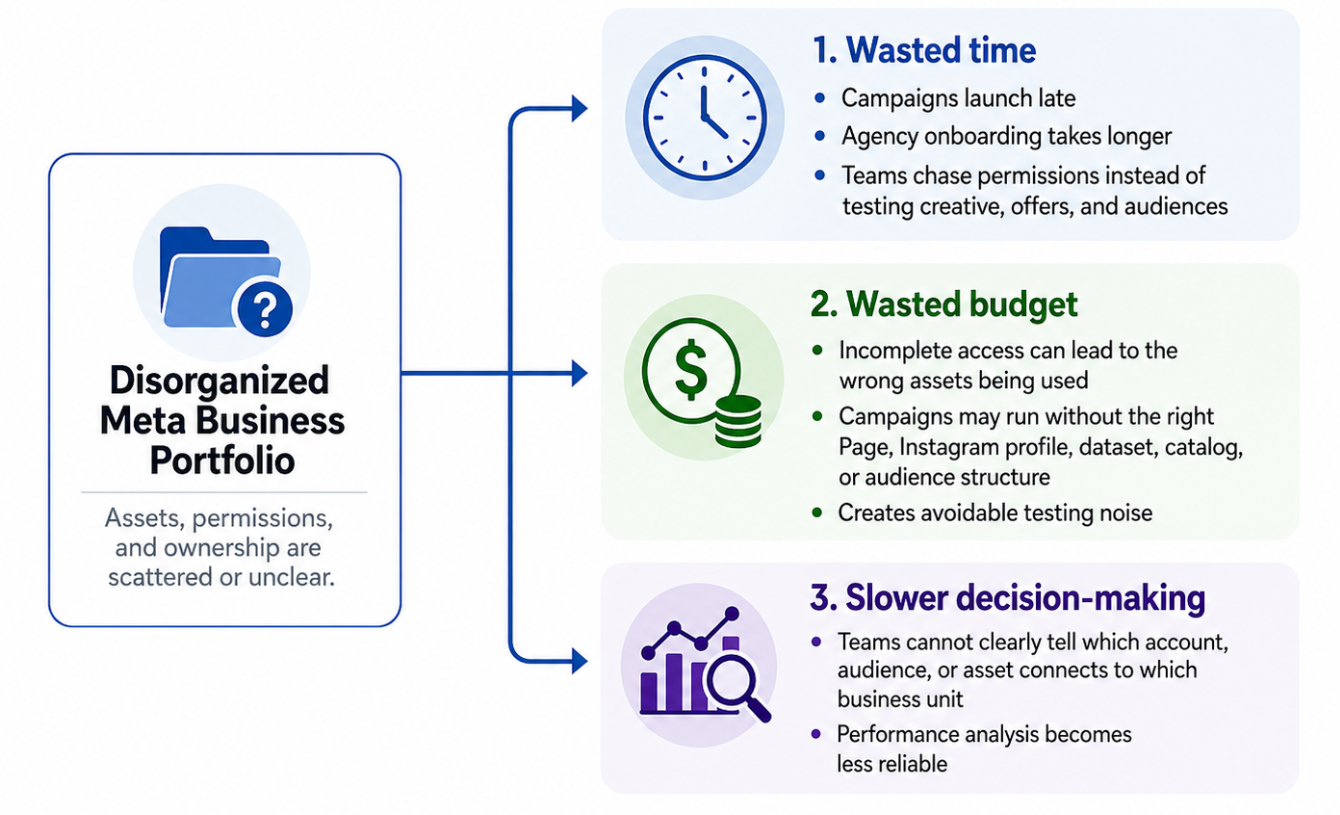
Poor Meta Business Portfolio structure creates three business risks for paid social teams: delayed execution, avoidable testing noise, and less reliable performance analysis
For advertisers focused on CPA, CAC, lead quality, and ROAS, this matters because bad structure can hide the real reason a campaign is underperforming. Sometimes the issue is not the offer. It is the operating setup behind the campaign.
Typical Scenarios Where This Applies
This issue shows up often in practical paid social environments.
- An SMB owner created a Facebook Page years ago, then later hired an agency. The agency now needs ad account and Page access, but the owner does not know which Business Portfolio owns the assets.
- A startup has a founder, a freelance media buyer, and a growth lead all working in different parts of Meta Business Suite. Campaigns are being tested, but nobody has a clean view of all assets and permissions.
- An ecommerce brand wants to run catalog campaigns, retarget website visitors, and test lookalike audiences, but the catalog, ad account, and dataset are not clearly organized inside one portfolio.
- A B2B lead-generation team wants to test audiences built from LinkedIn-derived professional data and relevant social-profile segments, but the media team cannot activate those audiences in the correct Meta ad account.
- An agency inherits a client account where old contractors still have access, new users are missing permissions, and the business owner is unsure who has full control.
In each case, the portfolio setup affects the speed and quality of campaign execution.
Risks and Considerations
A clean Business Portfolio does not guarantee strong ad performance. It simply gives your team a better foundation.
Before making changes, advertisers should check several risks.
- Do not give broad access to every user. People should only receive the level of access required to do their work. Too much access increases operational and security risk.
- Do not assume a portfolio cleanup will fix poor targeting. If your audiences are too broad, too cold, or poorly aligned with your ICP, campaign performance can still suffer.
- Do not rely on one channel or one audience source. Even precise social-profile audiences should be tested against other prospecting and retargeting strategies.
- Do not ignore creative and landing pages. Better access and better audiences cannot compensate for weak messaging, poor offers, or a page that fails to convert.
- Do not misread platform metrics. A campaign with low CPC is not automatically efficient if lead quality is poor. A campaign with higher CPC may still win if it produces better sales-qualified leads.
- Advertisers should also keep compliance in mind when using custom audiences, profile-derived data, or third-party tools. Avoid treating audience creation as a shortcut around platform policies or consent requirements.
Prerequisites and Dependencies
A Business Portfolio works best when the advertiser has the basics in place.
- You need a clear ICP. Without a defined customer profile, asset control will not tell you who to target.
- You need relevant business assets connected to the right portfolio. This may include Pages, Instagram accounts, ad accounts, datasets, catalogs, domains, and other assets used by your campaign team.
- You need a clean campaign objective. The structure for a lead-generation campaign may differ from ecommerce retargeting or local service ads.
- You need reliable conversion signals. Portfolio organization helps teams access assets, but it does not replace conversion tracking or CRM follow-up.
- You need enough audience size to test properly. Very narrow segments may be useful, but they can also limit delivery if they are too small.
- You need clear success metrics. Decide whether you are optimizing for CPA, CAC, ROAS, lead quality, booked calls, trial starts, purchases, or another business outcome.
How LeadEnforce Helps
LeadEnforce helps advertisers improve the audience side of the paid social equation.
Once your Meta Business Portfolio is organized, LeadEnforce can help you build more relevant ad audiences from Facebook groups, Instagram profiles, followers, engagers, LinkedIn professional data, and custom social-profile data. That gives your campaign team a more precise starting point than broad interest targeting or generic demographic assumptions.
- For example, instead of targeting a broad “business owners” interest, a B2B advertiser can use LeadEnforce to identify people associated with relevant professional communities, competitor audiences, niche Instagram profiles, or LinkedIn-derived segments.
- For agencies, this can make portfolio setup more valuable. Once the client gives proper access, the agency can move faster from audience research to campaign testing.
LeadEnforce does not replace Meta permissions, tracking setup, policy review, or landing page optimization. Its value is in helping advertisers create better audience inputs so paid social tests start with stronger relevance.
For the next step in this cluster, read How to Give an Agency Partner Access to Meta Assets Without Losing Campaign Control. If your team cannot manage the portfolio because nobody has the right permissions, read No Full Control of Your Meta Business Portfolio? Fix Access Before Campaigns Stall.
Practical Recommendations
Start with an asset audit. List every Page, Instagram account, ad account, dataset, catalog, domain, and partner currently involved in your paid social activity.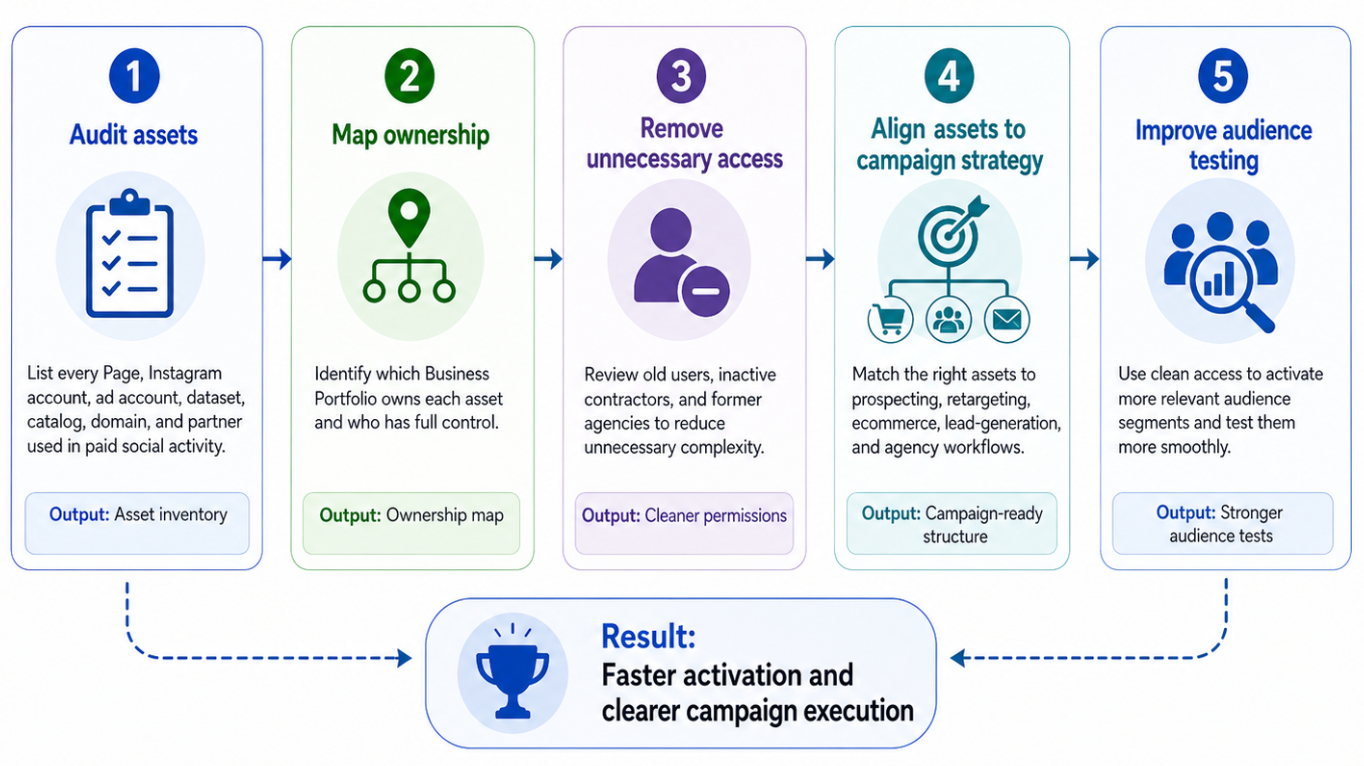
A five-step cleanup process helps advertisers move from scattered Meta assets to cleaner permissions, smoother campaign activation, and better audience testing
Then map ownership. Identify which Business Portfolio owns each asset and who has full control.
Next, remove unnecessary complexity. If old users, inactive contractors, or former agencies still have access, review whether they still need it.
After that, connect structure to campaign strategy. Decide which assets are required for prospecting, retargeting, ecommerce campaigns, lead-generation campaigns, and agency collaboration.
Finally, pair clean access with better audience testing. Use your Business Portfolio to make activation smoother, then use LeadEnforce to build audience segments that match your ICP more closely.
Final Takeaway
Your Meta Business Portfolio is not just an admin panel. It is the operational foundation behind campaign access, partner collaboration, asset control, and testing speed.
When it is organized, your team can spend less time solving permission problems and more time improving audience quality, creative performance, and budget efficiency.
To test more precise paid social audiences for your own campaigns, join the free 7-day LeadEnforce trial period.