How Meta Reduced Its Manual Targeting Options
Meta has not removed manual targeting completely, but it has made it less precise and given its delivery system more room to expand.
Three recent updates are shaping Meta Ads targeting in 2026.
1. Meta consolidated detailed targeting interests
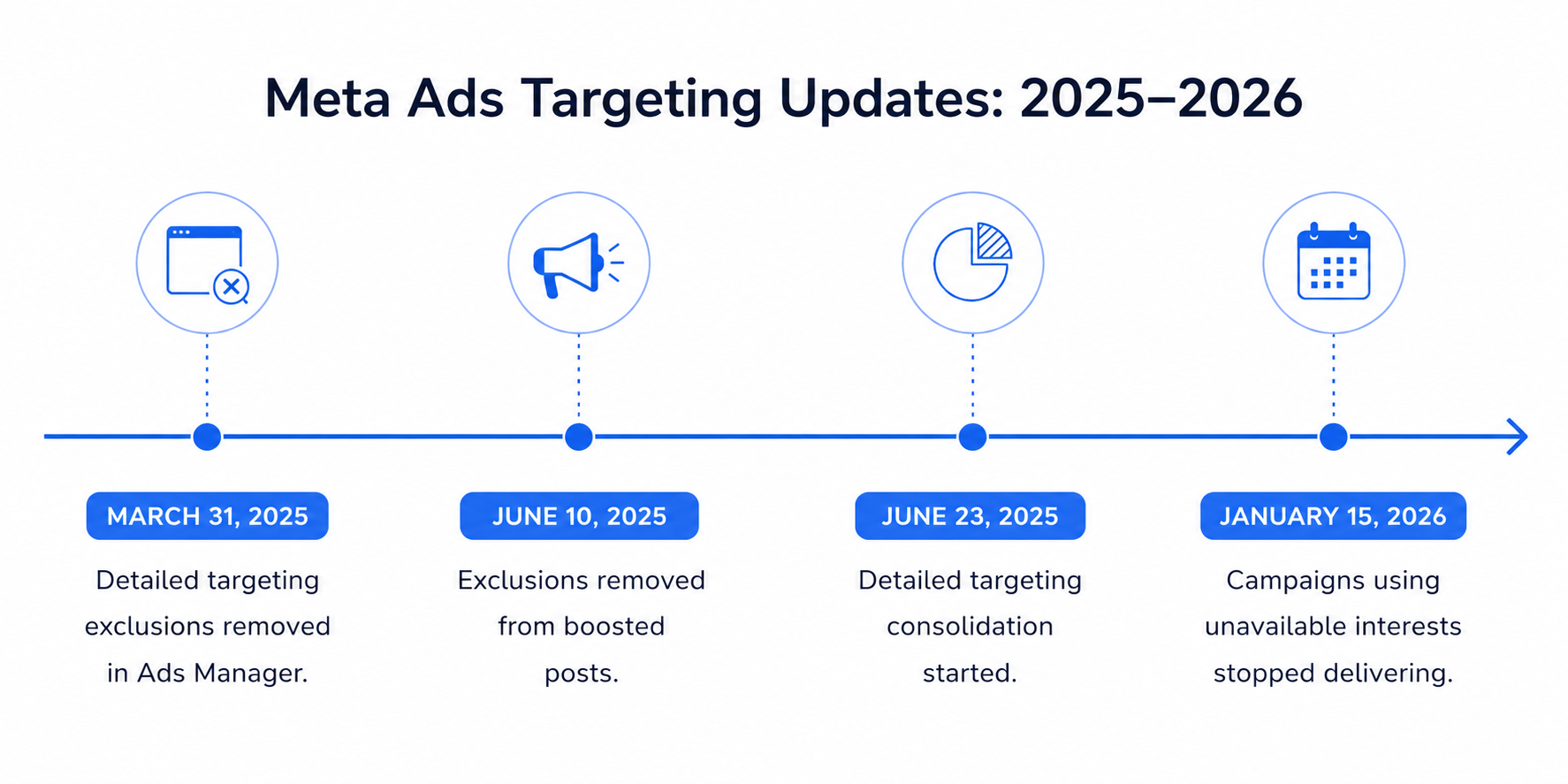
Meta started combining detailed targeting options on June 23, 2025. Some narrow interests were removed or grouped into broader categories, including:
- sports;
- films and music;
- car models;
- food and drinks.
When an interest became unavailable, Ads Manager could suggest a replacement. In many cases, that replacement covered a broader group than the original option.
Older campaigns could keep affected interests until January 15, 2026. After that date, advertisers had to remove or replace them. Otherwise, the affected campaigns would stop delivering.
As a result, advertisers now have fewer precise interests to work with, and old campaigns or saved audiences do not preserve options Meta has removed.
2. Meta removed detailed targeting exclusions
Meta also removed the ability to exclude people based on interests, behaviors, and detailed demographics.
Advertisers previously used exclusions to narrow broad audiences. For example, they could target an entrepreneurship interest while excluding students or job seekers.
That option is gone.
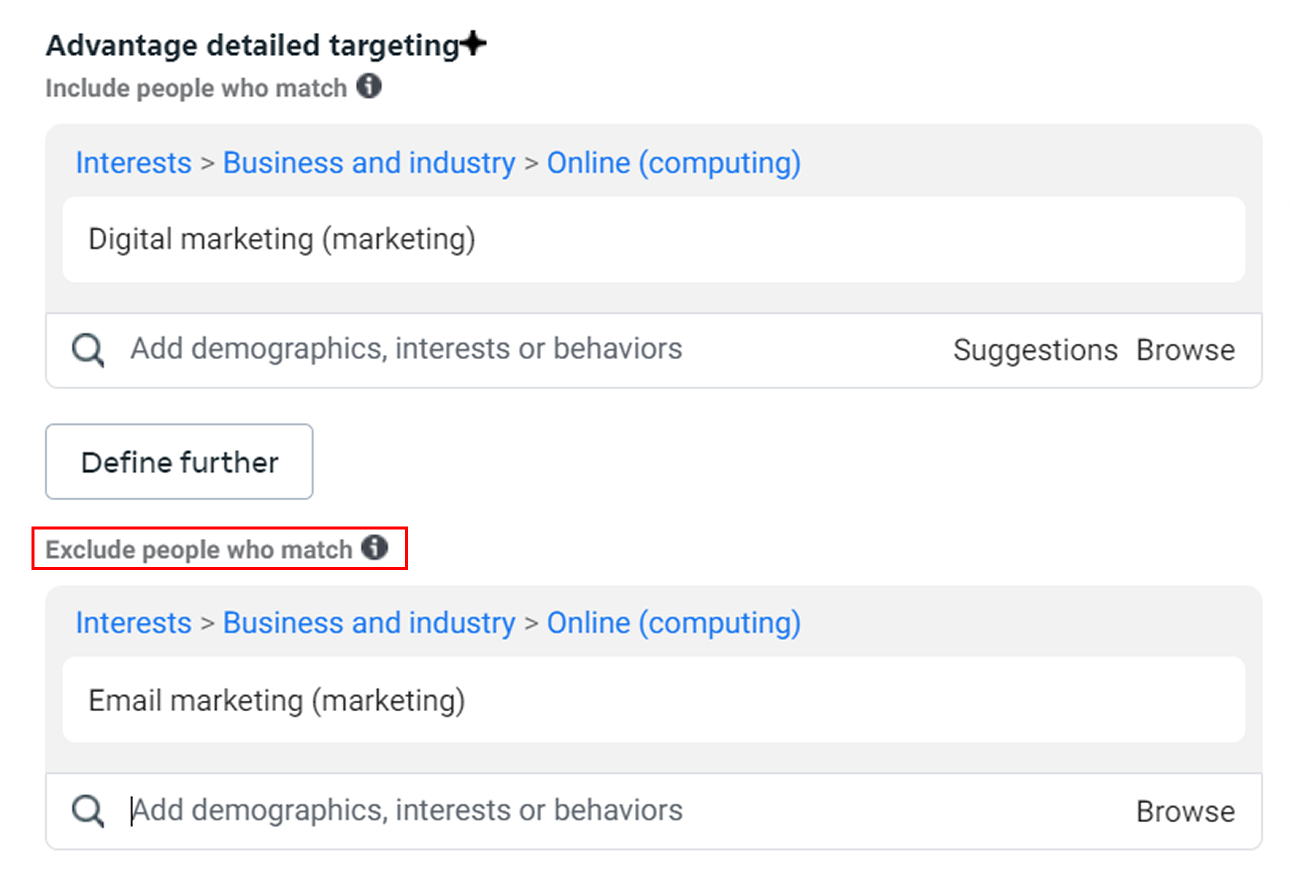
Custom Audience exclusions are still available. Advertisers can continue excluding groups they can identify through their own data, including:
- existing customers;
- current leads;
- employees;
- website visitors;
- people who have already converted.
Meta says one advertiser test produced a 22.6% lower median cost per conversion without detailed targeting exclusions. That supports Meta’s case for broader delivery, but it does not show whether those conversions became better leads, more valuable customers, or higher revenue.
3. More targeting inputs now work as suggestions
With Advantage+ Audience, Meta can treat these settings as guidance rather than fixed limits:
- interests and behaviors;
- lookalike audiences;
- age and gender;
- Custom Audience inclusions.
Meta may expand beyond them without showing when expansion starts or how much spend goes outside the selected audience. Manual targeting does not always restore full control either.
In other words, advertisers now have fewer strict audience controls and more settings that function as optional guidance.
Why Targeting Still Matters in the Age of Advantage+
Meta has access to a huge amount of user data, but that does not mean it always knows which people are valuable to your business.
More precise targeting can still help for several reasons.
1. Meta may optimize for the wrong type of result
Meta looks for people who are likely to complete the action you selected.
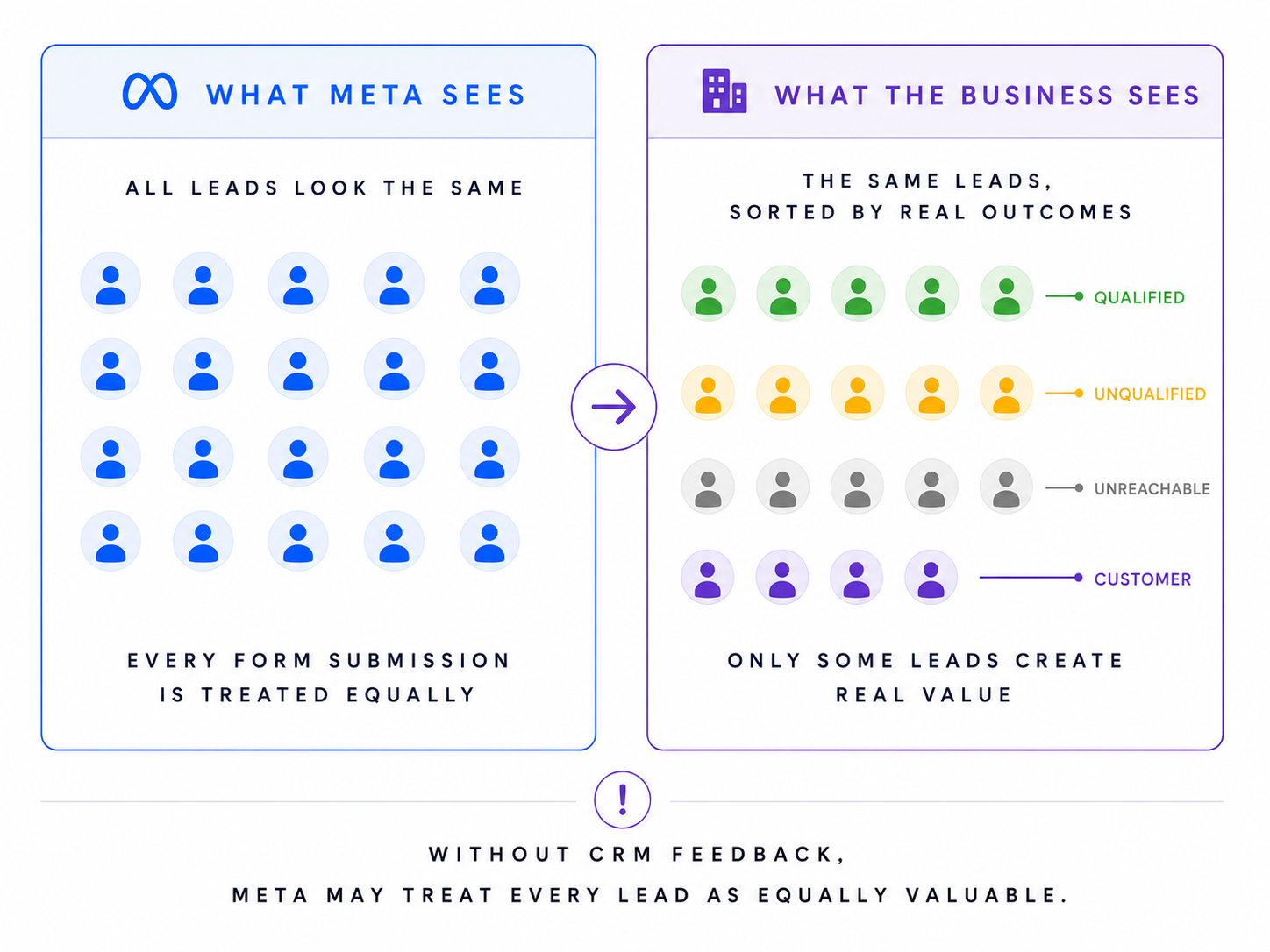
For a lead campaign, that may mean people who often fill in forms. It does not mean they are qualified, can afford the offer, or will answer a sales call. If you do not send lead quality data back to Meta, a weak lead and a strong lead may look exactly the same to the system.
2. Meta may not have enough data
Advantage+ works better when the account already has a solid history of good conversions. That is not always the case with:
- new ad accounts;
- new products;
- niche B2B offers;
- low conversion volume;
- long sales cycles;
- offline sales.
In these cases, a more specific audience can give Meta a better place to start.
3. Broad targeting can waste budget
Meta may test several audience groups before finding likely buyers. That can be expensive for niche, local, or high-cost campaigns.
More precise targeting reduces spend on people who were unlikely to convert.
4. Advertisers often know their market better
You may already know which competitors, communities, or industries attract your best customers.
Meta may find the same pattern, but it can miss it, find it slowly, or prioritize cheaper low-quality conversions. Targeting lets you use that knowledge from the start.
5. Creative cannot replace targeting
Specific copy can reduce irrelevant clicks, but it cannot control who receives the ad. Targeting affects who Meta tries to reach. Creative affects who responds after seeing the ad.
Both matter. Compare lead quality, sales, and revenue—not just Meta’s reported CPA.
Ways to Stop Advantage+ Audience From Going Too Broad
There are two practical ways to get more control over Meta ad targeting:
- Turn Advantage+ Audience off and target a limited audience.
- Keep Advantage+ Audience on, but add controls and stronger audience signals.
The right choice depends on how much control you need and how much room you want to give Meta. We covered that decision in more detail in our guide to choosing between Advantage+ and a manual campaign setup.
1. Turn Advantage+ Audience off and target a limited audience
Use this setup when the campaign is meant for a specific group and broad delivery keeps bringing irrelevant clicks, weak leads, or poor-quality customers.
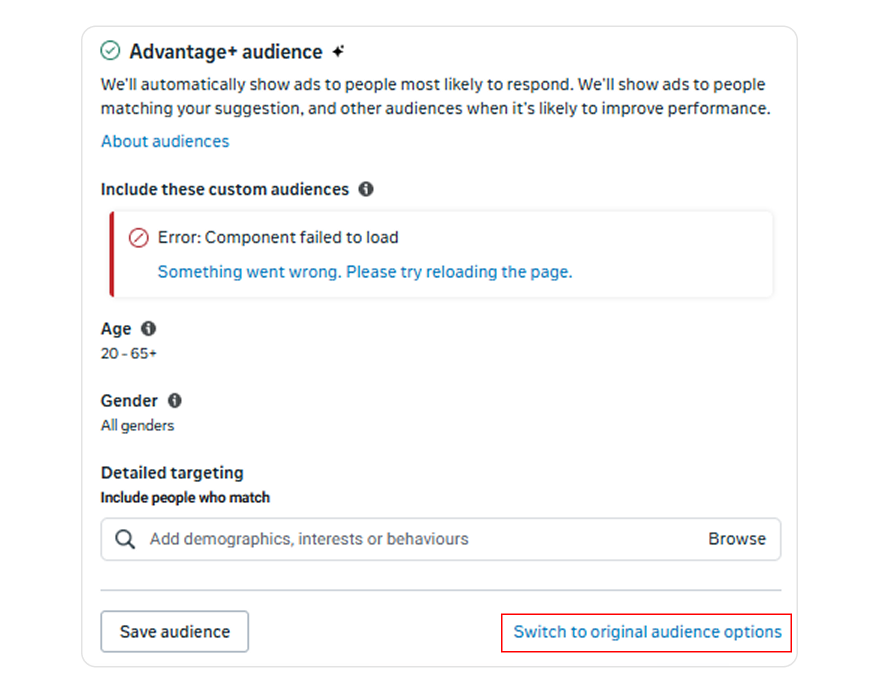
To switch it off:
- Open the ad set and go to Audience.
- Select Switch to original audience options, if available.
- If you have another Ads Manager setup, choose Further limit your audience or Further limit the reach of your ads.
- Select a limited audience.
- Untick Use as a suggestion where required.
This option is not available in every campaign or ad account. If you do not see it, you may need to keep Advantage+ Audience on and use the guardrails covered in the next section.
Once you switch to the original audience setup, you can build the audience in three main ways:
Use Meta’s manual targeting options
You can still use interests, behaviors, demographics, and lookalikes, but Meta may expand them for some campaign goals. Check whether each selection:
- closely matches your customers;
- has been broadened by Meta;
- is large enough to deliver;
- may be treated as a suggestion.
Avoid stacking loosely related interests. It makes the audience broader and the results harder to interpret.
Use a LeadEnforce Custom Audience
LeadEnforce can help when Meta’s native interests are too broad or the audience you need is not available for targeting in Ads Manager.
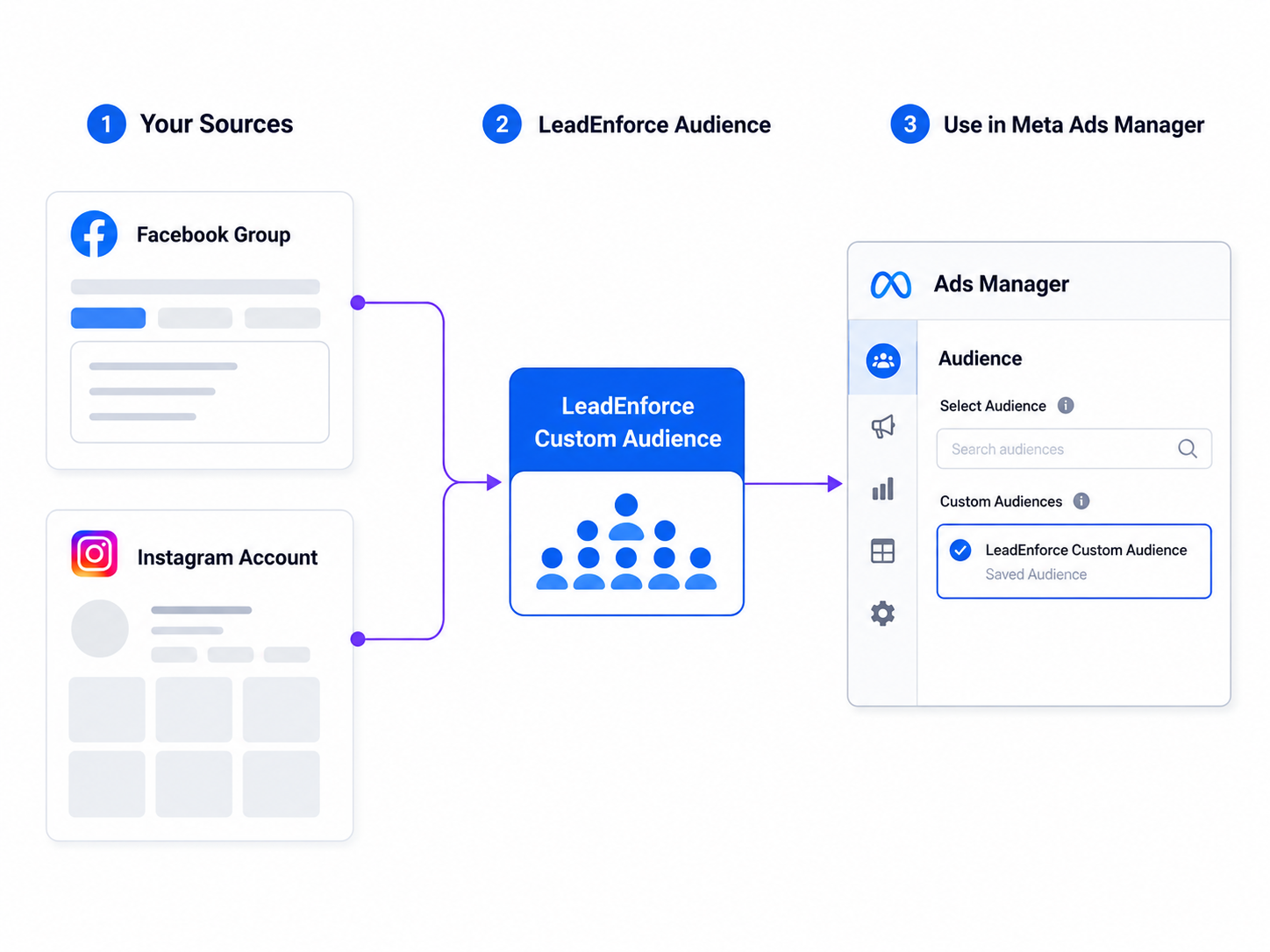
You can build an audience from:
- Facebook groups and Pages;
- Instagram accounts.
These sources can include industry communities, competitor pages, and niche accounts followed by your target customers.
LeadEnforce creates a Custom Audience from these sources and shares it with your Meta ad account. Once Advantage+ Audience is off, select the LeadEnforce Custom Audience in the ad set’s audience settings.
This gives you several advantages over standard targeting:
- You choose the actual sources behind the audience instead of relying on a broad interest created by Meta.
- You can reach cold audiences connected to specific competitors, communities, and industry pages.
- You can run a cleaner audience test because Meta is not mixing the selected group with a much broader audience.
For example, a cybersecurity company could build an audience from Facebook groups for MSPs and Pages followed by IT consultants instead of relying on the broad “cybersecurity” interest.
Note: the quality of the sources matters more than their total size. Adding unrelated groups just to make the audience larger usually makes it less focused.
If Facebook Groups are your main source, follow this step-by-step guide to building a target audience from a Facebook Group. For more practical advice, see our guide to selecting the right Facebook and Instagram sources for a LeadEnforce audience.
Use a first-party Custom Audience
For retargeting or customer campaigns, you can build your own custom audience from:
- customer or lead lists;
- website visitors;
- app activity;
- Facebook or Instagram engagement;
- video viewers;
- people who opened or submitted a lead form.
These audiences work well when you want to reach people who already know the business.
Their main limitation is that they usually do not help with cold acquisition. That is where a source-based audience, such as one built with LeadEnforce, can be more useful.
Check delivery after launch
A limited audience may improve relevance, but it can also reduce scale. Track the following after launch:
- Spend: Is the ad set using its budget?
- Reach: Is the audience large enough?
- Frequency: Are the same people seeing the ad too often?
- CPM: Has delivery become much more expensive?
- Lead or customer quality: Are the results better than those from Advantage+ audience?
If delivery is too limited, widen one setting at a time. This makes it easier to see which change improves performance without making the audience too broad again.
2. Keep Advantage+ Audience on and add guardrails
Use this setup when you still want Meta to expand beyond your preferred audience, but you do not want to leave delivery completely open.
It works best when:
- The campaign needs more scale than a limited audience can provide;
- Meta already has enough conversion data to learn from;
- Your product can appeal to more than one customer segment;
- You want to block clearly irrelevant groups without restricting the audience too heavily;
- You are testing whether Meta can find useful customers outside your original audience.
This is also the main fallback when Ads Manager does not give you the option to switch Advantage+ Audience off completely.
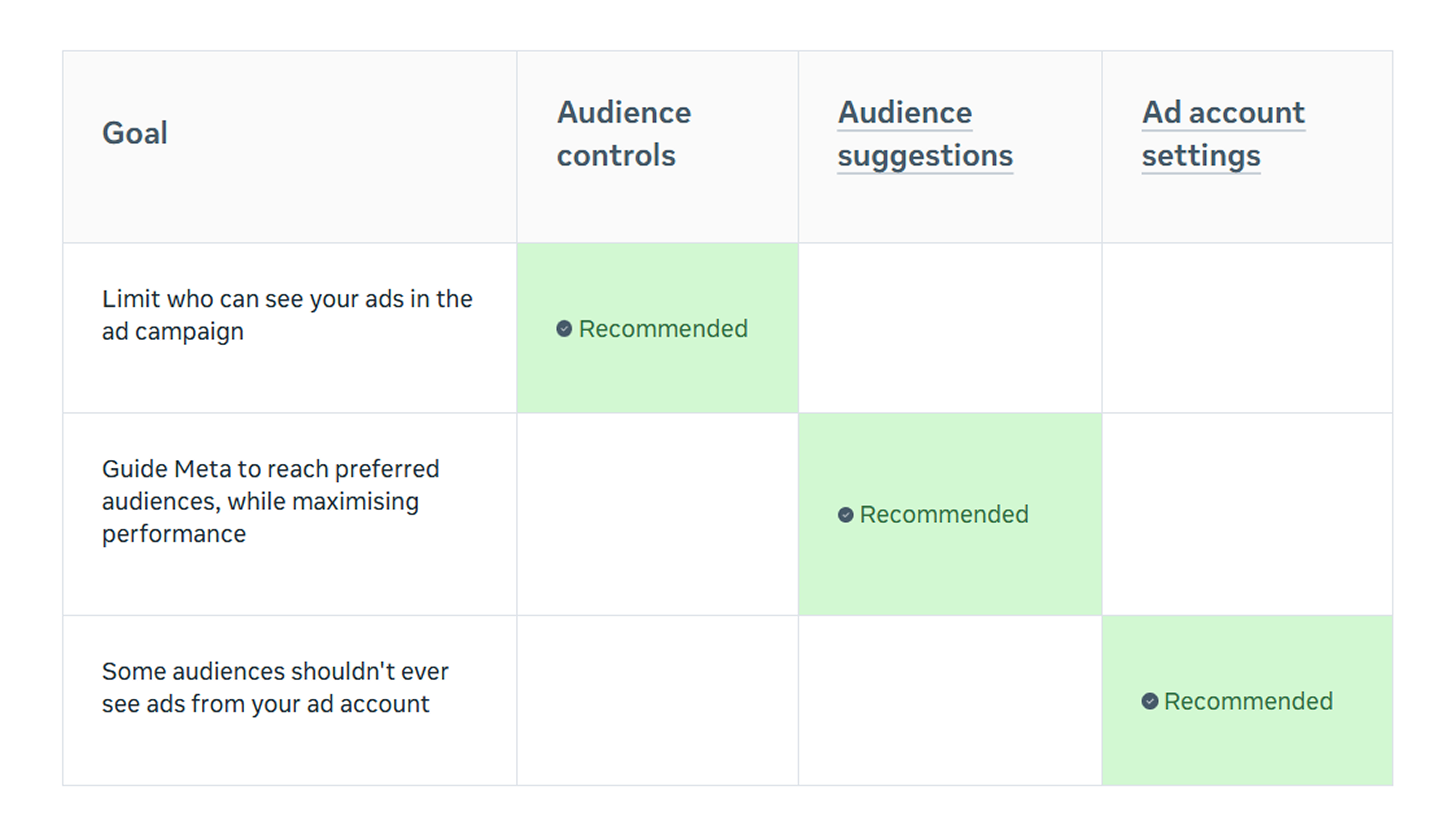 Meta separates audience controls, audience suggestions, and ad account settings based on how strictly they limit delivery.
In that case, you can reduce unwanted expansion by:
- Setting audience controls that define the limits Meta should follow;
- Adding audience suggestions that show Meta which people you would prefer to reach.
Controls set the boundaries. Suggestions help point Meta in the right direction within those boundaries.
Set firm audience controls
With Advantage+ Audience, controls can include:
- location;
- minimum age;
- employer;
- specific audiences to exclude.
Use them to set the basic limits Meta should not cross.
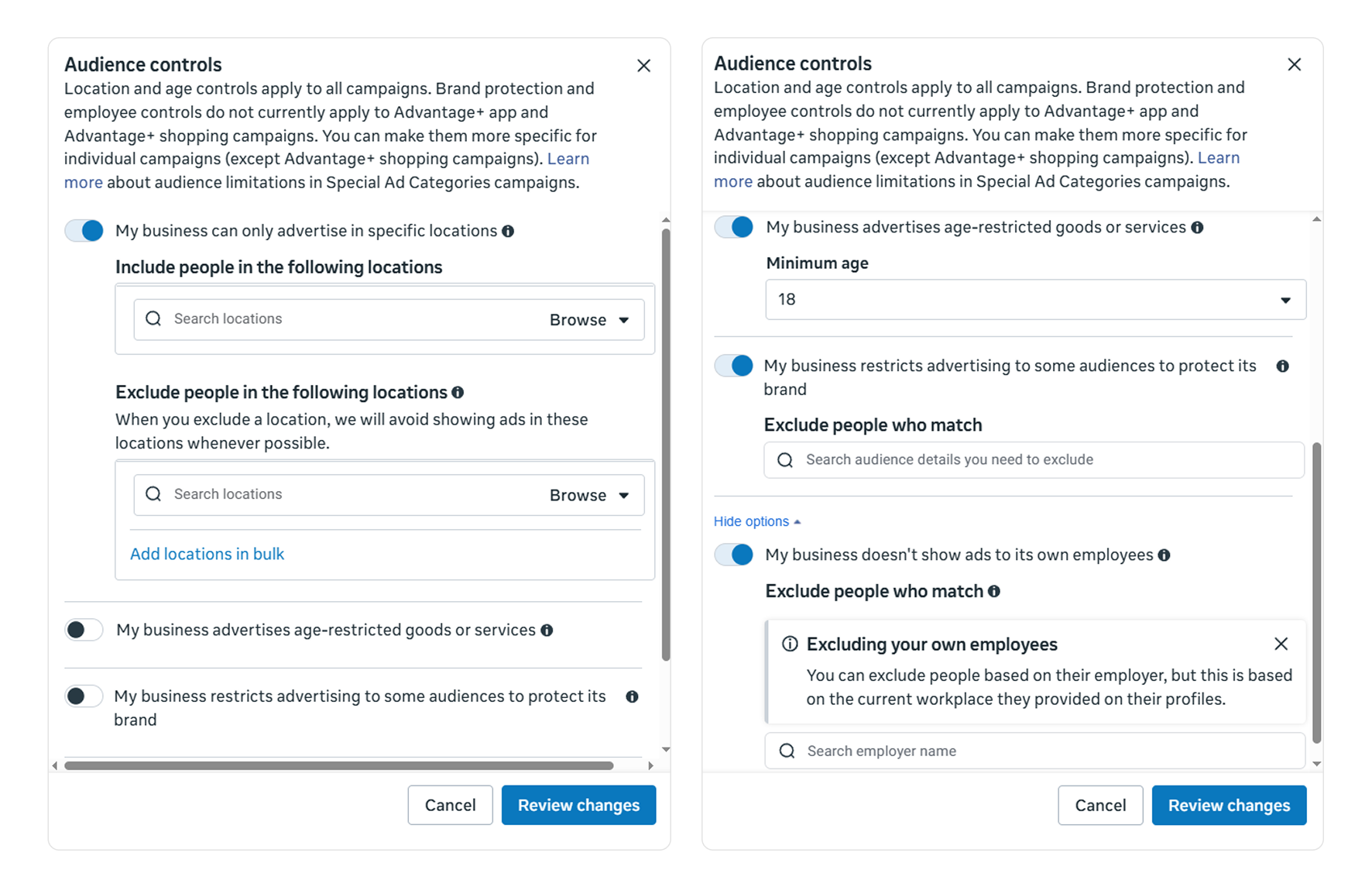
You can set Audience controls at the level of a specific campaign (in the Ad Set settings) or for the Ad Account in general (in Audience Controls).
For example:
- target only the locations you serve;
- exclude existing customers from acquisition campaigns;
- exclude recent leads from prospecting;
- exclude employees;
- exclude people who already completed the promoted action.
Check the location settings carefully. Meta may show an option such as Reach more people likely to respond to your ads, which can allow delivery beyond the locations you selected. Keep this option off when you cannot serve people outside the selected locations.
Once these limits are in place, you can use audience suggestions to point Meta toward the people you actually want to reach.
Add stronger audience suggestions
Audience suggestions tell Meta which people you would prefer to reach, but they do not restrict delivery.
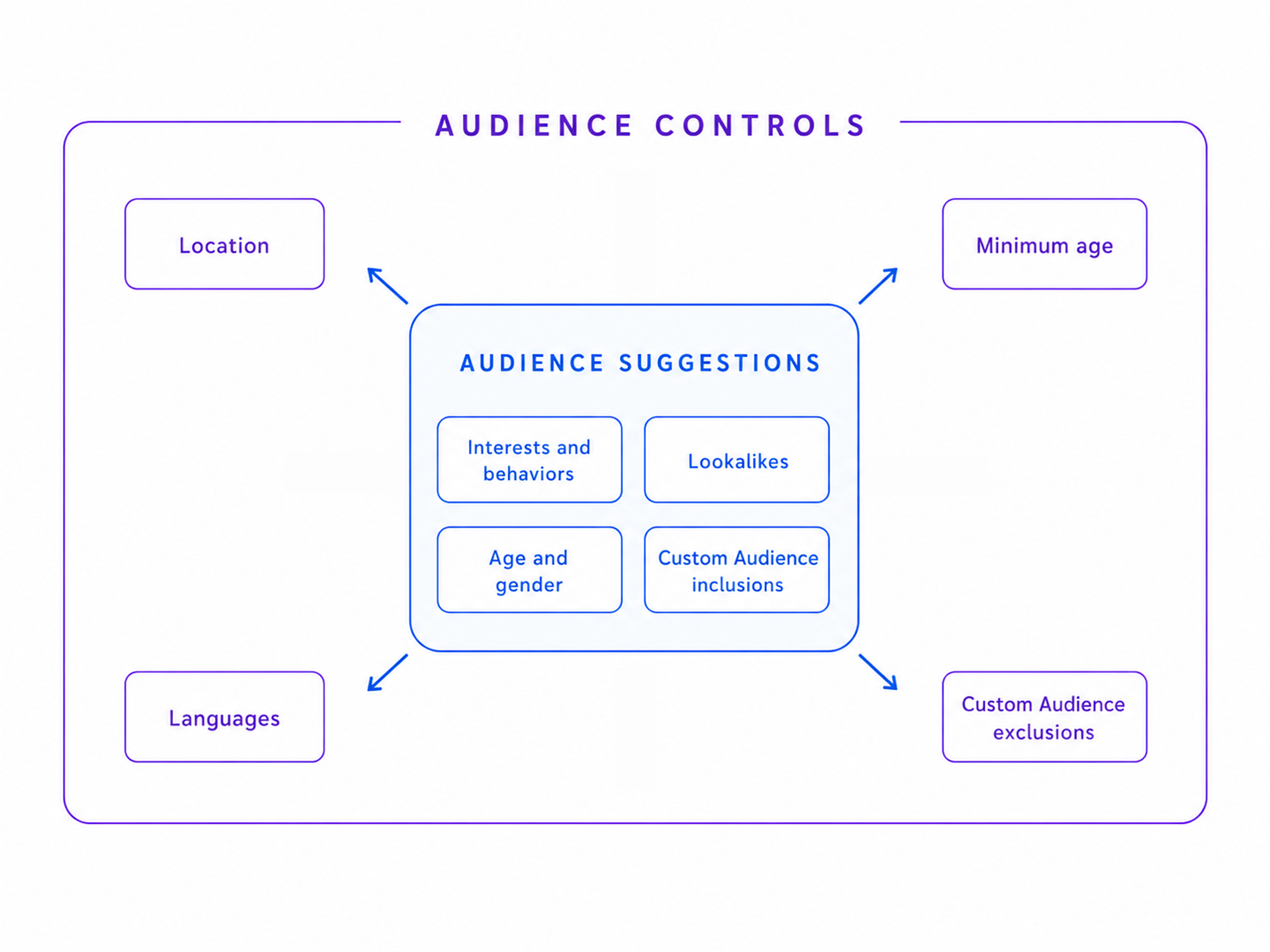
You can suggest:
- age and gender;
- interests and behaviors;
- lookalike audiences;
- first-party Custom Audiences;
- LeadEnforce Custom Audiences.
Meta may show ads to people who match these suggestions, but it can also expand beyond them when it expects better results. For example, selecting women as a gender suggestion does not always stop delivery to men.
Use a LeadEnforce audience as a suggestion
A LeadEnforce Custom Audience can give Meta a more focused signal than a broad native interest.
For example, instead of using the general “cybersecurity” interest, a company could suggest an audience built from Facebook groups for MSPs and Pages followed by IT consultants.
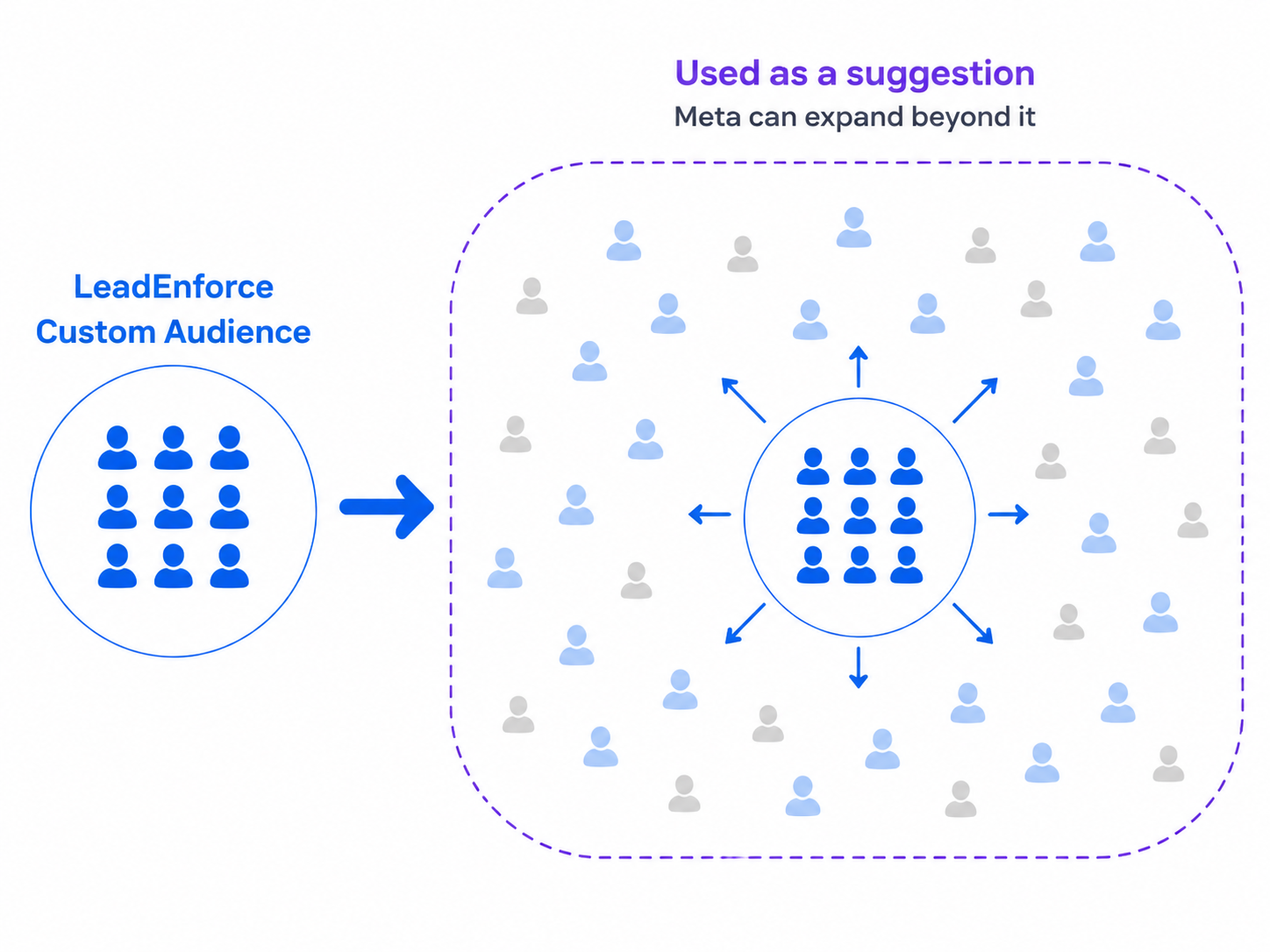
To set it up:
- Build a focused audience from relevant Facebook groups, Pages, or Instagram accounts in LeadEnforce.
- Add it as a Custom Audience in the ad set.
- Leave Use as a suggestion turned on.
Meta can still reach people outside that audience. But the main benefit is that it starts with a clearer, source-based signal instead of relying only on Meta’s existing campaign and account data.
This works best when Meta’s interests are too general, you want to guide delivery toward a specific niche, and you are still willing to let the system expand when it finds likely converters.
Make the ad specific to the audience
Meta also uses the ad itself to infer who may be interested.
For example, a line like “Save time and grow your business” could apply to almost anyone. “Automate monthly client reporting for independent accounting firms” gives both Meta and the reader a much clearer idea of who the offer is for.
Keep the headline, visual, offer, landing page, and lead form closely aligned with the intended audience. This will not prevent expansion, but it can reduce irrelevant clicks and low-quality leads.
Optimize for a useful conversion
Meta looks for people who are likely to complete the action you select. For example, if you optimize for basic form submissions, it may find people who often fill in forms rather than people who are likely to buy.
To limit this possibility, try this:
- Send qualified lead or sales data back from your CRM;
- Optimize for purchases instead of landing page views;
- Pass purchase values to Meta;
- Separate accepted leads from rejected leads;
- Use form questions to filter out obvious poor fits.
The better the conversion signal, the better chance Meta has of finding people who are actually useful to the business.
Compare both setups
Do not judge the campaigns only by Meta’s reported cost per result. A useful test could include:
- A limited LeadEnforce Custom Audience;
- Advantage+ with the same audience used as a suggestion;
- Advantage+ without an audience suggestion.
Keep the offer, creative, optimization event, budget, and other main settings as similar as possible. Because Meta may reach overlapping users in the Advantage+ versions, treat this as a test of the overall targeting setup rather than a perfectly isolated audience test.
Then compare qualified lead rate, close rate, customer acquisition cost, average order value, and revenue.
Final Takeaway
Meta is giving Advantage+ Audience more freedom, but that does not make precise targeting irrelevant.
Use a limited audience when the campaign is built for a specific group and broad delivery keeps producing weak leads or wasted spend.
Keep Advantage+ on when you need more scale, but use audience controls, stronger suggestions, specific creative, and better conversion data to keep delivery closer to the people you actually want to reach.
LeadEnforce can support both setups: as a defined Custom Audience in a limited campaign or as a focused suggestion for Advantage+.
The final decision should come from the results. Compare lead quality, close rate, customer acquisition cost, and revenue instead of relying only on Meta’s reported cost per result.