Most advertisers open Ads Manager and jump directly into campaign reports.
That works until performance starts slipping for reasons the campaign table cannot explain.
Meta’s Account Overview page exists to surface those hidden issues early. It shows alerts, campaign trends, recommendations, learning-phase spend, audience overlap warnings, account setup tasks, and ad account health signals in one place.
For new advertisers, it helps complete setup. For experienced media buyers, it works more like a diagnostic dashboard.
When CPA suddenly climbs or spend distribution becomes unstable, the first warning often appears here before it becomes obvious inside reporting columns.
The Real Reason Advertisers Ignore Account Overview
The page looks simplified, so many performance marketers treat it like onboarding material.
That usually changes after a delivery problem burns budget for several days.
A rejected ad, expired payment method, audience overlap issue, or learning limitation can quietly reduce delivery efficiency account-wide. Campaign metrics may still look “normal” at first, especially during scaling.
Inside Ads Manager, this often shows up as:
- CPM rising across several campaigns at the same time.
- Spend pacing becoming inconsistent throughout the day.
- One ad set suddenly absorbing most of the campaign budget.
- Campaigns remaining stuck in Learning Limited longer than expected.
- CTR holding steady while CPA climbs week over week.
Those are operational signals, not just creative problems.
The Most Valuable Sections Inside Account Overview
Not every recommendation matters equally. Some sections directly affect delivery economics while others are mostly informational.
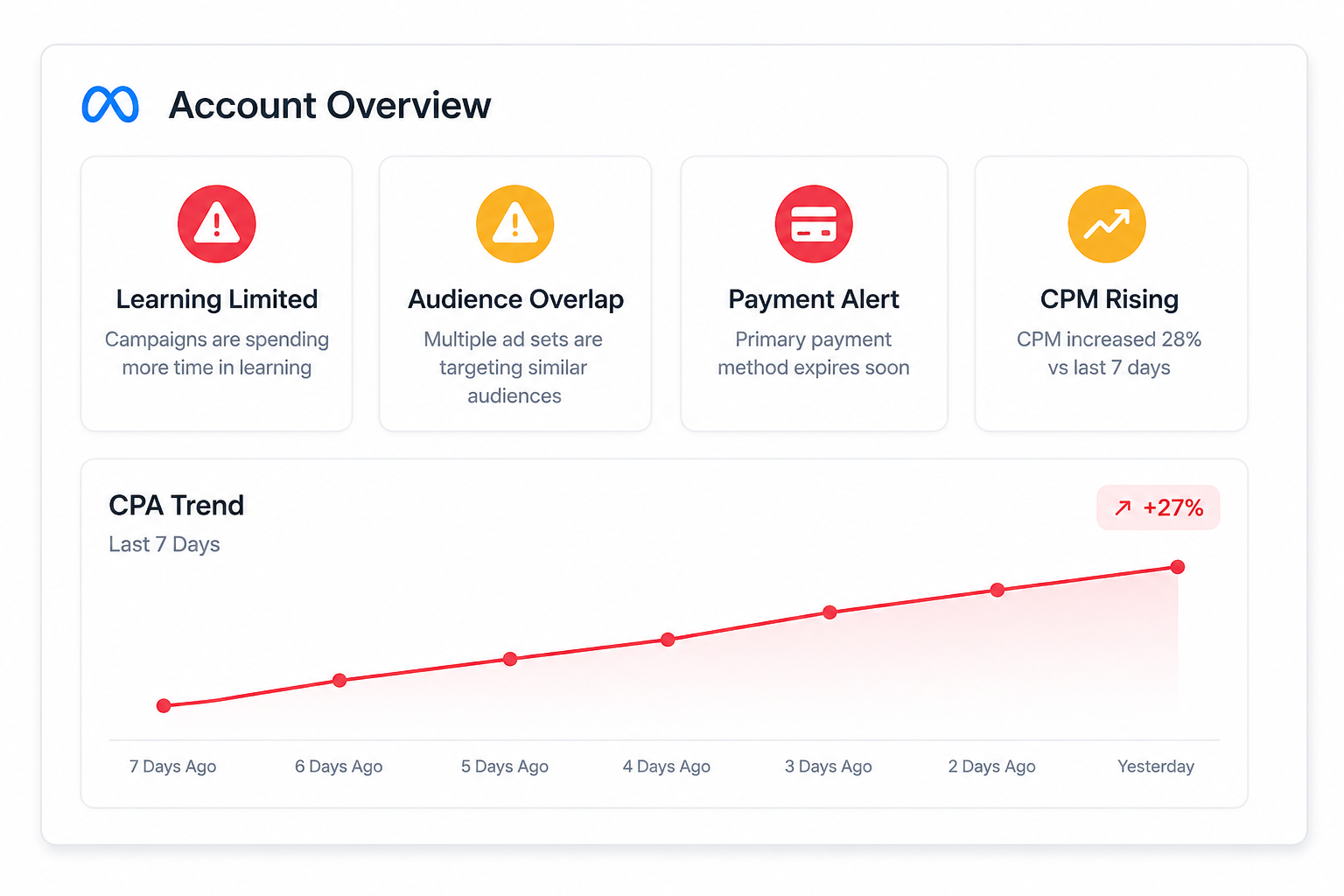
The most useful areas to monitor are:
- Alerts. These include ad rejections, payment method expiry, account restrictions, or setup problems. Even one unresolved alert can disrupt delivery consistency.
- Learning phase spend percentage. Meta shows how much of your budget was spent while campaigns were still learning during the last seven days. High percentages usually signal unstable optimization conditions.
- Audience overlap warnings. Meta flags ad sets targeting highly similar audiences because they can compete against each other in auctions.
- Campaign trends. This section highlights movement in key campaign metrics like ThruPlays, engagement signals, or Page likes. Sudden trend shifts often explain why costs begin drifting upward.
- Opportunity score and recommendations. Meta suggests changes intended to improve delivery efficiency, including audience expansion, automation, or structural adjustments.
This page becomes especially useful during scaling periods. Small delivery inefficiencies become expensive very quickly once budgets increase.
Why Audience Overlap Quietly Raises CPM
Audience overlap is one of the most overlooked problems Meta surfaces.
If multiple ad sets target similar users, your campaigns may begin competing against each other in the same auctions. Meta explicitly warns advertisers about this because it reduces delivery efficiency and creates unnecessary bidding pressure.
The damage usually appears gradually.
You may notice:
- CPM increasing without meaningful scale.
- ROAS declining despite stable click-through rates.
- Budget distribution becoming uneven between ad sets.
- Frequency rising faster than expected.
- One audience suddenly “winning” most of the spend.
This is common in accounts running multiple lookalikes, stacked interests, or duplicated retargeting pools.
Before creating additional audiences, review what audience overlap means and how to fix it. In many cases, simplifying the structure improves efficiency faster than launching more ad sets.
Learning Phase Spend Is a Hidden Budget Leak
Most advertisers check whether a campaign is learning.
Fewer check how much money keeps getting trapped there.
That distinction matters because learning-phase traffic is usually less stable. Meta continuously reallocates impressions while searching for stronger conversion patterns. During this period, CPC and CPA often fluctuate aggressively.
A high percentage of learning-phase spend usually points to excessive campaign editing.
Common triggers include:
- repeated budget changes;
- audience edits;
- duplicated ad sets;
- creative swaps;
- optimization-event changes.
Inside Ads Manager, this creates visible instability. Spend pacing changes hourly. Conversion volume becomes inconsistent. Some days look profitable while others collapse without explanation.
That is one reason poorly organized accounts struggle to scale. The algorithm keeps relearning the same signals repeatedly.
The issue is often structural, not creative. That connects directly to the hidden costs of a messy ad account.
Meta Recommendations Can Improve Delivery While Hurting Lead Quality
Meta’s recommendations optimize for platform efficiency first.
Your business optimizes for profitability.
Those are not always the same thing.
For example, Meta may recommend broader targeting, automated expansion, campaign consolidation, or increased budgets. Those changes can improve delivery volume and lower CPM.
They can also weaken lead quality.
A B2B advertiser generating software demos may suddenly see lower CPL after expanding targeting broadly. Sales teams, however, may report weaker meetings, lower close rates, and more unqualified leads.
Inside Ads Manager, the campaign looks healthier.
Inside the pipeline, CAC gets worse.
This is where stronger audience inputs matter. Advertisers using LeadEnforce often build higher-intent audiences from Facebook groups, Instagram followers, engaged communities, and social profile signals instead of relying only on broad targeting expansion.
That cleaner intent layer gives Meta stronger behavioral signals to optimize against.
Why Setup Tasks Matter More Than Advertisers Think
The “Tasks” section looks administrative, but incomplete setup can absolutely affect delivery stability.
Meta may ask advertisers to:
- verify business email addresses;
- connect Pages properly;
- resolve billing issues;
- complete missing account setup steps;
- review account limits or restrictions.
Accounts with unresolved setup friction often experience softer delivery issues before hard restrictions appear.
Campaign approvals may slow down. Spend pacing may become inconsistent. Scaling may feel unstable despite strong creatives and decent conversion data.
These problems become much more visible during competitive periods when Meta’s auction system tightens.
Account Overview Should Be Part of Every Scaling Workflow
Most scaling failures start before ROAS visibly collapses.
The early signals usually appear inside account-level diagnostics first.
A smart workflow looks something like this:
- Check Account Overview for alerts, learning instability, overlap warnings, and delivery recommendations.
- Review campaign metrics for CPM spikes, CPA movement, frequency growth, and spend pacing changes.
- Compare platform efficiency against downstream metrics like qualified leads, booked calls, and closed revenue.
That sequence prevents advertisers from solving the wrong problem.
If audience quality is deteriorating, broader targeting may make performance worse even if Meta recommends expansion. If account structure is unstable, increasing budgets may amplify volatility instead of improving scale.
This becomes even more important when trying to structure ad accounts for scale.
Final Takeaway
Meta Ads Manager Account Overview is not just a beginner dashboard.
Used correctly, it becomes an early-warning system for delivery instability, audience overlap, learning-phase waste, and scaling friction.
The best advertisers do not blindly follow Meta recommendations, and they do not ignore them either.
They use Account Overview to identify operational signals early, then validate those signals against ROAS, CAC, lead quality, and sales outcomes before making changes.