You launch a campaign, Meta approves it, and nothing happens. The status says Active, but spend stays at zero. This situation confuses many advertisers, especially when everything looks correct.
Approval only means the ad passed policy review. It does not guarantee delivery. Spending depends on auction dynamics, budget logic, targeting, and account signals.
This guide explains the real reasons approved ads do not spend and how to fix each one.
Approved Does Not Mean Eligible to Win Auctions
Meta Ads run on an auction system. Every impression is an auction. Your ad must compete against others targeting the same users.
Even approved ads can fail in the auction. That happens when your ad rank is too low. Ad rank depends on bid, estimated action rate, and ad quality.
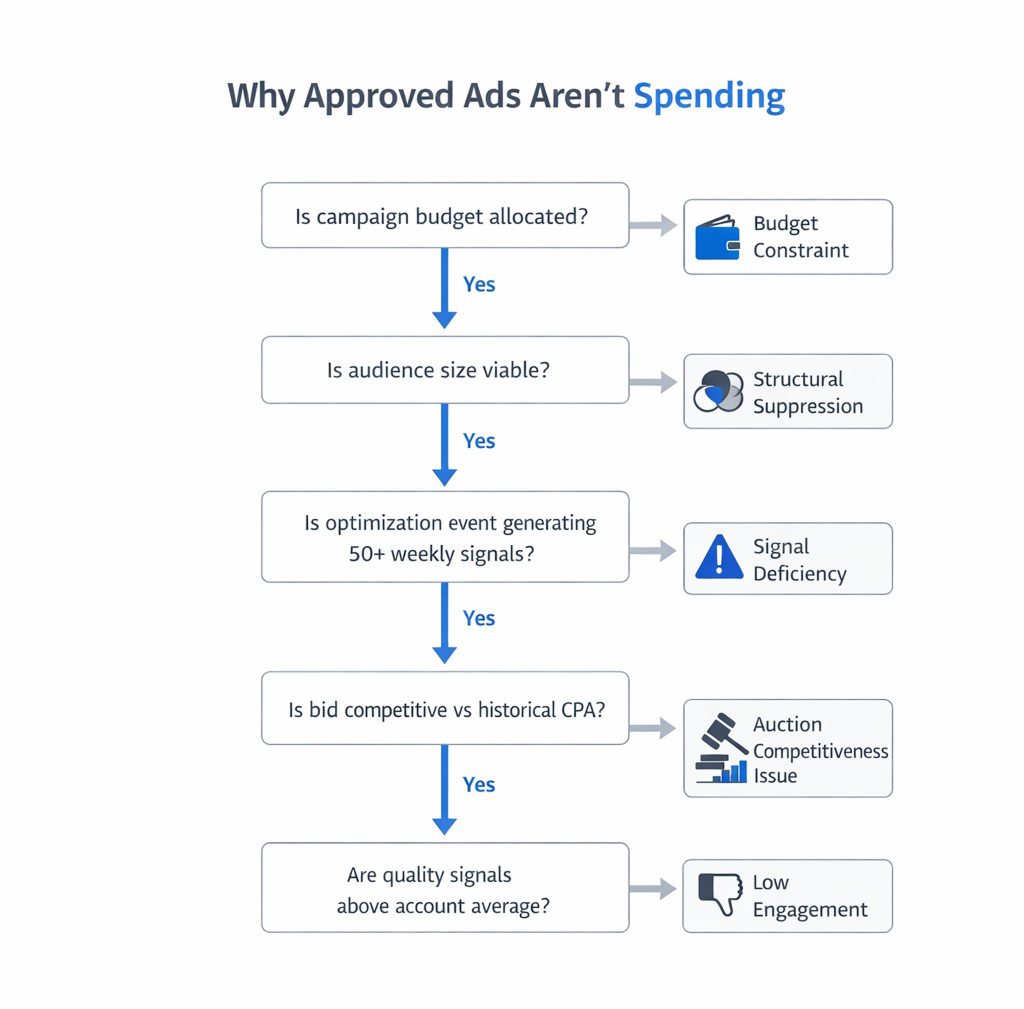
If you want a deeper explanation of internal statuses and delivery states, review Understanding Facebook Ad Statuses: Common Issues and How to Fix Them. Approval is only one status among many.
Campaign-Level Issues That Block Delivery
Sometimes the problem starts at the top of the structure. Campaign settings control how budgets and optimization behave.
Campaign Budget Optimization Starving Ad Sets
With Campaign Budget Optimization enabled, Meta allocates budget dynamically. It sends spend to ad sets that it expects to perform better.
If one ad set has weak early signals, Meta may send it almost no budget. The ad remains approved but barely delivers.
Check these signals:
-
Budget concentration; if one ad set receives over 90 percent of spend, others are effectively paused by the system.
-
Learning phase instability; frequent edits reset learning and reduce budget distribution.
-
Conversion volume; ad sets with low event volume struggle to compete for budget.
For a detailed breakdown of CBO vs ad set budgets, see The Difference Between Campaign Budget Optimization and Ad Set Budgets.
Daily Budget Below Minimum Effective Threshold
Technically, Meta allows small daily budgets. In practice, very low budgets limit auction participation.
For example, a $5 daily budget in a competitive niche often cannot win enough auctions. The system throttles delivery to avoid inefficient spend.
Watch for these indicators:
-
High CPM in your industry; small budgets struggle in expensive auctions.
-
Broad targeting with low bids; the system explores slowly and may never exit learning.
-
Purchase optimization with minimal historical data; the algorithm lacks confidence.
If you operate with tight budgets, Campaign Optimization for Facebook Ads with Small Daily Budgets provides structural adjustments that improve delivery stability.
Ad Set Targeting Problems
Targeting often blocks delivery without obvious warnings. The ad appears active, but audience constraints limit impressions.
Audience Too Narrow or Overlapping
Very small audiences restrict delivery. If you layer too many interests, behaviors, and demographics, your reach collapses.
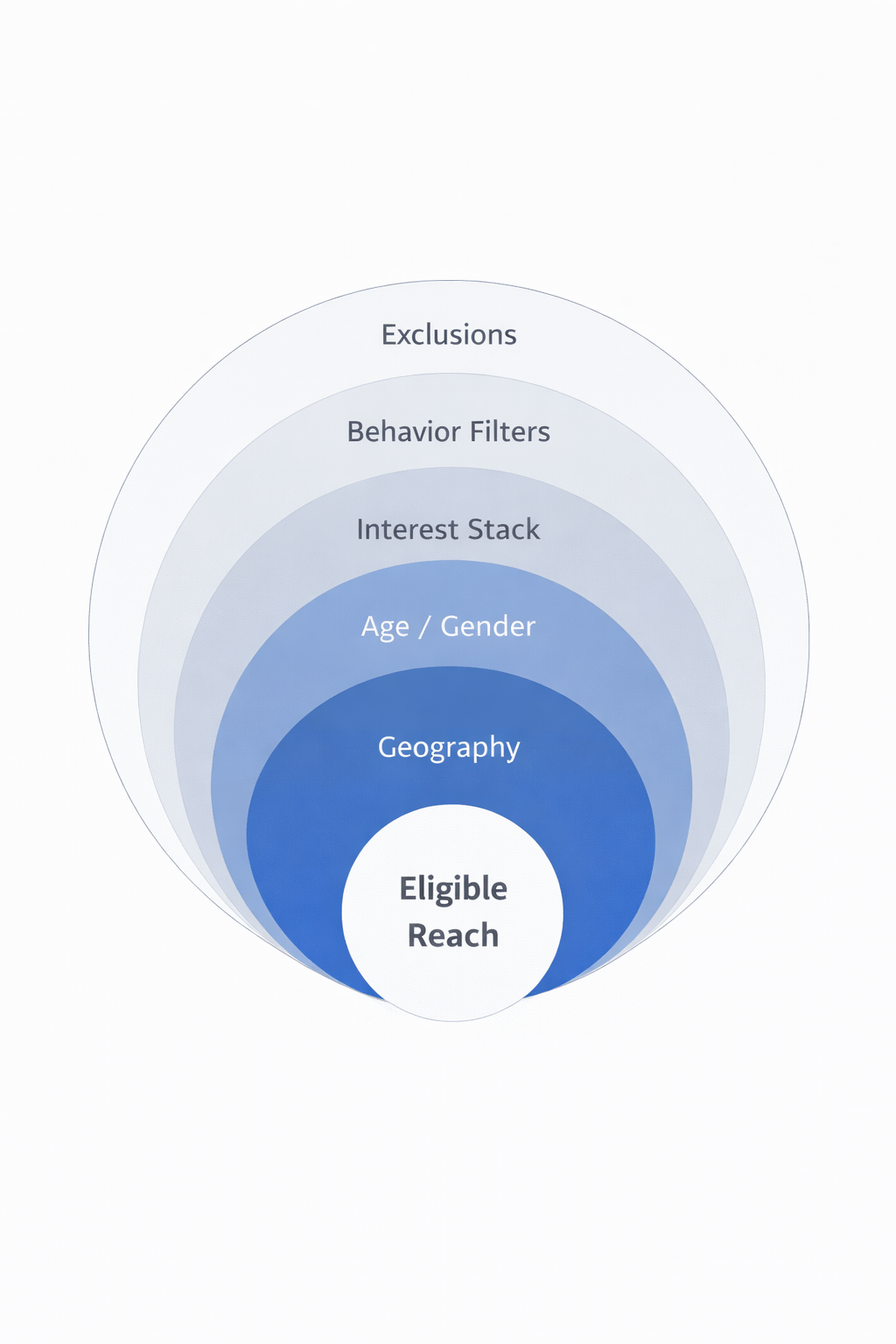
Common restrictive setups include:
-
Detailed targeting stacked with multiple narrow interests; the intersection becomes tiny.
-
Strict age and gender filters combined with geographic micro-targeting.
-
Retargeting windows under seven days with low traffic volume.
Audience overlap also matters. If two ad sets target the same users, Meta prioritizes one and suppresses the other.
To understand how overlap silently reduces spend, read The Role of Audience Overlap in Facebook Ads Performance .
Exclusions That Remove Most Eligible Users
Exclusions help structure funnels. They can also eliminate your audience by mistake.
Examples include:
-
Excluding website visitors when running retargeting; you remove the very users you want.
-
Excluding recent purchasers with an overly long time window; the exclusion list grows too large.
-
Excluding engaged users while targeting engagement-based custom audiences.
Review every exclusion carefully. Many delivery issues come from a single misconfigured custom audience.
Optimization and Event Mismatch
Optimization settings heavily influence delivery. If Meta cannot find enough optimization events, it slows or stops spending.
Conversion Event With Insufficient Volume
Optimizing for Purchase requires consistent purchase data. If your account records only a few per week, delivery stalls.
Meta needs around 50 optimization events per week per ad set for stable learning. Lower volumes reduce delivery confidence.
Consider these adjustments:
-
Optimize for Initiate Checkout or Add to Cart temporarily; move back to Purchase once volume increases.
-
Consolidate ad sets; split testing across many ad sets dilutes event signals.
-
Verify pixel and event prioritization; incorrect event mapping disrupts optimization.
For a full setup walkthrough, review The Complete Guide to Facebook Pixel Setup and Optimization.
Event Prioritization and Aggregated Event Measurement Conflicts
After iOS privacy changes, event prioritization affects delivery. If your selected optimization event is not ranked high enough, performance suffers.
Check:
-
Event configuration in Aggregated Event Measurement; ensure your main event is properly prioritized.
-
Domain verification; unverified domains can limit event tracking accuracy.
-
Deduplication between pixel and Conversions API; mismatches distort data.
Poor signal quality reduces Meta’s confidence. Reduced confidence reduces spend.
Account-Level and Billing Issues
Sometimes the campaign is fine. The problem sits at the account level.
Account Spending Limit or Billing Hold
An account spending limit can quietly block delivery. If you hit the cap, ads remain approved but stop spending.
Also review:
-
Payment method failures; declined cards pause delivery.
-
Outstanding balances; unpaid charges halt campaigns.
-
Risk flags; sudden budget increases can trigger internal reviews.
If delivery shows “not delivering” instead of “active,” compare your case with Facebook Ads ‘Not Delivering’ Status: What It Means and How to Fix It.
Learning Phase Resets From Frequent Edits
Frequent edits reset learning. Each reset forces the algorithm to re-evaluate performance.
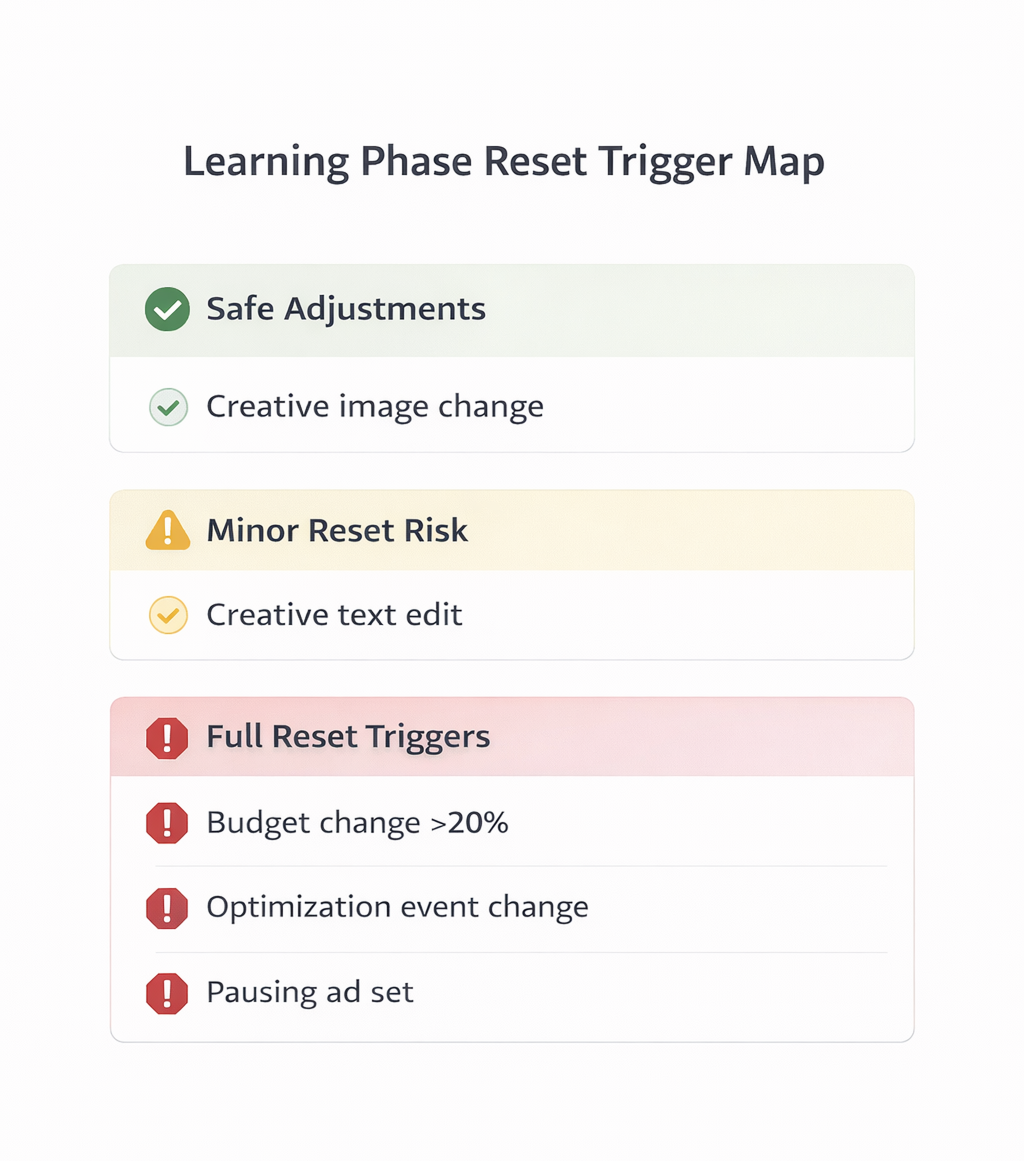
Edits that trigger learning resets include:
-
Changing optimization events.
-
Major budget adjustments.
-
Significant audience modifications.
If you edit daily, delivery becomes unstable. Allow at least three to five days before making new changes.
Auction Competition and Bid Strategy Conflicts
Approved ads still need competitive bids. Bid strategy strongly affects whether impressions are won.
Cost Cap or Bid Cap Set Too Low
Cost controls protect CPA targets. They also restrict auction entry.
If your cost cap is below realistic market rates, Meta limits participation. The ad rarely wins auctions and barely spends.
Check:
-
Historical CPA; compare your cap with actual results.
-
Competitor pressure; seasonal demand increases auction prices.
-
CPM trends; rising CPM signals more aggressive competition.
Raising the cap slightly often restores delivery.
Lowest Cost Strategy in Highly Competitive Niches
Lowest cost without a cap sounds flexible. In saturated markets, it can still fail.
If estimated action rates are low, the system deprioritizes your ads. That leads to minimal spend despite approval.
Improve creative relevance and offer clarity. Auction performance depends on expected user response.
Creative Quality and Engagement Signals
Creative impacts auction rank more than many advertisers realize. Low engagement reduces delivery probability.
If early impressions generate poor click-through or negative feedback, the system scales down delivery.
Watch these metrics:
-
Low CTR compared to account average; signals weak resonance.
-
High frequency with low engagement; indicates audience fatigue.
-
Negative feedback rate; hides and reports harm ad rank.
Refreshing creative often solves delivery issues faster than adjusting budgets.
Diagnostic Framework: How to Identify the Real Cause
When ads are approved but not spending, follow a structured review.
Step 1: Check Account and Billing
Confirm no spending limits or payment failures exist. Review Account Quality for restrictions.
Step 2: Review Budget Allocation
Analyze campaign-level distribution. Identify ad sets receiving negligible spend.
Step 3: Validate Audience Size and Overlap
Ensure the audience is large enough for your objective. Remove unnecessary filters and check overlap.
Step 4: Confirm Optimization Event Volume
Verify that your chosen event has sufficient weekly volume. Consolidate ad sets if signals are diluted.
Step 5: Evaluate Bid Strategy Against Market Reality
Compare cost caps and bids with historical data. Adjust if they are unrealistically low.
Delivery problems rarely have one cause. They result from structural friction between budget, signal quality, and competition.
Final Thoughts
An approved status only confirms policy compliance. It says nothing about auction viability.
When ads do not spend, avoid random edits. Diagnose the system layer by layer, from account settings to creative signals.
Clear structure and strong data signals lead to stable delivery. Everything else creates silent throttling.